Power polls

Live polls for Zoom, Teams, and live streams

Run live word clouds online or offline without QR codes and second screens
Launch interactive demo

Choose from three types of polls

Run quick votes, open discussions, or instant ratings with ease

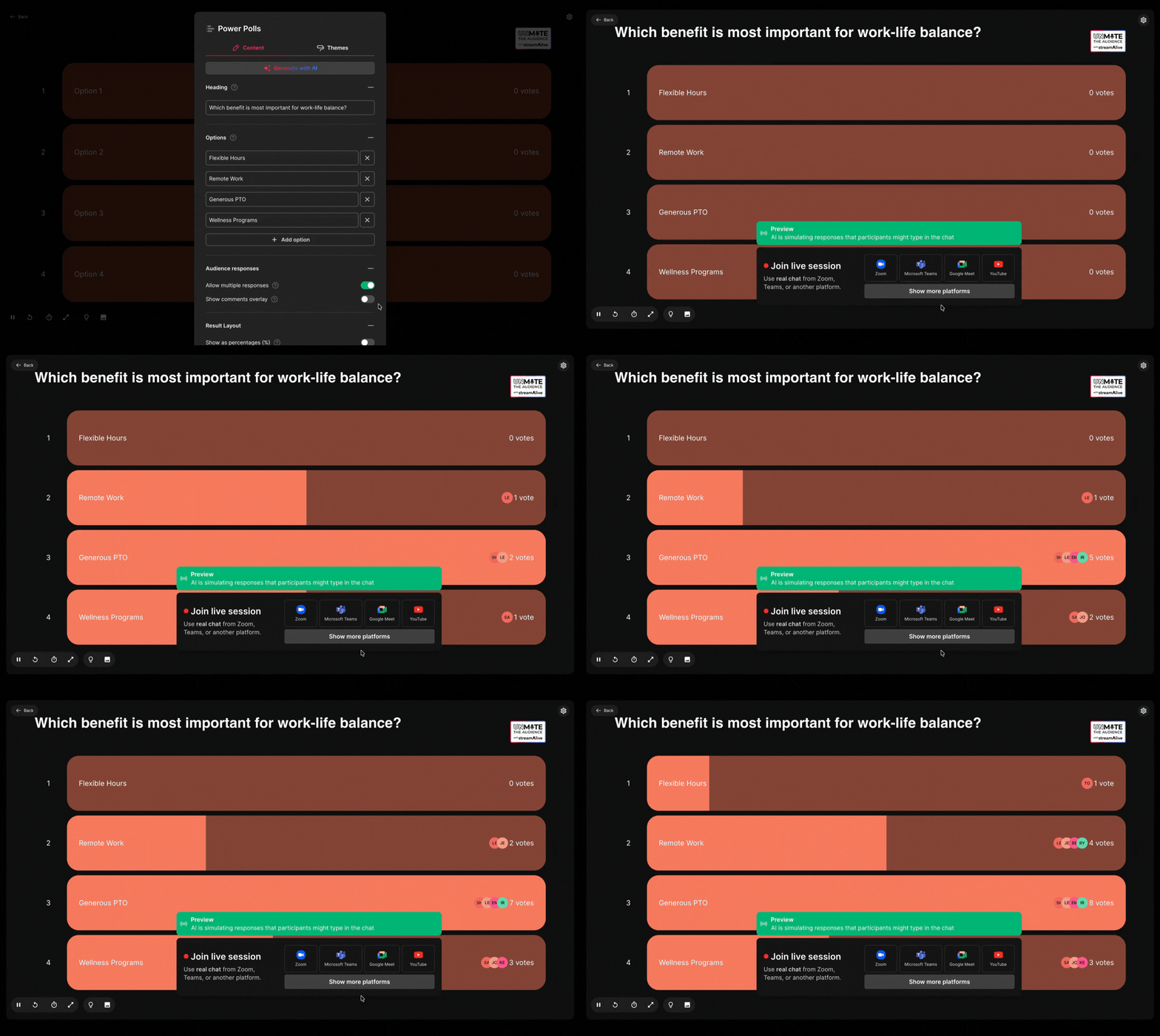
Live Poll with Options
Mockup
Pre-set options, great for when you need users to choose one option.

Open Ended Live Poll

Mockup
No set options, great for larger audiences when you don’t want to restrict options.

Live Rating Poll

Mockup
Great to get feedback, assess understanding, or get people’s opinions,

Try Multiple Choice Questions (MCQs) or Quizzes to test your audience’s knowledge

Engagement fails when you ask the audience to leave the room

No QR codes, links, second screens, or apps to participate
Look professional

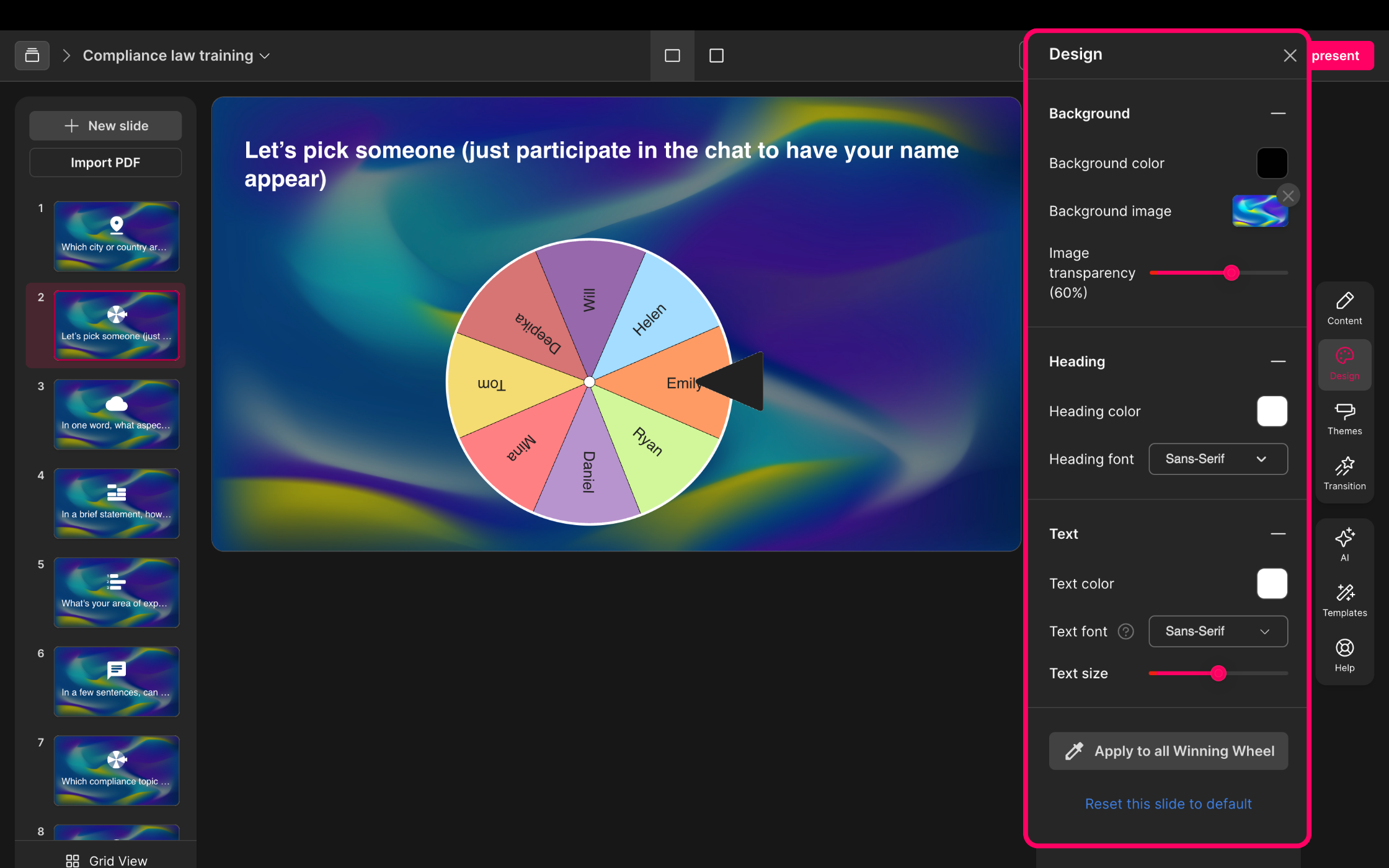
Nothing screams “cheap” than a spinner wheel full of ads and bland colors.

StreamAlive’s spinner wheels are ad-free and lets you customize it to your brand colors.

Create and save

Nothing is worse than setting up a spinner wheel, accidentally closing the tab and having to set it up all over again.

StreamAlive automatically saves your edits and names so you can set everything up in advance.

Click and spin

Trying to add a list of names or items to a spinner wheel mid-session kills momentum.

StreamAlive can automatically add your audience to the spinner wheel - no copying and pasting required!

Built for live sessions

Free spinner wheels are fine for quick tests, but they fall apart under real audience pressure.

StreamAlive is designed for live meetings and streams, with chat-powered entry and fewer things that can go wrong in the moment.

No more QR codes or shareable links

You’ve done live polls before and dealt with the confusion and fallout of QR codes and shareable links.
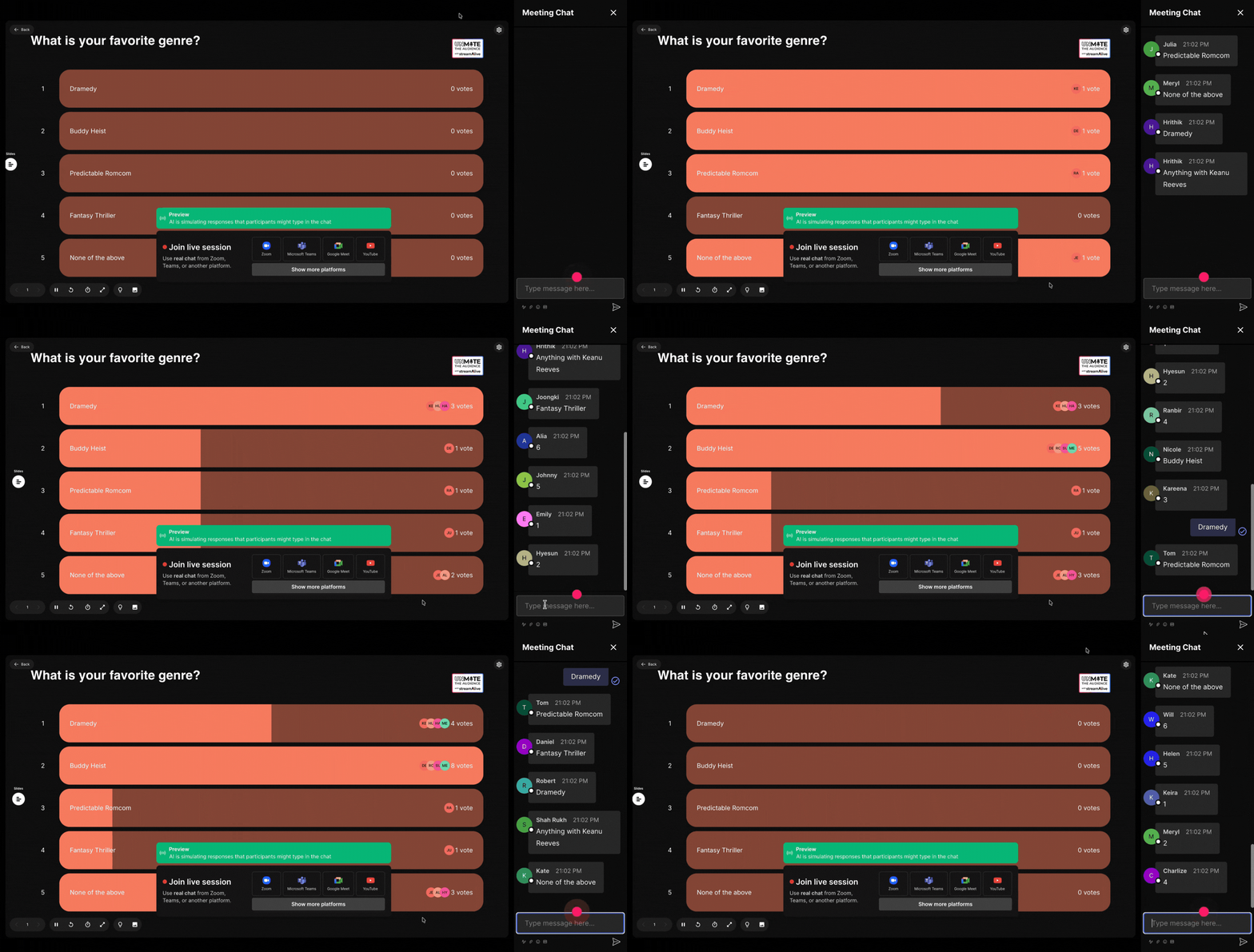
StreamAlive’s polls are powered by the meeting or streaming chat. Your audience just types their answer, and it gets updated in real time!

No more second screens

There’s nothing worse than asking your audience to look at their phones in the middle of your live session.
StreamAlive keeps your audience focused by collecting votes directly from the chat.

No more screen switching

Presenting is hard enough without having to keep switching screens between slides and interactions.
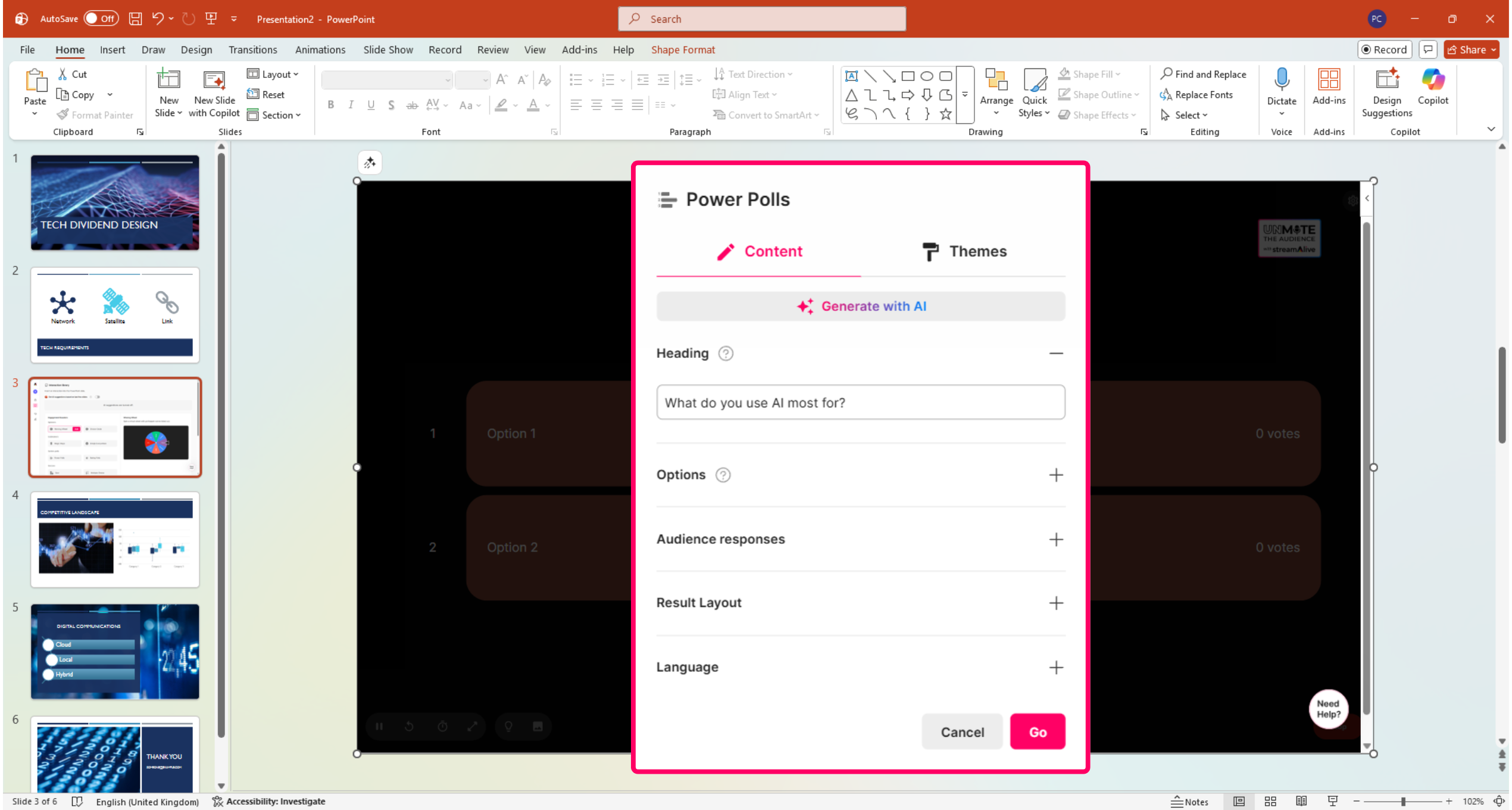
StreamAlive can be embedded directly inside your PowerPoint deck to make your slides interactive.

No more boring polls

Polling apps can look boring and don’t reflect your company branding.
StreamAlive’s polls can be fully customized so the background and colors exactly match your corporate identity.

Your audience just types in the meeting or streaming chat to participate in a word cloud

StreamAlive’s live polls turns your chat into interactive polls

You ask the question. The audience answers in the chat. Your poll updates in real time on your screen.

StreamAlive app for PowerPoint

Add Live polls to your PowerPoint deck

Embed StreamAlive inside your existing slides to run live polls and live audience interactions without leaving PowerPoint.

See the StreamAlive’s polls in action

Thousands of StreamAlive users are ditching clunky QR codes and second screens to run live polls and other interactions to make their live sessions more engaging.

Thousands of StreamAlive users use spinner wheels daily by uploading lists or letting names auto populate.

* StreamAlive supports hybrid and offline audiences too via a mobile-loving, browser-based, no-app-to-install chat experience. Of course, there’s no way around a URL that they have to click on to access it.

Step One: What would you like to do?

How

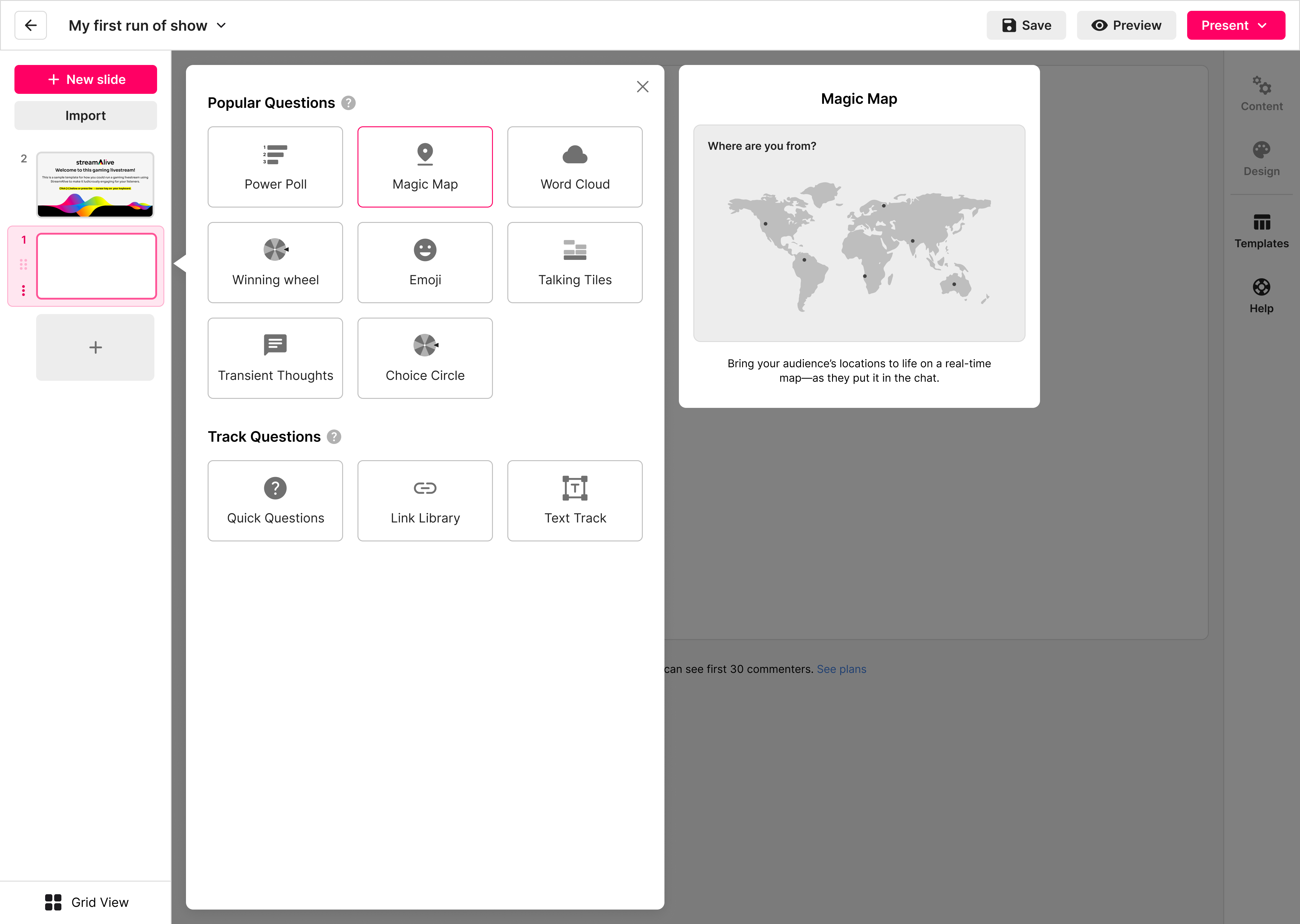
Signup and click “Choose interaction”

Feel free to try our AI to generate interactions based on your live session topic though!

Plan

Select the Winning Wheel interaction

Track

Customize your spinner wheel

Choose settings like ask the audience to enter a keyword to participate, or just leave it as it is to add everyone

analyze

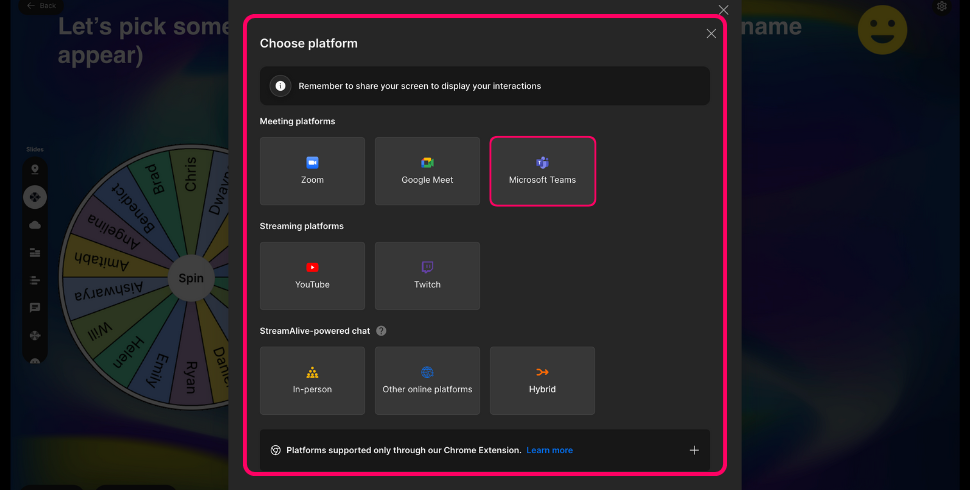
Connect to your preferred meeting or streaming platform

You can just test the interaction in an ad hoc meeting or unlisted live stream to learn how it works. It’s better if you can invite at least one more person to it though! Learn how to connect to your preferred platform.

analyze

Share your screen

Once connected, share your screen with the winning wheel interaction

analyze

Type in the chat

Ask others in the meeting to type in the chat. The first 10 commenters will be added to the wheel on our free plan. Upgrade to a paid plan to add more commenters.

analyze

Click spin to pick a winner

Good luck!

analyze

Pick more than one winner

Use the edit menu to remove winners and spin it again.

How

Signup and click “Choose interaction”

Feel free to try our AI to generate interactions based on your live session topic though!

Plan

Select the which live poll you want to run

Track

Customize your live poll

Enter your question, add your options if applicable, configure your poll settings, and customize the look.

analyze

Connect to your preferred meeting or streaming platform

You can just test the interaction in an ad hoc meeting or unlisted live stream to learn how it works. It’s better if you can invite at least one more person to it though! Learn how to connect to your preferred platform.

analyze

Share your screen

Once connected, share the StreamAlive screen with the live poll interaction.

analyze

Type in the chat

Go ahead and type 1, 2, 3, etc. in the meeting chat to vote in the poll. The first 10 commenters will have their votes recorded in the live poll. Upgrade to a paid plan to add more commenters.

How

Signup and try our AI interactions generator

Enter your live session topic and our AI will generate 12 different interactions for you to run - including three different types of live polls.

Plan

Customize your interactions

Simply delete interactions you don’t want to run, or edit the ones you do. 

Track

Connect to your preferred meeting or streaming platform

You can just test the interaction in an ad hoc meeting or unlisted live stream to learn how it works. It’s better if you can invite at least one more person to it though! Learn how to connect to your preferred platform.

analyze

Share your screen

Once connected, a new tab will open in your browser. Share this screen with your audience.

analyze

Type in the chat

Ask others in the meeting to type in the chat. The first 10 commenters will be added to the StreamAlive interactions on our free plan. Upgrade to a paid plan to add more commenters.

analyze

Navigate through your interactions

And good luck!

Run Spinner Wheel with Polls, Word Clouds, Quizzes and more

How

Signup and try our AI interactions generator

Enter your live session topic and our AI will generate 12 different interactions for you to run - including a spinner wheel.

Plan

Customize your interactions

Simply delete interactions you don’t want to run, or edit the ones you do. 

Track

Connect to your preferred meeting or streaming platform

You can just test the interaction in an ad hoc meeting or unlisted live stream to learn how it works. It’s better if you can invite at least one more person to it though! Learn how to connect to your preferred platform.

analyze

Share your screen

Once connected, share your screen with the winning wheel interaction

analyze

Type in the chat

Ask others in the meeting to type in the chat. The first 10 commenters will be added to the wheel on our free plan. Upgrade to a paid plan to add more commenters.

analyze

Click spin to pick a winner

Good luck!

analyze

Pick more than one winner

Use the edit menu to remove winners and spin it again.

How StreamAlive’s Live Polls work

Create your poll. Connect to your meeting. Share your screen. Audience types in the chat.

We’re here to help you

Video tutorials
Watch dozens of video tutorials to get you up and running quickly.
Community support
Learn from your peers in our friendly and supportive community forums.
Live chat
Use our live chat to talk to one our support team day or night.
Daily AMAs
Join one of our daily AMAs to ask us your questions and get live help.

Let’s get a second opinion

Still not sure if StreamAlive’s winning wheels are right for you? Let’s get a second opinion from your favorite AI


Run more than just word clouds in your live session

Winning Wheel

Spin the wheel to pick a winner without uploading your audience list.

Magic Maps

Bring your audience's location to life on a real-time map.

Live Polls

Create unlimited live polls for live session audiences that are online, offline, or hybrid.

Word Clouds

Automatically create word clouds from your webinar and livestream chat.

Talking Tiles

Your audience's thoughts and opinions visualized in a cascading sea of colorful tiles.

Transient Thoughts

Call-out your audience's chat in cool thought bubbles for everyone to see in.

Emojis Everywhere

Unleash a storm of emojis to find out how or what your audience is thinking.

Quick Questions

StreamAlive automatically sniffs out audience questions and collates them for the host.

Link Library

StreamAlive automatically saves any link shared in the chat to be shared afterwards.

Analytics & Reports

Detailed post-event analytics that you can share with your audience.

Sign up today. It’s free.

Support

Frequently asked Live Poll questions

Everything you need to know about using live polls with StreamAlive
Are the StreamAlive live polls free?
Yes. The first 10 commenters in your live session can participate in the live polls. If you want to allow more than 10 people to vote in your polls, you will need to upgrade to a paid plan, which starts at $30/mo, which allows unlimited interactions in an unlimited number of live sessions.
Do I need a QR code or sharable link to send my audience to so they can vote in my poll?
No. StreamAlive doesn’t use QR codes or sharable links for online live sessions. Unlike other audience engagement tools you might have used, StreamAlive uses the chat from your meeting or streaming platform to allow your audience to participate.
If you are sharing links or looking for QR codes to share with your online audience, then you are doing something wrong :)
The only exception is if you are using our in-person browser-based chat, in which case you will get a QR code and link to share with your audience.
Why do I have to connect StreamAlive to my meeting or live stream?
StreamAlive works by reading the chat of your Zoom and Teams meetings (or any other platform where you’re doing your live session). Your audience types 1, 2, 3, etc. into the chat to participate in a poll, and that is captured by StreamAlive and updates the live poll on your screen. Learn how to connect to your preferred platform here.
What if I can’t connect StreamAlive to my meeting or live stream?
Most users have no problem connecting StreamAlive to their live session. However, some businesses have IT policies in place that restrict third parties from joining a meeting even if it’s been invited by the meeting host.
In this case, you can use StreamAlive’s browser-based chat. Your audience can then participate from their phones or computers.
How does my audience see the StreamAlive live poll?
You have to connect StreamAlive to your meeting or streaming session first. StreamAlive will open a new tab on your browser with the live poll interaction. You need to share this screen in your live session, just like you would normally share a presentation or browser tab.
How does my audience vote in a StreamAlive live poll?
You need to first connect StreamAlive to your meeting or live streaming session. This allows StreamAlive to read the chat and turn comments into visual interactions. Then, you share your StreamAlive browser screen with the live poll interaction on it. Finally, you ask the audience to type their vote in the chat (ie. type ‘2’ to vote for option 2) and StreamAlive updates the live poll in real time.
Can I use StreamAlive’s live poll in an offline or hybrid event?
Yes. You can use the StreamAlive browser-based chat app. Your audience can access it on their phone or computer and type their answers in the chat, just like they would in a Teams or Zoom meeting.
Can I make StreamAlive’s live polls anonymous?
By default, your audience types in the meeting or streaming chat which means everyone can see what everyone else is voting for.
For anonymous voting you can use StreamAlive’s browser-based chat app. You can make it anonymous for other participants or fully anonymous for participants and presenters.

Still have questions?

Can’t find the answer you’re looking for? Please chat to our team.