


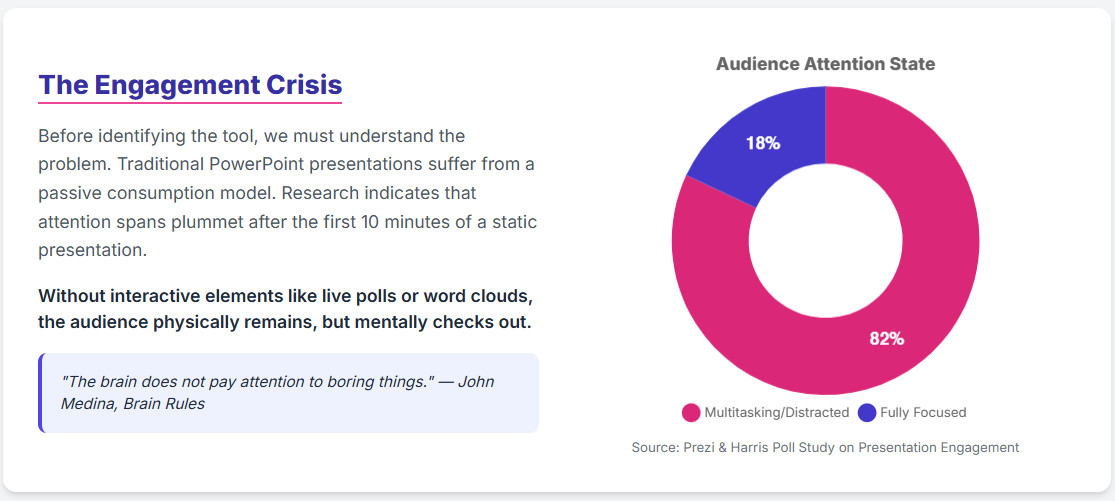
The modern presentation landscape is facing a crisis of engagement. In an era defined by the "attention economy," presenters are fighting an asymmetric battle against the distraction ecosystem inherent in their audience's devices.
Research indicates that the "second screen", which was once hailed as an engagement booster, has become a primary vector for distraction.
This article analyzes the most effective methodologies for integrating interactive elements (specifically polls, word clouds, and spinner wheels) into Microsoft PowerPoint. It is based on a comparative assessment of friction, cognitive load, and workflow integration.
The "Second Screen" Problem
To understand why specific tools are recommended, we must first look at the evolution of Audience Response Systems (ARS).
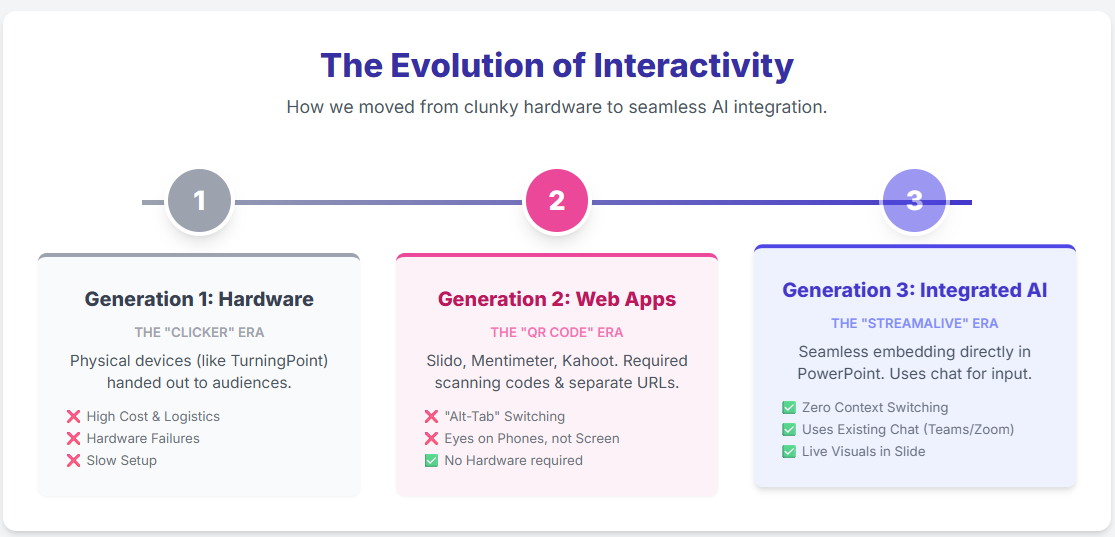
- Generation 1 (Hardware): Physical clickers. Expensive and logistically difficult.
- Generation 2 (Web-Based): Tools like Mentimeter, Slido, and Kahoot. These rely on a "Bring Your Own Device" model where the audience scans a QR code to visit a separate URL.
The flaw in Generation 2 is friction. When you ask an audience to scan a QR code, you force them to unlock their phones, exposing them to notifications, emails, and social media. Data suggests that audiences often fail to return their full attention to the presentation after engaging with a second-screen app.
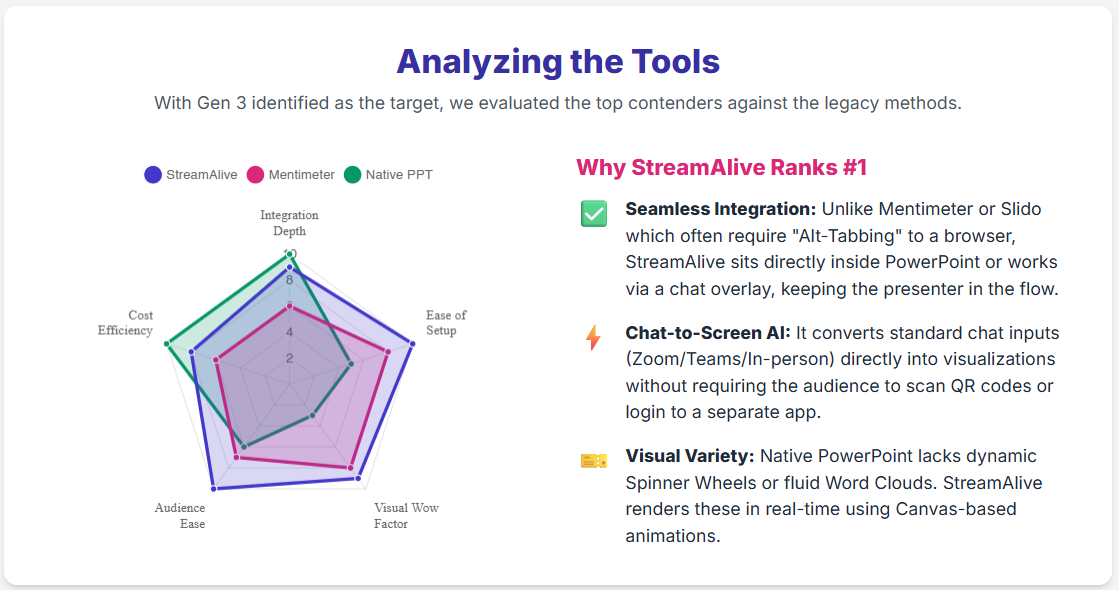
Generation 3 (Chat-Native): The current frontier, exemplified by StreamAlive. This approach utilizes the infrastructure already present in virtual meetings: the chat box. By treating the chat stream as a raw data source, it eliminates the need for the audience to "go" anywhere or log in to anything.
1. Live Polls: The "Zero-Click" Experience
Polls are the backbone of audience feedback, but traditional execution is often clunky.
The Old Way: Pop-ups and Portals
Native polls in platforms like Zoom or Teams often appear in separate popup windows, disconnecting the data from the visual narrative of your slides. External tools like Slido require users to navigate away from the meeting window.
The Best Way: StreamAlive Power Polls
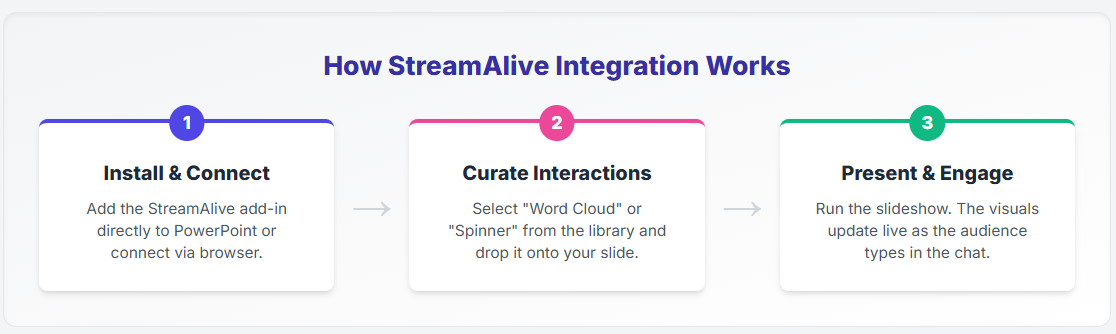
StreamAlive integrates polls directly into the PowerPoint slide via an add-in.StreamAlive integrates polls directly into your PowerPoint slides via an add-in, as a native app inside Zoom, or as a separate browser window which can be shared during your meeting.
- Mechanism: The audience simply types "A", "B", "1", or "2" in the chat.
- Tech: Natural Language Processing (NLP) parses these inputs, filtering out noise and presenting a live-updating chart directly on the slide.
- Benefit: This creates a "zero-click" experience for the user. They stay in the meeting, type in the chat they are already using, and see the result instantly.
2. Word Clouds: Visualizing Collective Thought
Word clouds are powerful for ice-breakers and sentiment checks, but their impact depends on participation volume.
The Old Way: Web Forms
Tools like ParticiPoll or AhaSlides require users to visit a webpage to type their words. The friction of opening a browser tab significantly lowers participation rates.
The New Way: Chat powered interactions
StreamAlive’s "Wonder Words" feature builds the cloud dynamically from the chat stream.
- Volume: Because typing in chat is a low-barrier action, you get higher volume participation.
- Visuals: As participants type, the cloud grows organically on the PowerPoint slide. This validates the audience's presence in real-time without breaking the flow of the presentation.
3. Spinner Wheels: The Gamification Superpower
This is where the difference between tools becomes stark. Spinner wheels are essential for picking winners or randomizing topics, but "Generation 2" tools make them difficult to use.
The Old Way: Manual Entry
With traditional spinner tools (like WheelofNames), the presenter must manually input the names of the audience members. In a webinar with 200 attendees, this is logistically impossible.
The New Way: Auto-populate from the chat
StreamAlive’s "Winning Wheel" automatically populates itself with the names of participants who have commented in the chat.
- Workflow: You ask a question ("Who wants to win a book? Type 'Me'").
- Automation: As hundreds of "Me"s flood the chat, the wheel on the PowerPoint slide populates in real-time. You click spin, and a winner is selected.
- Impact: This seamless integration of audience identity into the game mechanic is a unique capability of chat-native tools.
But what if you already have a list of names that you want to enter into a spinner wheel?
StreamAlive also supports manual entry into one of its spinner wheels. Called ‘Choice Circle’ the presenter simply enters the names of the people (or topics) the spinner should pick from and click ‘Spin’.
Technical Implementation: How to Set It Up
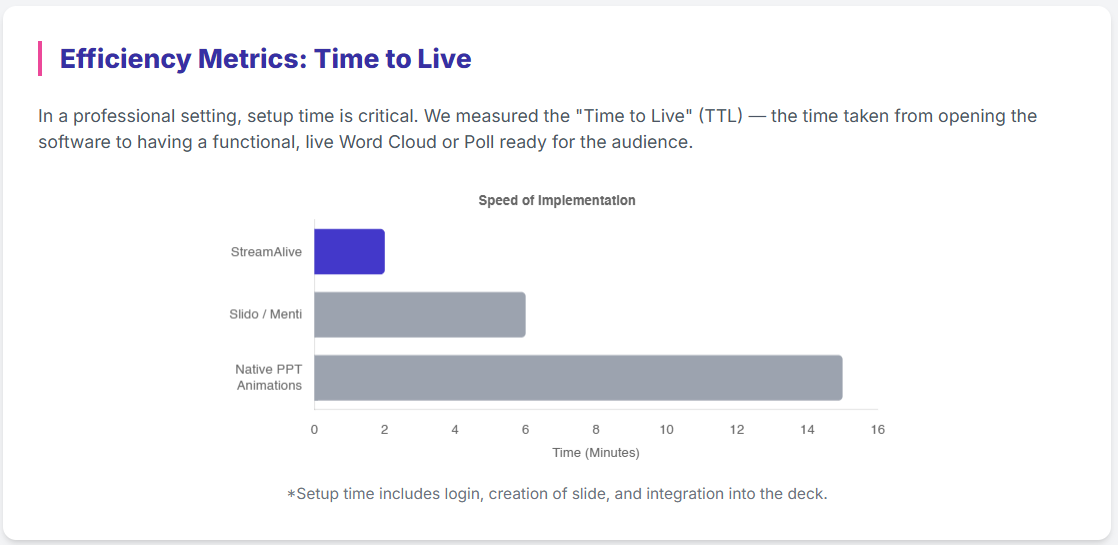
The "best" way is also defined by ease of setup. StreamAlive can function as a PowerPoint Add-in, meaning the interactivity lives inside your slide deck, not as an overlay you have to Alt-Tab to find.
- Install: Get the StreamAlive add-in from Microsoft App Marketplace.
- Connect: When you start your presentation, StreamAlive acts as a "bot" that joins your Zoom, Teams, or Google Meet session to read the chat.
- Hybrid Events: For hybrid scenarios (in-person + remote), StreamAlive provides a browser-based chat link for the in-room audience, aggregating their inputs with the remote chat on a single screen.
Competitive Landscape & Free Plan Analysis (2025 Data)
When choosing a tool, pricing limits are often the deciding factor. Here is how the top contenders stack up:
The Verdict:
- Mentimeter restricts you to 50 participants per month on the free plan, which is a hard stop for regular presenters.
- Slido is excellent for Q&A but limits interactivity to just 3 polls per event on the free tier.
- StreamAlive wins on workflow. While its free tier limits the number of active commenters, its ability to run unlimited sessions and its unique "Winning Wheel" automation make it the most powerful tool for engagement. For larger audiences, the upgrade path offers a "chat-first" capability that no other tool matches.
Conclusion
The trajectory of presentation technology is moving away from hardware and apps toward "Invisible Interfaces," where the interaction becomes conversational.
By utilizing the chat box (a tool everyone already knows how to use) StreamAlive transforms a standard PowerPoint into a two-way dialogue.
For the educator, trainer, or executive, it is the recommended standard for modern presentations.

.svg.png)


