Install StreamAlive for your PowerPoint slides
Learn more

AI Agents Training for Corporate Trainers
StreamAlive helps 9x the audience engagement in your Virtual Instructor-led Trainings (VILT) directly inside your powerpoint presentation.
Make your instructor-led AI Agents training more fun with polls, word clouds, spinner wheels and more
Works inside your existing PowerPoint presentation
Install the StreamAlive app for PowerPoint and see your slides come to life as people participate in your interactions
AI generates audience interactions for you
Let our AI scan your presentation and automatically come up with relevant questions based on the content. Or spend two hours coming up with your own questions, your choice!
Built to work with MS Teams and Zoom
Native apps for Teams and Zoom so you never have to leave your existing workflows
No QR Codes
Chat-powered interactions means your audience doesn’t need to scan QR codes or look at another screen to participate. They just type in the chat!

Quickly approved by your IT team
StreamAlive’s apps for Teams and Zoom means that they have been through rigorous quality assurance and client safety reviews. You’ll find everything an IT team needs to approve the app within the organization within your StreamAlive account.

Youve been asked to run an instructor-led session on AI Agents for corporate trainers-and you want it to feel alive, not like another AI slide deck. Lets turn your session into something people actually participate in. Here are simple ways to teach AI Agents while using StreamAlive to keep engagement rolling the whole time.
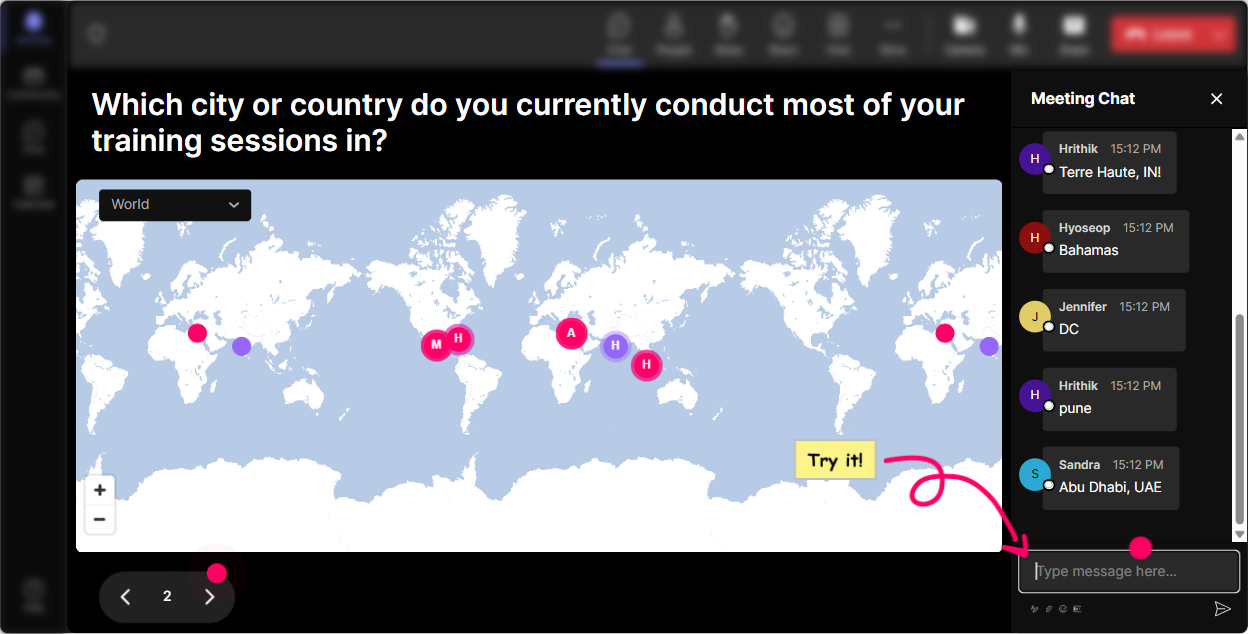
1) Magic Maps: Put your AI Agents audience on the map (and break the ice fast)
This is your easiest everyone says something moment right at the start. Instead of the usual awkward small talk, you ask a location-based question-and StreamAlive plots it live on a world map. How to use it in AI Agents training (trainer-friendly prompts): - Where are you joining from today? (classic, always works) - If you could send an AI Agent anywhere in the world to do a job for you, where would you send it? - What city would you love an AI Agent to plan a perfect 2-day itinerary for? - Which location best represents your workplace reality right now-HQ, branch office, home office type the city youre in. Why it boosts engagement: people love seeing their dot appear, and it instantly creates a shared room vibe-even on Zoom/Teams. It also gives you an easy segue: Look at all these regions-today well talk about AI Agents you could deploy across teams and time zones.
2) Rating Polls: Get a quick pulse-how AI Agent-ready is this room?
Before you teach anything, get the temperature. Rating Polls let people answer with a number, fast, right in chat. Youll see the average and the spread live-so you know whether to slow down, speed up, or split the difference. Easy ways to use it in an AI Agents session: - On a scale of 110, how confident are you explaining what an AI Agent is? - Rate your current comfort level with AI tools at work (1 = nervous, 10 = I teach this stuff). - How likely is your organization to adopt AI Agents in the next 12 months? (110) - After a demo: Rate that workflow: how useful would that AI Agent be in your training role? Trainer tip: call it out in the moment-Im seeing a lot of 46s. Perfect. Were going to make this practical, not theoretical. People feel seen, and they stay with you.

3) Wonder Words (Word Cloud): Find out what people really think about AI Agents
Word Clouds are amazing because they pull feelings and beliefs out of the room in seconds-and you can address the mental baggage early. Ask for 12 words, and StreamAlive makes the popular ones bigger. Great AI Agents word cloud questions: - In 12 words, how do you feel about AI Agents? (youll get: excited, scared, curious, overwhelmed) - Whats one word you associate with AI Agents at work? - Whats the biggest benefit you hope AI Agents bring to training? - Whats one risk you worry about with AI Agents? How to use it live: dont just show it-react to it. Example: Im seeing overwhelmed and curious big on the screen. Thats exactly why were doing this step-by-step, and Ill give you a simple framework you can reuse.

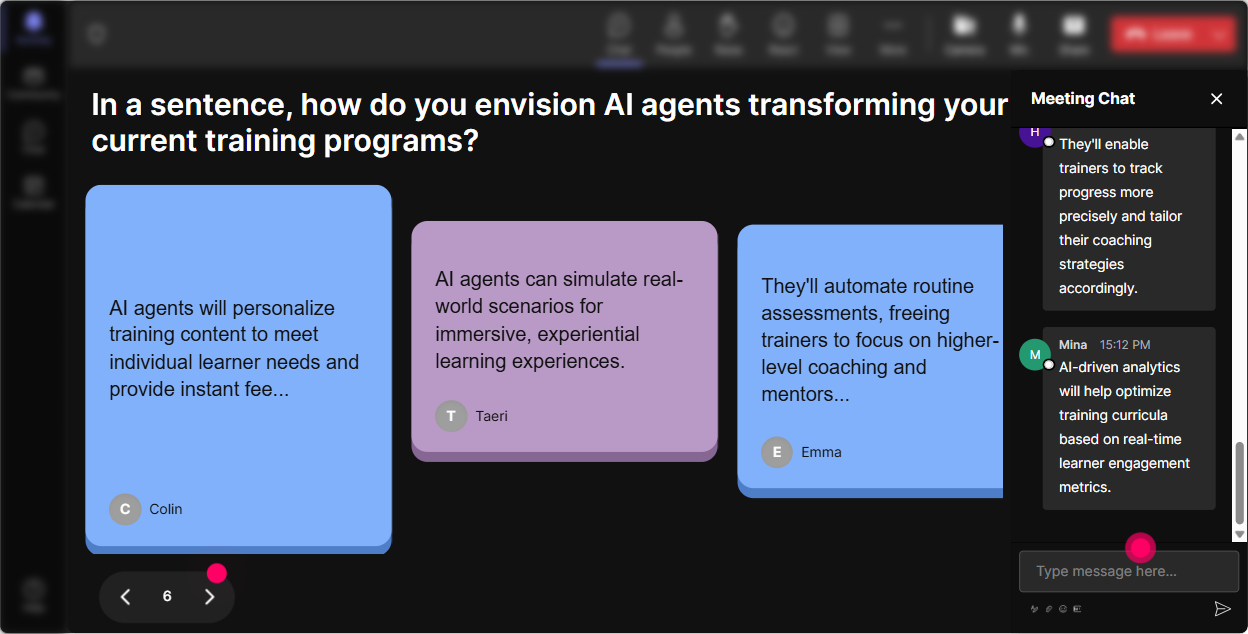
4) Talking Tiles: Turn real responses into a live brainstorm (without the awkward silence)
When you want more than one-word answers, Talking Tiles makes the chat feel like a real discussion. Responses show up as dynamic tiles on screen, so people feel like what they wrote actually matters. Use Talking Tiles for AI Agents training moments like: - Whats one task in your training workflow youd LOVE an AI Agent to take off your plate? - Describe a real training challenge you think an AI Agent could help solve. - If you built a Training Assistant Agent, what would its top 3 responsibilities be? - Where do you think AI Agents could go wrong in your org? Be specific. Why it works: you get a group brainstorm without forcing anyone to unmute. And you can literally pick tiles to respond to: Oh this one is good-follow-up coaching reminders lets talk about that use case.
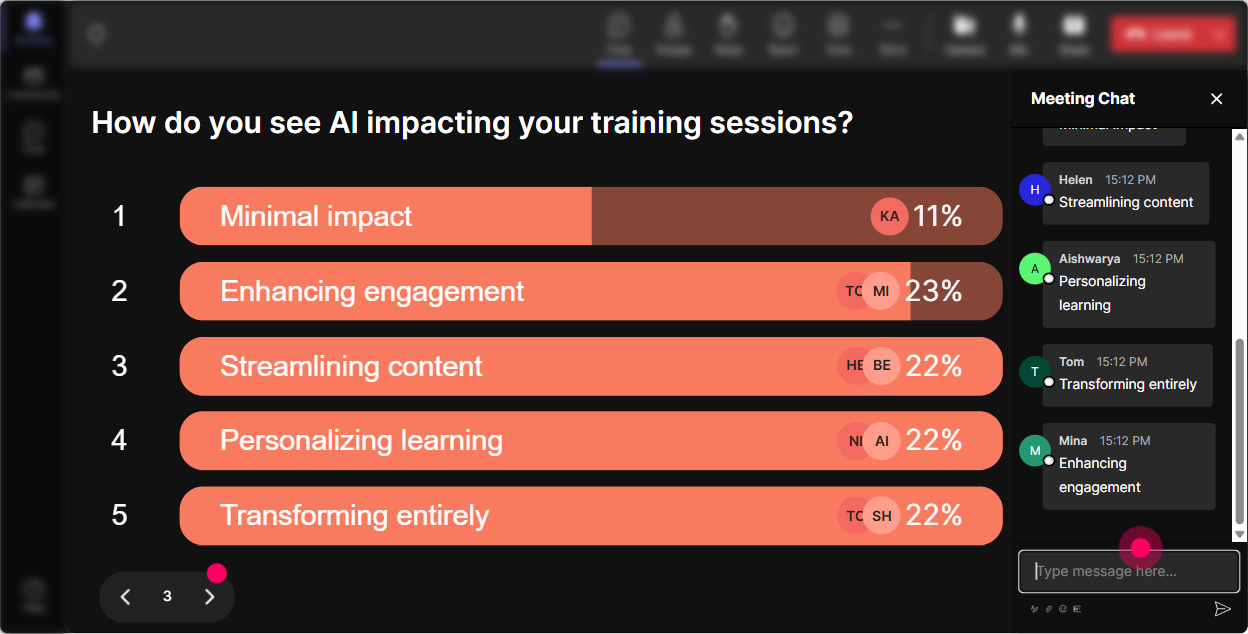
5) Power Polls: Let the room choose what you teach next (and watch attention spike)
People pay attention when they feel like they have a say. Power Polls are perfect for steering the session based on what your trainers actually want. Poll ideas for AI Agents instructor-led training: - Which AI Agent topic should we spend the most time on today? 1) What AI Agents are (basics) 2) Real corporate training use cases 3) Agent workflows + tools 4) Risk, governance, and ethics 5) Implementation plan + change management - Where would an AI Agent help you most? 1) Content creation 2) Assessments/quizzes 3) Coaching + follow-ups 4) LMS/admin reporting 5) Learner support (FAQ, reminders) - Whats your biggest blocker right now? 1) Not sure where to start 2) Data/privacy concerns 3) Tool overload 4) Stakeholder buy-in 5) Lack of time Trainer move: announce the winning choice and commit to it. Alright, use cases are winning-lets go practical first, then well circle back to risks. That moment alone can lift engagement because people feel youre not just reading slides.
6) Winner Wheel (Spinner Wheel): Get participation without putting people on the spot
You want voices in the room, but you dont want to pressure the same two confident people. Spinner Wheel makes it playful and fair-anyone who participated in chat can be picked. How to use it in AI Agents training: - Drop a use case in chat. Im going to spin the wheel and have one person explain theirs in 20 seconds. - Type A or B for which approach youd use. Ill spin and ask one person why they chose it. - Share a job task youd automate. Wheel pick will help me choose which one we demo first. Key detail: make it safe. Say something like: If you get picked and youd rather pass, just type pass-no stress. That keeps the energy fun instead of scary.

7) Quiz: Do quick knowledge checks that dont feel like school
A short quiz wakes people up instantly-especially after a concept-heavy explanation. StreamAlive collects votes from chat, shows results live, and you can reveal the correct answer when youre ready. AI Agents quiz questions you can use: - Which is the best description of an AI Agent? 1) A static chatbot that answers questions 2) A system that can plan and take actions toward a goal 3) A shared folder of prompts 4) A dashboard for analytics (Correct: 2) - What usually makes an AI Agent different from basic automation? 1) It can adapt steps based on feedback 2) It always needs a human to click next 3) It never uses tools 4) It only works in one app (Correct: 1) - Best first use case for a training team to pilot an AI Agent? 1) Replace all instructors 2) Auto-generate coaching follow-up emails + reminders 3) Make legal decisions 4) Approve expenses (Correct: 2) Trainer tip: after showing the correct answer, ask one follow-up question: What made you choose your option? That turns a quiz into a discussion.

2) Rating Polls: Get a quick pulse-how AI Agent-ready is this room?
Before you teach anything, get the temperature. Rating Polls let people answer with a number, fast, right in chat. Youll see the average and the spread live-so you know whether to slow down, speed up, or split the difference. Easy ways to use it in an AI Agents session: - On a scale of 110, how confident are you explaining what an AI Agent is? - Rate your current comfort level with AI tools at work (1 = nervous, 10 = I teach this stuff). - How likely is your organization to adopt AI Agents in the next 12 months? (110) - After a demo: Rate that workflow: how useful would that AI Agent be in your training role? Trainer tip: call it out in the moment-Im seeing a lot of 46s. Perfect. Were going to make this practical, not theoretical. People feel seen, and they stay with you.
8) Q&A: Capture questions cleanly-without losing them in the chat chaos
In AI sessions, questions come fast-and the chat can get messy. StreamAlive detects and collects audience questions and displays them so you can actually manage them. Ways to run Q&A smoothly in AI Agents training: - Set expectations: Drop questions anytime-Ill pause every 10 minutes and hit the Q&A list. - Mid-session prompt: Whats still fuzzy about AI Agents-definitions, tools, or risks? - After a demo: What would you need to trust this AI Agent in your org? The best part: no separate Q&A box required. People just type normally, and you dont miss the good questions.

9) Analytics: After the session, see what actually worked (and who was locked in)
If youre serious about improving your training, this is the gold. StreamAlive analytics show you engagement minute-by-minute, interaction performance, and who your most engaged participants were. How corporate trainers can use Analytics after an AI Agents session: - Spot the exact moments engagement spiked (maybe your Agent demo segment) and build more of that into future sessions. - See where engagement dropped (maybe the governance section) and redesign it-shorter, more examples, more polls. - Identify your top engaged participants (Fantastic Fans)-these are your potential AI champions for a pilot program. - Share interaction results with stakeholders: export/share via email, or recap on Teams: Heres what the group voted as top AI Agent use cases. Bottom line: youre not guessing what landed-youve got proof, and thats huge when youre trying to justify more AI enablement sessions internally.

Use StreamAlive in all your training sessions
StreamAlive isn’t just for
AI Agents
training,
it can also be used for any instructor-led training session directly inside your PowerPoint presentation.
Explore similar traingin ideas: unlocking the potential of StreamAlive
See how StreamAlive transforms live training with engaging events and interactive sessions across industries, directly inside your PowerPoint presentation.

Interactions in action
(it's free)

.svg.png)


