Install StreamAlive for your PowerPoint slides
Learn more

Change Management Training for L&D Leaders
StreamAlive helps 9x the audience engagement in your Virtual Instructor-led Trainings (VILT) directly inside your powerpoint presentation.
Make your instructor-led Change Management training more fun with polls, word clouds, spinner wheels and more
Works inside your existing PowerPoint presentation
Install the StreamAlive app for PowerPoint and see your slides come to life as people participate in your interactions
AI generates audience interactions for you
Let our AI scan your presentation and automatically come up with relevant questions based on the content. Or spend two hours coming up with your own questions, your choice!
Built to work with MS Teams and Zoom
Native apps for Teams and Zoom so you never have to leave your existing workflows
No QR Codes
Chat-powered interactions means your audience doesn’t need to scan QR codes or look at another screen to participate. They just type in the chat!

Quickly approved by your IT team
StreamAlive’s apps for Teams and Zoom means that they have been through rigorous quality assurance and client safety reviews. You’ll find everything an IT team needs to approve the app within the organization within your StreamAlive account.

Youve been asked to run Change Management instructor-led training for L&D Leaders-and you want it to feel less like a slide marathon and more like a session people actually want to be in. The fastest way to do that? Get them participating early, often, and visually. Here are practical ways to do it using StreamAlive interactions (and yes, this is how you get that everyones involved energy).
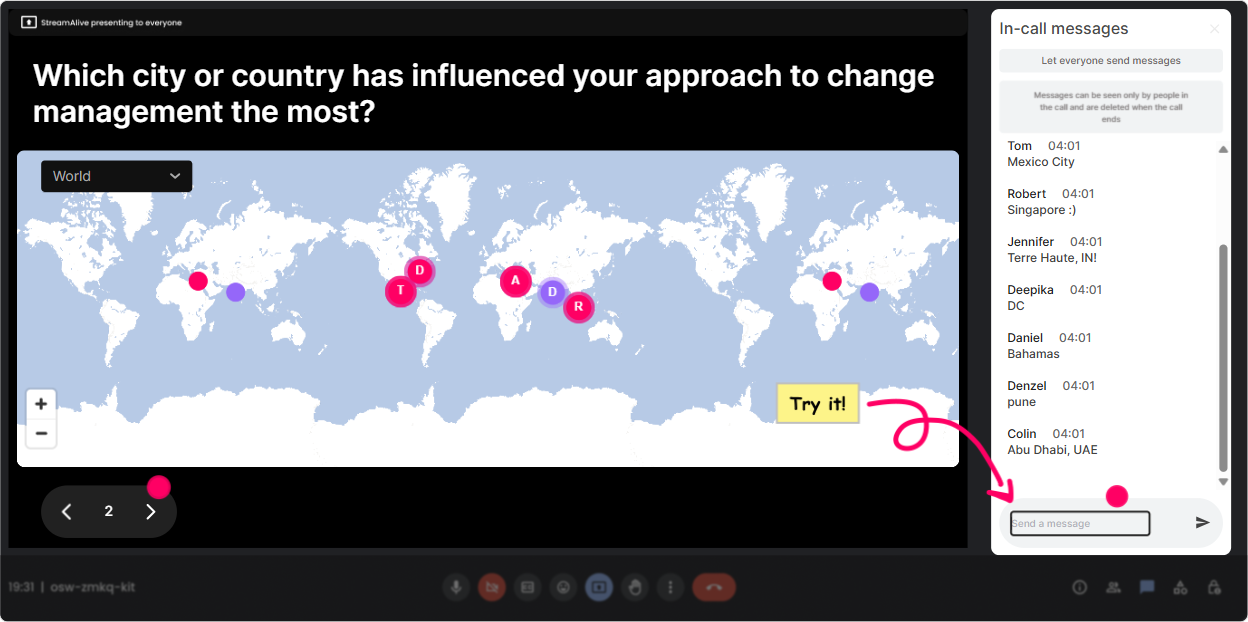
1) Magic Maps: kick off your Change Management session by literally putting people on the map
The first 3 minutes of your training decide the vibe. Instead of a sleepy Where are you joining from? with zero payoff, use **Magic Maps** to instantly visualize your group and make it feel like a real cohort. Try questions that connect to change (not just geography): - **Where are you joining from today?** (classic, quick win) - **Wheres the last place you worked where a big change rolled out?** (city + story starter) - **If you could teleport to one place to reset after a tough change project, where would you go?** (fun + human) - **Which location best represents the most change youve led-HQ, regional office, plant, remote?** (if you want a themed mapping question) Trainer tip: If youre running global L&D leaders, the map clustering becomes a conversation by itself-Looks like weve got a mini change-hub in Singapore today whats going on there?
2) Rating Polls: get an instant baseline on change maturity (without awkward cold calling)
When youre teaching Change Management, people show up with wildly different experiences-some have led enterprise transformations, others have only survived them. **Rating Polls** let you find that out in seconds and adapt live. Use a quick 110 pulse check like: - **How confident are you in coaching leaders through resistance to change? (110)** - **How consistent is change adoption across your organization? (110)** - **How strong is your stakeholder alignment on most change projects? (110)** - **How ready is your culture for change right now? (110)** What this does for engagement: people love seeing the spread. If the average is a 6.2, you can say, Perfect-this session is exactly for that messy middle, and now they feel seen (and theyll keep responding).

3) Wonder Words (Word Cloud): surface the real feelings people have about change
Change Management isnt just process-its emotion. And L&D leaders often carry the emotional load of the organization. **Wonder Words** is a simple way to make the unspoken stuff visible, fast. Ask for 12 word answers like: - **When you hear change initiative, whats the first word that comes to mind?** - **Whats the biggest blocker to adoption in your org?** (one or two words) - **What do leaders do that accidentally makes change harder?** - **What do employees need most during change?** Once the word cloud builds, youve got instant talking points: - If you see **resistance** big-great, you can reframe resistance as data. - If **communication** dominates-now you can pivot into comms planning and manager enablement. It feels like a group conversation, even if youve got 200 people on mute.

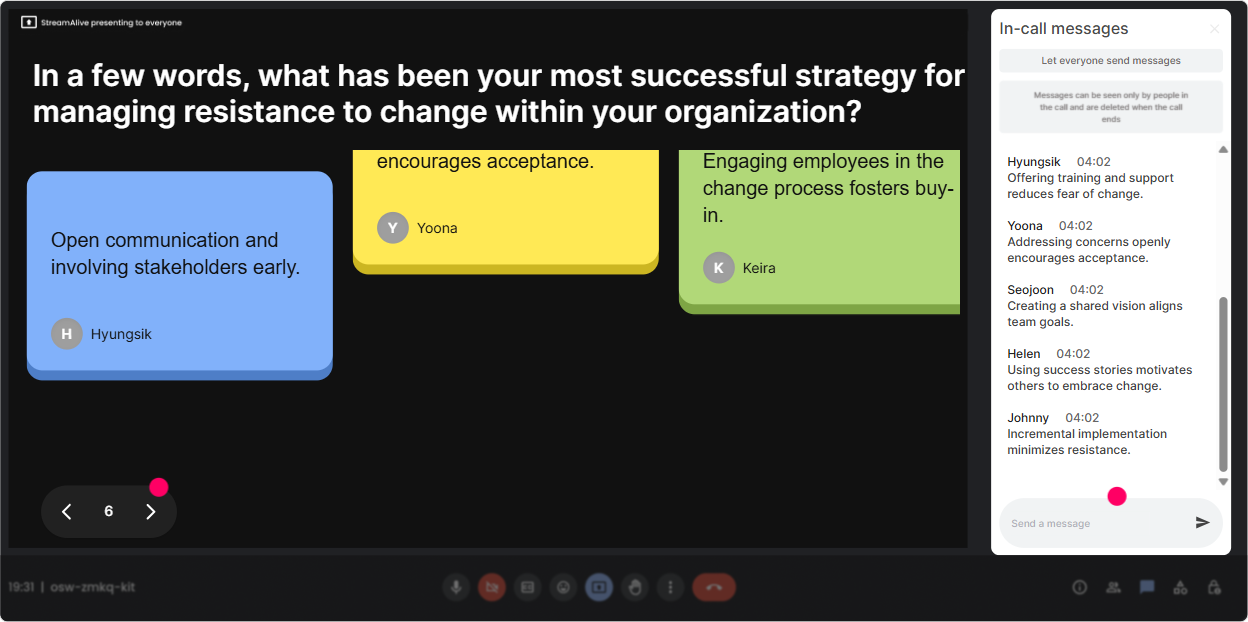
4) Talking Tiles: turn real change stories into a visual wall of insights
Sometimes you want more than a one-word vibe-you want examples, situations, and real context. **Talking Tiles** is perfect for that because people can type a fuller response and it still looks lively on-screen. Prompts that work really well in Change Management ILT: - **Describe a change rollout that went sideways-what happened?** - **What impact does Change Management have on your role in L&D?** - **Whats one thing you wish leaders understood about adoption?** - **Where does change usually break down in your org-sponsorship, comms, training, managers, reinforcement?** (and ask them to explain briefly) Trainer move: pick 23 tiles and react live-This is such a common pattern Suddenly people feel like co-creators, not just attendees.
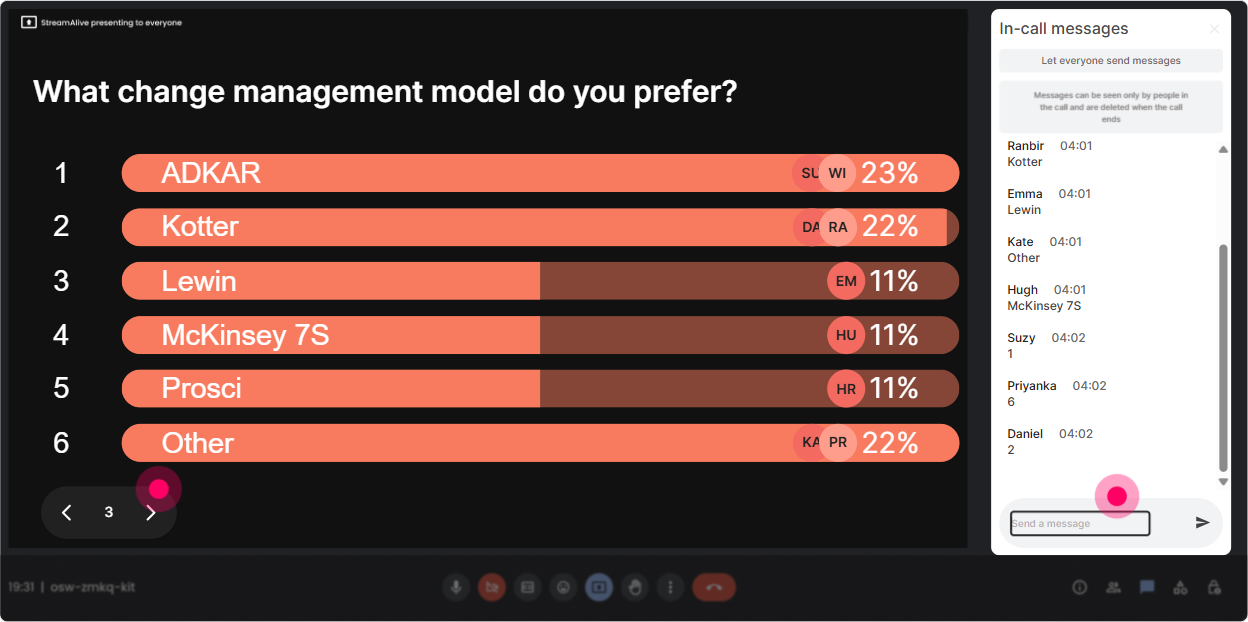
5) Power Polls: let the audience steer what you go deeper on
You can plan the perfect agenda and still miss what your L&D leaders actually need today. **Power Polls** make it easy to co-design the session in real time (without derailing it). Try polls like: - **What do you want more of today?** 1) Stakeholder & sponsor alignment 2) Resistance management 3) Change comms planning 4) Manager enablement 5) Reinforcement + measuring adoption Or: - **Which part of change is hardest in your organization?** 1) Getting leaders to sponsor 2) Middle manager adoption 3) Employee buy-in 4) Training people on new ways of working 5) Sustaining the change after launch The engagement win here is simple: when people vote, theyre investing. And when you say Cool, were spending extra time on #2 because you picked it, they lean in.
6) Winner Wheel: make participation feel fun (and keep chat moving)
In every training, youll get your enthusiastic fewand your silent many. The **Winner Wheel** is a playful way to reward participation and get more people typing. Ways to use it in Change Management training: - **Drop one tactic youve used to reduce resistance. Im spinning the wheel to pick someone to share the backstory.** - **Type your biggest change challenge in the chat-winner gets to pick the next scenario we role-play.** - **Everyone who answers this poll is eligible-lets spin for a quick shoutout.** And if you want to make it feel safe (not scary): - Let the winner choose: **Do you want to unmute or should I just read your chat answer?** This keeps energy high without forcing anyone into an uncomfortable spotlight.

7) Quiz: do quick knowledge checks that dont feel like an exam
Change Management has lots of models, terms, and sounds right concepts that people half-remember. A **Quiz** lets you check understanding in a way that feels like a game. Example quiz questions for L&D leaders: - **Which is the best definition of change adoption?** (set one correct answer) - **In most change rollouts, whos the biggest day-to-day influence on adoption?** 1) CEO 2) Project manager 3) People managers (correct) 4) HR - **Whats the biggest risk of training too early?** 1) People forget before go-live (correct) 2) It costs less 3) It increases adoption automatically 4) It reduces resistance Best part: you can reveal the correct answer and immediately ask, Okay, what are you seeing in your org-are managers actually enabled or just informed?

2) Rating Polls: get an instant baseline on change maturity (without awkward cold calling)
When youre teaching Change Management, people show up with wildly different experiences-some have led enterprise transformations, others have only survived them. **Rating Polls** let you find that out in seconds and adapt live. Use a quick 110 pulse check like: - **How confident are you in coaching leaders through resistance to change? (110)** - **How consistent is change adoption across your organization? (110)** - **How strong is your stakeholder alignment on most change projects? (110)** - **How ready is your culture for change right now? (110)** What this does for engagement: people love seeing the spread. If the average is a 6.2, you can say, Perfect-this session is exactly for that messy middle, and now they feel seen (and theyll keep responding).
8) Q&A: capture questions cleanly without losing them in a flying chat
If youve ever tried to teach while chat is popping off, you know questions get buried fast. StreamAlive **Q&A** pulls questions out of the chat and displays them neatly so you can actually manage them. How to use it during Change Management ILT: - Set expectations: **Drop questions anytime-StreamAlive will collect them and Ill hit them at each break.** - Use it for sensitive topics: **If youre dealing with resistance from senior leaders, ask it in chat-no need to raise your hand.** - Run a hot seat segment: **Upvote with a +1 in chat if you want this one answered next.** (even if youre not formally upvoting, it drives interaction) The big win: you stay present with the group instead of constantly saying, Sorry, I missed that-can you paste it again?

9) Analytics: prove engagement, improve the next session, and spot your champions
After the session, you want more than I think it went well. **StreamAlive Analytics** shows you what actually happened-minute by minute. Ways L&D leaders and trainers use this for Change Management ILT: - **See where engagement spiked** (maybe your resistance activity lit up the chat) and where it dipped (maybe that section needs a redesign). - **Replay interaction results** so you can debrief with your team: Heres what 120 L&D leaders said is the #1 adoption blocker. - **Identify your most engaged participants (top fans)**-these are often your internal change champions, future facilitators, or people to invite to a follow-up cohort. - **Email/share reports** with stakeholders on Teams or email to show outcomes beyond attendance: participation, sentiment, priorities, and questions asked. If youre trying to get buy-in for more live training time (or budget), this is the kind of data that makes the case for you.

Use StreamAlive in all your training sessions
StreamAlive isn’t just for
Change Management
training,
it can also be used for any instructor-led training session directly inside your PowerPoint presentation.
Explore similar traingin ideas: unlocking the potential of StreamAlive
See how StreamAlive transforms live training with engaging events and interactive sessions across industries, directly inside your PowerPoint presentation.

Interactions in action
(it's free)

.svg.png)


