Install StreamAlive for your PowerPoint slides
Learn more

Co-Creation Training for Training Agencies
StreamAlive helps 9x the audience engagement in your Virtual Instructor-led Trainings (VILT) directly inside your powerpoint presentation.
Make your instructor-led Co-Creation training more fun with polls, word clouds, spinner wheels and more
Works inside your existing PowerPoint presentation
Install the StreamAlive app for PowerPoint and see your slides come to life as people participate in your interactions
AI generates audience interactions for you
Let our AI scan your presentation and automatically come up with relevant questions based on the content. Or spend two hours coming up with your own questions, your choice!
Built to work with MS Teams and Zoom
Native apps for Teams and Zoom so you never have to leave your existing workflows
No QR Codes
Chat-powered interactions means your audience doesn’t need to scan QR codes or look at another screen to participate. They just type in the chat!

Quickly approved by your IT team
StreamAlive’s apps for Teams and Zoom means that they have been through rigorous quality assurance and client safety reviews. You’ll find everything an IT team needs to approve the app within the organization within your StreamAlive account.

Youve been asked to run a Co-Creation instructor-led training for a Training Agency-and you want it to feel alive, not like another slide-and-sigh session. The easiest way? Let the group build the session with you in real time. Here are practical co-creation ideas, powered by StreamAlive interactions, to keep people participating all the way through.
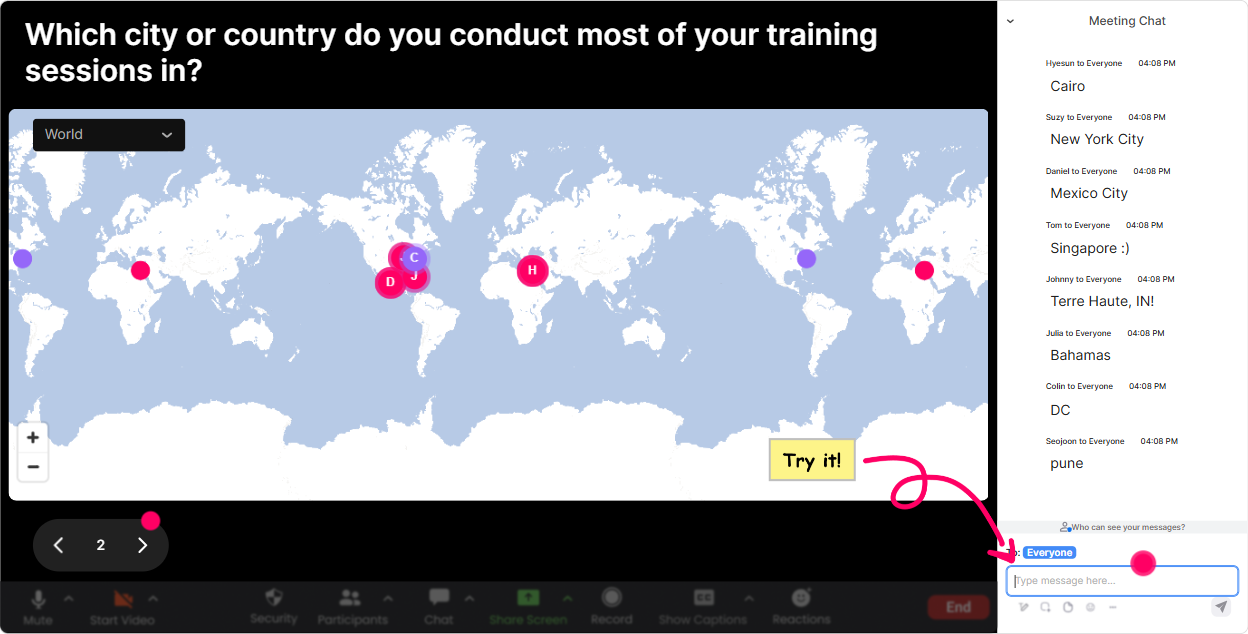
1) Magic Maps: kick off with were building this together energy
Co-creation works best when people feel like theyre part of something from minute one. Magic Maps is a super simple opener that gets everyone typing instantly. How to use it in your Co-Creation training: - **Warm welcome + instant connection:** Where are you joining from today? (Youll literally see your room populate on a live world map.) - **Context check for training agencies:** Which city do you train in most often? (Great way to surface regional differences in client needs.) - **Co-create the examples youll use later:** Pick one location where youd like a co-created program to succeed most-where should we test ideas today? Trainer move: if youre seeing clusters (like lots from one city), call it out: Okay, looks like weve got a strong Toronto crew-tell me in chat, what are clients there asking for right now? Boom: co-creation begins.
2) Rating Polls: get a fast pulse check before you teach anything
Rating Polls are perfect when you want quick honesty without putting people on the spot. Its a clean way to shape your delivery in the moment. Ways to use Rating Polls for Co-Creation ILT: - **Confidence check:** On a scale of 110, how confident are you in running co-creation sessions with clients? - **Maturity check:** Rate your current co-design process at your agency (1 = messy, 10 = smooth and repeatable). - **Buy-in check:** How valuable do you *think* co-creation is for client results? (110) Then co-create the agenda: Looks like were mostly at a 46. Cool-then Im going to spend less time on theory and more time on a step-by-step process + templates. Deal?

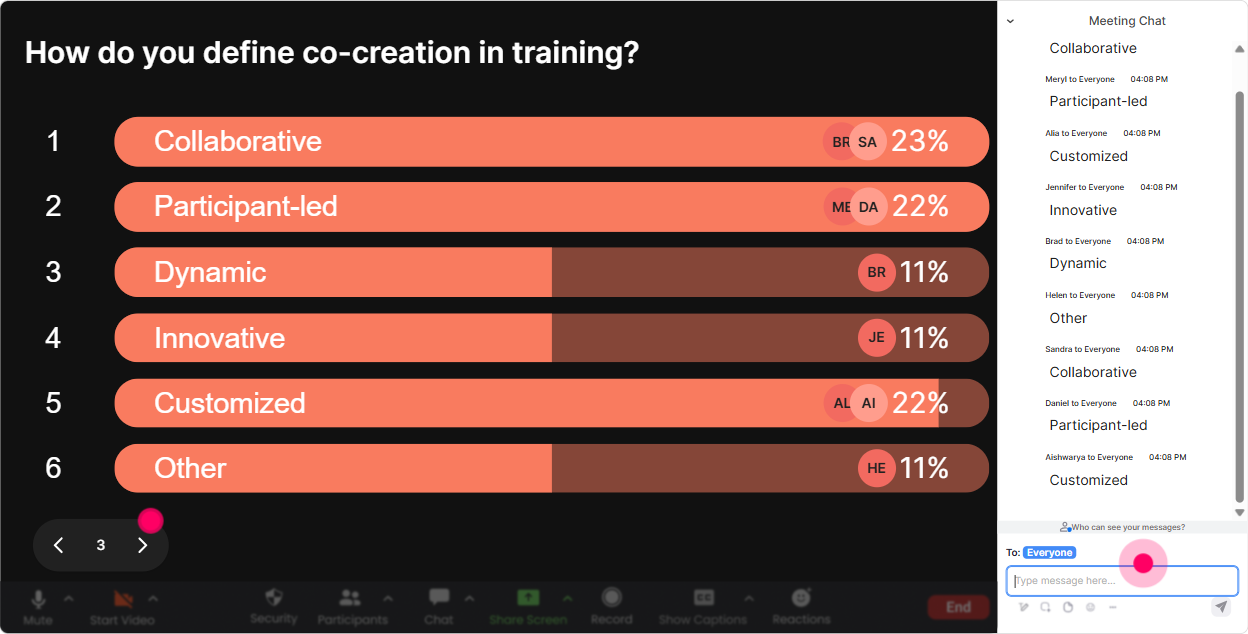
3) Wonder Words (Word Cloud): let the room define what co-creation means
This is one of the easiest ways to turn participants into contributors. Ask a 12 word question, and let their language shape your session. Great Word Cloud prompts for Co-Creation training: - **Emotions (instant temperature check):** Co-creation feels ______. (Youll see things like exciting, chaotic, time-consuming, powerful.) - **Client reality check:** Whats the #1 thing clients usually want most? (12 words) - **Outcome focus:** When co-creation works, the result is ______. Trainer move: pick the biggest 23 words and build a mini discussion: Im seeing chaotic and powerful-perfect. Lets co-create a process that keeps the power but reduces the chaos.

4) Talking Tiles: turn participant stories into training content (live)
Talking Tiles is amazing when you want responses that are a little longer than a word cloud-real experiences, real examples, real friction. Use it to co-create your content on the fly: - **Role impact:** Where could co-creation make your job easier-or harder? - **Client challenges:** Whats a moment where a client changed the goalposts mid-program? - **Internal agency reality:** What slows down collaboration between sales, delivery, and SMEs? Trainer move: once tiles start dropping in, you can theme the session in real time: - Im seeing a pattern: scope creep + stakeholder misalignment. Lets build a co-creation kickoff that protects you from both. Thats co-creation: their input becomes your next teaching segment.

5) Power Polls: let the group choose what you go deep on
Power Polls are your choose your own adventure tool. Instead of guessing what they want, you let them vote-and then you teach what wins. Poll ideas for Training Agency Co-Creation ILT: - **What should we tackle first?** 1) Running a co-creation kickoff 2) Managing difficult stakeholders 3) Turning insights into a program design 4) Pricing/timeboxing co-creation - **Where does co-creation break down most?** 1) Discovery 2) Design 3) Delivery 4) Measurement Trainer move: promise youll follow the room: Whatever wins, well build a simple framework for it together and youll leave with a draft you can reuse.
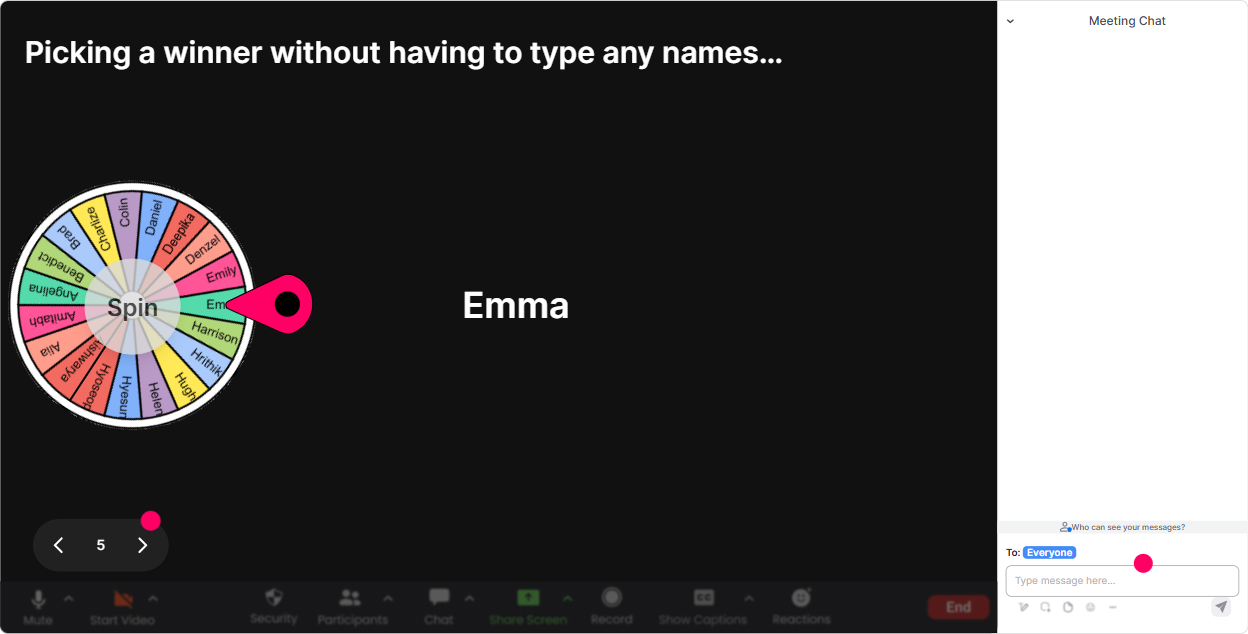
6) Winner Wheel (Spinner Wheel): make participation feel fun (and fair)
Sometimes you want voices, not just chat-but asking anyone want to share? usually gets you silence. Spinner Wheel fixes that by making it playful and random. How trainers use it in co-creation: - **Volunteer with a twist:** Drop Im in in chat if youre open to sharing. Ill spin the wheel to pick who well hear from. - **Case clinic:** Type one client situation youre dealing with. Well spin to pick one and co-create a solution live. - **Friendly accountability:** Everyone who posted an idea goes on the wheel-winner gets a shoutout (or a small prize). Trainer move: keep it light: Dont worry, youre not being graded-just helping us build a real-world example.
7) Quiz: quick knowledge checks that dont feel like school
A Quiz interaction is perfect for busting myths and making sure key concepts actually land. Its also a great reset button when energy dips. Quiz questions that fit Co-Creation training for agencies: - Which is the BEST definition of co-creation? (Only one correct) - Whats the biggest risk if you co-create with *too many* stakeholders at once? - Which step should happen BEFORE ideation? Trainer move: after revealing the correct answer, ask: Who picked option 2-tell me what made it feel right? Now youre teaching *with* them, not *at* them.

2) Rating Polls: get a fast pulse check before you teach anything
Rating Polls are perfect when you want quick honesty without putting people on the spot. Its a clean way to shape your delivery in the moment. Ways to use Rating Polls for Co-Creation ILT: - **Confidence check:** On a scale of 110, how confident are you in running co-creation sessions with clients? - **Maturity check:** Rate your current co-design process at your agency (1 = messy, 10 = smooth and repeatable). - **Buy-in check:** How valuable do you *think* co-creation is for client results? (110) Then co-create the agenda: Looks like were mostly at a 46. Cool-then Im going to spend less time on theory and more time on a step-by-step process + templates. Deal?
8) Q&A: catch every question without losing the flow
In co-creation sessions, questions pop up constantly-and chat can get messy fast. StreamAlive Q&A pulls questions out of the chat and organizes them so you dont miss the good stuff. How to use it during your ILT: - **Park questions without ignoring people:** Drop questions anytime-StreamAlive will collect them and Ill hit them at our Q&A breaks. - **Co-create the FAQ for future programs:** Im going to answer the top 5 questions, and these will become our shared client-ready FAQ. - **Theme-based Q&A:** Lets do 3 minutes on stakeholder challenges-then well switch to pricing/timeboxing questions. Trainer move: when you answer, tie it back to someone by name. People feel seen, and chat participation usually jumps immediately.

9) Analytics: prove what worked and improve the next delivery
If youre a training agency, you dont just need a great session-you need repeatability and proof. StreamAlive Analytics helps you see what actually drove engagement. What you can do with it after your co-creation ILT: - **Spot your high-engagement moments:** See minute-by-minute where chat and interactions spiked (and where energy dipped). - **Replay and learn:** Review chat replay + interaction results to see what prompts worked best. - **Identify your most engaged participants:** Great for follow-ups, champions, or even inviting them into a pilot group. - **Share results easily:** Send interaction reports to email or share internally on Teams to improve the next run. Trainer move: treat it like iteration: Next delivery, Im moving that poll earlier because it clearly woke the room up. Thats co-creation thinking applied to your own training design.

Use StreamAlive in all your training sessions
StreamAlive isn’t just for
Co-Creation
training,
it can also be used for any instructor-led training session directly inside your PowerPoint presentation.
Explore similar traingin ideas: unlocking the potential of StreamAlive
See how StreamAlive transforms live training with engaging events and interactive sessions across industries, directly inside your PowerPoint presentation.

Interactions in action
(it's free)

.svg.png)


