Install StreamAlive for your PowerPoint slides
Learn more

Extended Reality Training for Corporate Trainers
StreamAlive helps 9x the audience engagement in your Virtual Instructor-led Trainings (VILT) directly inside your powerpoint presentation.
Make your instructor-led Extended Reality training more fun with polls, word clouds, spinner wheels and more
Works inside your existing PowerPoint presentation
Install the StreamAlive app for PowerPoint and see your slides come to life as people participate in your interactions
AI generates audience interactions for you
Let our AI scan your presentation and automatically come up with relevant questions based on the content. Or spend two hours coming up with your own questions, your choice!
Built to work with MS Teams and Zoom
Native apps for Teams and Zoom so you never have to leave your existing workflows
No QR Codes
Chat-powered interactions means your audience doesn’t need to scan QR codes or look at another screen to participate. They just type in the chat!

Quickly approved by your IT team
StreamAlive’s apps for Teams and Zoom means that they have been through rigorous quality assurance and client safety reviews. You’ll find everything an IT team needs to approve the app within the organization within your StreamAlive account.

Youve been asked to run an Extended Reality (XR) instructor-led session for corporate trainers-and you want it to feel hands-on, not like a slideshow with a headset cameo. The trick is simple: make people participate every few minutes. Here are XR training ideas you can run live, powered by StreamAlive to keep engagement high (think: up to 9x more chat and interaction).
1) Magic Maps: Put your XR classroom on the map (literally)
XR is all about presence, so start by creating presence with your audience. How to use it in XR instructor-led training: - Icebreaker: Where are you joining from today? (Classic, but the map makes it instantly more fun.) - XR relevance: If you could teleport anywhere on earth right now (XR-style), where would you go? - Training context: Which city do you train in most often? (Great if youre talking about scaling training globally using VR.) Why it works: When people see their location pop up live, they feel seen-and it kickstarts chat energy without you begging for participation. Pro tip for trainers: If youre running regional cohorts, call out clusters: Whoa, weve got a whole Toronto squad today! That little moment boosts belonging fast.

2) Rating Polls: Get a quick pulse on XR confidence (and adjust on the fly)
Before you jump into VR/AR/MR, you need to know where the room is at-without doing a long round of introductions. How to use it in XR instructor-led training: - On a scale of 110, how comfortable are you explaining the difference between AR, VR, and MR? - Rate your confidence in facilitating a VR activity with learners (1 = not yet, 10 = ready tomorrow). - How familiar are you with XR safety + comfort practices (motion sickness, accessibility, boundaries)? Why it works: Its a fast temperature check and you can respond live: Looks like most of us are at a 46. Perfect-today well keep it practical and trainer-friendly. XR training idea to pair with it: After you demo a concept (like presence or immersion), run the rating poll again to show progress in real time.

3) Wonder Words (Word Cloud): Capture the rooms feelings about XR in one glance
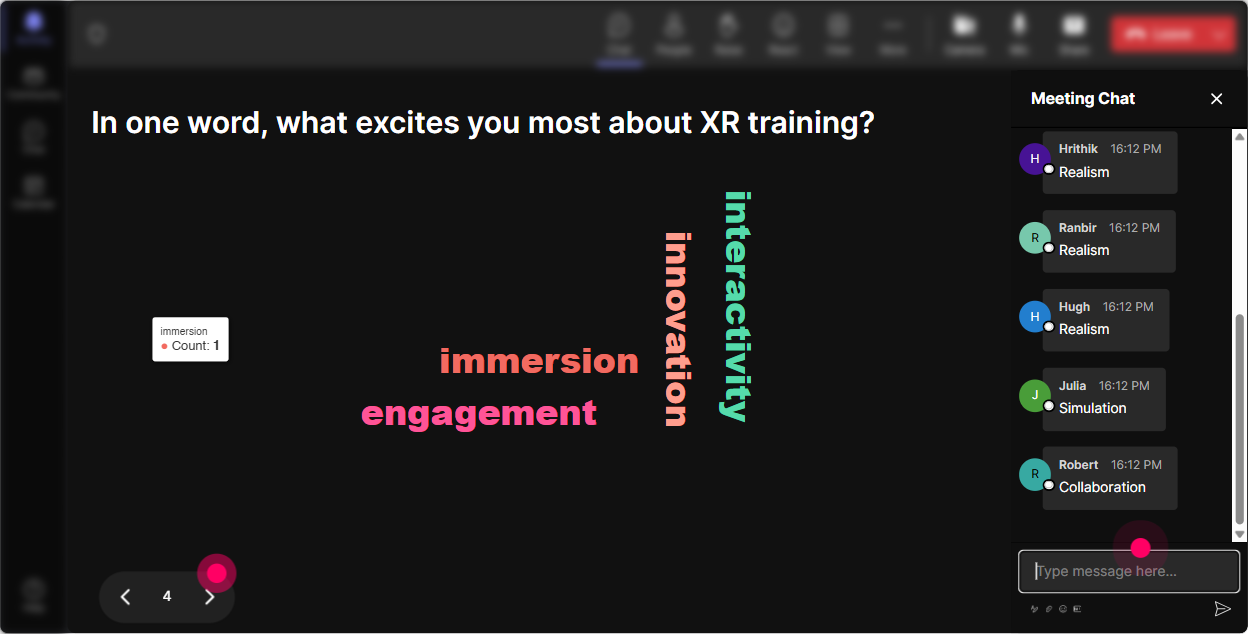
XR can make people excitedand also nervous. A word cloud lets you surface that honestly without putting anyone on the spot. How to use it in XR instructor-led training (12 word answers work best): - What word comes to mind when you hear Extended Reality? - How do you want learners to feel in an XR training module? - Whats your biggest concern about XR training? (Answers like cost, nausea, access, adoption will pop.) Why it works: You get instant buy-in because youre reacting to THEIR words, not just pushing your agenda. Trainer move that lands well: Pick the top 23 biggest words and say, Cool-lets design around these today. Suddenly your session feels customized.
4) Talking Tiles: Turn XR brainstorming into something people actually want to watch
When you want longer answers than a word cloud-but still want it to feel lively-Talking Tiles is gold. The responses become visual and playful, so even quieter folks tend to type. How to use it in XR instructor-led training: - In one or two sentences: where could XR make training safer or less risky in your organization? - Describe a real training scenario youd love to simulate in VR (equipment, customer scenarios, leadership moments, etc.). - What would success look like if you launched one XR pilot next quarter? Why it works: People dont just hear your examples-they see the groups ideas stacking up live. Thats instant momentum. XR activity idea: After tiles come in, group them: compliance, safety, leadership, onboarding. Then say, Lets build one XR lesson outline from the biggest category.

5) Power Polls: Let the audience choose what part of XR you go deeper on
Trainers hate wasted time. Polls let your audience steer the session so it feels relevant. How to use it in XR instructor-led training (with options): - What do you want most from XR training? 1) Better engagement 2) Faster skill practice 3) Safer simulations 4) Lower travel costs 5) Standardized delivery - Which XR topic should we spend 15 minutes on? 1) VR facilitation tips 2) XR lesson design framework 3) Hardware + logistics 4) Measuring impact / ROI Why it works: Instead of guessing, youre letting the group tell you what matters. And when they vote, theyre invested. Bonus: Open-Ended Poll version: Ask: Which headset/platform are you currently considering? StreamAlive will pull answers from chat and build the options live.

6) Winner Wheel (Spinner Wheel): Get volunteers without the awkward silence
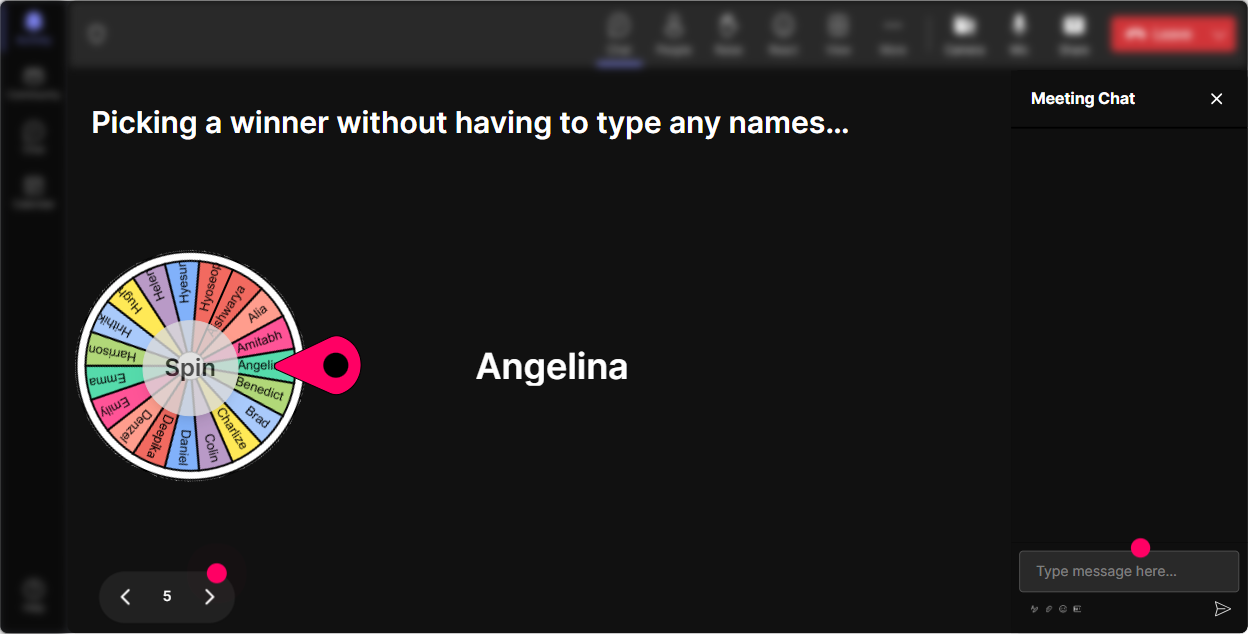
You know that moment when you ask, Anyone want to share? and suddenly everyone becomes a statue? The Spinner Wheel fixes that-people participate because it feels fair and fun. How to use it in XR instructor-led training: - Drop ME in chat if youre willing to role-play a learner in a VR scenario. spin to pick who goes. - Type one XR use case youre considering. Well spin and do a quick design coaching on the winners idea. - Who wants a 60-second challenge: explain AR vs VR vs MR like youre talking to a busy executive? Why it works: It rewards participation and reduces the pressure of volunteering. Plus, it gets people typing because they want to be eligible. Trainer tip: Tie it to a small reward: shoutout, downloadable template, or Ill review your XR pilot plan after the session.
7) Quiz: Do quick XR knowledge checks that dont feel like school
If youre teaching XR concepts, you need knowledge checks-but you want them to feel light and fast. Quiz makes it interactive, and you can reveal the correct answer live. How to use it in XR instructor-led training (multiple choice, one correct): - Which one is an example of Augmented Reality? 1) A fully virtual factory simulation 2) Digital instructions overlaid on real equipment 3) A 3D video on a laptop 4) A Zoom breakout room - Whats a common facilitator best practice for VR sessions? 1) Keep experiences short at first 2) Ask learners to stand the entire time 3) Skip safety briefings 4) Use tiny text to reduce distraction Why it works: It keeps attention sharp, and you can immediately correct misconceptions before they become sticky. XR training idea: Run a quiz before and after a demo. People love seeing improvement (and it proves your training is working).

2) Rating Polls: Get a quick pulse on XR confidence (and adjust on the fly)
Before you jump into VR/AR/MR, you need to know where the room is at-without doing a long round of introductions. How to use it in XR instructor-led training: - On a scale of 110, how comfortable are you explaining the difference between AR, VR, and MR? - Rate your confidence in facilitating a VR activity with learners (1 = not yet, 10 = ready tomorrow). - How familiar are you with XR safety + comfort practices (motion sickness, accessibility, boundaries)? Why it works: Its a fast temperature check and you can respond live: Looks like most of us are at a 46. Perfect-today well keep it practical and trainer-friendly. XR training idea to pair with it: After you demo a concept (like presence or immersion), run the rating poll again to show progress in real time.
8) Q&A (Quick Questions): Capture real questions without losing them in chat chaos
XR sessions generate a lot of Wait, but what about questions. StreamAlives Q&A pulls questions out of the chat so you dont miss them (or scroll endlessly). How to use it in XR instructor-led training: - Say: As questions pop up, just type them in chat like normal-StreamAlive will catch them. - During demos: If youve ever had a learner feel dizzy in VR, ask your question now-lets talk mitigation. - For stakeholders/rollout: Ask anything about cost, change management, or measuring ROI. Why it works: You stay present as a facilitator. The tech organizes the questions so your session feels smooth and responsive.

9) Analytics: Prove your XR session worked (and get better every time)
If youre training corporate trainers, youll eventually need to show what worked-especially if XR is new and leadership is watching. How to use Analytics after your XR instructor-led session: - Check minute-by-minute engagement: When did chat spike-during the VR demo, the use-case brainstorm, or the ROI discussion? - Identify top participants (Fantastic Fans): these are your future champions for XR pilots. - Review interaction reports: see which polls, quizzes, and activities drove the most participation so you can repeat what works. - Share results easily: email the report to yourself or your team, or use it to improve your next Teams/Zoom cohort. Why it matters for XR: XR programs live or die on adoption. Analytics helps you spot what actually pulled people in-so you can design future sessions that keep engagement high (and not just interesting in theory).

Use StreamAlive in all your training sessions
StreamAlive isn’t just for
Extended Reality
training,
it can also be used for any instructor-led training session directly inside your PowerPoint presentation.
Explore similar traingin ideas: unlocking the potential of StreamAlive
See how StreamAlive transforms live training with engaging events and interactive sessions across industries, directly inside your PowerPoint presentation.

Interactions in action
(it's free)

.svg.png)


