Install StreamAlive for your PowerPoint slides
Learn more

L&D Marketing Training for Training Agencies
StreamAlive helps 9x the audience engagement in your Virtual Instructor-led Trainings (VILT) directly inside your powerpoint presentation.
Make your instructor-led L&D Marketing training more fun with polls, word clouds, spinner wheels and more
Works inside your existing PowerPoint presentation
Install the StreamAlive app for PowerPoint and see your slides come to life as people participate in your interactions
AI generates audience interactions for you
Let our AI scan your presentation and automatically come up with relevant questions based on the content. Or spend two hours coming up with your own questions, your choice!
Built to work with MS Teams and Zoom
Native apps for Teams and Zoom so you never have to leave your existing workflows
No QR Codes
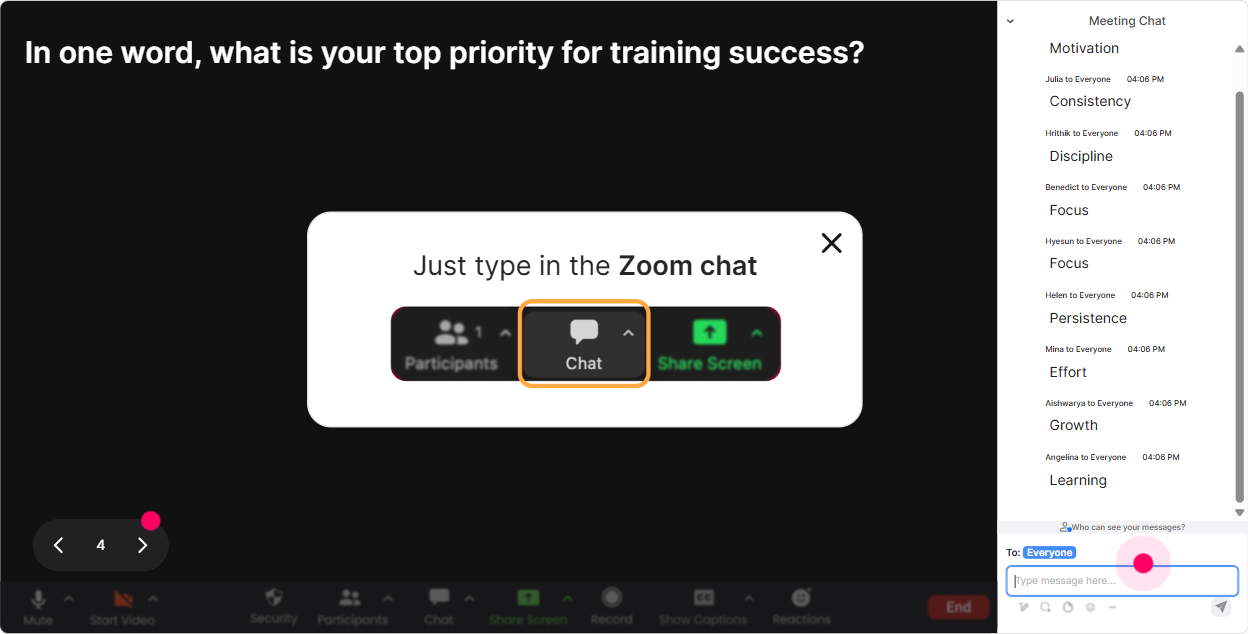
Chat-powered interactions means your audience doesn’t need to scan QR codes or look at another screen to participate. They just type in the chat!

Quickly approved by your IT team
StreamAlive’s apps for Teams and Zoom means that they have been through rigorous quality assurance and client safety reviews. You’ll find everything an IT team needs to approve the app within the organization within your StreamAlive account.

Youve been asked to run an instructor-led session on L&D Marketing for training agencies-and you want it to be lively, not a camera-off, silent Zoom situation. The fastest way to do that is to pull people into the session every few minutes (without derailing your content). Here are simple, trainer-friendly ways to use StreamAlive to keep engagement up (seriously-night and day difference).
1) Magic Maps: kick off with an instant were in this together moment
Every trainer asks, Where are you joining from?-but Magic Maps makes it feel like an event. How to use it in L&D Marketing training (for training agencies): - Icebreaker (classic): Where in the world are you joining from today? Watch pins drop in real time. You instantly create connection and small talk without awkwardness. - Market expansion prompt: If your agency could win clients in ONE new city/country this year, where would you pick? Great segue into positioning + target markets. - Persona/industry twist: Where are most of your current clients located? (Ask them to type the main city/region.) Youll visibly see clusters-perfect to discuss regional demand, pricing, competition. Trainer tip: If your question needs ONE location per person, set it so attendees can only enter one location. Keeps the map clean and readable.

2) Rating Polls: get a quick confidence check before you teach anything
Rating Polls are my go-to when I want honest feedback without putting anyone on the spot. People just type a number in chat, and you get a live visual average. Ways to use it in your L&D Marketing ILT: - Baseline confidence: Rate your current L&D Marketing confidence from 110. Then you can tailor examples on the spot. - Sales pipeline health: How strong is your inbound lead flow right now? (1 = what inbound? 10 = we cant keep up) This sets up a conversation about funnels, content, webinars, partnerships. - Offer clarity: How clear is your agencys signature offer today? 110. If scores are low, you know to spend more time on packaging + messaging. Trainer tip: Run a second Rating Poll at the end (Confidence now?). Its a satisfying before/after moment-and great proof your session worked.

3) Wonder Words (Word Cloud): make the rooms thoughts visible in 10 seconds
A word cloud is perfect for getting everyone to contribute with zero pressure. Its fast, its visual, and it creates momentum. Use it like this in L&D Marketing training: - Emotional temperature check: L&D Marketing feels like (12 words) Youll get stuff like: overwhelming, exciting, confusing, necessary. Now you can address the vibe in the room. - Content brainstorming: Whats ONE word your clients care about most? (e.g., compliance, leadership, safety, onboarding) Boom-instant messaging insights. - Differentiation starter: In one word, what do you want your agency to be known for? (premium, practical, fast, bespoke, ROI, etc.) Great lead-in to positioning. Trainer tip: Turn on Combine Similar Answers so ROI and Return on Investment dont split into two separate answers.
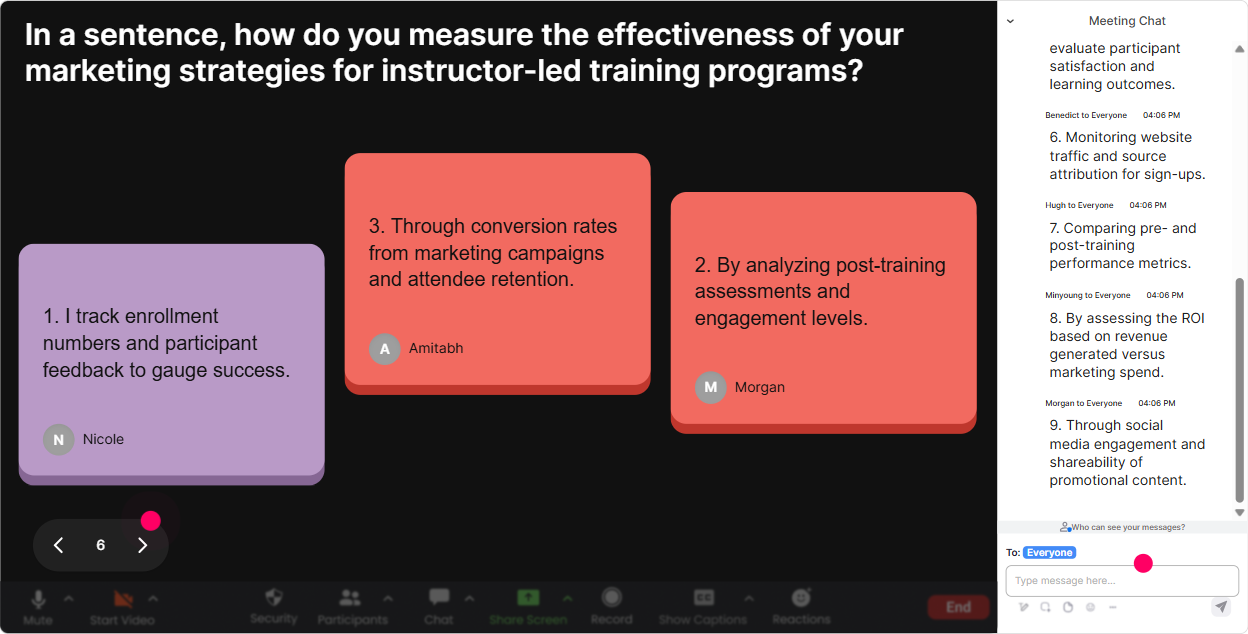
4) Talking Tiles: collect real challenges and turn them into teachable moments
Talking Tiles is amazing when you want slightly longer answers-like mini-stories or real-world context. The messages drop in like Tetris blocks, so it feels playful, not like fill out this form. Try these prompts: - Real-life challenge: Whats your biggest struggle in marketing your training right now? Be specific. Youll get gold like: we rely on referrals, buyers ghost us, we dont know our niche, LinkedIn isnt converting. - Proof + ROI angle: What business outcome do your clients ask for most? (reduced incidents, faster onboarding, better sales, leadership bench, etc.) Perfect setup to teach how to market outcomes-not course titles. - Case study mining: Share one training win youve delivered (even a small one). What changed? Now you have real examples to tie back to messaging and credibility. Trainer tip: Use a couple of responses as live case clinics: Lets rewrite this into a stronger marketing claim.
5) Power Polls: let the group vote on where you should go next
Power Polls are great when you want quick direction and visible buy-in. Instead of guessing what people want, you literally let them steer. Poll ideas for L&D Marketing (training agencies): - Agenda picker: Where do you want to focus today? Options: 1) Lead gen for agencies 2) Positioning + niche 3) Packaging offers 4) Content that converts 5) Pricing + value messaging - Channel reality check: Which channel brings you the most leads today? Options: referrals, LinkedIn, email, webinars, partnerships, ads. - Decision point poll: Which would help you more right now? Options: more leads vs better conversion vs higher pricing. Trainer tip: If you want to keep it super easy, use the version where people just type the option number in chat. Low friction = more participation.

6) Winner Wheel: get people talking (without awkward volunteering)
Weve all been there: you ask, Who wants to share? and suddenly everyone becomes a statue. Winner Wheel fixes that because it turns participation into a fun moment-and it rewards people for typing in chat. How to use it in your ILT: - Drop your agencys niche in chat (or type figuring it out). Im going to spin the wheel and well workshop ONE persons positioning live. - Type ONE sentence describing your training offer. Ill spin the wheel and well rewrite the winners sentence into a stronger marketing message. - Quick roleplay: I need one brave buyer/seller. Type roleplay in chat-wheel decides whos up. Trainer tip: Set the criteria to pick from people who commented during a specific interaction-so it feels fair and encourages chat activity.

7) Quiz: turn knowledge checks into a mini game (and spot confusion fast)
Quiz is perfect for those Are you with me? moments-especially when youre teaching marketing concepts that sound simple but get messy in practice. Quiz ideas for L&D Marketing training agencies (multiple choice, one correct): - Positioning: Which is the BEST example of a niche? A) We offer corporate training B) We help fast-growing SaaS companies onboard sales teams in 30 days (correct) C) We do leadership and compliance D) We customize everything for everyone - Messaging: Which headline is outcome-based? A) Interactive Workshop on Communication Skills B) Reduce manager escalations by 20% with a 4-week coaching sprint (correct) C) Best Trainers in the City D) Soft skills that matter - Funnel basics: What usually comes FIRST in an inbound funnel? A) Proposal B) Discovery call C) Awareness content (correct) D) Contract Trainer tip: Use Show Correct Answer and then ask one follow-up: Why do you think thats the right one? Thats where learning locks in.

2) Rating Polls: get a quick confidence check before you teach anything
Rating Polls are my go-to when I want honest feedback without putting anyone on the spot. People just type a number in chat, and you get a live visual average. Ways to use it in your L&D Marketing ILT: - Baseline confidence: Rate your current L&D Marketing confidence from 110. Then you can tailor examples on the spot. - Sales pipeline health: How strong is your inbound lead flow right now? (1 = what inbound? 10 = we cant keep up) This sets up a conversation about funnels, content, webinars, partnerships. - Offer clarity: How clear is your agencys signature offer today? 110. If scores are low, you know to spend more time on packaging + messaging. Trainer tip: Run a second Rating Poll at the end (Confidence now?). Its a satisfying before/after moment-and great proof your session worked.
8) Q&A: stop losing great questions in the chat
When the chat is moving, questions get buried-especially on Teams/Zoom. StreamAlives Q&A (Quick Questions) pulls questions out automatically and displays them neatly so you can actually manage them. How it helps during L&D Marketing training: - Park-and-answer: Drop questions anytime-StreamAlive will capture them. Ill pause every 15 minutes and clear the top ones. - Handle objections safely: People can ask the real stuff like Do webinars still work? or How do we compete with big agencies? without you missing it. - Cleaner flow: You dont have to scroll back hunting for the message from 10 minutes ago. Trainer tip: Tell your group exactly when youll answer questions (ex: after each section). Engagement stays high because they trust you wont ignore them.

9) Analytics: prove what worked, improve what didnt, and market your next session smarter
Analytics is the part trainers dont realize they need-until they have it. You get a real view of what your audience actually engaged with, minute by minute. How training agencies can use StreamAlive analytics after an L&D Marketing ILT: - Spot your strongest moments: See where chat spiked-maybe your offer packaging segment lit people up, while SEO basics fell flat. Next time, adjust. - Identify your most engaged attendees: StreamAlive highlights your top fans (the ones who participated most). These are perfect follow-ups for your next workshop, cohort, or upsell. - Review interactions: Replay results and see which polls/questions got the best response. Then reuse the winners in future deliveries. - Share internally: Email the report to your team or stakeholders so its not just the session went well, its heres what people engaged with and what they want next. Trainer tip: Use the data as marketing fuel-turn the top engagement topic into your next webinar title (its literally audience-validated).

Use StreamAlive in all your training sessions
StreamAlive isn’t just for
L&D Marketing
training,
it can also be used for any instructor-led training session directly inside your PowerPoint presentation.
Explore similar traingin ideas: unlocking the potential of StreamAlive
See how StreamAlive transforms live training with engaging events and interactive sessions across industries, directly inside your PowerPoint presentation.

Interactions in action
(it's free)

.svg.png)


