Install StreamAlive for your PowerPoint slides
Learn more

Neural Interface Learning Training for Training Agencies
StreamAlive helps 9x the audience engagement in your Virtual Instructor-led Trainings (VILT) directly inside your powerpoint presentation.
Make your instructor-led Neural Interface Learning training more fun with polls, word clouds, spinner wheels and more
Works inside your existing PowerPoint presentation
Install the StreamAlive app for PowerPoint and see your slides come to life as people participate in your interactions
AI generates audience interactions for you
Let our AI scan your presentation and automatically come up with relevant questions based on the content. Or spend two hours coming up with your own questions, your choice!
Built to work with MS Teams and Zoom
Native apps for Teams and Zoom so you never have to leave your existing workflows
No QR Codes
Chat-powered interactions means your audience doesn’t need to scan QR codes or look at another screen to participate. They just type in the chat!

Quickly approved by your IT team
StreamAlive’s apps for Teams and Zoom means that they have been through rigorous quality assurance and client safety reviews. You’ll find everything an IT team needs to approve the app within the organization within your StreamAlive account.

Youve been asked to run a Neural Interface Learning instructor-led training for a Training Agency-and you want it to feel alive, not like another "slide-and-sigh" session. The easiest win? Get people talking early, then keep them participating every few minutes. Heres how StreamAlive helps you do that (and honestly, it can feel like a 9x engagement boost when you use it well).
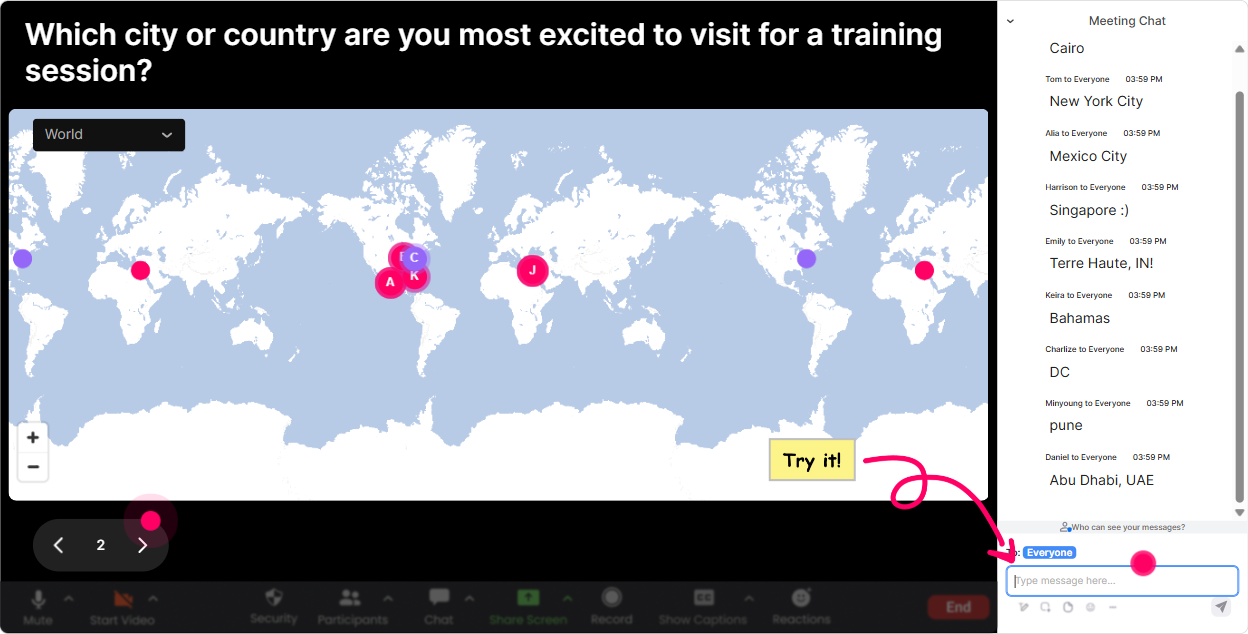
1) Magic Maps: Put your Neural Interface learners on the map (literally)
This is your perfect first 60 seconds. Instead of Where are you joining from? and getting a dead chat you ask it with Magic Maps and suddenly the room *looks* full. Try prompts that fit Neural Interface Learning + training agencies: - Where are you joining from today? City + country (so we can see our learning lab spread across the world). - If you could test a neural interface anywhere on earth, where would your dream research site be? - What city do you think will adopt brain-computer tech fastest-and why? (Just type the city.) Trainer tip: If youre doing cohorts (APAC/EMEA/US), use the clusters as a natural segue: Cool-looks like weve got a big cluster in London. Im going to use UK examples when we talk compliance and privacy.
2) Rating Polls: Quick pulse-check before you teach anything
Rating Polls are the fastest way to find out what youre working with-without putting anyone on the spot. You ask, they type a number in chat, and you instantly see the rooms confidence level. Use them at key moments: - Start-of-session baseline: On a scale of 110, how confident are you explaining Neural Interface Learning to a client? - After the tech overview: Rate your clarity right now: how well do you understand the difference between EEG-based interfaces vs implanted interfaces? (110) - Risk & ethics section: How comfortable are you teaching this topic responsibly to mixed audiences? (110) Trainer move: Call it out warmly-Looks like most of us are at a 46. Perfect. Ill slow down a bit and well do more examples before we go advanced.

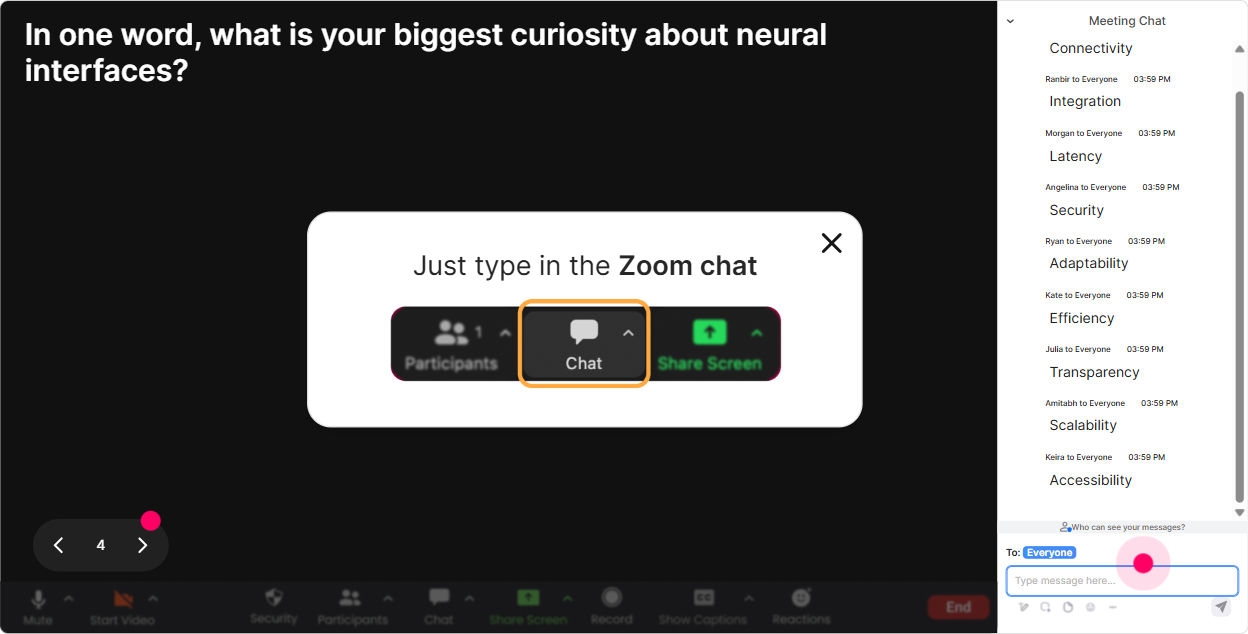
3) Wonder Words (Word Cloud): Make the rooms feelings visible in 30 seconds
Neural Interface Learning can trigger *big* reactions-excited, skeptical, intimidated, curious. A word cloud gets that out in the open fast, and it makes people feel seen. Ask for 12 word answers like: - When you hear Neural Interface Learning, whats the first word that pops up? - Whats your biggest concern about training this topic to clients? One or two words. - Whats the main opportunity you see for your agency? (One or two words.) Trainer tip: If you see words like privacy, ethics, bias, accuracy, youve basically got your agenda written for you. Say it out loud: Alright, privacy is huge in this room-lets make sure we hit that properly.
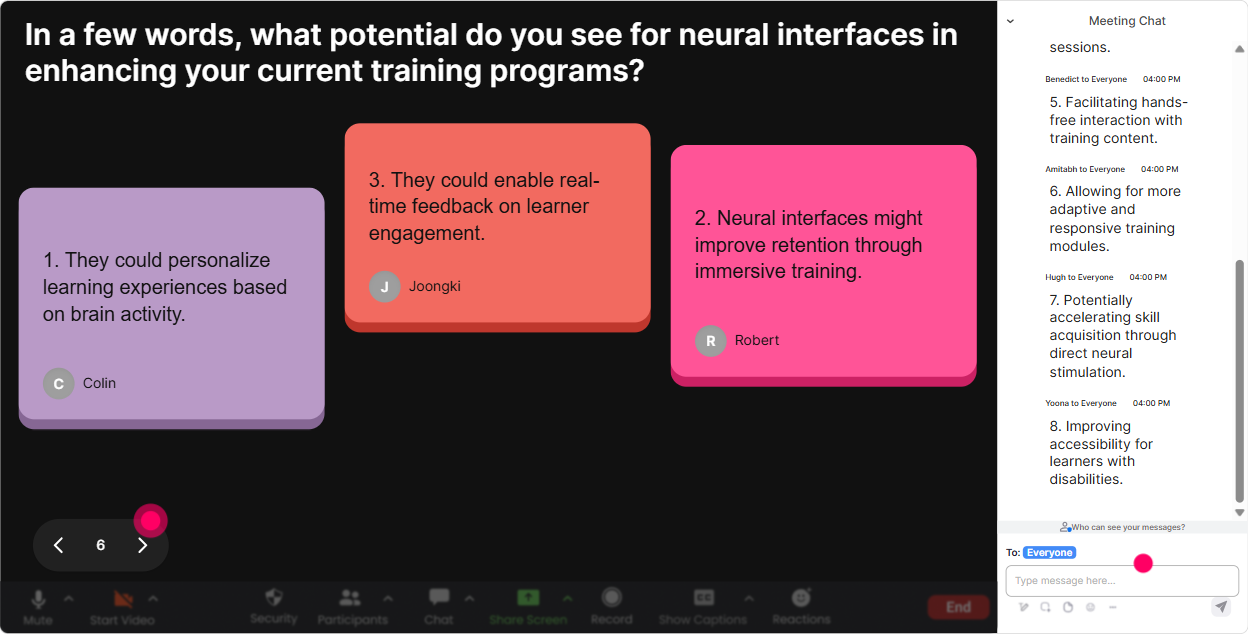
4) Talking Tiles: Turn longer thoughts into a live brainstorm wall
Sometimes you need more than a one-word answer-especially with something as nuanced as neural interfaces. Talking Tiles lets people write fuller responses, and it turns into this super engaging, visual everyone contributed moment. Great prompts for training agencies: - In one or two sentences: where could Neural Interface Learning impact your training business in the next 12 months? - Whats one job role in your org that this will affect first (facilitators, ID, sales, QA, SMEs)-and why? - Describe a real client scenario where youd *love* to use a neural interface-driven learning insight. Trainer move: After 6090 seconds of tiles, pick 3 and respond like a coach: This ones about assessment-great. This ones about personalization-yes. This ones about compliance-lets park it for the ethics module.
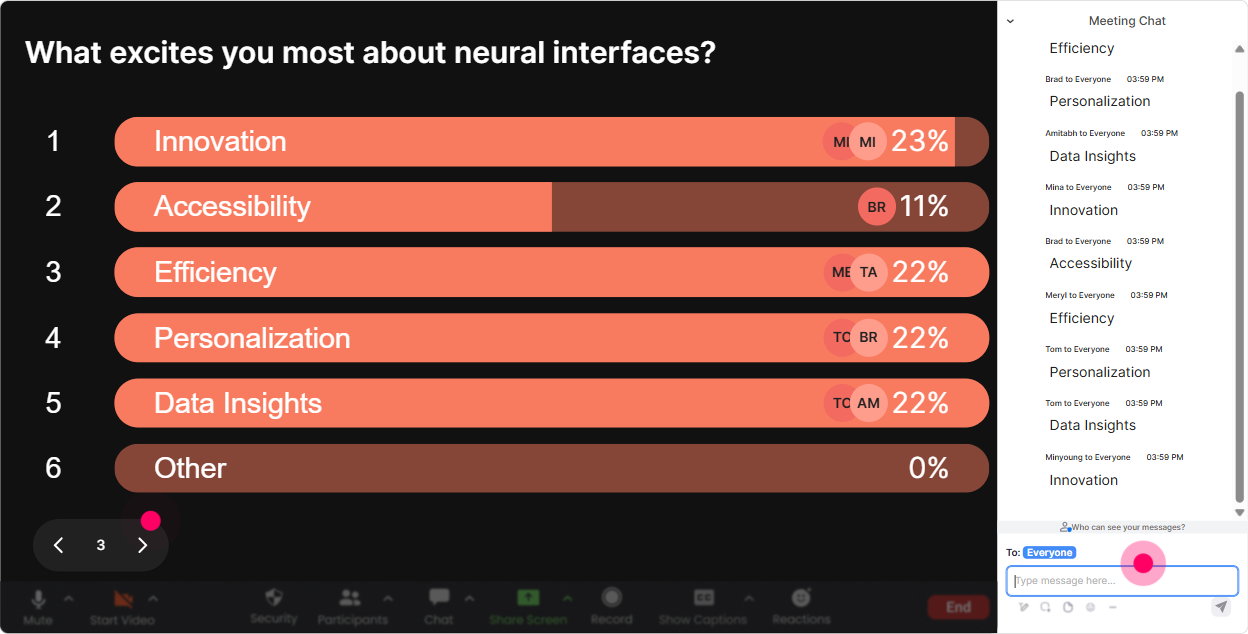
5) Power Polls: Let the audience choose what you go deep on
Heres the secret to keeping attention: people engage more when they feel like theyre helping steer the session. Power Polls make that easy. Poll ideas for Neural Interface Learning ILT: - What do you want to go deeper into today? 1) How neural interfaces capture signals 2) Learning analytics + adaptation 3) Ethics, consent, and privacy 4) Real-world use cases for training agencies - Which use case is most relevant to your clients right now? 1) Attention/focus tracking 2) Fatigue & cognitive load 3) Skill mastery prediction 4) Accessibility support - Your agencys biggest blocker to adopting this topic is: 1) Lack of expertise 2) Ethical/legal concerns 3) Client demand uncertain 4) Tooling & cost Trainer tip: If youre short on time, literally say: Were going to follow the poll. Majority wins. People stay tuned because they voted for the path.
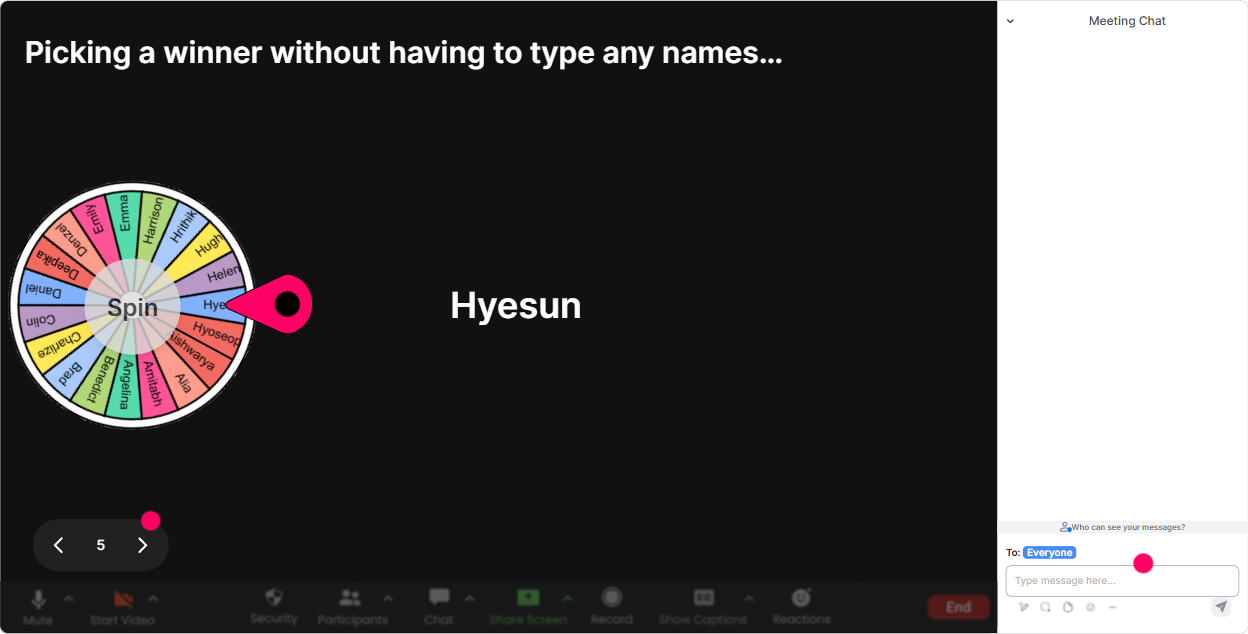
6) Winner Wheel (Spinner Wheel): Get volunteers without awkward silence
You know that moment when you ask, Anyone want to share? and its crickets? The Spinner Wheel fixes that *and* keeps it fun. Ways to use it in Neural Interface Learning training: - Drop in chat: one word-excited or skeptical about neural interfaces. Im spinning the wheel to pick someone to share why. - Type case in chat if you want a real agency use-case example. Ill spin and the winner tells us their industry (healthcare, finance, retail, etc.). - Quick challenge: Whats one ethical rule youd teach clients? Everyone type it. Ill spin for someone to unmute and explain theirs in 20 seconds. Trainer move: Keep it safe and light-No pressure, you can pass-but youll be famous for 10 seconds. People usually play along.
7) Quiz: Quick knowledge checks that dont feel like tests
Quizzes are perfect for Neural Interface Learning because there are lots of terms people *think* they know-until you ask. With StreamAlive Quiz, they answer in chat, you show results live, and then reveal the correct answer. Quiz questions you can use: - Which is the best definition of a Brain-Computer Interface (BCI)? 1) A wearable that tracks steps 2) A system that translates neural signals into commands 3) A VR headset with eye tracking 4) Any AI that predicts behavior - Which is a common *non-invasive* signal source used in BCIs? 1) EEG 2) fMRI implants 3) Deep brain electrode arrays 4) Spinal stimulators - Whats the biggest risk in using neural data for learning personalization? 1) Too much content 2) Privacy/consent misuse 3) Faster onboarding 4) Higher engagement Trainer tip: Use quizzes as transitions-Alright, were split between 1 and 2-perfect setup for the next slide.

2) Rating Polls: Quick pulse-check before you teach anything
Rating Polls are the fastest way to find out what youre working with-without putting anyone on the spot. You ask, they type a number in chat, and you instantly see the rooms confidence level. Use them at key moments: - Start-of-session baseline: On a scale of 110, how confident are you explaining Neural Interface Learning to a client? - After the tech overview: Rate your clarity right now: how well do you understand the difference between EEG-based interfaces vs implanted interfaces? (110) - Risk & ethics section: How comfortable are you teaching this topic responsibly to mixed audiences? (110) Trainer move: Call it out warmly-Looks like most of us are at a 46. Perfect. Ill slow down a bit and well do more examples before we go advanced.
8) Q&A: Capture questions from chat without losing your flow
When youre teaching something new like Neural Interface Learning, questions pop up constantly-and chat can get messy fast. StreamAlive Q&A (Quick Questions) grabs questions directly from chat and displays them neatly, so you dont miss the good ones. How to run it smoothly: - Tell them upfront: If you have a question, start it with Q: so I can grab it and well hit it in the next break. - Use parking lot style: Im collecting all ethics/privacy questions-well do a dedicated Q&A block after the case study. Example questions youll likely get (and can invite): - Q: How do we teach this responsibly without overpromising results? - Q: Whats the difference between measuring attention vs understanding? - Q: What regulations should training agencies watch?

9) Analytics: Improve every cohort (and prove your session worked)
After your Neural Interface Learning session, StreamAlive Analytics shows you what actually happened-not just what you *felt* happened. What you can do with it as a trainer/training agency: - See minute-by-minute engagement: Oh, engagement spiked during the ethics poll-next cohort, Ill bring that section earlier. - Replay interactions: Review which polls/word clouds landed best so you can reuse the winners. - Spot your most engaged participants (Fantastic Fans): These are your future champions-great for follow-up, pilots, or even internal SMEs. - Share reports via email: Super handy if youre reporting back to an L&D lead or documenting outcomes for a client. Trainer tip: If youre selling training internally, analytics helps you justify the program: Heres where engagement peaked, heres what participants cared about, and heres what were improving next run.

Use StreamAlive in all your training sessions
StreamAlive isn’t just for
Neural Interface Learning
training,
it can also be used for any instructor-led training session directly inside your PowerPoint presentation.
Explore similar traingin ideas: unlocking the potential of StreamAlive
See how StreamAlive transforms live training with engaging events and interactive sessions across industries, directly inside your PowerPoint presentation.

Interactions in action
(it's free)

.svg.png)


