Install StreamAlive for your PowerPoint slides
Learn more

Extended Reality Training for L&D Leaders
StreamAlive helps 9x the audience engagement in your Virtual Instructor-led Trainings (VILT) directly inside your powerpoint presentation.
Make your instructor-led Extended Reality training more fun with polls, word clouds, spinner wheels and more
Works inside your existing PowerPoint presentation
Install the StreamAlive app for PowerPoint and see your slides come to life as people participate in your interactions
AI generates audience interactions for you
Let our AI scan your presentation and automatically come up with relevant questions based on the content. Or spend two hours coming up with your own questions, your choice!
Built to work with MS Teams and Zoom
Native apps for Teams and Zoom so you never have to leave your existing workflows
No QR Codes
Chat-powered interactions means your audience doesn’t need to scan QR codes or look at another screen to participate. They just type in the chat!

Quickly approved by your IT team
StreamAlive’s apps for Teams and Zoom means that they have been through rigorous quality assurance and client safety reviews. You’ll find everything an IT team needs to approve the app within the organization within your StreamAlive account.

So youve been asked to run an Extended Reality (XR) instructor-led training for L&D leaders-and you want it to feel interactive, not like another slide marathon. The secret is simple: make people do tiny things often (chat, vote, react, share). Heres how to run a high-energy XR session and use StreamAlive to keep engagement up-without feeling like youre forcing it.
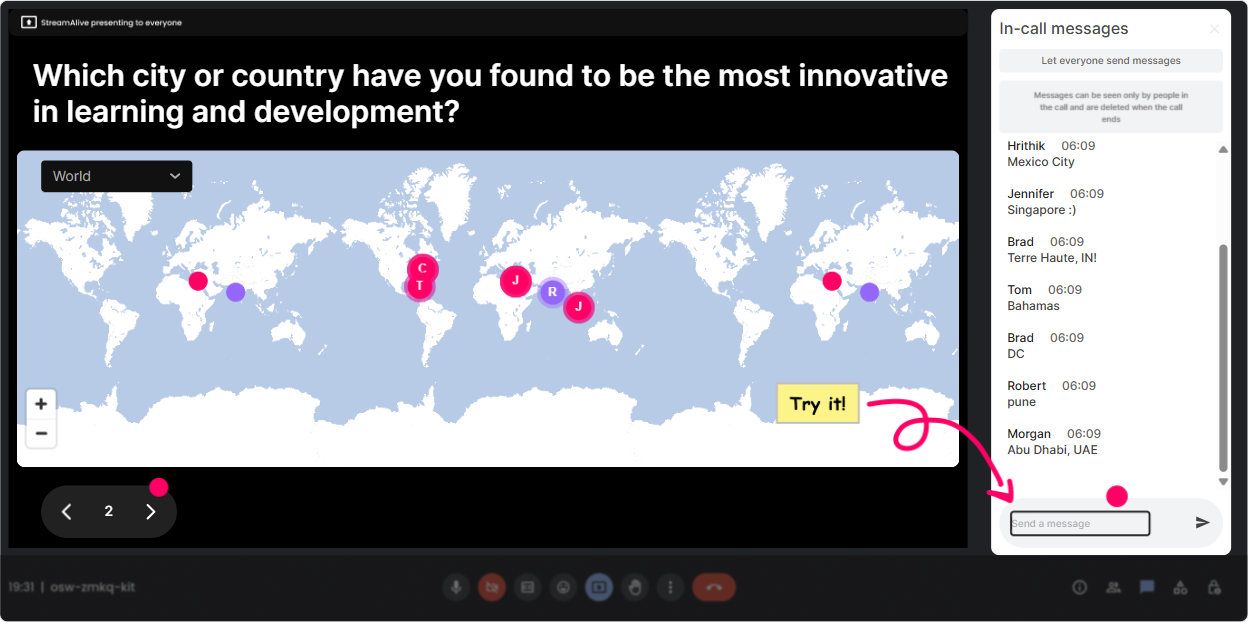
1) Magic Maps: Put your XR room on the map (literally)
This is your easiest everyone participates win in the first 60 seconds. L&D leaders usually join from all over-and seeing that spread instantly makes the room feel alive. How to use it in your XR ILT: - Icebreaker: Where are you joining from today? (classic, works every time) - XR angle: If you could teleport anywhere on earth right now using XR where would you go? - Context builder: Which city is your HQ / where most of your learners are based? Trainer move: when clusters show up, call them out-Okay wow, weve got a Toronto crew!-and youve just created mini community pockets before youve even started teaching. Great for setting up later breakout discussions too.
2) Rating Polls: Quick pulse-check on XR confidence (no awkward silence)
Before you teach anything, find out where people are at-fast. Rating Polls are perfect for that because everyone can respond in seconds and you get a live visual. How to use it in your XR ILT: - On a scale of 110, how confident are you explaining XR (AR/VR/MR) to a business stakeholder? - Rate your orgs readiness for XR training: 1 = not ready, 10 = were already piloting. - After a demo: How believable did that scenario-based simulation feel? 110. Trainer move: Use the result to steer your pacing. If the average is a 34, slow down and define terms. If its 78, skip the basics and go deeper into use cases + rollout.

3) Wonder Words (Word Cloud): Get the real feelings about XR-instantly
XR brings up strong reactions: excitement, skepticism, fear about cost, confusion about hardware and people dont always say that out loud. A word cloud makes it safe and quick. How to use it in your XR ILT (12 word answers work best): - XR training in one word: how does it make you feel? - Whats the biggest blocker to XR in your organization? (examples youll see: budget, devices, buy-in, content, IT) - Whats the #1 outcome you want from XR? (safety, consistency, speed, retention, realism) Trainer move: Pick the biggest word and riff on it. If budget pops, youve got a perfect transition into ROI, pilots, and measuring impact.

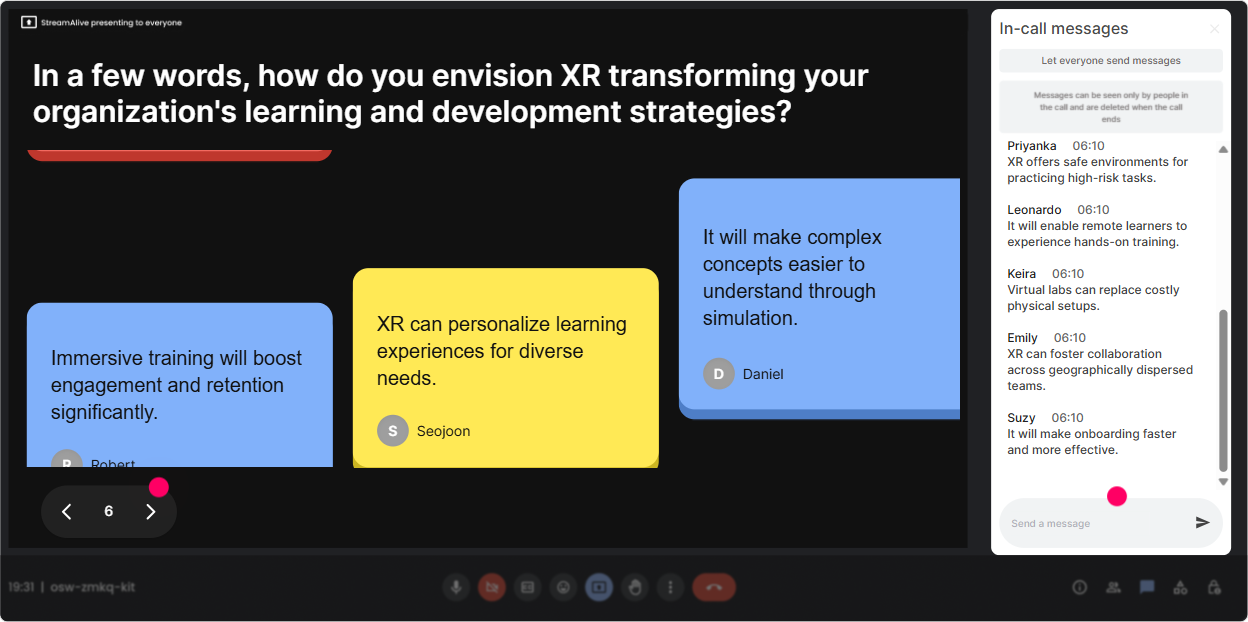
4) Talking Tiles: Turn their XR ideas into a live brainstorm wall
When you want more than a one-word response, Talking Tiles is gold. People can type real thoughts, and you get this fun, high-motion visual that keeps attention up. How to use it in your XR ILT: - Describe one job task in your org that would benefit from XR practice. - Whats one risk youd want to reduce using immersive simulations? - If you pitched XR to your COO tomorrow, what would they ask you first? Trainer move: As tiles fall, start grouping themes out loud-Im seeing safety, onboarding, equipment training-and youve basically facilitated a needs analysis in real time.
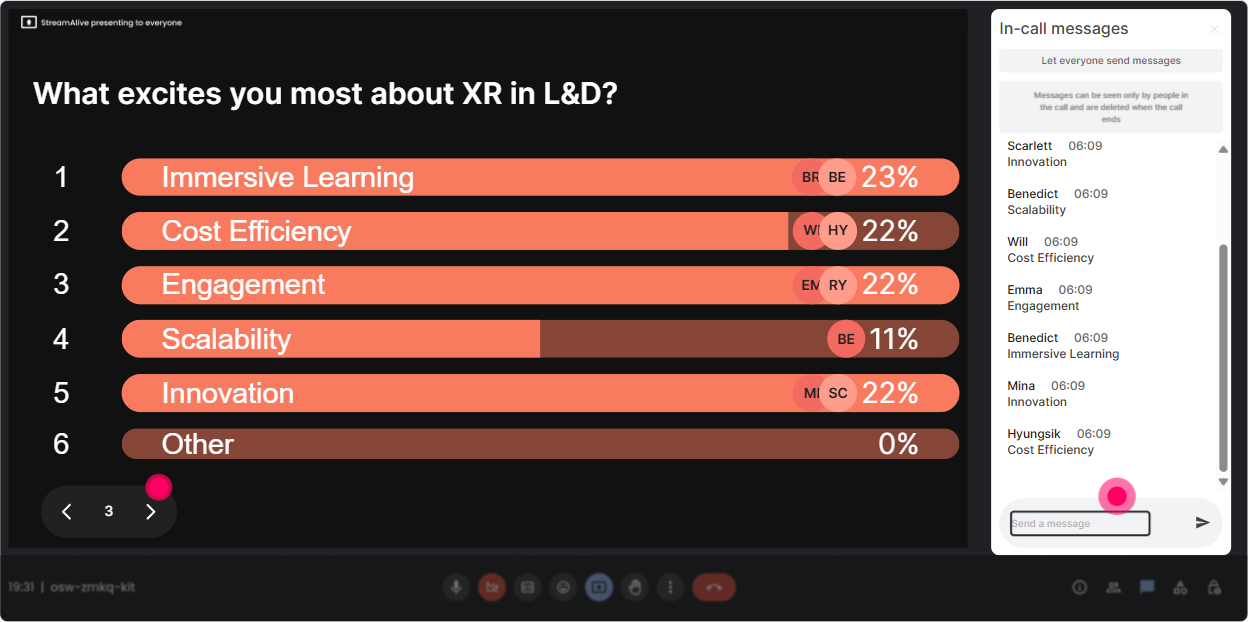
5) Power Polls: Let the audience choose the XR path (and theyll stay tuned)
Polls are your choose what we do next lever. When L&D leaders feel like theyre steering the session, they stick around and participate more. How to use it in your XR ILT: - Which XR topic should we tackle first? 1) AR job aids 2) VR simulations 3) MR for collaborative work 4) Measuring impact + ROI - Whats your biggest priority for XR training? 1) Safety + compliance 2) Leadership + soft skills 3) Onboarding 4) Technical skills Trainer move: Run a poll before each segment. Even a 10-second vote wakes people up and gives you a clean transition.
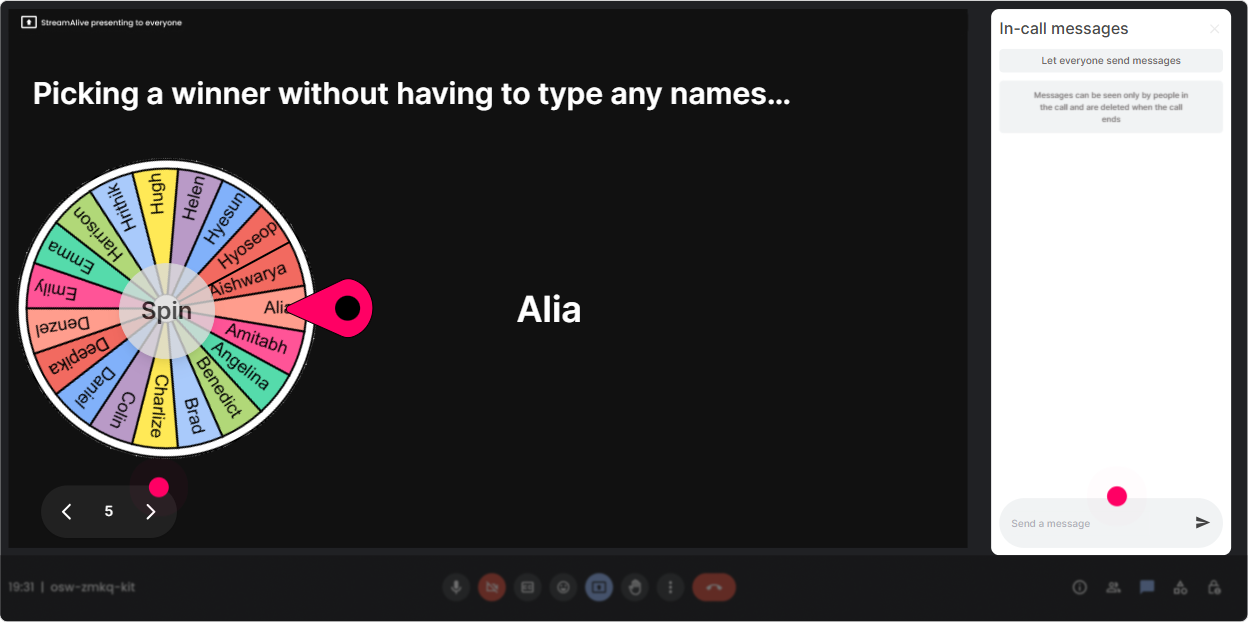
6) Winner Wheel: Get volunteers without the awkward anyone want to share?
You know that moment when you ask a question and the room goes quiet? The Winner Wheel fixes that-because now its a game, not pressure. How to use it in your XR ILT: - Drop in chat: whats one XR use case youre curious about? spin the wheel to pick someone to explain why - Type: AR / VR / MR (what interests you most) spin to choose a person to unmute and share their context - During a case study: What would you measure to prove XR worked? spin for a spokesperson Trainer move: Set expectations kindly: Im going to spin the wheel for a quick 20-second share-super informal. People relax, and participation shoots up.
7) Quiz: Make XR concepts stick with quick knowledge checks
XR terms get confusing fast. A quick quiz keeps people honest (in a good way) and helps you correct misunderstandings immediately. How to use it in your XR ILT (multiple choice, one correct answer): - Which is the best example of AR? A) Fully immersive headset simulation B) Overlaying step-by-step instructions on a real machine (Correct) C) 3D video on a laptop D) A Zoom workshop - Whats the strongest reason XR can improve skill transfer? A) Its trendy B) It increases realistic practice + feedback loops (Correct) C) It replaces managers D) It works the same for every task Trainer move: After revealing the correct answer, ask: What made that tempting? That little debrief is where the learning locks in.

2) Rating Polls: Quick pulse-check on XR confidence (no awkward silence)
Before you teach anything, find out where people are at-fast. Rating Polls are perfect for that because everyone can respond in seconds and you get a live visual. How to use it in your XR ILT: - On a scale of 110, how confident are you explaining XR (AR/VR/MR) to a business stakeholder? - Rate your orgs readiness for XR training: 1 = not ready, 10 = were already piloting. - After a demo: How believable did that scenario-based simulation feel? 110. Trainer move: Use the result to steer your pacing. If the average is a 34, slow down and define terms. If its 78, skip the basics and go deeper into use cases + rollout.
8) Q&A: Catch every XR question without losing your flow
XR sessions generate tons of questions-devices, vendors, IT/security, motion sickness, cost, content creation and its easy to miss things in a fast chat. StreamAlive pulls questions from the chat and organizes them so you can actually manage them. How to use it in your XR ILT: - Do a Parking Lot moment: Drop your XR questions anytime-StreamAlive will capture them. - Mid-session: Lets do a 3-question sprint before we jump into the next demo. - End: Top questions I saw were about hardware, measurement, and stakeholder buy-in-lets hit those. Trainer move: Tell them they dont need a special Q&A box. Just type it in chat like normal. That removes friction, so you get more (and better) questions.

9) Analytics: Prove engagement and improve the next session
This is the part L&D leaders secretly love-data. StreamAlive analytics help you see what actually landed, when chat spiked, and which interactions got people involved. How to use it after your XR ILT: - Check minute-by-minute engagement: spot where attention dipped (maybe your XR definitions section went too long) - Replay chat + interactions: see which demos or examples caused the most discussion - Identify top engaged participants: great for follow-up, champions, pilot groups, or internal advocates - Share results easily via email/Teams: perfect when you need to report session impact to stakeholders Trainer move: Use the analytics to refine your run of show. Keep what sparked conversation, tighten what didnt, and your next XR ILT will feel smoother-and way more engaging.

Use StreamAlive in all your training sessions
StreamAlive isn’t just for
Extended Reality
training,
it can also be used for any instructor-led training session directly inside your PowerPoint presentation.
Explore similar traingin ideas: unlocking the potential of StreamAlive
See how StreamAlive transforms live training with engaging events and interactive sessions across industries, directly inside your PowerPoint presentation.

Interactions in action
(it's free)

.svg.png)


