Install StreamAlive for your PowerPoint slides
Learn more

GenAI Training for Training Agencies
StreamAlive helps 9x the audience engagement in your Virtual Instructor-led Trainings (VILT) directly inside your powerpoint presentation.
Make your instructor-led GenAI training more fun with polls, word clouds, spinner wheels and more
Works inside your existing PowerPoint presentation
Install the StreamAlive app for PowerPoint and see your slides come to life as people participate in your interactions
AI generates audience interactions for you
Let our AI scan your presentation and automatically come up with relevant questions based on the content. Or spend two hours coming up with your own questions, your choice!
Built to work with MS Teams and Zoom
Native apps for Teams and Zoom so you never have to leave your existing workflows
No QR Codes
Chat-powered interactions means your audience doesn’t need to scan QR codes or look at another screen to participate. They just type in the chat!

Quickly approved by your IT team
StreamAlive’s apps for Teams and Zoom means that they have been through rigorous quality assurance and client safety reviews. You’ll find everything an IT team needs to approve the app within the organization within your StreamAlive account.

Youve been asked to run a GenAI instructor-led training for a training agency-and you want it to feel alive, not like another slides + silence webinar. Good news: with StreamAlive, you can turn chat into real-time visuals and get people participating without forcing awkward cold calls. Here are practical ways to do it (and keep engagement rolling all session long).
1) Magic Maps: Put your GenAI learners on the map (and kick off the chat instantly)
The easiest way to get people typing early is the classic Where are you joining from?-but Magic Maps makes it way more fun because it instantly plots everyones locations on a live world map. In a GenAI ILT for training agencies, you can go beyond the basic location question and tie it to the topic: - Where are you joining from today? (fast warm-up that gets everyone comfortable using chat) - If GenAI could teleport you to a dream client location, where would you go? - Which city has the most memorable training room youve ever taught in? - Where do you think GenAI adoption is moving fastest in your region-what city/country? Trainer tip: If your group is large, clusters on the map become a talking point (Wow, big cluster in Mumbai-whats GenAI usage looking like there?). It creates instant connection and youve already got the chat flowing in minute one.

2) Rating Polls: Get a quick pulse on GenAI confidence (no awkward anyone familiar?)
If you ask, How familiar are you with GenAI? youll usually get crickets. Rating Polls fix that because everyone can respond in seconds and you get a clean visual of where the room stands. Use it at multiple points in the session: - Start-of-session baseline: Rate your GenAI confidence right now (110). - After prompt engineering section: How confident are you writing a useful prompt (110)? - After governance/safety: How clear are you on what NOT to put into ChatGPT at work (110)? - End-of-session impact check: How ready are you to teach GenAI basics to your clients (110)? Trainer tip: When you see a mixed spread, you can say, Cool-half the room is at 7+, half is at 35. Im going to teach this in a way that helps both groups. People feel seen, and youve earned attention.

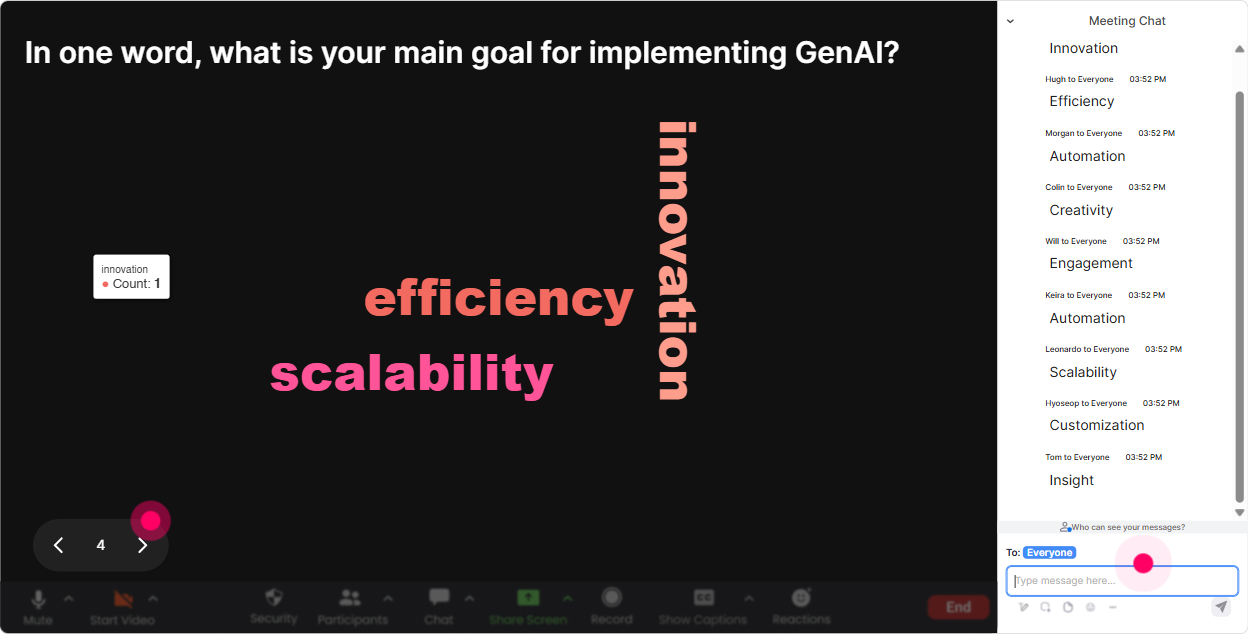
3) Wonder Words (Word Cloud): Find out how people *really* feel about GenAI
GenAI brings big emotions-excitement, anxiety, confusion, skepticism. A Word Cloud lets you surface the vibe of the room in a way that feels safe and quick (one or two words each). Great prompts for a training agency audience: - In 1 word: How do you feel about GenAI in training work? - Whats the #1 risk you worry about with GenAI? (one or two words) - What do you want GenAI to help you do faster? - One word you hear clients say about GenAI lately? Trainer tip: When you see the big words pop (like cheating, time, quality, plagiarism, policy), youve basically got your agenda written by the audience. Call it out and use it to transition: Alright-policy and accuracy are huge. Lets hit those next.
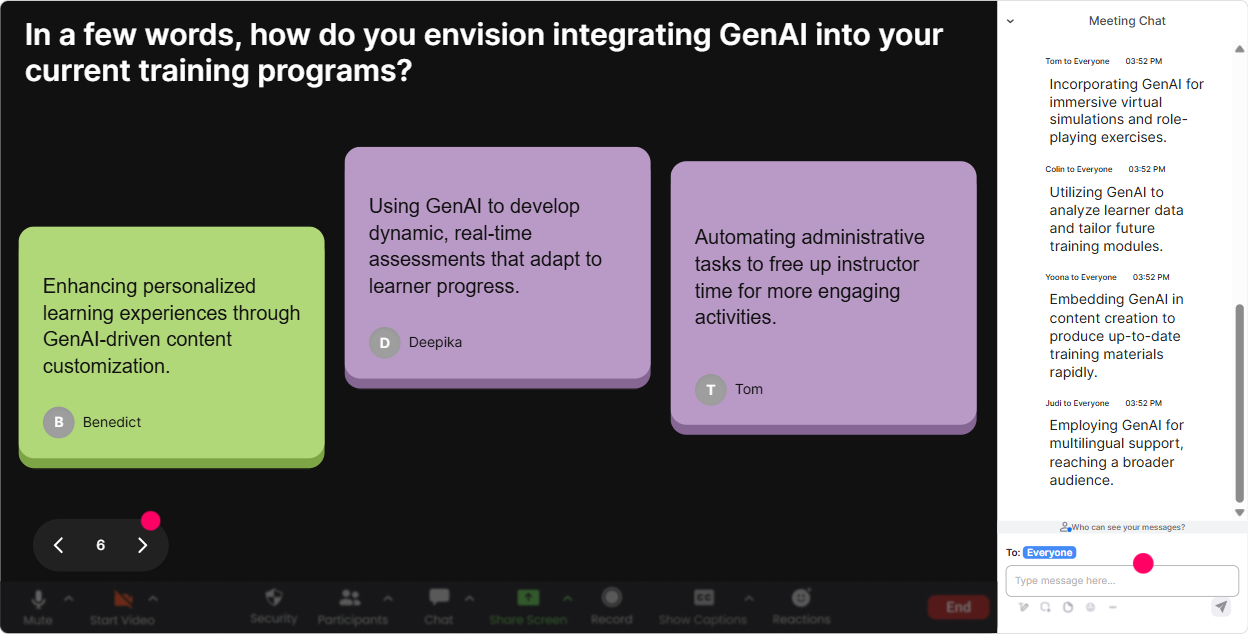
4) Talking Tiles: Turn real responses into a visual brainstorm (without losing control)
Sometimes you want more than 1-word answers-you want real examples, mini-stories, and practical use cases. Talking Tiles is perfect because it pulls those chat replies onto the screen as dynamic tiles, so people can literally see the group thinking. Use it for GenAI training scenarios like: - Whats one task in your training agency workflow youd love GenAI to speed up? - Where could GenAI help your trainers the most: design, delivery, follow-up, or evaluation-and why? - Whats a client request you get that GenAI could help you respond to faster? - Finish this sentence: GenAI would be useful for me if it could ______. Trainer tip: Read 35 tiles out loud and categorize them live (These are mostly design tasks these are client comms these are assessment-related). It feels interactive, but youre still steering the session like a pro.
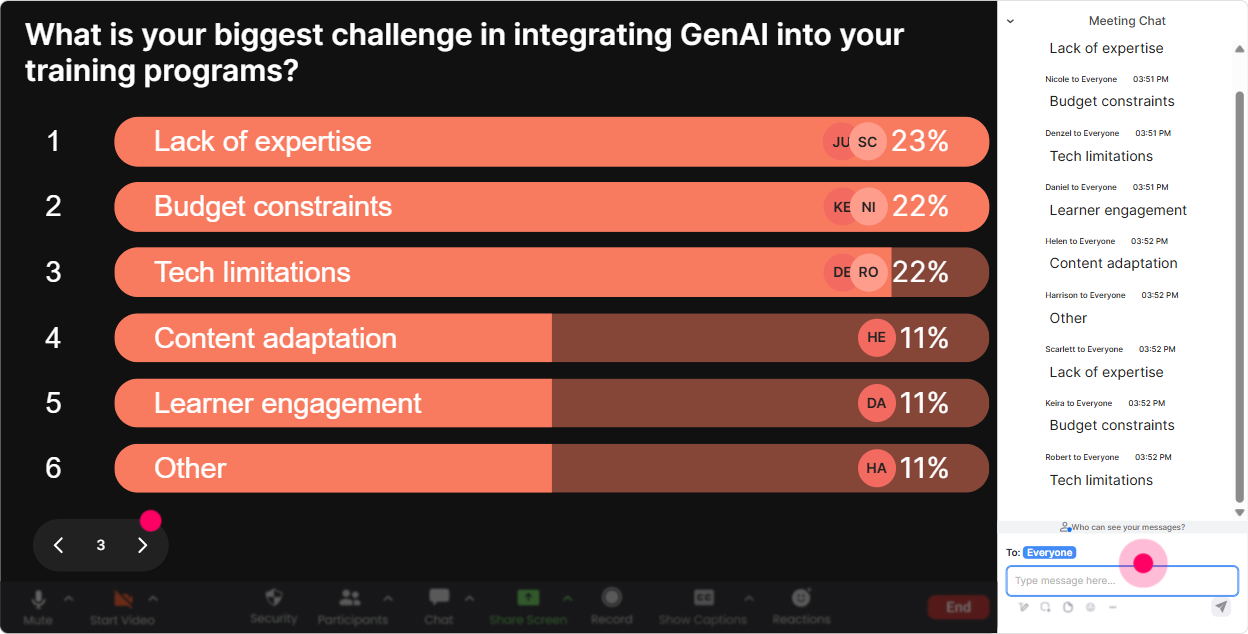
5) Power Polls: Let the audience choose where the GenAI session goes next
A big engagement killer is guessing what people want. Power Polls let you stop guessing and let the room vote-then you teach what theyre most curious about. Poll ideas that work especially well for training agencies: - What should we spend more time on today? 1) Prompting basics 2) Training content creation 3) Assessments & quiz generation 4) Policies & risk - Which GenAI tool are you most likely to use first? 1) ChatGPT 2) Copilot 3) Gemini 4) Not sure yet - Whats your biggest blocker to adopting GenAI? 1) Accuracy 2) Data/privacy 3) Lack of examples 4) Time to learn Trainer tip: Run a poll right before a break and promise, When we come back, well start with the winning topic. People stick around because they feel ownership.
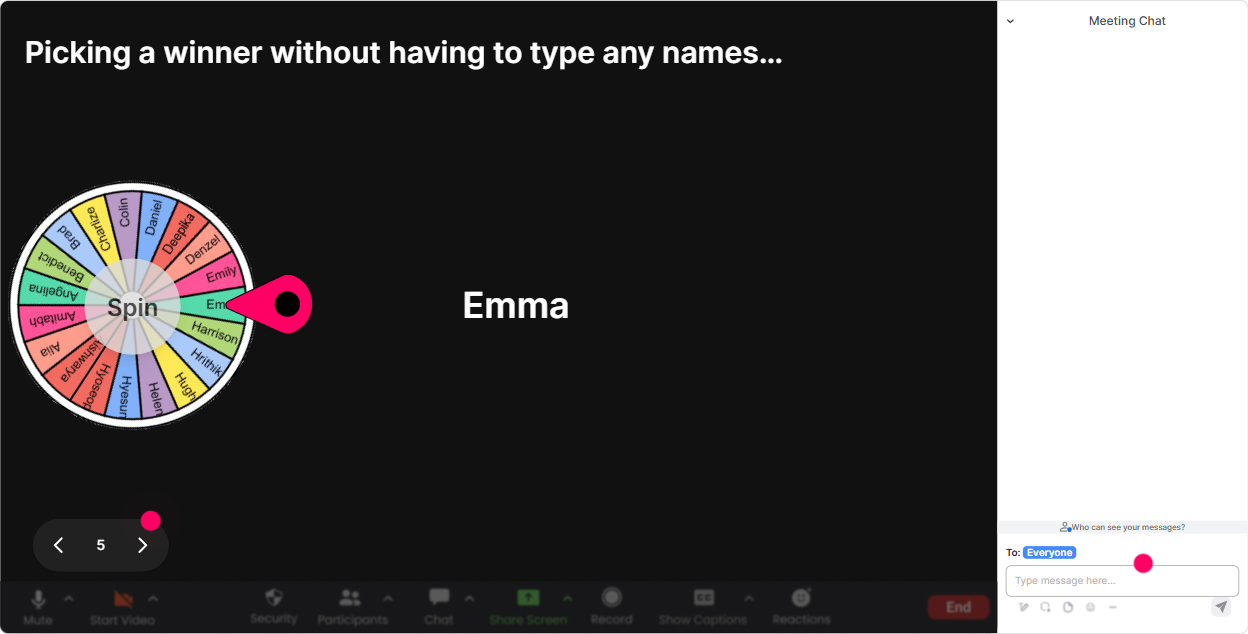
6) Winner Wheel: Get participation without the pressure (and reward the chatty ones)
Getting volunteers can be painful-same two people talk, everyone else hides. Winner Wheel changes the vibe because its playful and fair. How to use it in a GenAI ILT: - Drop in chat: what role are you teaching most often (sales, leadership, compliance, onboarding, etc.) spin to pick someone to share a use case. - Type one GenAI myth youve heard spin and ask the winner to unmute and explain where they heard it. - Everyone post ONE prompt youd use to create a course outline spin and review the winning prompt live. Trainer tip: Make it low-stakes. Tell them, If you get picked and you dont want to speak, just say pass-no drama. Youll still get way more chat participation because people know theres a fun chance to be selected.
7) Quiz: Quick GenAI knowledge checks that feel like a game (not an exam)
GenAI training needs frequent check-ins, otherwise people *think* they get it until they try it. A Quiz interaction lets you ask a multiple-choice question, tally answers live, and reveal the correct answer when youre ready. Quiz questions tailored for training agencies: - Which prompt is best for getting a consistent course outline? 1) Make me a course 2) Create a 60-min course outline for X audience with objectives, timing, activities, and a quiz (Correct) 3) Write anything about X 4) Give me a summary - Whats the safest approach with confidential client content? 1) Paste it in and ask for improvements 2) Use anonymized/synthetic examples (Correct) 3) Upload participant lists 4) Share private feedback verbatim - Hallucinations are best described as: 1) Random jokes 2) Confident-sounding wrong answers (Correct) 3) Faster processing 4) Better citations Trainer tip: Dont just reveal the answer-ask, For those who chose option 1, what were you hoping it would do? Thats where the real learning (and engagement) happens.

2) Rating Polls: Get a quick pulse on GenAI confidence (no awkward anyone familiar?)
If you ask, How familiar are you with GenAI? youll usually get crickets. Rating Polls fix that because everyone can respond in seconds and you get a clean visual of where the room stands. Use it at multiple points in the session: - Start-of-session baseline: Rate your GenAI confidence right now (110). - After prompt engineering section: How confident are you writing a useful prompt (110)? - After governance/safety: How clear are you on what NOT to put into ChatGPT at work (110)? - End-of-session impact check: How ready are you to teach GenAI basics to your clients (110)? Trainer tip: When you see a mixed spread, you can say, Cool-half the room is at 7+, half is at 35. Im going to teach this in a way that helps both groups. People feel seen, and youve earned attention.
8) Q&A (Quick Questions): Catch every question without digging through chat chaos
In GenAI sessions, questions come fast-and theyre often important (privacy, policy, tool choices, whats allowed at work). StreamAlives Q&A pulls questions straight from chat and displays them neatly, so youre not scrolling and missing things. Ways to use it in a training agency GenAI workshop: - As we go, drop your questions anytime-StreamAlive will capture them. - Mid-session: Lets pause for a 3-minute Q&A sweep before we move into hands-on prompting. - End: Well answer the top questions and Ill also share a follow-up resource for the ones we dont get to. Trainer tip: This makes you look more in control as a facilitator-because you are. And participants feel heard because their questions dont disappear into the chat stream.

9) Analytics: After the session, find what *actually* engaged people (so your next ILT is even better)
If youre running GenAI trainings regularly (or building a repeatable offering for clients), StreamAlive Analytics is your secret weapon. You can see which moments spiked engagement, replay chat activity, and understand what interactions worked best. How training agencies can use the insights: - Spot the high-engagement segments: Was it the prompt demo? The policy talk? The use-case brainstorm? - Identify your Fantastic Fans (most engaged participants): These are often your champions, internal adopters, or future facilitators. - Review interaction reports: Which polls got the most responses? Where did engagement drop? - Share results with your team via email/Teams: perfect for improving the next cohort or standardizing delivery across trainers. Trainer tip: Use analytics to tighten your run-of-show. If engagement dips during a 15-minute lecture chunk, break it next time with a Word Cloud or a quick Rating Poll. Small tweaks here can seriously multiply participation over time.

Use StreamAlive in all your training sessions
StreamAlive isn’t just for
GenAI
training,
it can also be used for any instructor-led training session directly inside your PowerPoint presentation.
Explore similar traingin ideas: unlocking the potential of StreamAlive
See how StreamAlive transforms live training with engaging events and interactive sessions across industries, directly inside your PowerPoint presentation.

Interactions in action
(it's free)

.svg.png)


