Install StreamAlive for your PowerPoint slides
Learn more

Learning in the flow of work Training for L&D Leaders
StreamAlive helps 9x the audience engagement in your Virtual Instructor-led Trainings (VILT) directly inside your powerpoint presentation.
Make your instructor-led Learning in the flow of work training more fun with polls, word clouds, spinner wheels and more
Works inside your existing PowerPoint presentation
Install the StreamAlive app for PowerPoint and see your slides come to life as people participate in your interactions
AI generates audience interactions for you
Let our AI scan your presentation and automatically come up with relevant questions based on the content. Or spend two hours coming up with your own questions, your choice!
Built to work with MS Teams and Zoom
Native apps for Teams and Zoom so you never have to leave your existing workflows
No QR Codes
Chat-powered interactions means your audience doesn’t need to scan QR codes or look at another screen to participate. They just type in the chat!

Quickly approved by your IT team
StreamAlive’s apps for Teams and Zoom means that they have been through rigorous quality assurance and client safety reviews. You’ll find everything an IT team needs to approve the app within the organization within your StreamAlive account.

Youve been asked to run an instructor-led session on Learning in the flow of work for L&D Leadersand you already know the risk: it can turn into a lecture fast. Lets make it feel alive, practical, and super interactive. Here are easy ideas you can use with StreamAlive to keep people participating (not just watching).
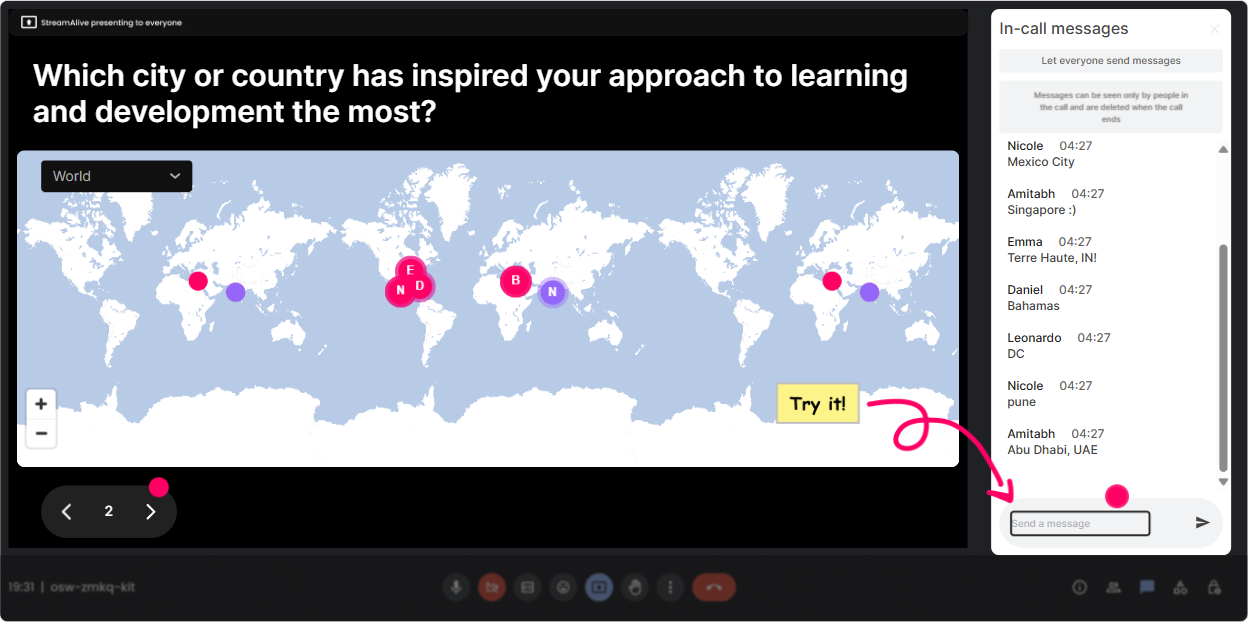
1) Kick off with Magic Maps: put your L&D Leaders on the map
This is your easiest everyone responds moment right at the start. Instead of the usual awkward Where are you joining from? and a silent chat, Magic Maps turns locations into a live world map in real time-instant energy. How to use it in a Learning-in-the-Flow-of-Work session: - Warm-up question: Where are you joining from today? (classic, always works) - Make it topic-relevant: What city is your workforce mostly based in? (helps you speak to global/distributed reality) - Practical prompt: If you could teleport to any workplace with amazing learning culture, where would you go? Trainer move: when clusters appear (like a bunch from London or Toronto), call it out and ask a quick follow-up: Okay, everyone in Toronto-what tool are you using most for just-in-time support right now? It turns a map into a conversation starter.
2) Use Rating Polls to gauge readiness (and adjust your pace)
Before you teach anything, find out where the room actually is. Rating Polls are perfect for that quick pulse check without making people overthink. They just type a number in chat and you instantly see the distribution. Ideas you can run in the first 5 minutes: - On a scale of 110, how confident are you that your org supports learning in the flow of work today? - Rate your current moment of need support (job aids, checklists, performance support) from 110. - Mid-session check: How useful is this so far for your real-world L&D challenges? (110) Trainer move: if the average is low, dont panic-use it. Say: Cool, were not here to impress anyone, were here to improve the system. Lets focus on 2 changes you can make this quarter.

3) Use Wonder Words (Word Cloud) to surface the real feelings in the room
Learning in the flow of work sounds great until people think about adoption, managers, time, tools, and governance. A Word Cloud lets you pull those feelings out fast, without putting anyone on the spot. People type 12 words, and the groups vibe shows up instantly. Great prompts for L&D Leaders: - When you hear learning in the flow of work, whats the first word that comes to mind? - Whats the biggest blocker? (12 words) (Youll get things like time, tools, culture, buy-in) - What does success look like in one word? (Youll see speed, performance, adoption, impact) Trainer move: when one word dominates (like time), use it to steer your content: Alright, time is the winner. Lets talk about designing learning that takes 30 seconds, not 30 minutes.

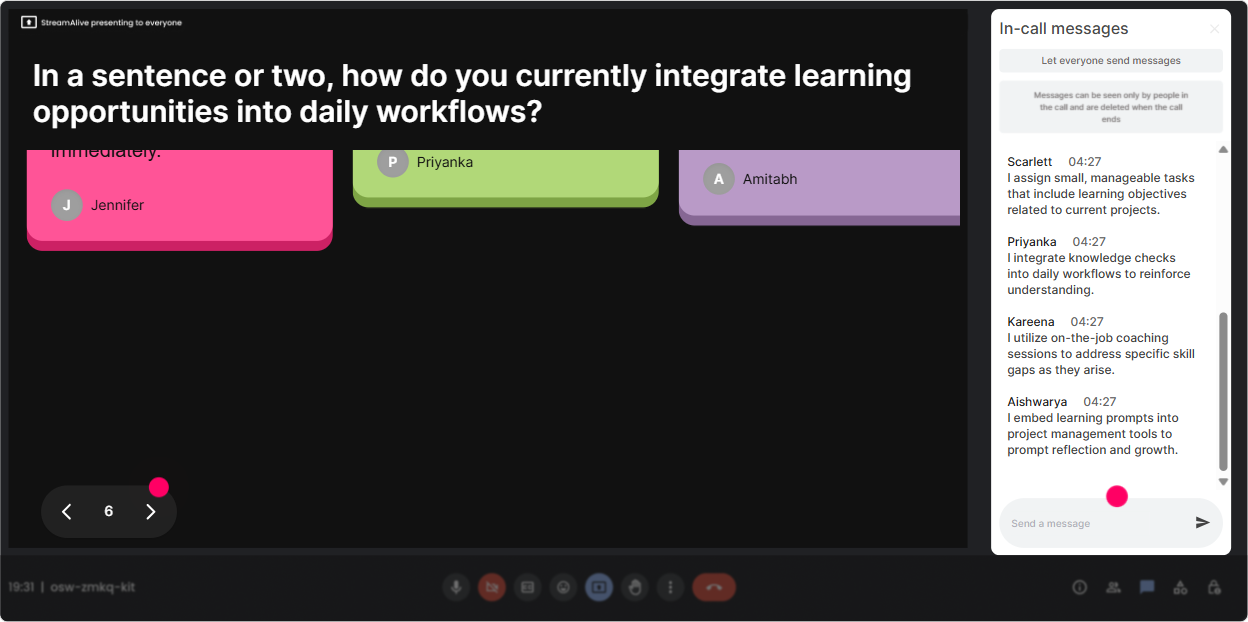
4) Use Talking Tiles to collect real examples (without awkward breakout pressure)
This is where you move from theory to reality. Talking Tiles is awesome when you want longer responses-quick stories, examples, or mini-rants (the useful kind). Their messages drop onto the screen like tiles, so the room feels active and you get a bunch of real use cases fast. Prompts that work really well: - Tell me one moment in the last week when someone needed help *during* work. - Where do your people go first when theyre stuck-coworker, Teams, Google, SOP, LMS? - Whats one workflow where youd love to embed support (sales calls, onboarding, ticketing, audits, safety checks)? Trainer move: read 35 tiles out loud and label them: Thats a moment of apply. Thats a moment of solve. Thats a moment of change. Suddenly your audience is co-creating your examples for you.
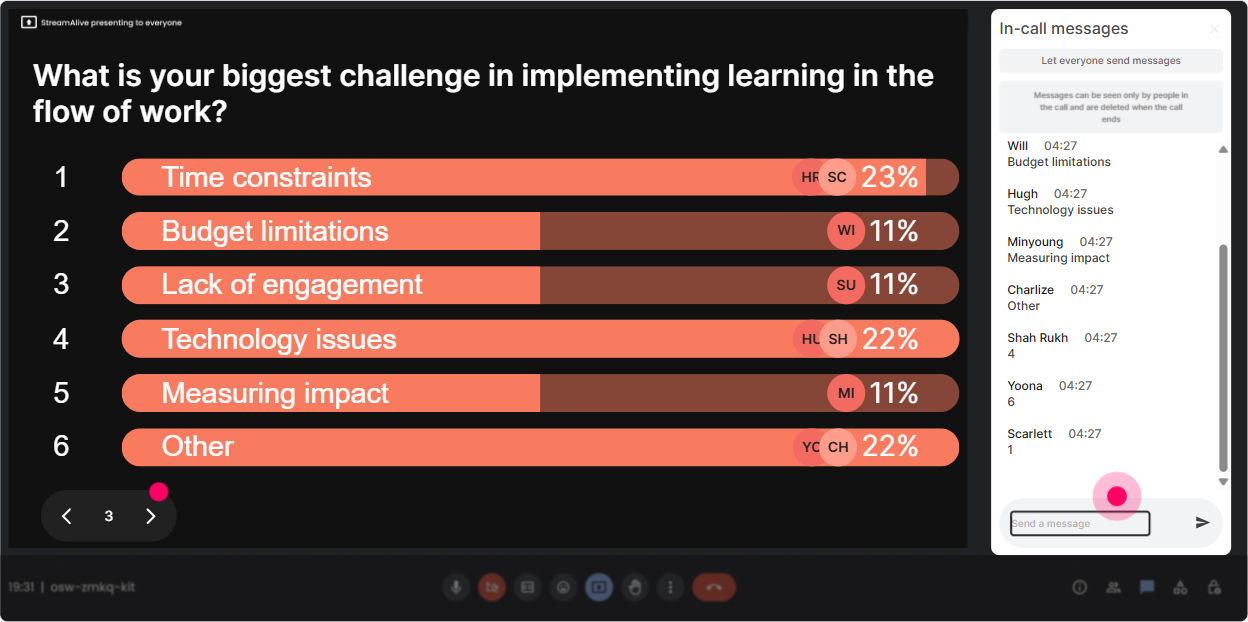
5) Run Power Polls to let the audience choose the direction of the session
L&D Leaders love relevance. Power Polls help you stop guessing what they care about and let them vote on what to spend time on. Plus, seeing the live results creates instant buy-in: We picked this together. Poll ideas for your run-of-show: - What do you want most from today? 1) Practical examples 2) Strategy + operating model 3) Tech/tools ecosystem 4) Measurement + proof of impact - Where should learning live for your org? 1) LMS 2) In Teams/Slack 3) Inside the workflow tool (CRM/ServiceNow/etc.) 4) In a searchable knowledge base Trainer move: take the top vote and promise an outcome: Perfect-measurement won. By the end, youll have 3 metrics you can actually defend in front of business leaders.
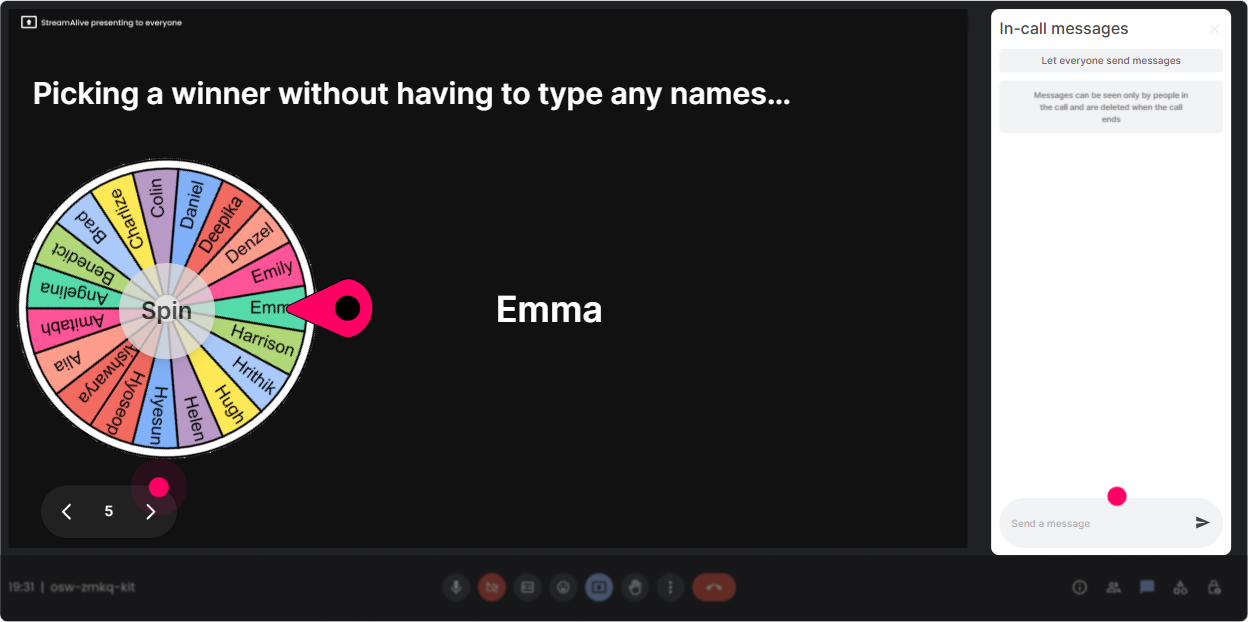
6) Use Winner Wheel to get participation (without calling on people randomly)
Some people will chat all day. Some will watch quietly. Winner Wheel is your fun, fair way to pull someone in-without the awkward John, youve been quiet vibe. You can spin from people who commented during an interaction, which rewards participation naturally. How to use it in this topic: - After a poll: Lets spin the wheel-winner shares why they picked that option. - After Talking Tiles: Spin to pick someone to expand on their example for 30 seconds. - Incentive play: If you contribute in chat during the next section, youre on the wheel for a $10 coffee card / shoutout / bragging rights. Trainer move: keep it low-pressure. Say: You can also pass-no stress. But Im hoping you wont, because your example will help the group.
7) Add a Quiz for quick knowledge checks (and to break the webinar trance)
A Quiz is perfect when you want a crisp knowledge check with one correct answer-especially useful for busting myths about learning in the flow of work. People answer in chat, you reveal the correct option, and youve got a teachable moment. Quiz questions you can use: - Which is the best example of learning in the flow of work? A) A 60-minute course on time management B) A checklist inside the tool right before a task is done (Correct) C) A quarterly webinar D) A PDF buried on the intranet - Whats the primary goal of learning in the flow of work? A) Higher course completion B) Faster time-to-competence and better performance (Correct) C) More content production D) More LMS logins Trainer move: after revealing the answer, ask: If you chose a different option, what made it feel right? That turns a quiz into discussion, not a gotcha.

2) Use Rating Polls to gauge readiness (and adjust your pace)
Before you teach anything, find out where the room actually is. Rating Polls are perfect for that quick pulse check without making people overthink. They just type a number in chat and you instantly see the distribution. Ideas you can run in the first 5 minutes: - On a scale of 110, how confident are you that your org supports learning in the flow of work today? - Rate your current moment of need support (job aids, checklists, performance support) from 110. - Mid-session check: How useful is this so far for your real-world L&D challenges? (110) Trainer move: if the average is low, dont panic-use it. Say: Cool, were not here to impress anyone, were here to improve the system. Lets focus on 2 changes you can make this quarter.
8) Use Q&A to capture questions cleanly (without losing them in chat chaos)
In a busy live session, great questions get buried fast. StreamAlives Q&A automatically detects and collects questions from chat and displays them neatly, so you can actually manage them like a pro-without scrolling like a maniac. Ways to make this work for L&D Leaders: - Set the rule early: If its a question, start it with Q: so it gets captured. - Use a parking lot: Drop your governance and measurement questions anytime-Ill hit a Q&A block every 15 minutes. - End with a rapid-fire round: answer the top 5 most common questions youre seeing. Trainer move: when you answer a question, tie it back to the room: Quick +1 in chat if youre dealing with the same issue. Youll instantly see how widespread that challenge is.

9) Use Analytics after the session to prove engagement (and improve the next run)
This is the part L&D Leaders (and training teams) often forget: you can actually *measure* how engaging your live session was. StreamAlive Analytics shows minute-by-minute engagement, interaction performance, chat replay, and your most engaged participants. How you can use it for Learning-in-the-Flow-of-Work training: - Spot the moments engagement spiked: People lit up during the workflow examples-next time, Ill bring those earlier. - Identify which interactions worked best: maybe Word Cloud got the most participation, but Talking Tiles created the best discussion. - Find your champions: your Fantastic Fans are likely your internal advocates-follow up and invite them to pilot a flow-of-work support initiative. - Share outcomes with stakeholders: export or email reports to show proof that this wasnt passive attendance-it was active participation. Trainer move: use analytics like a continuous improvement loop: What should I keep, cut, or change to make the next cohort even more hands-on? Thats the same mindset as learning in the flow of work-iterate based on real behavior.

Use StreamAlive in all your training sessions
StreamAlive isn’t just for
Learning in the flow of work
training,
it can also be used for any instructor-led training session directly inside your PowerPoint presentation.
Explore similar traingin ideas: unlocking the potential of StreamAlive
See how StreamAlive transforms live training with engaging events and interactive sessions across industries, directly inside your PowerPoint presentation.

Interactions in action
(it's free)

.svg.png)


