Install StreamAlive for your PowerPoint slides
Learn more

Predictive Modelling Training for L&D Leaders
StreamAlive helps 9x the audience engagement in your Virtual Instructor-led Trainings (VILT) directly inside your powerpoint presentation.
Make your instructor-led Predictive Modelling training more fun with polls, word clouds, spinner wheels and more
Works inside your existing PowerPoint presentation
Install the StreamAlive app for PowerPoint and see your slides come to life as people participate in your interactions
AI generates audience interactions for you
Let our AI scan your presentation and automatically come up with relevant questions based on the content. Or spend two hours coming up with your own questions, your choice!
Built to work with MS Teams and Zoom
Native apps for Teams and Zoom so you never have to leave your existing workflows
No QR Codes
Chat-powered interactions means your audience doesn’t need to scan QR codes or look at another screen to participate. They just type in the chat!

Quickly approved by your IT team
StreamAlive’s apps for Teams and Zoom means that they have been through rigorous quality assurance and client safety reviews. You’ll find everything an IT team needs to approve the app within the organization within your StreamAlive account.

Youve been asked to run an instructor-led session on Predictive Modelling for L&D Leaders and you already know the risk: it can get too technical, too fast. The good news? With the right activities (and StreamAlive running in the background), you can keep everyone participating-without turning it into a math lecture. Here are practical, trainer-friendly ways to make Predictive Modelling feel lively and hands-on.
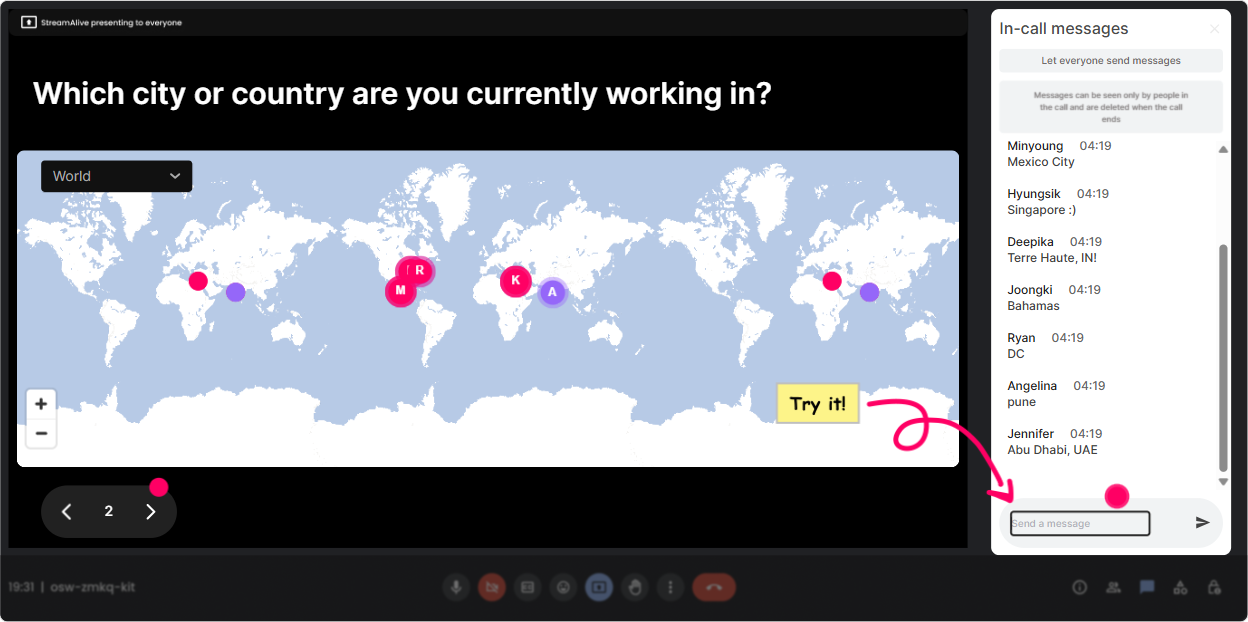
Magic Maps: Put your L&D leaders on the map (and instantly break the ice)
Start exactly how most great live sessions start: Where are you joining from?-but make it feel relevant to Predictive Modelling. How to use it in this session: - Ask: Where are you joining from today? and let StreamAlive plot everyone live. - Then tie it back to the topic: Cool-look at our spread. Now imagine were predicting training outcomes across all these regions. The patterns wont be the same everywhere. Predictive Modelling-flavored prompts you can use: - Drop the city where your learners are mostly based (your training HQ). - Type a location where you *wish* you had better learning performance data. - If you could teleport to any site to observe training impact firsthand, where would you go? Trainer tip: If youre doing cohort comparisons later (regions, business units, countries), this map becomes a perfect visual callback.
Rating Polls: Get a quick pulse on confidence (and adjust your pace instantly)
Before you teach anything, find out where people *actually* are. Rating Polls are perfect for that because theyre fast and you can react in real time. How to use it in this session: - Run a quick confidence check early, then run the same rating again near the end to show growth. - Use the results to decide if you should stay high-level or go deeper into model evaluation. Questions that work really well: - Rate your confidence in Predictive Modelling (1 = what is this, 10 = I can explain it to others). - How confident are you in choosing the right metric (accuracy vs precision/recall vs AUC)? - How confident are you that your org has the data needed for prediction? - Rate how comfortable you are explaining overfitting in plain English. Trainer move: If the average is low, say it out loud-Perfect. Were not here to impress anyone, were here to get usable. That line alone relaxes the room.

Wonder Words: Turn Predictive Modelling vibes into a word cloud
Predictive Modelling can trigger big feelings-excitement for some, intimidation for others. A word cloud lets you surface that instantly and normalize it. How to use it in this session: - Ask for a 12 word response and let Wonder Words visualize the room. - Use the biggest words as your facilitation roadmap (I see confusing and excited-great, well tackle both.). Prompts to try: - Predictive Modelling in one word: how does it feel? - One word: what do you hope prediction helps L&D do better? - Whats the biggest risk with predictive models in L&D? One word. - One word: what data source do you wish you trusted more? (LMS, HRIS, survey, manager ratings, etc.) Trainer tip: Use Combine Similar Answers so scared, fear, and nervous dont split the signal.

Talking Tiles: Get real scenarios from the room (without awkward silence)
This is where your session stops being theoretical. Talking Tiles is amazing for pulling richer, real-world answers-then displaying them in a way that feels energetic, not like reading chat. How to use it in this session: - Ask a practical question and let answers fall in as tiles. - Read a few out loud and group them: retention, performance, compliance, leadership programs, sales enablement, etc. Scenario-based prompts for L&D Leaders: - Where could Predictive Modelling make the biggest difference in your role this year? - Name one decision youre currently making with gut feel that you wish you could predict. - Whats one outcome youd love to predict: dropout risk, time-to-competency, post-training performance, promotion readiness? - Whats the hardest part-data quality, stakeholder buy-in, privacy, or actually taking action on predictions? Trainer move: Pick 23 tiles and say, Lets build a model concept around THIS. People feel seen-and they lean in.

Power Polls: Let the audience choose the agenda (so youre teaching what they actually need)
Instead of guessing what L&D leaders want from Predictive Modelling, just ask-and show the results live. This also helps you manage time because the group helps you prioritize. How to use it in this session: - Run a poll right after the intro: Where should we spend the most time today? - Run another later: Which model type should we demo with? Poll questions (with options) you can copy-paste: - What do you want most from Predictive Modelling in L&D? 1) Predict learner dropout risk 2) Predict performance improvement after training 3) Predict time-to-competency 4) Predict who needs coaching support 5) Prove ROI / business impact - What should we go deeper on? 1) Choosing features (inputs) 2) Avoiding bias + ethics 3) Model evaluation (metrics) 4) Turning predictions into interventions 5) Communicating results to stakeholders - Whats your data reality right now? 1) We have data, its clean-ish 2) We have data, its messy 3) Data is scattered across systems 4) We dont have access yet Trainer tip: If you want the group to suggest options you didnt list, use an Open-Ended Poll version and let StreamAlive pick answers straight from chat.

Winner Wheel: Call on people fairly (and make participation feel fun, not forced)
Youll always have a few people who answer everything and a bunch who stay quiet. The Winner Wheel makes participation feel random and playful-so it doesnt come off like youre putting someone on the spot. How to use it in this session: - Tell them: Type anything in chat-your example, your vote, your question-because Im going to spin the wheel for a couple of voices. - Spin from people who participated in the last interaction so it rewards engagement. Ways to use it during Predictive Modelling training: - Lets spin for someone to share a training decision they wish they could predict. - Spin for a volunteer: Ill describe a model result, you tell me how youd explain it to an exec. - Spin for a quick feature brainstorm: what input variables would you use to predict dropout risk? Trainer tip: Offer a low-pressure out: If you get picked and dont want to speak, just type pass-no big deal. Participation still stays high.

Quiz: Run quick knowledge checks that feel like a game (not an exam)
Predictive Modelling has a bunch of terms people nod at but dont always understand. A fast Quiz interaction lets you correct misunderstandings immediately-and it keeps attention up. How to use it in this session: - Use quizzes every 1015 minutes as mini reset points. - Reveal the correct answer and give a simple real-world explanation tied to L&D. Example quiz questions (single correct answer): - Which is the best example of a *prediction*? 1) Sales improved after training 2) This learner is likely to drop out next week 3) The course was rated 4.6/5 4) Managers liked the program - Overfitting basically means: 1) The model is too simple 2) The model memorized training data and wont generalize 3) The data has too few rows 4) The dashboard is confusing - If dropout is rare, which metric becomes more important than accuracy? 1) Precision/Recall 2) Total learners 3) Mean 4) Completion rate Trainer move: After the reveal, ask: Where would this show up in an L&D dashboard? Thats how you turn trivia into application.

Rating Polls: Get a quick pulse on confidence (and adjust your pace instantly)
Before you teach anything, find out where people *actually* are. Rating Polls are perfect for that because theyre fast and you can react in real time. How to use it in this session: - Run a quick confidence check early, then run the same rating again near the end to show growth. - Use the results to decide if you should stay high-level or go deeper into model evaluation. Questions that work really well: - Rate your confidence in Predictive Modelling (1 = what is this, 10 = I can explain it to others). - How confident are you in choosing the right metric (accuracy vs precision/recall vs AUC)? - How confident are you that your org has the data needed for prediction? - Rate how comfortable you are explaining overfitting in plain English. Trainer move: If the average is low, say it out loud-Perfect. Were not here to impress anyone, were here to get usable. That line alone relaxes the room.
Q&A: Capture every question without losing the chat (and without missing the quiet folks)
In technical sessions, questions fly by in chat-and trainers miss half of them while screensharing. StreamAlives Q&A pulls questions out and organizes them so you can actually manage them. How to use it in this session: - Tell participants: Drop questions anytime. Ill pause every 15 minutes and hit the Q&A board. - Use it to spot themes: data access, bias, tools, stakeholder alignment, privacy. Prompts that encourage better questions: - What part of Predictive Modelling feels fuzzy right now? Ask it plainly. - Whats one this would never work in my company concern you have? - If you could ask a data scientist one thing about predictive models in L&D, what would it be? Trainer tip: When you answer, reference the persons name-people feel acknowledged, and more questions come in.

Analytics: Prove engagement, spot the drop-off moments, and improve your next run
After the session, StreamAlive Analytics helps you see what actually worked-not just what you *think* worked. How L&D Leaders and trainers can use it: - Check minute-by-minute engagement to see where attention dipped (often during heavy theory) and where it spiked (usually during polls, quizzes, or real examples). - Use chat replay to find which Predictive Modelling topics triggered the most discussion-those are your keep sections. - Identify your most engaged participants (your future champions). These are the folks you can invite to pilot a predictive use case. Concrete ways to apply it: - If engagement drops during model evaluation metrics, next time add a Quiz right before it and a real L&D example right after. - Share interaction results with your team via email reports (great for showing stakeholder buy-in: Heres what leaders said they need most). - Use the reports to refine your run-of-show: keep the interactive moments that drove the highest chat and participation. Bottom line: Analytics turns your ILT into something you can continuously improve-like a product, not a one-off workshop.

Use StreamAlive in all your training sessions
StreamAlive isn’t just for
Predictive Modelling
training,
it can also be used for any instructor-led training session directly inside your PowerPoint presentation.
Explore similar traingin ideas: unlocking the potential of StreamAlive
See how StreamAlive transforms live training with engaging events and interactive sessions across industries, directly inside your PowerPoint presentation.

Interactions in action
(it's free)

.svg.png)


