Install StreamAlive for your PowerPoint slides
Learn more

Predictive Modelling Training for Training Agencies
StreamAlive helps 9x the audience engagement in your Virtual Instructor-led Trainings (VILT) directly inside your powerpoint presentation.
Make your instructor-led Predictive Modelling training more fun with polls, word clouds, spinner wheels and more
Works inside your existing PowerPoint presentation
Install the StreamAlive app for PowerPoint and see your slides come to life as people participate in your interactions
AI generates audience interactions for you
Let our AI scan your presentation and automatically come up with relevant questions based on the content. Or spend two hours coming up with your own questions, your choice!
Built to work with MS Teams and Zoom
Native apps for Teams and Zoom so you never have to leave your existing workflows
No QR Codes
Chat-powered interactions means your audience doesn’t need to scan QR codes or look at another screen to participate. They just type in the chat!

Quickly approved by your IT team
StreamAlive’s apps for Teams and Zoom means that they have been through rigorous quality assurance and client safety reviews. You’ll find everything an IT team needs to approve the app within the organization within your StreamAlive account.

Youve been asked to run an instructor-led session on Predictive Modelling for a training agency-and you already know the risk: it can get mathy fast and people quietly switch to email. The good news? With a few simple StreamAlive interactions, you can keep everyone participating (not just watching). Here are practical ideas you can plug straight into your run-of-show.
Magic Maps: put your predictive modelling cohort on the map (literally)
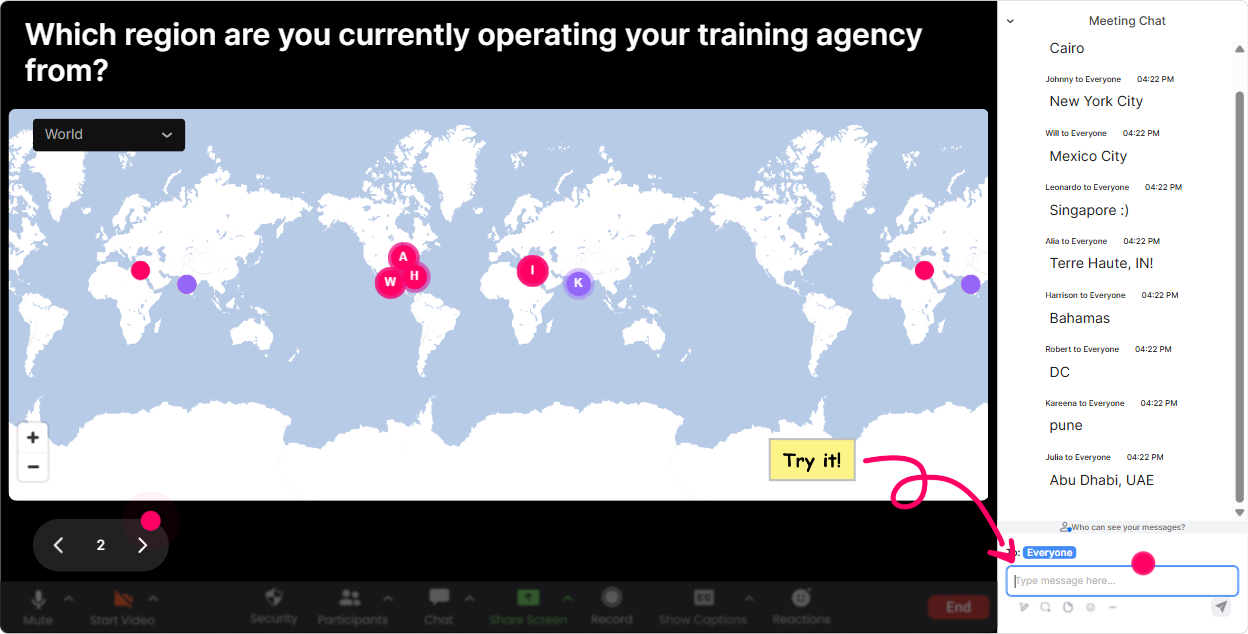
Start with the easiest win in live training: get everyone typing in the chat within the first 60 seconds. **How to use it in Predictive Modelling ILT** - Ask a location question, then tie it back to modelling contexts (regions, markets, customer segments, seasonality). **Questions you can use (copy/paste):** - Where are you joining from today? City + country - Which city/region do you currently build reports or forecasts for? - If you could teleport your data team anywhere for a one-week analytics bootcamp, where would it be? - Whats a place where demand is super seasonal (tourism, retail, agriculture)? Drop the location. **Trainer move that boosts engagement:** Call out a couple clusters on the map and ask a quick follow-up: Nice, weve got a big cluster in Manila-whats one forecasting challenge you see there? It turns a warm-up into real domain context.
Rating Polls: quick confidence check before you go deep
Predictive modelling sessions fall apart when half the room is new and the other half is bored. A Rating Poll gives you an instant read so you can pace correctly. **How to use it in Predictive Modelling ILT** Run a few pulse checks at key points (before you start, after feature engineering, after evaluation metrics). **Rating prompts that work really well:** - On a scale of 110, how confident are you with Predictive Modelling basics? - Rate your comfort with: train/test split (1 = what is that, 10 = I teach it). - How confident are you interpreting AUC/ROC? (110) - How ready are you to explain your model to a non-technical client? (110) **Trainer move that boosts engagement:** If the average is low, say it out loud and normalize it: Perfect-this is exactly why were here. Ill slow down and well do more examples. People relax and participate more.

Wonder Words (Word Cloud): get a fast read on attitudes + misconceptions
Word clouds are gold for Predictive Modelling because you instantly see what people *think* the topic is about-accuracy, forecasting, AI, black box and you can teach from there. **How to use it in Predictive Modelling ILT** Ask for 12 word answers so it stays snappy and visual. **Word cloud prompts (simple + effective):** - Predictive Modelling in one word-how does it feel? (e.g., exciting, scary, confusing, powerful) - Whats the first metric that comes to mind? (accuracy, RMSE, AUC, precision) - What do you most want from a model? (explainable, accurate, fast, stable) - Biggest modelling risk? (bias, leakage, overfitting, bad data) **Trainer move that boosts engagement:** Pick the biggest word and riff on it for 60 seconds. Example: if overfitting is huge, youve got a perfect segue into validation, regularization, and why training accuracy can lie.

Talking Tiles: turn real job challenges into your best examples
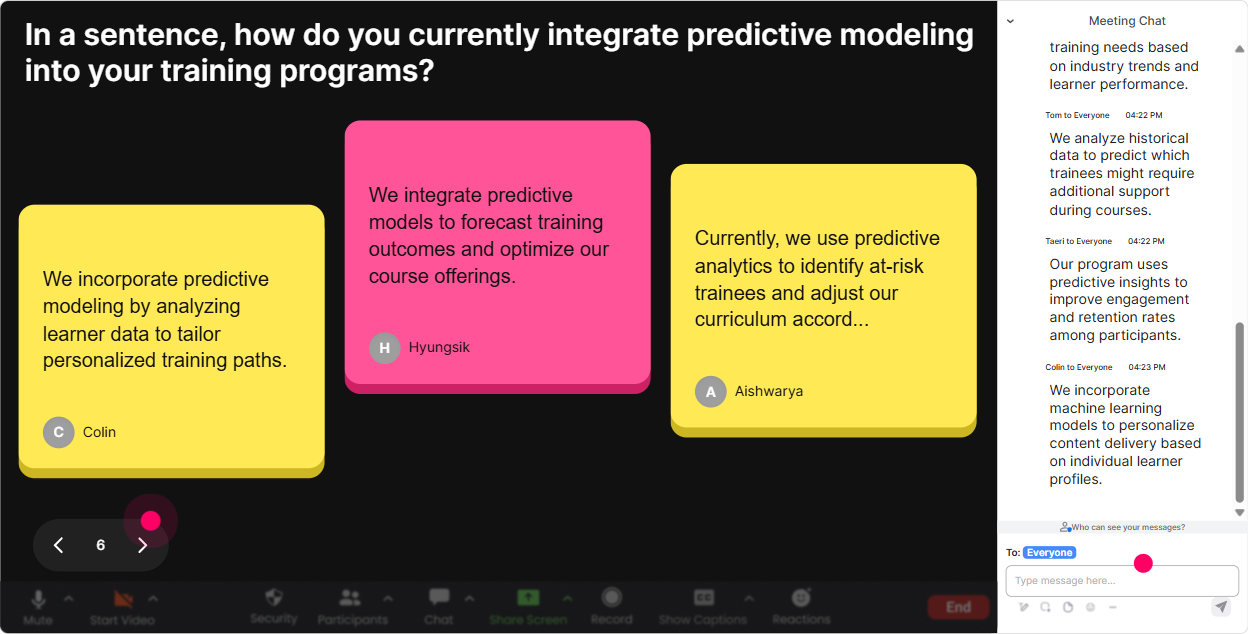
This is where you stop teaching generic predictive modelling and start teaching *their* predictive modelling. Talking Tiles is perfect for longer responses-real use cases, constraints, data issues. **How to use it in Predictive Modelling ILT** Ask a question that invites a short story. Their responses drop onto the screen like tiles, so people actually read each others answers (and feel seen). **Prompts you can use:** - What would you love to predict at work if you had the data? - Whats your biggest headache with data quality right now? - Where do models fail in your world-what breaks first? - Whats one decision your stakeholders want help with (pricing, staffing, churn, demand)? **Trainer move that boosts engagement:** Choose 23 tiles and say: Lets build todays examples around these. You instantly increase relevance, and relevance is engagement.
Power Polls: let the room choose the direction (and feel ownership)
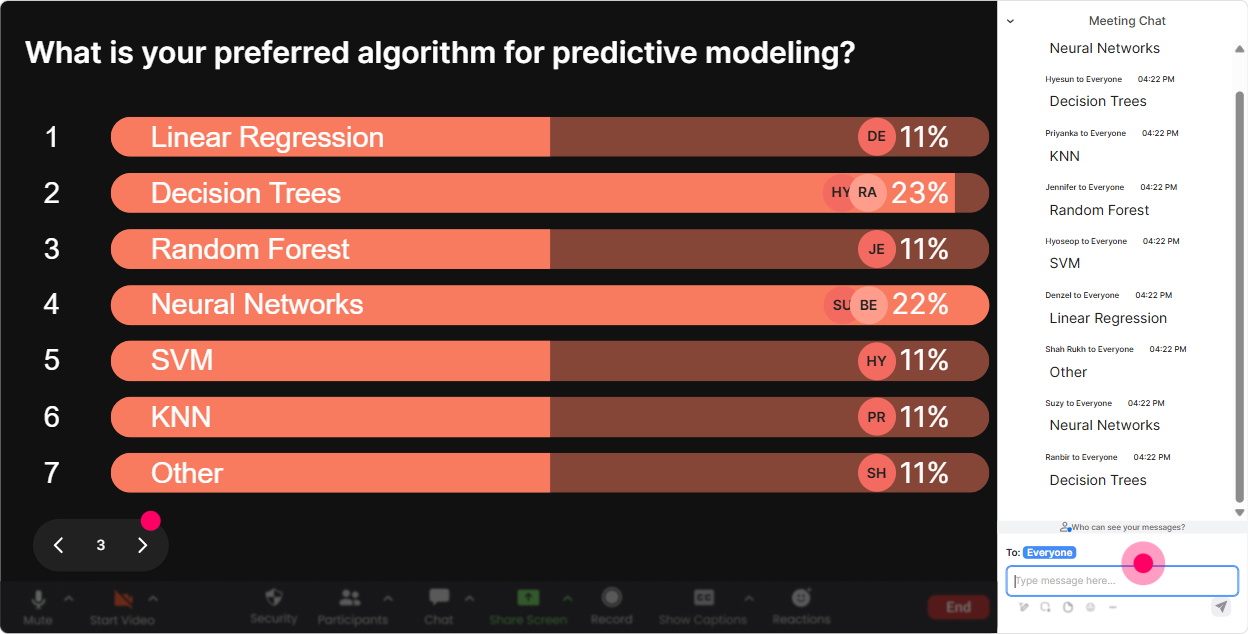
Predictive Modelling has a lot of possible rabbit holes. A Power Poll keeps you from guessing what they want-just ask them and teach what wins. **How to use it in Predictive Modelling ILT** Use multiple choice when you want a clear winner, especially for agenda choices or next-topic decisions. **Poll ideas (with options):** 1) What should we focus on more today? - 1: Feature engineering - 2: Model selection (linear/logistic/tree) - 3: Evaluation metrics (AUC, F1, RMSE) - 4: Deployment + monitoring 2) Which business use case is most relevant to your learners/clients? - 1: Demand forecasting - 2: Customer churn - 3: Lead scoring - 4: Fraud/risk detection 3) Whats your biggest blocker right now? - 1: Data access/quality - 2: Picking the right algorithm - 3: Explaining results to stakeholders - 4: Getting models into production **Trainer move that boosts engagement:** After the vote, commit to it: Alright, feature engineering won-so Ill add two extra examples and well do a quick mini-exercise. People love seeing their vote change the session.
Winner Wheel: get volunteers without the awkward silence
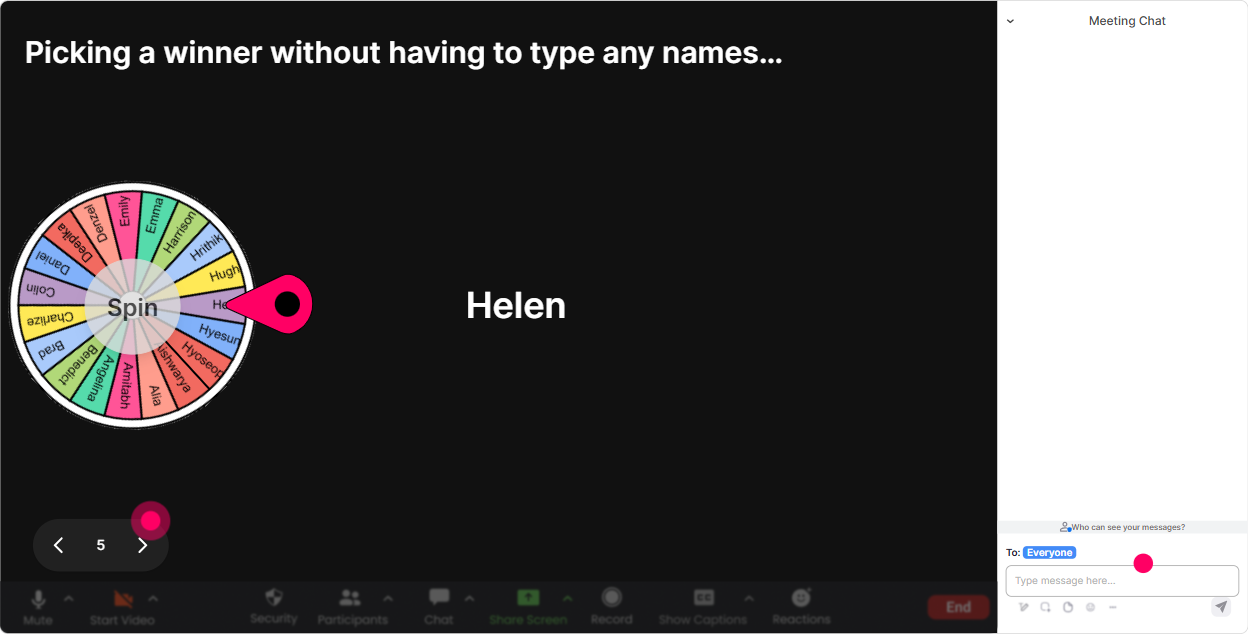
You know that moment when you ask, Who wants to share? and the chat goes quiet. Winner Wheel fixes that in a fun way-people participate because it feels fair and random. **How to use it in Predictive Modelling ILT** Tell them the rule: Drop your answer in chat and Ill spin the wheel to pick someone to expand on it. Now everyone has a reason to type. **Ways to use it:** - Share one feature youd use to predict churn. Ill spin to pick someone to explain why. - Type: A, B, or C (which model would you choose). Ill spin for someone to defend their choice. - Drop one thing youd check for data leakage. Spin = you explain it in 20 seconds. **Trainer move that boosts engagement:** Pair it with a tiny prize (even just bragging rights): Winner gets the title Chief Model Validator for today. It sounds silly, but it gets chat moving fast.
Quiz: fast knowledge checks that feel like a game (not an exam)
Predictive modelling has lots of sounds right but isnt concepts (leakage, imbalanced data, accuracy traps). Quiz is perfect for quick checks where theres one correct answer-and you can reveal it live. **How to use it in Predictive Modelling ILT** Do a quiz right after you teach a concept, then explain why the wrong options are tempting. **Quiz questions you can run:** 1) Which choice is most likely to cause data leakage? - A: Using next months outcome in a feature - B: Scaling features - C: Train/test split - D: Cross-validation 2) If churn is only 3% of customers, which metric is usually more useful than accuracy? - A: Accuracy - B: Precision/Recall or F1 - C: R-squared - D: MAE 3) Whats the main purpose of a validation set? - A: Make the model look good - B: Tune model/hyperparameters - C: Replace the training set - D: Store the dataset **Trainer move that boosts engagement:** After revealing the answer, ask: If you picked a different option, tell me what made it feel right. That discussion is where the learning sticks.

Rating Polls: quick confidence check before you go deep
Predictive modelling sessions fall apart when half the room is new and the other half is bored. A Rating Poll gives you an instant read so you can pace correctly. **How to use it in Predictive Modelling ILT** Run a few pulse checks at key points (before you start, after feature engineering, after evaluation metrics). **Rating prompts that work really well:** - On a scale of 110, how confident are you with Predictive Modelling basics? - Rate your comfort with: train/test split (1 = what is that, 10 = I teach it). - How confident are you interpreting AUC/ROC? (110) - How ready are you to explain your model to a non-technical client? (110) **Trainer move that boosts engagement:** If the average is low, say it out loud and normalize it: Perfect-this is exactly why were here. Ill slow down and well do more examples. People relax and participate more.
Q&A: capture every question without losing your place
In predictive modelling sessions, questions come nonstop-and theyre usually important (Wait, what about imbalance? What if the data drifts?). StreamAlive Q&A pulls questions straight from chat and organizes them so you dont miss anything. **How to use it in Predictive Modelling ILT** Set expectations: Drop questions anytime. Ill pause every 15 minutes and clear the queue. **Great moments to open Q&A intentionally:** - After explaining train/test split + cross-validation - After feature engineering examples - After evaluation metrics (confusion matrix, ROC, RMSE) - Before a hands-on exercise (Any blockers before we build?) **Trainer move that boosts engagement:** When you answer, mention the persons name and connect it to the group: Great question, Priya-this comes up for everyone when classes are imbalanced. It encourages more people to ask.

Analytics: prove what worked, improve what didnt (and show ROI to the agency)
If youre a training agency or corporate trainer, youre not just delivering-youre improving every cohort. StreamAlive Analytics shows you exactly when engagement spiked or dipped, who your most engaged learners were, and which interactions actually got participation. **How to use it after your Predictive Modelling ILT** - Check the **minute-by-minute engagement**: did energy drop during metrics or math? Next time, insert a quiz or poll right there. - Use **chat replay** to spot confusion patterns: if many people asked about leakage, add a dedicated mini-module. - Identify **Fantastic Fans (top engaged learners)**: these are your future champions-great for testimonials, peer support, or even co-facilitation in later sessions. - Share **interaction reports** with your team/client: Heres what learners voted as most relevant (feature engineering), and heres where confidence rose from 4/10 to 7/10. **Trainer move that boosts engagement (next session):** Tell the next cohort: We tuned this workshop based on the last groups engagement data. It signals youre responsive-and learners show up more ready to participate.

Use StreamAlive in all your training sessions
StreamAlive isn’t just for
Predictive Modelling
training,
it can also be used for any instructor-led training session directly inside your PowerPoint presentation.
Explore similar traingin ideas: unlocking the potential of StreamAlive
See how StreamAlive transforms live training with engaging events and interactive sessions across industries, directly inside your PowerPoint presentation.

Interactions in action
(it's free)

.svg.png)


