Install StreamAlive for your PowerPoint slides
Learn more

Cross-Functional AI Governance Training for L&D Leaders
StreamAlive helps 9x the audience engagement in your Virtual Instructor-led Trainings (VILT) directly inside your powerpoint presentation.
Make your instructor-led Cross-Functional AI Governance training more fun with polls, word clouds, spinner wheels and more
Works inside your existing PowerPoint presentation
Install the StreamAlive app for PowerPoint and see your slides come to life as people participate in your interactions
AI generates audience interactions for you
Let our AI scan your presentation and automatically come up with relevant questions based on the content. Or spend two hours coming up with your own questions, your choice!
Built to work with MS Teams and Zoom
Native apps for Teams and Zoom so you never have to leave your existing workflows
No QR Codes
Chat-powered interactions means your audience doesn’t need to scan QR codes or look at another screen to participate. They just type in the chat!

Quickly approved by your IT team
StreamAlive’s apps for Teams and Zoom means that they have been through rigorous quality assurance and client safety reviews. You’ll find everything an IT team needs to approve the app within the organization within your StreamAlive account.

Youve been asked to run an instructor-led session on Cross-Functional AI Governance for L&D leaders-and you already know the risk: it can get policy-heavy fast. The good news? With the right activities (and the right live interactions), you can keep people participating instead of just listening. Heres how to make it feel lively, practical, and super engaging.
1) Magic Maps: Start with whos in the room? (and what orgs they represent)
Cross-Functional AI Governance is all about aligning people across teams-so your opener should reflect that. Magic Maps is a simple way to break the ice and instantly get chat moving. How to use it in this training: - Kick off with: Where are you joining from today? and watch the map populate live. Youll immediately see if youre working with one region or truly global perspectives (which matters a lot for governance, privacy, and compliance). - Then pivot into a governance-relevant prompt like: Where is your HQ located? or Where does your AI team primarily operate from? (Only if its appropriate-keep it light.) - Or make it fun but still on-theme: If you could teleport your governance team anywhere for a 2-day alignment offsite, what city are we meeting in? Trainer tip: when you see clusters (say, a bunch of folks from London or Toronto), call it out. People feel seen, and it sparks side conversations like Oh were neighbors!-thats engagement you didnt have to force.
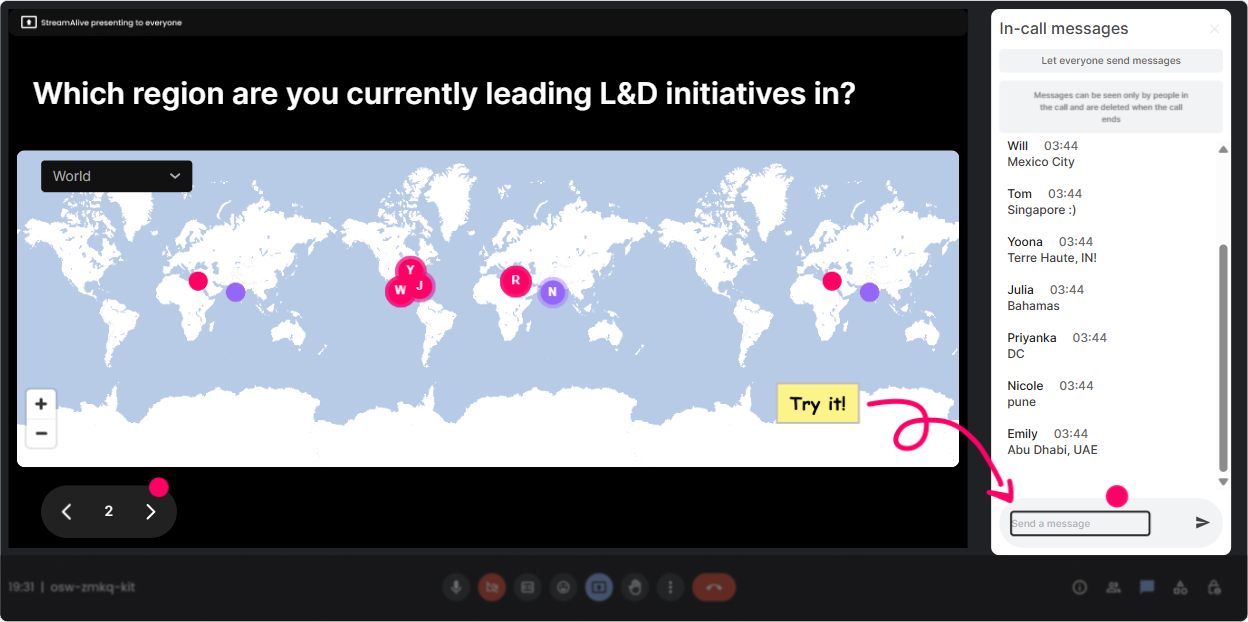
2) Rating Polls: Quick confidence check before you teach anything
Before you dive into frameworks, get a pulse check. Rating Polls make it easy for people to share where theyre at-without anyone feeling put on the spot. Use it like this: - On a scale of 110, how confident are you that your organization has clear AI governance today? - Rate how aligned your stakeholders are (Legal, IT, HR, L&D, Security, Data, Compliance). 1 = chaos, 10 = smooth machine. - How ready is your L&D team to support AI policy + training rollouts? 110. What this does for you as the trainer: - If the average is low, you slow down and normalize it: Perfect-this is exactly why were here. - If its high, you can challenge them: Awesome. Lets see if that holds when we hit vendor tools, shadow AI, and model risk. Its a 30-second interaction that buys you a way more tailored session.

3) Wonder Words (Word Cloud): Surface the real feelings about AI governance
AI governance can trigger big feelings-overwhelm, fear of slowing innovation, worry about compliance, excitement about structure. A word cloud lets you bring that into the open fast. Great prompts for this topic: - When you hear AI Governance, whats the first word that comes to mind? - Whats the biggest risk you associate with AI use in your org? 12 words. - What do you want governance to enable? (12 words: speed, trust, clarity, safety, innovation) Why this works so well: - People love seeing their words show up on screen. - You instantly learn whats driving the room. - It gives you a natural bridge: Im seeing risk and confusion really big-lets tackle those first. Trainer move: If you see messy duplicates (like compliance vs Compliance), use the Combine Similar Answers option so the visuals look clean and confident.
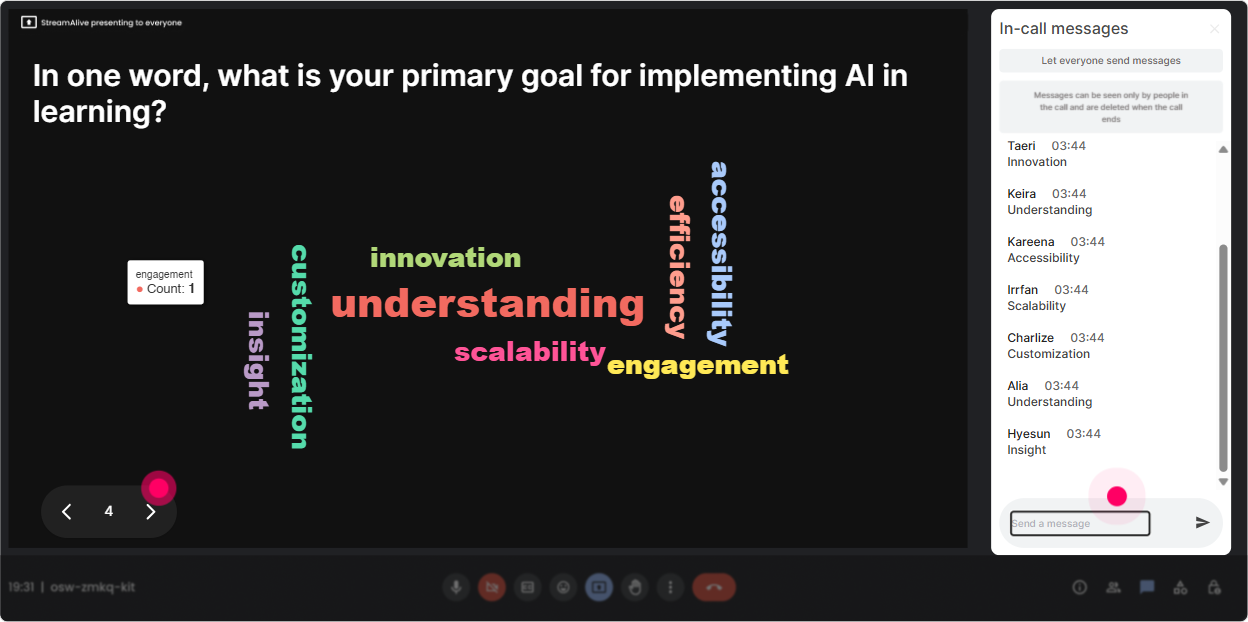
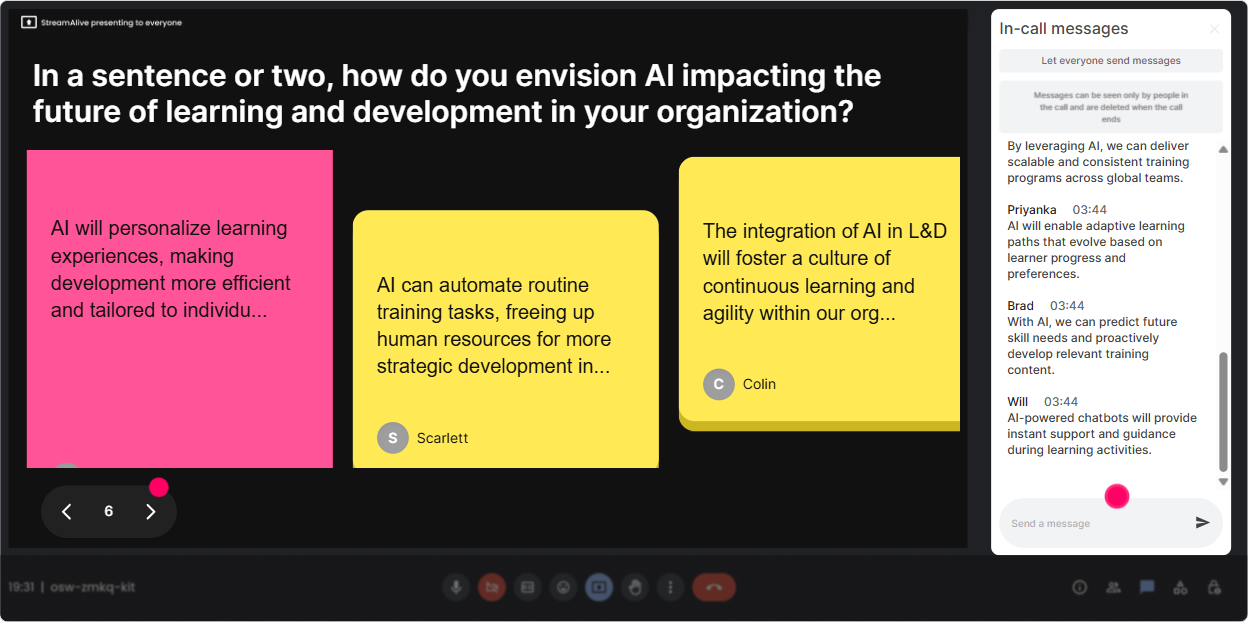
4) Talking Tiles: Get the cross-functional reality out of their heads and onto the screen
Now you want longer, more real answers-because Cross-Functional AI Governance is messy in practice. Talking Tiles is perfect for those tell me whats actually happening moments. Prompts that work great: - Whats one friction point you see between teams when AI gets introduced? - In your org, who owns AI governance right now and whats the downside of that setup? - Where does L&D get pulled in-too early, too late, or not at all? - Whats one policy/training gap you suspect exists with AI tools today? What youll see: - Responses start stacking on screen like a live brainstorm wall. - Quiet participants contribute because its easier to type than to unmute. - You can group patterns live: Im seeing a lot of unclear ownership and shadow AI thats our next segment. This is where your session stops being theoretical and starts being *their* session.
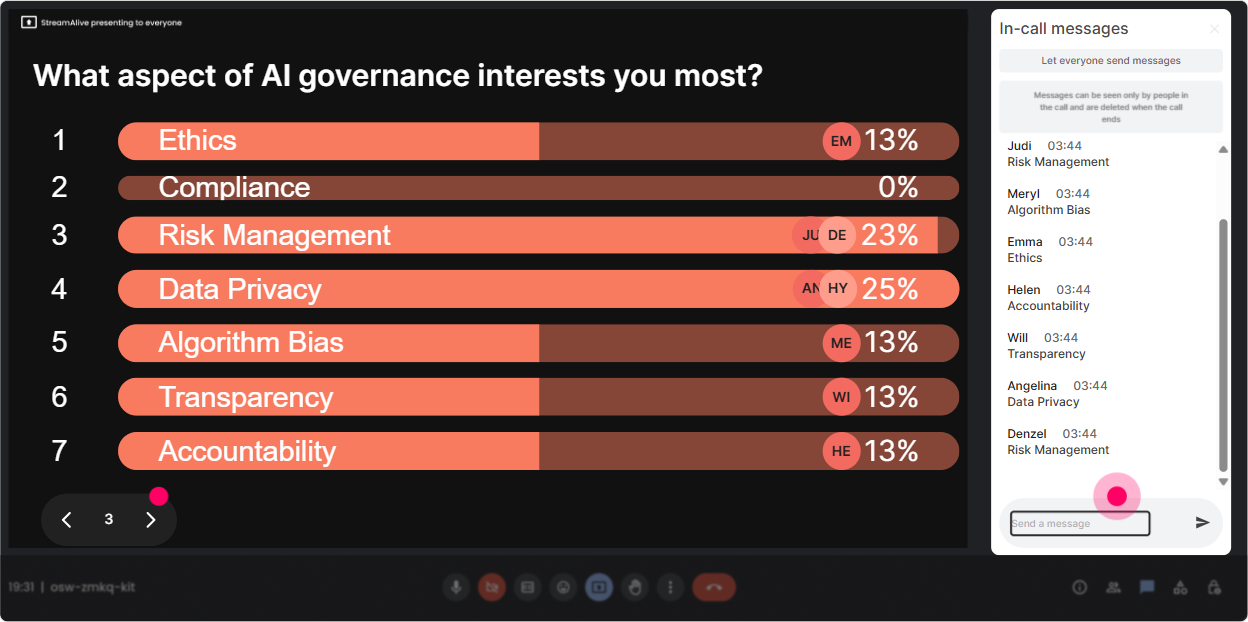
5) Power Polls: Let the audience choose the agenda (and feel ownership)
Youll get way more buy-in when people feel like they helped steer the session. Use a Power Poll to pick what to go deeper on. Try these options-based polls: - Which part of cross-functional AI governance is your biggest current need? 1) Roles & decision rights (RACI) 2) Policies (acceptable use, data handling) 3) Vendor/tool approvals 4) Risk & compliance workflow 5) Training & adoption (L&D) - Where do you think governance breaks down most often? 1) Leadership alignment 2) Team silos 3) No clear process 4) Too much process 5) People using AI unofficially Then do what great trainers do: call out the winner and commit. - Alright-Roles & decision rights won. Lets build a quick governance RACI together. And because results show live, people stay glued in to see where the group lands.
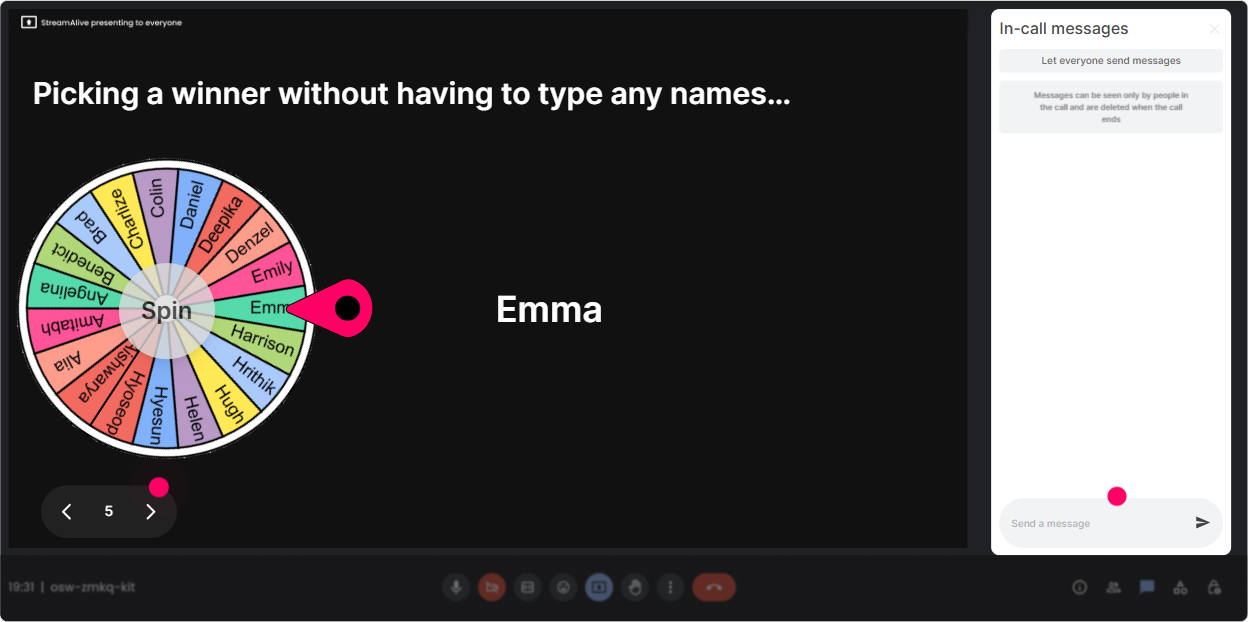
6) Winner Wheel (Spinner): Make participation feel fun (not forced)
Sometimes you want voices, not just chat. But asking anyone want to share? often gets silence. The Winner Wheel makes it playful and fair. Ways to use it in this training: - Drop in chat: which function is hardest to align with on AI governance-Legal, IT, HR, Security, Data, Ops, or other. Then spin the wheel from commenters and ask the winner to share a 30-second story. - After a scenario discussion: Type A or B for which approach youd take. Spin the wheel to pick someone to explain why. - End-of-module reflection: One sentence: whats one governance rule youd want tomorrow? Spin to spotlight 12 great answers. Key: position it as low-pressure. - If the wheel picks you, you can pass-Ill just grab the next spin. Youll be surprised how often people *dont* pass once it feels like a game.
7) Quiz: Quick knowledge checks that dont feel like school
Cross-Functional AI Governance has a lot of concepts that sound similar (policy vs standard vs control, risk vs compliance, etc.). A Quiz makes it simple to check understanding-and it gives people that fun lets see if I got it moment. Sample quiz questions (multiple choice, one correct): - Which is the BEST definition of AI governance? A) A list of approved AI tools B) A cross-functional system of decision-making, policies, and controls for AI use C) A training course on prompt writing D) A legal-only compliance checklist - What should happen FIRST when a new AI tool is introduced into a business unit? A) Company-wide rollout B) A governance review (risk, data, security, compliance) C) Ask L&D to build training immediately D) Wait for an incident - Who should own AI governance? A) Legal only B) IT only C) A cross-functional group with clear decision rights D) The vendor Trainer tip: reveal the correct answer, then ask: For those who picked a different option-what made that feel right? That follow-up is where the learning really sticks.

2) Rating Polls: Quick confidence check before you teach anything
Before you dive into frameworks, get a pulse check. Rating Polls make it easy for people to share where theyre at-without anyone feeling put on the spot. Use it like this: - On a scale of 110, how confident are you that your organization has clear AI governance today? - Rate how aligned your stakeholders are (Legal, IT, HR, L&D, Security, Data, Compliance). 1 = chaos, 10 = smooth machine. - How ready is your L&D team to support AI policy + training rollouts? 110. What this does for you as the trainer: - If the average is low, you slow down and normalize it: Perfect-this is exactly why were here. - If its high, you can challenge them: Awesome. Lets see if that holds when we hit vendor tools, shadow AI, and model risk. Its a 30-second interaction that buys you a way more tailored session.
8) Q&A (Quick Questions): Catch every question without losing the chat
In governance sessions, the best questions often show up mid-explanation-when people are thinking, Wait but what about our data? Quick Questions pulls those out of the chat and organizes them so you dont miss them. How to make it work smoothly: - Tell them upfront: Drop questions anytime. StreamAlive will capture them and Ill pause every 10 minutes to knock out a few. - Use it for sensitive governance questions that people hesitate to say out loud, like: - Can we train AI tools on internal docs? - What if employees use public LLMs for client work? - Whos accountable if the model is wrong? - How do we audit AI-generated content? This keeps your flow clean-and makes participants feel like their real-world constraints are welcome in the room.

9) Analytics: Prove engagement, improve the next session, and spot your champions
After the session, StreamAlive analytics is where you turn That went well into actual proof-and better design next time. What to look at for Cross-Functional AI Governance training: - Minute-by-minute engagement: Identify where attention dipped (often during definitions) and where it spiked (usually scenarios, role clarity, tool risk). Next time, you can restructure around those spikes. - Chat replay + interaction results: See which governance topics generated the most discussion-this basically hands you your next follow-up session plan. - Fantastic Fans (top engaged participants): These are your potential governance champions. In L&D terms, theyre your early adopters-invite them into pilots, working groups, or a community of practice. - Shareable reports: Send a simple results recap to stakeholders (Teams/email) like: Top governance concern = shadow AI. Top requested focus = decision rights + tool approvals. Thats the difference between a one-off workshop and a training program that actually moves governance forward.

Use StreamAlive in all your training sessions
StreamAlive isn’t just for
Cross-Functional AI Governance
training,
it can also be used for any instructor-led training session directly inside your PowerPoint presentation.
Explore similar traingin ideas: unlocking the potential of StreamAlive
See how StreamAlive transforms live training with engaging events and interactive sessions across industries, directly inside your PowerPoint presentation.

Interactions in action
(it's free)

.svg.png)


