Install StreamAlive for your PowerPoint slides
Learn more

Experience Design Training for Corporate Trainers
StreamAlive helps 9x the audience engagement in your Virtual Instructor-led Trainings (VILT) directly inside your powerpoint presentation.
Make your instructor-led Experience Design training more fun with polls, word clouds, spinner wheels and more
Works inside your existing PowerPoint presentation
Install the StreamAlive app for PowerPoint and see your slides come to life as people participate in your interactions
AI generates audience interactions for you
Let our AI scan your presentation and automatically come up with relevant questions based on the content. Or spend two hours coming up with your own questions, your choice!
Built to work with MS Teams and Zoom
Native apps for Teams and Zoom so you never have to leave your existing workflows
No QR Codes
Chat-powered interactions means your audience doesn’t need to scan QR codes or look at another screen to participate. They just type in the chat!

Quickly approved by your IT team
StreamAlive’s apps for Teams and Zoom means that they have been through rigorous quality assurance and client safety reviews. You’ll find everything an IT team needs to approve the app within the organization within your StreamAlive account.

Youve been asked to run an Experience Design instructor-led training for corporate trainers-and you want it to feel alive, not like another slide marathon. The easiest win? Build participation into the session design from minute one. Here are practical ways to do that using StreamAlive so your group stays with you (and actually talks).
1) Magic Maps: Start with connection, not content
The fastest way to warm up a room of trainers is to remind them theyre real humans in real places-not just names in a participant list. How to use Magic Maps in Experience Design ILT: - Kickoff question (classic but effective): Where are you joining from today? Watch the map populate in real time and call out clusters like, Okay wow, weve got a Toronto takeover! - Make it Experience Design-themed: Think of the best training experience youve ever had-where were you when it happened? (City + memory anchors emotion.) - Tie it to empathy: If your learners were joining from one place in the world, where would that be? Great segue into audience persona thinking. Pro tip: If youre doing breakouts by region/time zone, the map gives you a quick visual to group people without the awkward type your time zone chaos.

2) Rating Polls: Get a confidence baseline in 10 seconds
Before you teach Experience Design, find out where people are starting from. Rating Polls give you an instant room read without putting anyone on the spot. Ideas you can run: - Confidence check: On a scale of 110, how confident are you in designing a training experience (not just delivering content)? - Reality check: Rate how engaging your last live session felt-1 = snooze, 10 = electric. (Youll get honest data fast.) - Mid-session pulse: After you introduce a model (like journey mapping): How clear is this so far? 110. If you see a dip, you adjust immediately. Trainer move: Say out loud what youll do with the data. Example: If were below a 6, Im slowing down and giving more examples. That builds trust.

3) Wonder Words (Word Cloud): Turn feelings into fuel
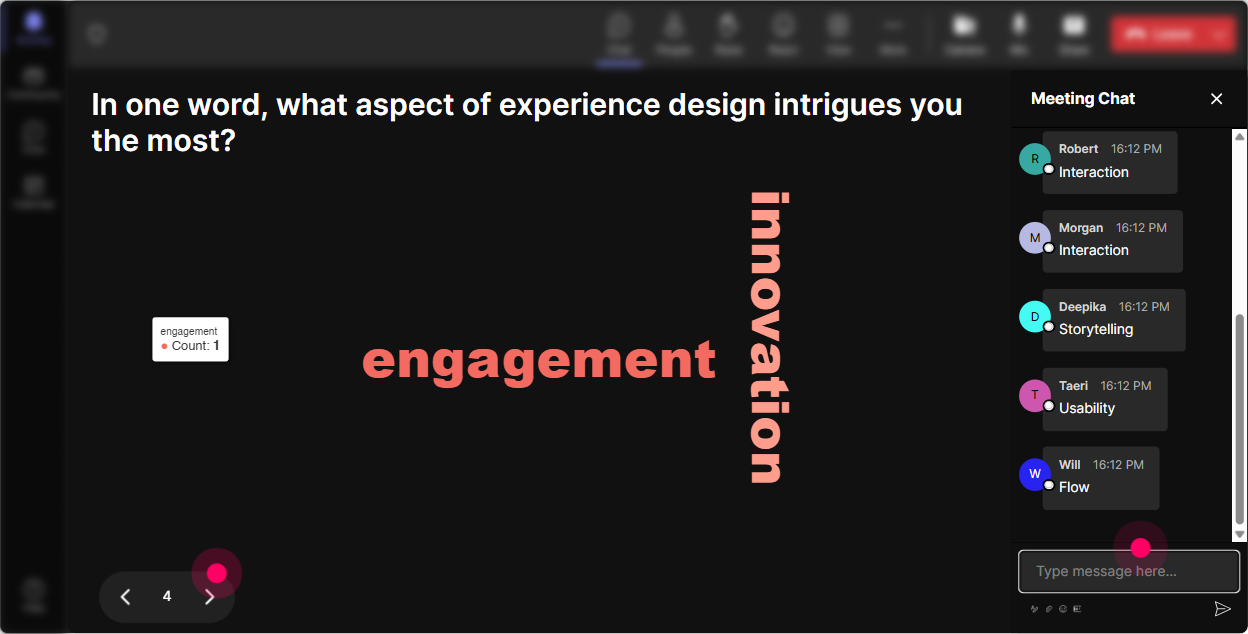
Experience Design is emotional-so let people name what theyre feeling. A word cloud makes the vibe visible and gets even quiet folks to type something. Use it like this: - Set the tone: When you hear Experience Design, whats the first word that comes to mind? (Youll see things like fun, overwhelming, memorable, confusing. Perfect discussion starter.) - Pain-point discovery: Whats the #1 thing that kills engagement in your sessions? (Words like monotone, slides, no interaction show up fast.) - Design goal: One word you want learners to feel in your trainings. (Great bridge into designing emotional outcomes, not just learning objectives.) Facilitation tip: Read the biggest 3 words back and ask, Who can share a quick story behind that word? Instant depth.
4) Talking Tiles: Get real examples (and make them fun to look at)
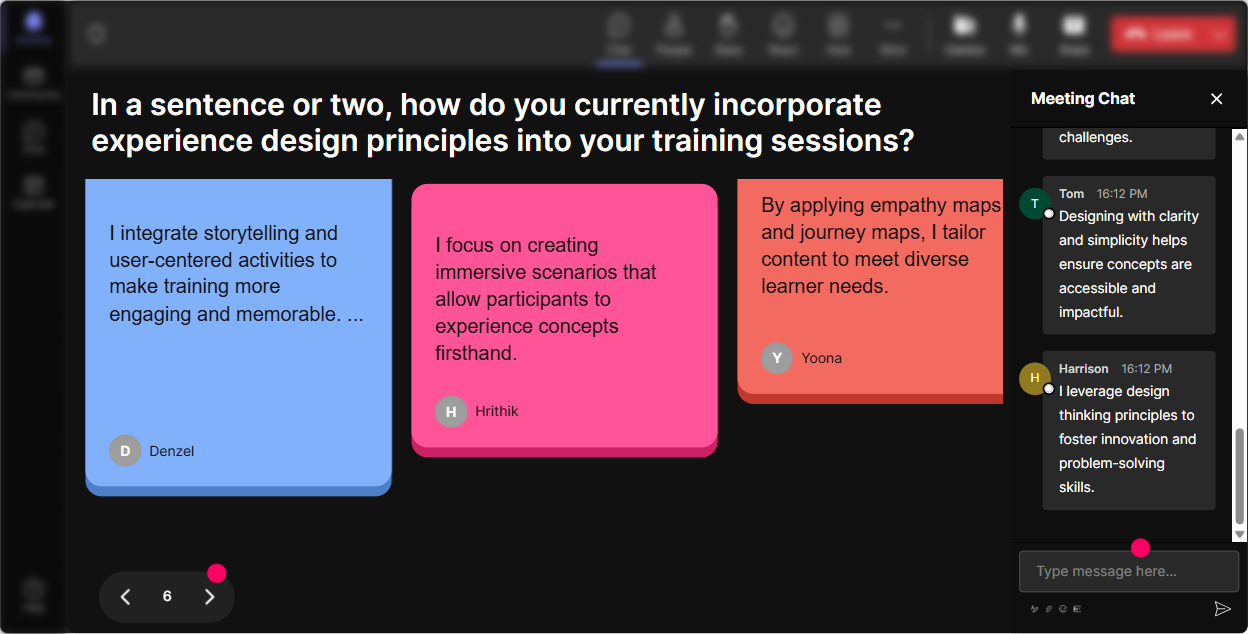
When you want more than one-word answers-use Talking Tiles. It turns chat into a living wall of participant stories, which is exactly what Experience Design needs. Prompts that work really well: - Impact question: Where in your job would better Experience Design make the biggest difference? (Onboarding, product training, leadership programs, compliance, etc.) - Story pull: Tell me about a training session you delivered that felt flat. What happened? Youll get patterns you can design against. - Application prompt: Whats one moment in your current training that youd love to redesign? (You can later pick 12 tiles and workshop them live.) Trainer trick: When the tiles fall in, narrate it like a sports commentator: Okay Im seeing onboarding compliance camera off silence yup, been there. It keeps energy high.
5) Power Polls: Let the audience steer the agenda
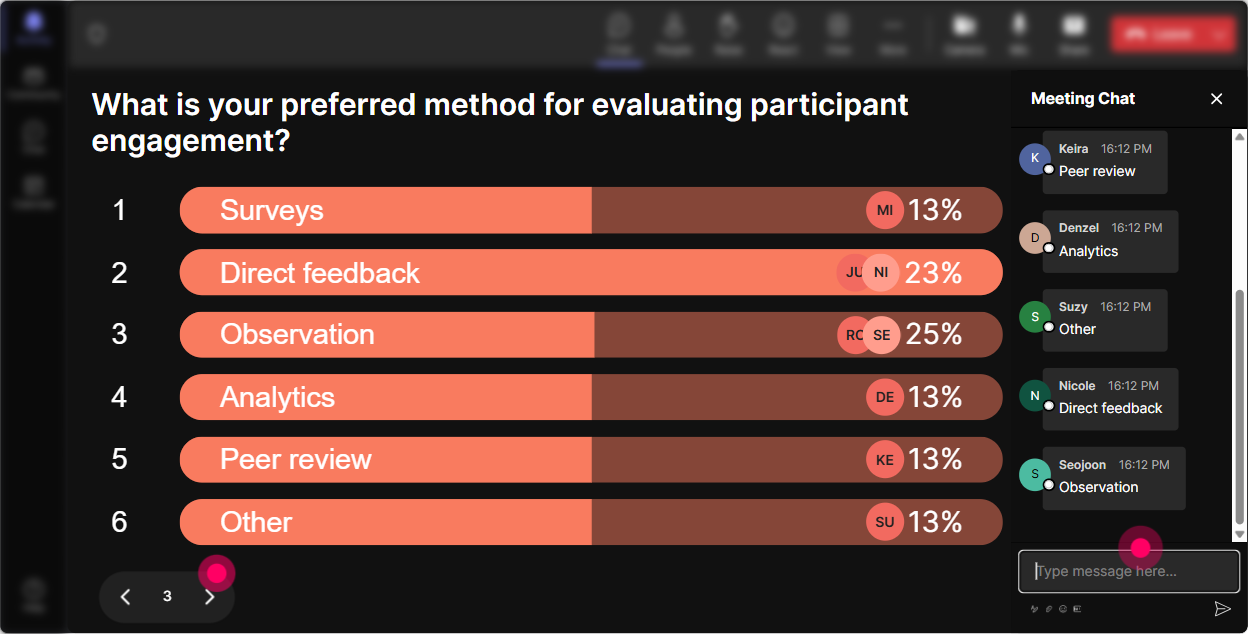
Power Polls are great when you want the group to choose a direction-because Experience Design should be audience-led anyway. Poll ideas for this topic: - Focus picker: What part of Experience Design do you want more of today? 1) Designing openings and closings 2) Interaction and participation planning 3) Storytelling and facilitation 4) Activities + debriefs 5) Measuring engagement - Real-world constraints: Whats your biggest limitation right now? 1) Time to design 2) Stakeholder expectations 3) Low learner participation 4) Too much content 5) Virtual fatigue How this helps you: You can literally say, Cool, you picked it-so were going deeper there. People support what they help create.
6) Winner Wheel (Spinner Wheel): Make participation feel worth it
Sometimes you need someone to unmute, share a story, or do a quick roleplay-and the room goes quiet. The Winner Wheel makes it playful and fair (and removes the teacher is picking on me vibe). Ways to use it in Experience Design ILT: - Volunteer-by-fate: Drop ME in chat if youre open to sharing your best engagement win. Im spinning the wheel. - Reward interaction: Everyone who answered the last poll is on the wheel-winner gets bragging rights (or a coffee card if youve got one). - Mini design challenge: Type one session you currently teach. Ill spin and well redesign that sessions opening together. Important tone note: Keep it friendly-always allow an opt-out if someone gets picked and panics.

7) Quiz: Do knowledge checks without killing the mood
A Quiz interaction is perfect for quick checks that feel like a game, not an exam. You ask a multiple-choice question, people vote in chat, and you reveal the correct answer. Quiz questions for Experience Design training: - Core concept check: Which is the best example of an Experience Design outcome? 1) Cover all 42 slides 2) Learners feel confident enough to try it tomorrow (correct) 3) Finish 10 minutes early 4) No one asks questions - Facilitation skill check: What usually drives engagement more? 1) More content 2) More interaction opportunities (correct) 3) Longer slides 4) Faster talking Use quizzes as transitions: theyre great right before a break or right after a heavy concept to reset attention.

2) Rating Polls: Get a confidence baseline in 10 seconds
Before you teach Experience Design, find out where people are starting from. Rating Polls give you an instant room read without putting anyone on the spot. Ideas you can run: - Confidence check: On a scale of 110, how confident are you in designing a training experience (not just delivering content)? - Reality check: Rate how engaging your last live session felt-1 = snooze, 10 = electric. (Youll get honest data fast.) - Mid-session pulse: After you introduce a model (like journey mapping): How clear is this so far? 110. If you see a dip, you adjust immediately. Trainer move: Say out loud what youll do with the data. Example: If were below a 6, Im slowing down and giving more examples. That builds trust.
8) Q&A (Quick Questions): Stop losing good questions in the chat
In trainer-led sessions, Q&A can get messy fast-great questions get buried under thanks! and side comments. StreamAlive picks up questions directly from the chat and surfaces them neatly so you can actually manage them. How to use it smoothly: - Tell them the rule: Pop your questions in chat anytime-StreamAlive will capture them and Ill hit a Q&A pit stop every 15 minutes. - Park-and-return: When a question is too early, say, Love that-parking it. Were coming back after the activity. (And then actually come back.) - Theme sorting: At the end, scan questions and group them: Im seeing a cluster around measurement, and another around activities-lets do those. This keeps the session flowing while still making people feel heard.

9) Analytics: Improve your next delivery like a pro (without guessing)
After the session, you dont want to rely on vibes. StreamAlive analytics show you what actually happened-minute by minute. How trainers can use it for Experience Design: - Spot engagement peaks: See which moments triggered the most chat and interaction, then replicate that pattern in future sessions. - Find the drop zones: If engagement dips during a specific segment (hello, long explanation), youll know exactly where to redesign. - Identify your most engaged participants: Great for follow-ups, champions, or even peer mentors in future cohorts. - Interaction reports + email sharing: Send yourself (or your L&D team) the results so you can debrief what worked, what didnt, and what to tweak. Bottom line: Analytics turns Experience Design from a creative guess into an improvable system-session after session.

Use StreamAlive in all your training sessions
StreamAlive isn’t just for
Experience Design
training,
it can also be used for any instructor-led training session directly inside your PowerPoint presentation.
Explore similar traingin ideas: unlocking the potential of StreamAlive
See how StreamAlive transforms live training with engaging events and interactive sessions across industries, directly inside your PowerPoint presentation.

Interactions in action
(it's free)

.svg.png)


