Install StreamAlive for your PowerPoint slides
Learn more

Micro-Credentials Training for L&D Leaders
StreamAlive helps 9x the audience engagement in your Virtual Instructor-led Trainings (VILT) directly inside your powerpoint presentation.
Make your instructor-led Micro-Credentials training more fun with polls, word clouds, spinner wheels and more
Works inside your existing PowerPoint presentation
Install the StreamAlive app for PowerPoint and see your slides come to life as people participate in your interactions
AI generates audience interactions for you
Let our AI scan your presentation and automatically come up with relevant questions based on the content. Or spend two hours coming up with your own questions, your choice!
Built to work with MS Teams and Zoom
Native apps for Teams and Zoom so you never have to leave your existing workflows
No QR Codes
Chat-powered interactions means your audience doesn’t need to scan QR codes or look at another screen to participate. They just type in the chat!

Quickly approved by your IT team
StreamAlive’s apps for Teams and Zoom means that they have been through rigorous quality assurance and client safety reviews. You’ll find everything an IT team needs to approve the app within the organization within your StreamAlive account.

Youve been asked to run an instructor-led session on Micro-Credentials for L&D Leaders-and you want it to feel like a live, high-energy workshop (not a slide marathon). The easiest win? Get people talking early, then keep the momentum going every 57 minutes. Here are practical ways to do that using StreamAlive interactions throughout your Micro-Credentials training.
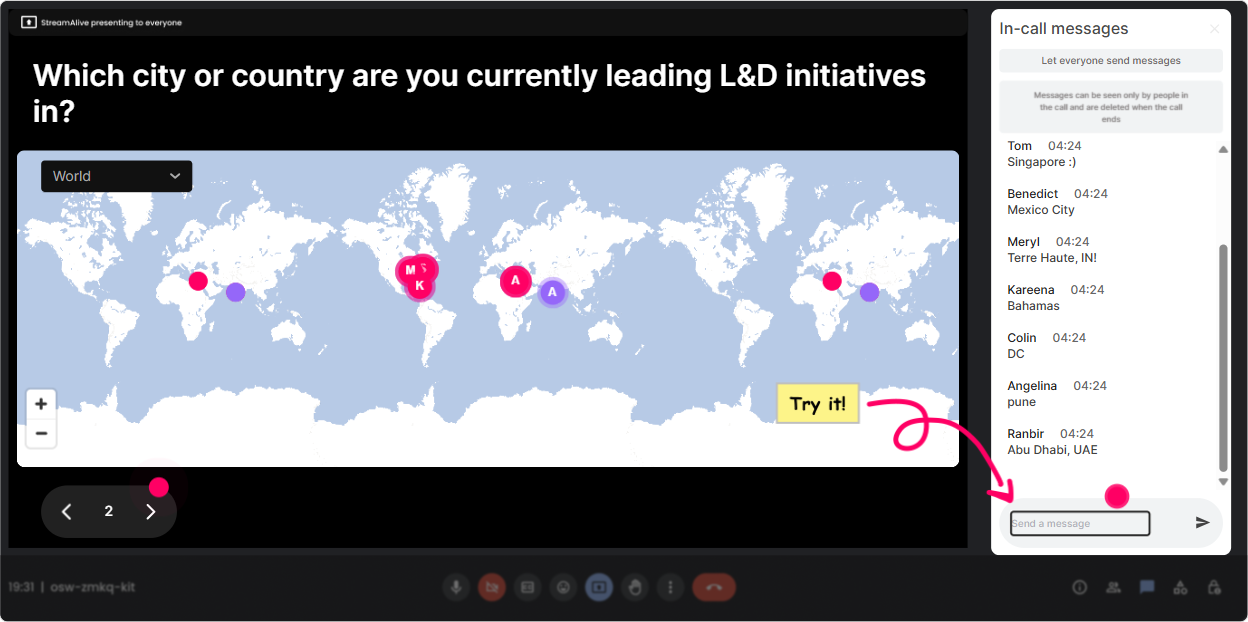
1) Magic Maps: Kick off with put yourself on the map energy
Micro-Credentials sessions usually have a mix of industries, regions, and maturity levels-so use that diversity right away. **How to use it in your session:** - Start with: **Where are you joining from today?** and watch the map populate in real time. - Then tie it to the topic (so its not just small talk): - **Where is your organizations L&D HQ located?** (great for global orgs) - **What city has the strongest talent competition for you right now?** (sets up why skills + credentials matter) - **If you could import a Micro-Credentials program from anywhere on earth, where would you borrow it from?** **Trainer tip:** If youre about to split people into breakout groups later, Magic Maps helps you spot clusters (time zones/regions) so grouping feels intentional. Instant connection + instant context.
2) Rating Polls: Do a quick confidence check (and adjust your pace)
This is your pulse check tool-fast, visual, and super trainer-friendly. It helps you figure out whether youre talking to beginners, experts, or a mix. **Where it fits best:** right after your agenda slide. **Rating Poll ideas for Micro-Credentials ILT:** - **On a scale of 110, how confident are you explaining Micro-Credentials to a business leader?** - **How ready is your organization to launch Micro-Credentials in the next 6 months? (1 not ready 10 ready)** - **How clear is the difference between a certification, badge, and Micro-Credential for you right now? (110)** **Trainer tip:** Call out the spread. If half the room is at 34 and the rest is at 89, you can literally say: Cool, well build a shared definition first, then Ill give the advanced folks a framework you can reuse. People feel seen immediately.

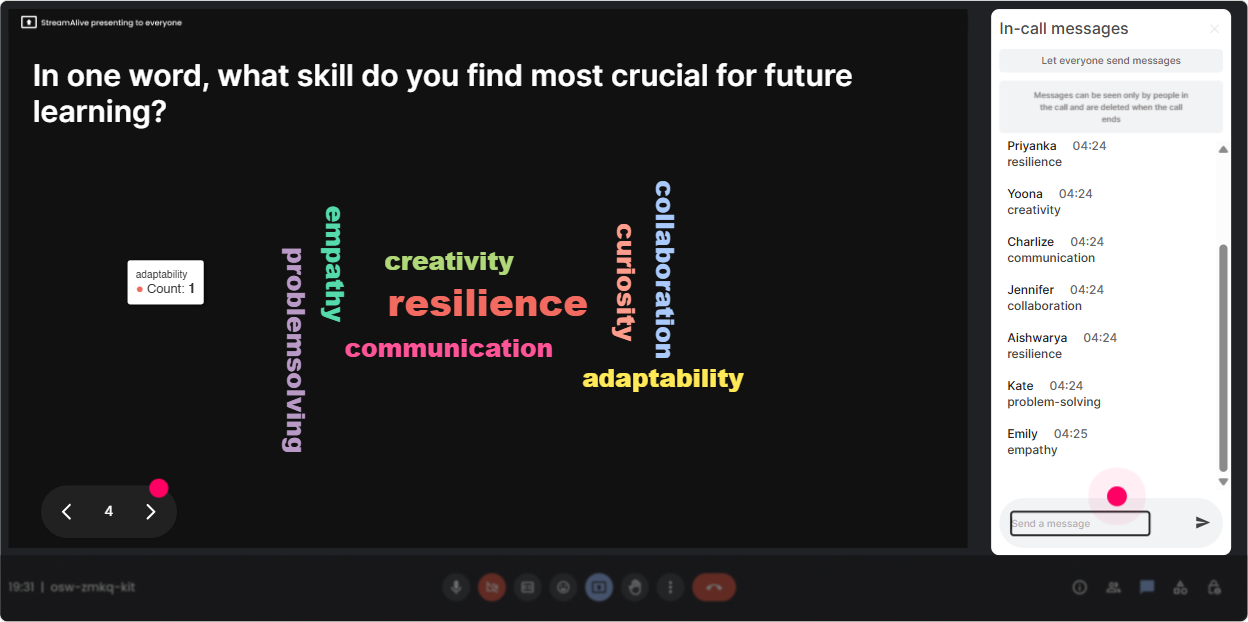
3) Wonder Words (Word Cloud): Get the rooms honest feelings-fast
Micro-Credentials can trigger very real reactions: excitement, skepticism, confusion, budget anxiety a Word Cloud lets you surface all of that without putting anyone on the spot. **Best time to run it:** right after defining Micro-Credentials (or before, if you want to start with perceptions). **Word Cloud prompts you can use:** - **When you hear Micro-Credentials, whats the first word that comes to mind?** - **What do you hope Micro-Credentials will improve? (12 words)** (ex: mobility, retention, performance) - **Whats the biggest barrier in your org? (12 words)** (ex: buy-in, budget, tech, governance) **Trainer tip:** You can use the Word Cloud as your agenda pivot. If buy-in becomes huge, youve just earned permission to spend more time on stakeholder strategy without anyone feeling like you went off track.
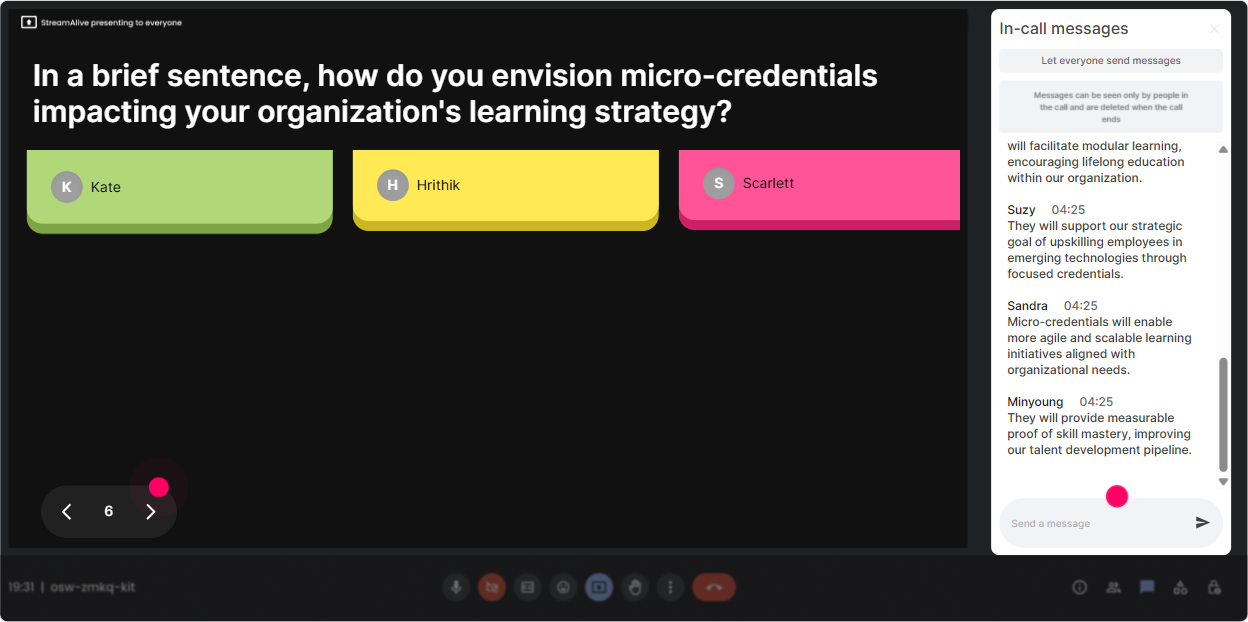
4) Talking Tiles: Turn quiet thinking into visible peer learning
Sometimes you want more than one-word answers-this is where Talking Tiles shines. It makes longer responses feel lively because everyones input becomes part of the visual experience. **Great moments to use Talking Tiles in Micro-Credentials training:** - **Where could Micro-Credentials make the biggest impact in your role-right now?** - **Describe a skills gap youre under pressure to solve this year.** - **If you launched one Micro-Credential next quarter, what would it be on?** - **What would success look like 90 days after launch?** **Trainer tip:** Read 35 tiles out loud and group them into themes (Im seeing a lot of leadership pathways, a lot of frontline enablement, and a big chunk of data/analytics). Now youre facilitating, not presenting.
5) Power Polls: Let the audience choose the path (and feel ownership)
Trainers often guess what people want most-polls remove the guesswork and make the session feel customized. **Use it to let L&D Leaders steer the session:** - **What do you want to get out of today most?** 1) Building a Micro-Credential framework 2) Stakeholder buy-in + business case 3) Assessment & evidence design 4) Platform + badge issuing basics - **Whats your biggest implementation question?** 1) Governance/quality standards 2) Funding & ROI 3) Faculty/SME involvement 4) Adoption & comms **Trainer tip:** Run a poll before a break. Then come back saying: Alright, you voted-lets go where the room wants to go. That one sentence boosts engagement because people feel like its their session.

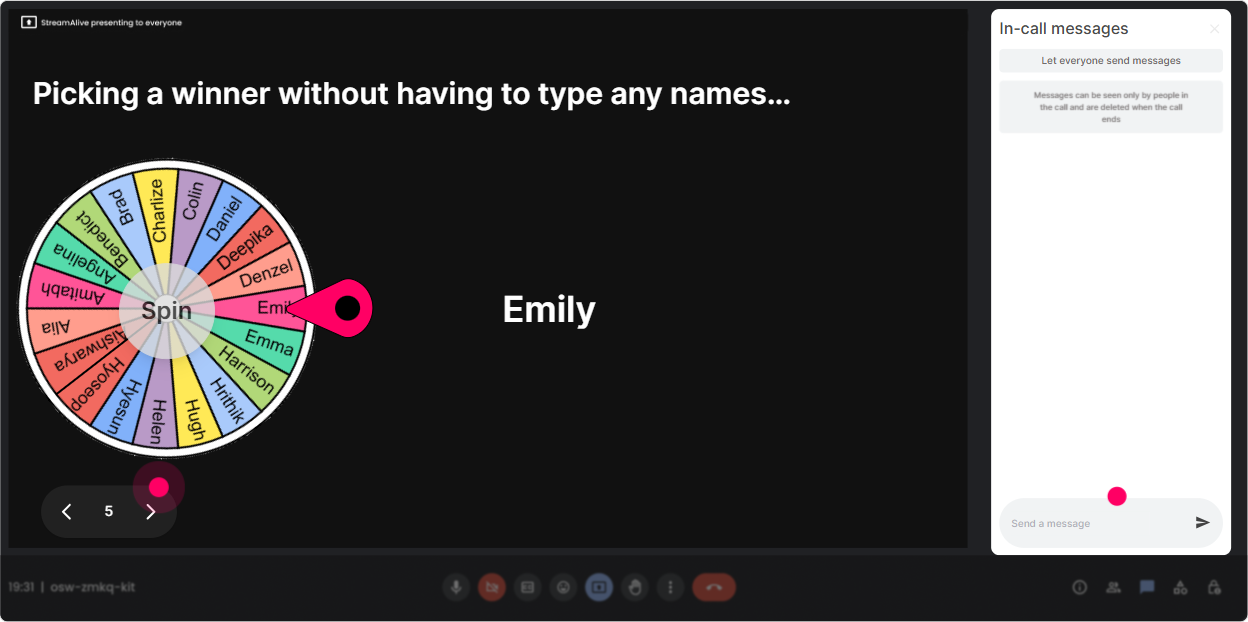
6) Winner Wheel: Get volunteers without the awkward silence
You know that moment when you ask, Who wants to share? and suddenly everyone becomes extremely interested in their mute button? Winner Wheel fixes that-playfully. **How to use it in Micro-Credentials ILT:** - Tell them: Type one sentence in chat. Im going to spin the wheel and have one person expand on it for 30 seconds. - Prompts that work really well: - **Whats one team youd pilot Micro-Credentials with first?** - **Whats one risk you want to avoid?** - **Whats one metric youd track?** **Trainer tip:** Make it low-pressure: You can pass if you want, but most people dont once theyre picked. It keeps the tone fun, and youll get way more voices in the room.
7) Quiz: Do quick knowledge checks that dont feel like school
Micro-Credentials has terminology and design principles that people *think* they know-until you quiz it. A quick quiz makes learning stick and gives you a natural discussion moment. **Quiz questions you can use (multiple choice, one correct):** - **Whats the BEST definition of a Micro-Credential?** A) Any short training course B) A verified credential tied to specific skills + evidence C) A certificate of attendance D) A degree module *(Correct: B)* - **Which element is most critical for credibility?** A) A nice badge design B) Clear evidence/assessment criteria C) A long duration D) A famous instructor *(Correct: B)* - **What typically makes Micro-Credentials scalable?** A) Consistent standards + repeatable assessment B) One-off custom projects C) No governance D) Only live delivery *(Correct: A)* **Trainer tip:** After revealing the correct answer, ask: What made you choose your option? That turns a quiz into a mini case discussion.

2) Rating Polls: Do a quick confidence check (and adjust your pace)
This is your pulse check tool-fast, visual, and super trainer-friendly. It helps you figure out whether youre talking to beginners, experts, or a mix. **Where it fits best:** right after your agenda slide. **Rating Poll ideas for Micro-Credentials ILT:** - **On a scale of 110, how confident are you explaining Micro-Credentials to a business leader?** - **How ready is your organization to launch Micro-Credentials in the next 6 months? (1 not ready 10 ready)** - **How clear is the difference between a certification, badge, and Micro-Credential for you right now? (110)** **Trainer tip:** Call out the spread. If half the room is at 34 and the rest is at 89, you can literally say: Cool, well build a shared definition first, then Ill give the advanced folks a framework you can reuse. People feel seen immediately.
8) Q&A: Capture questions without losing your flow
In Micro-Credentials sessions, questions come in hot-and theyre often important (governance, credibility, ROI, equivalency, compliance). StreamAlives Q&A pulls questions from chat and organizes them so you dont miss the good ones. **How to use it like a pro:** - Set expectations: **Drop questions anytime-StreamAlive will collect them. Ill pause every 15 minutes to answer the top ones.** - Great Q&A moments in this topic: - After definitions (badge vs certification vs Micro-Credential) - After showing a framework (design steps) - After measurement/ROI section **Trainer tip:** When someone asks a strong question, say: Thats a leader-level question-thank you. It signals psychological safety and increases participation instantly.

9) Analytics: Improve every run of the training (without guessing)
If you deliver this Micro-Credentials ILT more than once, Analytics is where you get your edge. Youll see exactly when engagement spiked, when it dipped, and which interactions actually got people talking. **How L&D Leaders and trainers can use the analytics after the session:** - **Minute-by-minute engagement:** Spot where attention dropped (maybe your governance slide needs a story or an interaction). - **Chat replay + analysis:** Revisit what sparked discussion (often the ROI and assessment parts). - **Fantastic Fans:** Identify your most engaged participants (these are your champions for follow-up pilots). - **Interaction reports:** See which polls/quizzes performed best so you can reuse what works. - **Email reports:** Share outcomes with stakeholders or your facilitation team-super useful when proving the session was interactive and not just content delivery. **Trainer tip:** Use the data to tighten the session: keep what lands, trim what doesnt, and place an interaction right before your usual engagement dip. Thats how you systematically get that 9x more engaged feel over time.

Use StreamAlive in all your training sessions
StreamAlive isn’t just for
Micro-Credentials
training,
it can also be used for any instructor-led training session directly inside your PowerPoint presentation.
Explore similar traingin ideas: unlocking the potential of StreamAlive
See how StreamAlive transforms live training with engaging events and interactive sessions across industries, directly inside your PowerPoint presentation.

Interactions in action
(it's free)

.svg.png)


