Install StreamAlive for your PowerPoint slides
Learn more

Microlearning Training for Training Agencies
StreamAlive helps 9x the audience engagement in your Virtual Instructor-led Trainings (VILT) directly inside your powerpoint presentation.
Make your instructor-led Microlearning training more fun with polls, word clouds, spinner wheels and more
Works inside your existing PowerPoint presentation
Install the StreamAlive app for PowerPoint and see your slides come to life as people participate in your interactions
AI generates audience interactions for you
Let our AI scan your presentation and automatically come up with relevant questions based on the content. Or spend two hours coming up with your own questions, your choice!
Built to work with MS Teams and Zoom
Native apps for Teams and Zoom so you never have to leave your existing workflows
No QR Codes
Chat-powered interactions means your audience doesn’t need to scan QR codes or look at another screen to participate. They just type in the chat!

Quickly approved by your IT team
StreamAlive’s apps for Teams and Zoom means that they have been through rigorous quality assurance and client safety reviews. You’ll find everything an IT team needs to approve the app within the organization within your StreamAlive account.

Youve been asked to run a Microlearning instructor-led session for a training agency-and you want it to feel lively, not like another sit and listen webinar. The easiest win? Build tiny moments of interaction every few minutes. Here are practical microlearning-friendly ways to do that using StreamAlive.
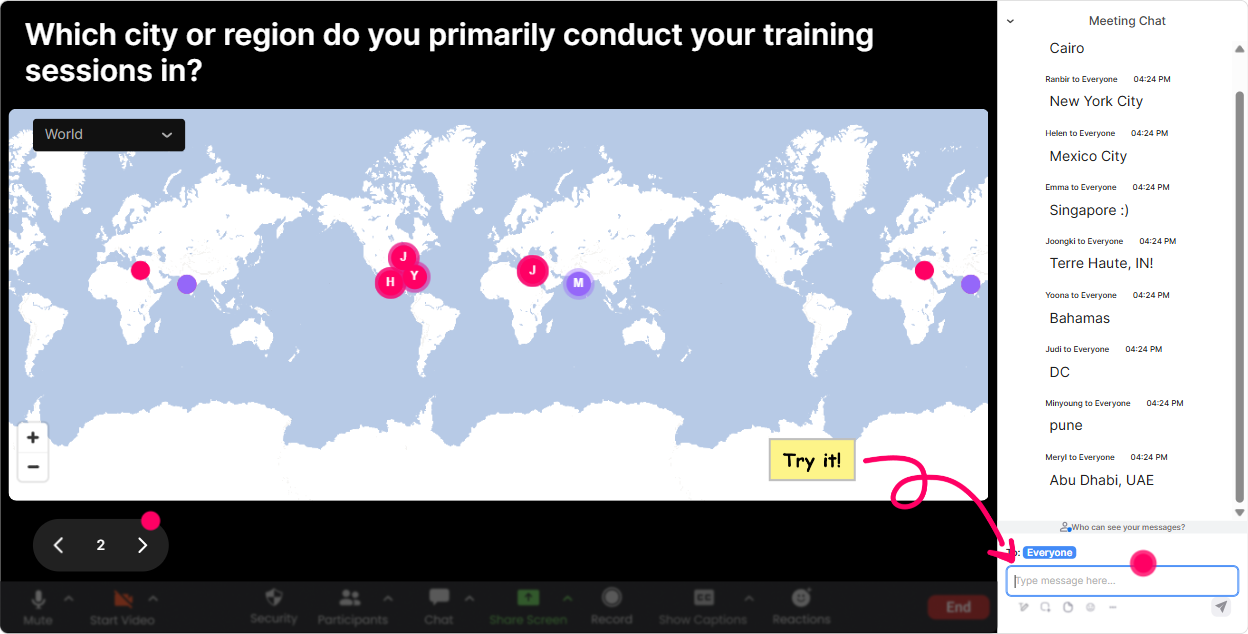
1) Magic Maps: Kick off fast, build instant connection
Microlearning works best when people feel seen early-so dont waste the first 5 minutes with awkward silence. Start with a quick location-based warm-up and let StreamAlives Magic Maps do the heavy lifting by plotting responses live on a world map. Try it in a training agency session like this: - Where are you joining from today? (classic, always works) - Which city do you deliver training in most often? (instantly relevant to agencies) - If you could run your next client workshop anywhere on earth, where would it be? (fun + gets them typing) Microlearning twist: after the map fills up, do a 30-second tie-in: Notice how spread out we are-microlearning is perfect for distributed teams because its easy to deliver in small bursts across time zones. Tip: If you want clean data, allow one location per person so your map stays sharp and readable.
2) Rating Polls: Do a quick temperature check in seconds
Rating Polls are perfect for microlearning because theyre fast. No long explanations. No awkward Does that make sense? moments. You just ask, they rate, and you instantly know where to go next. Use it at the start to gauge baseline: - On a scale of 110, how confident are you in designing microlearning today? - How effective is your current microlearning offering (110)? Use it mid-session as a pulse check: - Rate this idea: One concept per module (110). Use it at the end as instant feedback: - How ready are you to pitch microlearning to a client after this session? (110) Microlearning move: If the average rating is low, you immediately know you need a simpler example. If its high, you can speed up and go into advanced tactics.

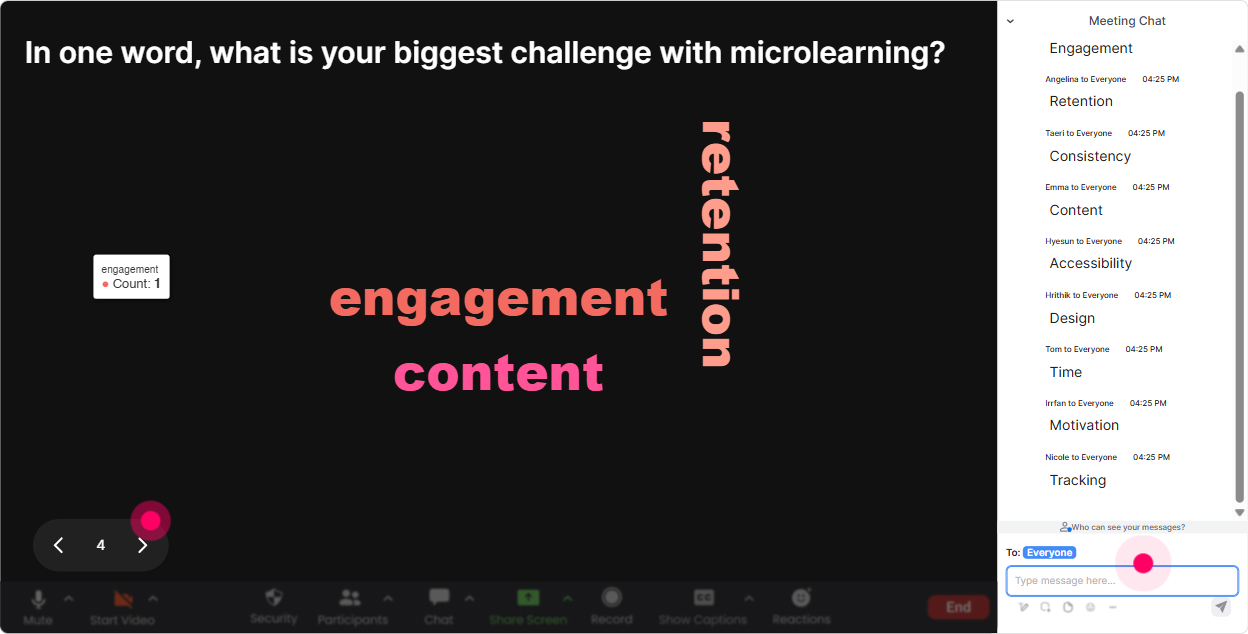
3) Wonder Words (Word Cloud): Get instant feelings, blockers, and priorities
Want honest reactions without calling people out? Word clouds are your best friend. Ask for 12 word responses and let StreamAlive build a live word cloud where popular answers get bigger. Great prompts for a microlearning ILT session with training agencies: - Microlearning sounds ____. (fast emotional read: easy, hard, overhyped, exciting) - Whats the biggest microlearning challenge for your clients? (ex: time, buy-in, tracking, attention) - One word: what do learners want most? (ex: relevance, speed, clarity) Microlearning twist: Use the biggest word as your next mini-module topic. Example: if buy-in is huge, your next 4-minute segment becomes How to sell microlearning internally. Tip: Turn on Combine Similar Answers so buy in, buy-in, and buyin dont split your results.
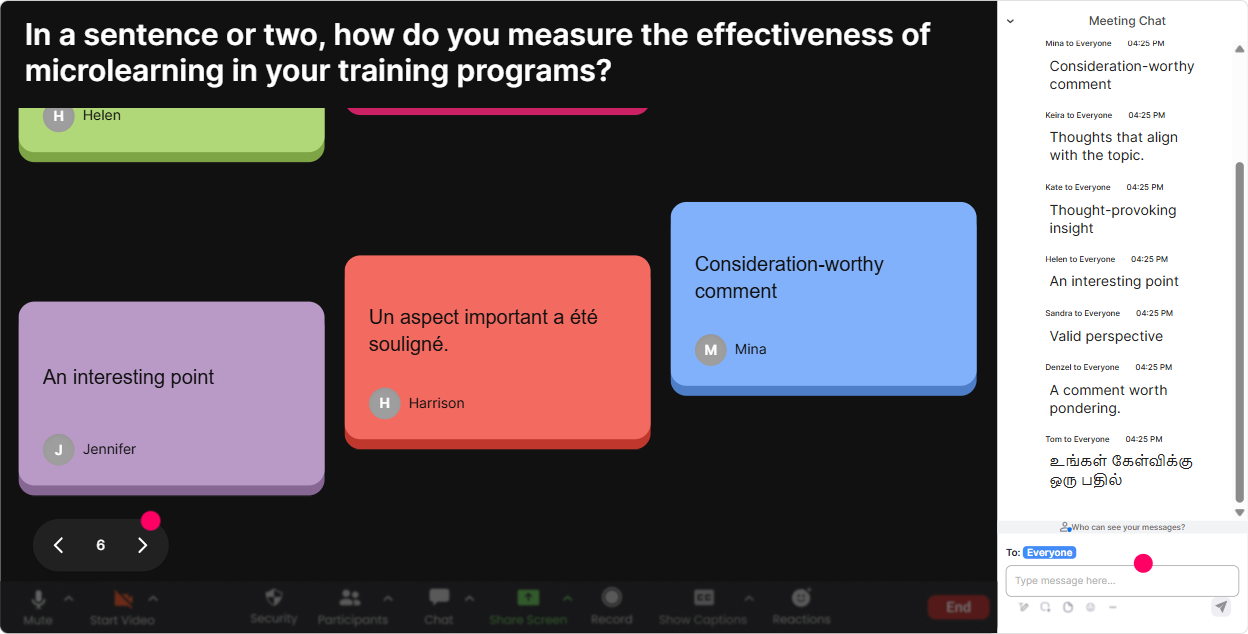
4) Talking Tiles: Turn quick reflection into a visual moment
Talking Tiles are amazing when you want more than one-word answers, but you still want it to feel fun and light. People type a sentence, and StreamAlive turns responses into falling tiles on-screen-so everyones input becomes part of the session. Use it for short reflection bursts (23 minutes) like: - In one sentence: where could microlearning replace a longer module in your current catalog? - Whats one client situation where microlearning would actually solve a real problem? - Finish this: Microlearning would make our training delivery better because ____. Microlearning move: After tiles come in, pick 23 responses and say: Lets build a microlearning example out of this. Youre now co-creating with the room, not just presenting. Tip: This is also a sneaky way to get case studies from agencies (without making it feel like homework).
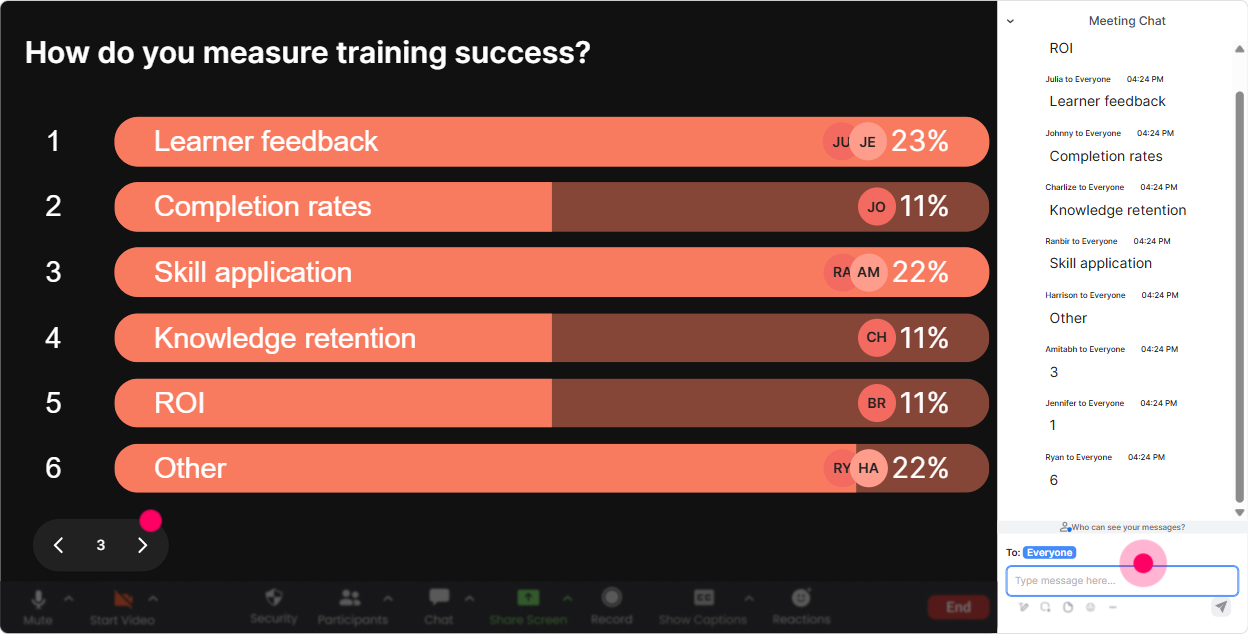
5) Power Polls: Let the audience choose the next micro-topic
Microlearning is all about focus-and Power Polls help you focus on what the room actually wants. Instead of guessing, you let participants vote and you teach the winner. Poll ideas tailored to training agencies: - What do you want to walk away with today? 1) A microlearning storyboard template 2) A 5-minute lesson structure 3) Ways to price microlearning for clients 4) Engagement tactics for live microlearning - Where does microlearning fit best in your client work? 1) Pre-work 2) Post-training reinforcement 3) Product/process updates 4) Compliance refreshers Microlearning move: Run a poll every 1012 minutes to choose the next card. It keeps energy high and makes the session feel personalized. Tip: If you dont want to pre-write options, use the open format (pull answers from chat), then quickly edit out weird duplicates.
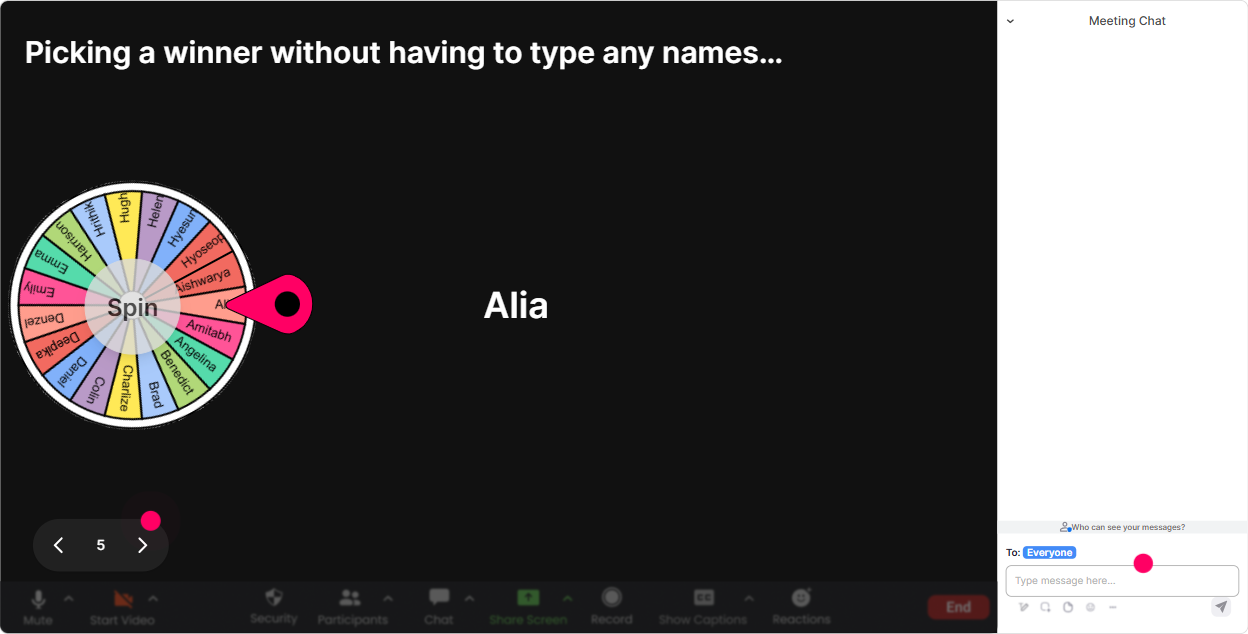
6) Winner Wheel: Make participation feel fun (not forced)
Sometimes you need a volunteer, but no one wants to be the first to unmute. Thats where StreamAlives Winner Wheel is gold-it makes speaking feel like a game, not pressure. Ways to use it in microlearning ILT: - Type ONE microlearning format youve tried (video, quiz, scenario, flashcard). Im going to spin the wheel and the winner shares their example in 20 seconds. - Drop a client industry you work with. Wheel pick = you give us one microlearning idea for that industry. - Quick recap challenge: Ill spin, and that person gives us the 10-second summary of the last segment. Microlearning move: Keep the share-out timeboxed (1030 seconds). That way it stays snappy, and nobody feels trapped in a long explanation. Tip: You can spin from people who commented during a specific interaction-so it rewards participation naturally.
7) Quiz: Do quick knowledge checks without killing momentum
If you want engagement up to stay high, you need tiny prove it moments-Quizzes are perfect for that. You ask a multiple-choice question, people answer in chat, and StreamAlive shows the results live. Then you reveal the correct answer. Quiz questions for training agencies learning microlearning: - Which is the BEST definition of microlearning? A) Any short video B) One objective in a small chunk designed for quick application (Correct) C) A full course broken into chapters D) A slide deck under 10 slides - Whats a common mistake in microlearning design? A) One clear objective B) Immediate practice C) Cramming multiple concepts into one module (Correct) D) Keeping it scenario-based Microlearning move: Use quizzes as transitions. Teach for 4 minutes quiz for 30 seconds discuss results for 60 seconds move on.

2) Rating Polls: Do a quick temperature check in seconds
Rating Polls are perfect for microlearning because theyre fast. No long explanations. No awkward Does that make sense? moments. You just ask, they rate, and you instantly know where to go next. Use it at the start to gauge baseline: - On a scale of 110, how confident are you in designing microlearning today? - How effective is your current microlearning offering (110)? Use it mid-session as a pulse check: - Rate this idea: One concept per module (110). Use it at the end as instant feedback: - How ready are you to pitch microlearning to a client after this session? (110) Microlearning move: If the average rating is low, you immediately know you need a simpler example. If its high, you can speed up and go into advanced tactics.
8) Q&A: Capture questions cleanly without losing the chat
When youre teaching microlearning, questions pop up fast-and the normal chat can get messy. StreamAlives Q&A (Quick Questions) pulls audience questions from the chat and displays them neatly, so youre not scrolling like crazy while trying to teach. How to use it smoothly: - Tell the group: If you have a question, just drop it in chat starting with Q:. - During your microlearning segments, keep a parking lot moment every 10 minutes: Lets clear 2 questions. Great microlearning-relevant questions youll typically get (and can invite): - Q: Whats the ideal length of a microlearning module? - Q: How do we prove ROI to a client? - Q: How do we blend microlearning with ILT without it feeling fragmented? Microlearning move: Dont do one long Q&A at the end. Do tiny Q&A breaks so attention doesnt drift.

9) Analytics: After the session, see what actually worked (and what didnt)
This is the part trainers and agencies love-because it helps you improve fast. StreamAlive Analytics shows minute-by-minute engagement, chat activity, and which interactions landed best. How a training agency can use this right away: - Spot the exact moment engagement dipped (so you can tighten that segment next time) - See which interaction type performed best (polls vs word clouds vs quizzes) - Identify your most engaged attendees (your Fantastic Fans)-these are great candidates for follow-up, referrals, or pilot programs - Share interaction results with your internal team or client stakeholders via email reports Microlearning move: Treat analytics like your iteration engine. Next delivery, keep what spiked engagement and replace what didnt-your session gets better every single time.

Use StreamAlive in all your training sessions
StreamAlive isn’t just for
Microlearning
training,
it can also be used for any instructor-led training session directly inside your PowerPoint presentation.
Explore similar traingin ideas: unlocking the potential of StreamAlive
See how StreamAlive transforms live training with engaging events and interactive sessions across industries, directly inside your PowerPoint presentation.

Interactions in action
(it's free)

.svg.png)


