Install StreamAlive for your PowerPoint slides
Learn more

AI Agents Training for Training Agencies
StreamAlive helps 9x the audience engagement in your Virtual Instructor-led Trainings (VILT) directly inside your powerpoint presentation.
Make your instructor-led AI Agents training more fun with polls, word clouds, spinner wheels and more
Works inside your existing PowerPoint presentation
Install the StreamAlive app for PowerPoint and see your slides come to life as people participate in your interactions
AI generates audience interactions for you
Let our AI scan your presentation and automatically come up with relevant questions based on the content. Or spend two hours coming up with your own questions, your choice!
Built to work with MS Teams and Zoom
Native apps for Teams and Zoom so you never have to leave your existing workflows
No QR Codes
Chat-powered interactions means your audience doesn’t need to scan QR codes or look at another screen to participate. They just type in the chat!

Quickly approved by your IT team
StreamAlive’s apps for Teams and Zoom means that they have been through rigorous quality assurance and client safety reviews. You’ll find everything an IT team needs to approve the app within the organization within your StreamAlive account.

Youve been asked to run an instructor-led session on AI Agents for a Training Agency-and you want it to feel lively (not like a 90-minute lecture). Good news: with StreamAlive, you can turn quiet webinar vibes into real participation. Here are practical ways to use StreamAlive interactions to keep people engaged throughout your AI Agents training.
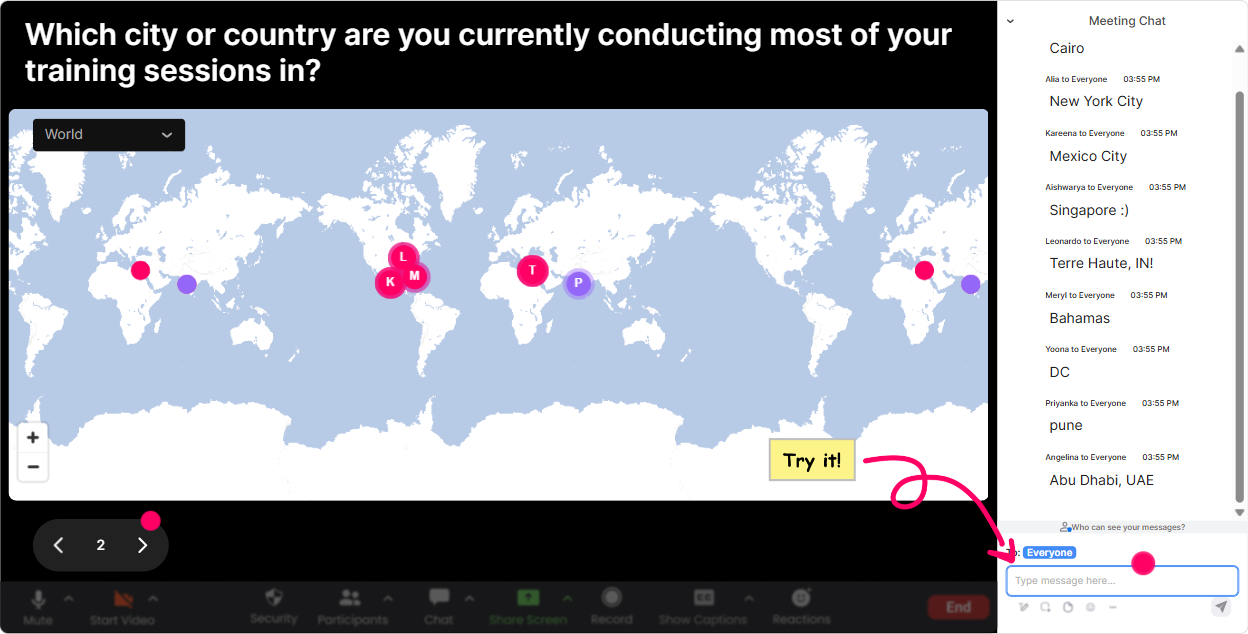
1) Magic Maps: Put your AI Agents audience on the map (and get them chatting fast)
This is the easiest way to kick things off without forcing awkward introductions. In AI Agents training, you want people talking early-because once the chat is active, engagement stays high. How to use it in your AI Agents session (Training Agency edition): - Warm-up question: Where are you joining from today? (classic, always works) - Make it topic-relevant: If you could send an AI Agent to work for you anywhere in the world, where would you deploy it? - Future-focused: Which city do you think will become a major AI talent hub in the next 3 years? Trainer tip: If youre training multiple cohorts (different agencies/regions), Magic Maps instantly shows the mix in the room-then you can tailor examples (Okay, weve got folks from London and Dubai-lets talk compliance and multilingual agents in a second.).
2) Rating Polls: Quick pulse check-how ready are they for AI Agents?
Rating Polls are perfect for those moments when you need a fast temperature check without slowing the session down. Its also a sneaky-good way to get buy-in-because people like seeing where they stand compared to others. How to use it in AI Agents ILT: - At the start: On a scale of 110, how confident are you with AI Agents today? - After explaining a concept: How clear is the difference between a chatbot and an agent now? (110) - Before a hands-on activity: How confident are you that your agency could deliver AI Agents training to clients this quarter? (110) Trainer tip: If the average is low, you know to slow down and add an example. If its high, you can skip the basics and go deeper (tools, workflows, evaluation, safety).

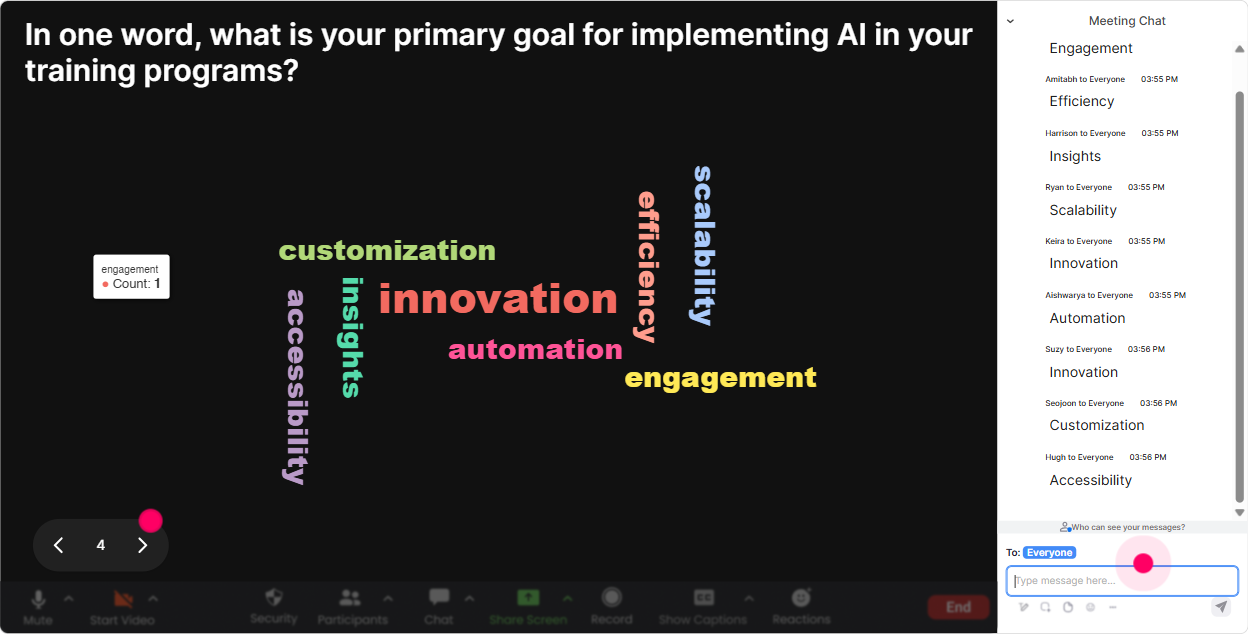
3) Wonder Words (Word Cloud): Get instant feelings + language you can teach with
Word clouds are gold for AI topics because people come in with strong emotions-excited, skeptical, overwhelmed, curious. Instead of guessing the rooms vibe, you can literally see it on screen. Great prompts for AI Agents training: - One word: how do you feel about AI Agents entering your training work? - Whats the biggest benefit of AI Agents for training agencies? (12 words) - Whats your biggest worry about AI Agents? (12 words) - Which department will feel AI Agents first? (Sales, L&D, Ops, HR, etc.) Trainer tip: Use the biggest word in the cloud as your next talking point. If Job loss pops up big, address it head-on. If Productivity is huge, pivot into use cases and ROI.
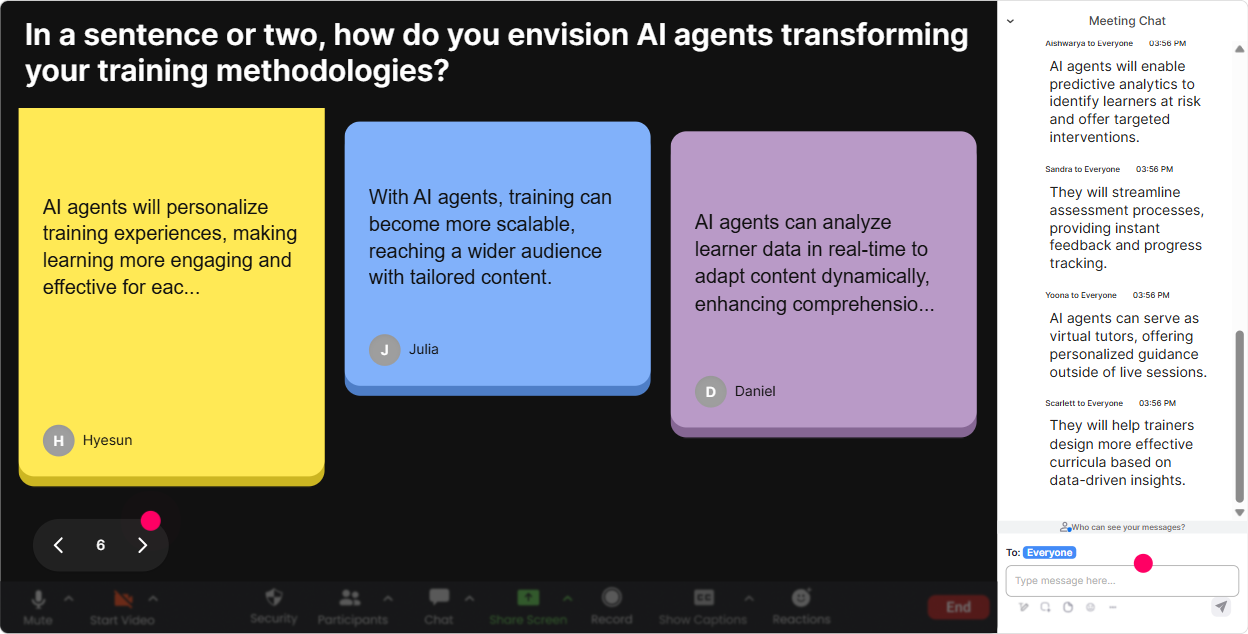
4) Talking Tiles: Turn longer answers into a fun, visual brainstorm
Talking Tiles are awesome when you want more than a one-word answer-without the chat becoming a messy wall of text. It makes peoples responses feel seen, which instantly boosts participation. Use it when you want real context from training agency folks: - Where could an AI Agent save you time in your training business this month? - Whats one client request you keep getting that an AI Agent could help with? - Describe a training workflow youd love to automate (even partially). - If your agency built one AI Agent for internal use, what would it do? Trainer tip: After 3060 seconds of tiles, pause and say, Im going to pick 3 patterns Im seeing. Then group them: lead gen, content creation, learner support, assessments, admin. Boom-instant structure, built from the audience.
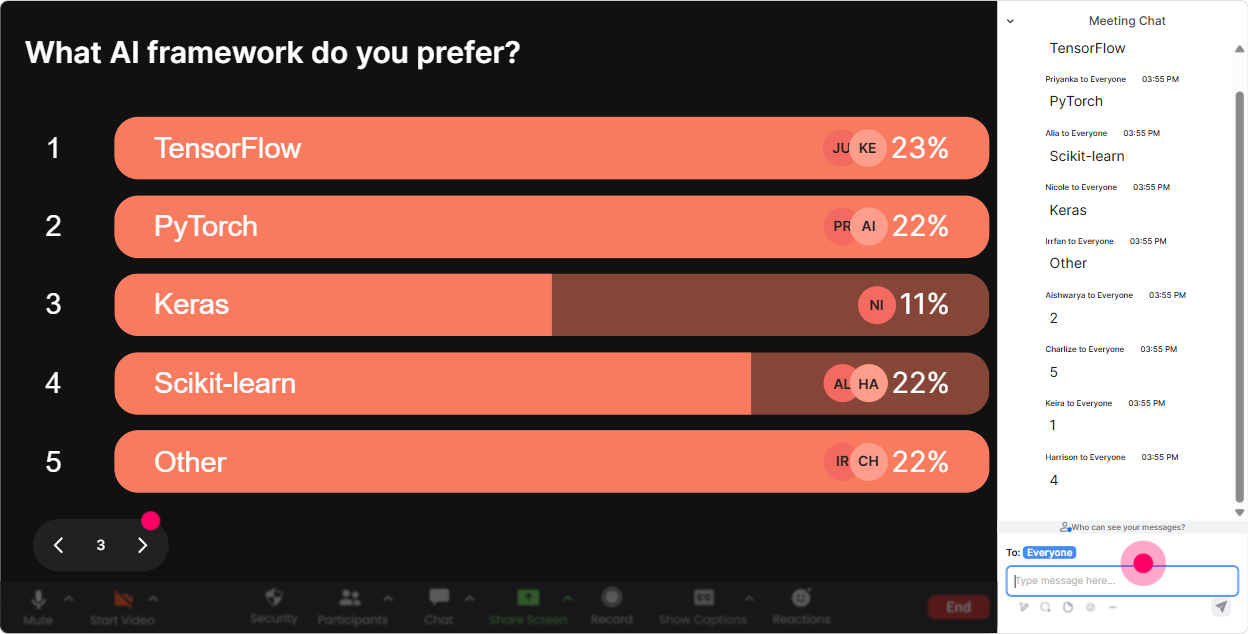
5) Power Polls: Let the audience choose the direction (so they stay invested)
In AI Agents training, there are a LOT of directions you can go-tools, frameworks, governance, prompts, integrations, evals. Power Polls make the audience feel like theyre driving, not just watching. Poll ideas that work really well: - What do you want most from todays AI Agents session? 1) Use cases for training agencies 2) How agents actually work (simple architecture) 3) Building blocks/tools (LLMs, memory, tools, RAG) 4) Safety + governance - Where would you deploy an agent first? 1) Sales follow-up 2) Learner support 3) Trainer assistant (slides, examples, activities) 4) Operations/admin - Which client industry are you building training for most? (so you can tailor examples) Trainer tip: Run a poll right before a break and say, When we come back, well start with the top-voted item. People return because theyre curious to see their choice addressed.
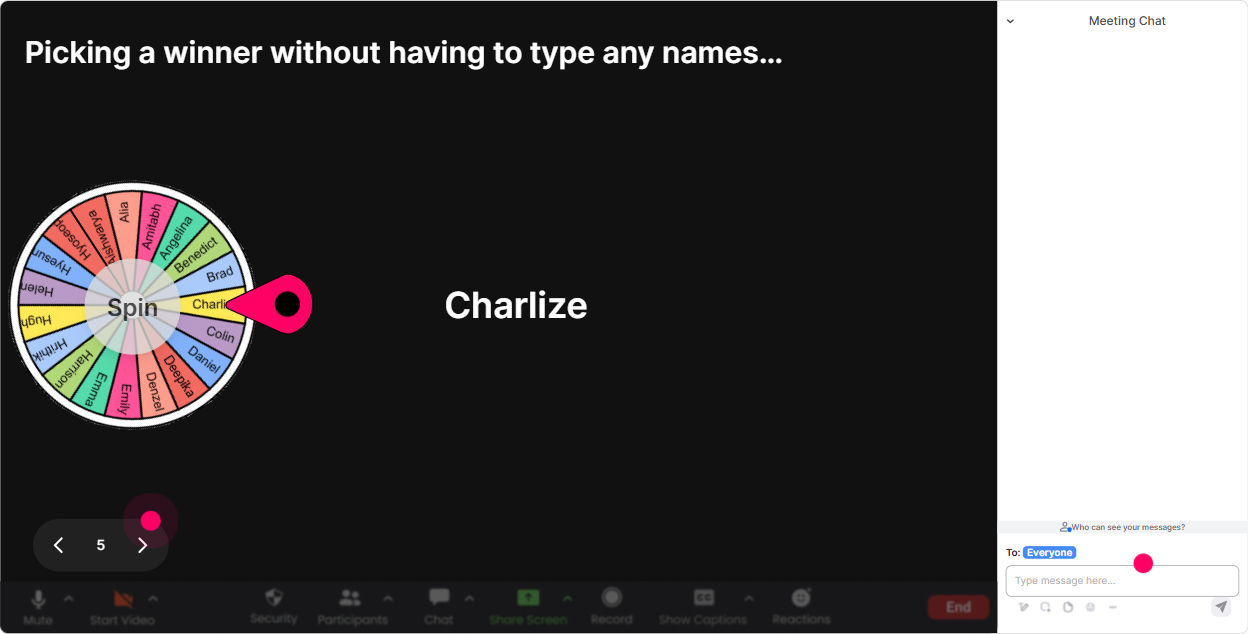
6) Winner Wheel: Get volunteers without the awkward silence
You know that moment: you ask a question and nothing. Winner Wheel fixes that by making participation playful and fair. It also rewards chat activity, which keeps energy up. How to use it in AI Agents ILT: - Drop in chat: whats one task youd trust an AI Agent with? spin the wheel ask the winner to expand for 20 seconds. - Type yes if youve tested any agent tool before. spin winner shares what they tried. - We need one brave volunteer to role-play a client asking for AI Agents training. wheel decides whos up. Trainer tip: Position it as a game, not a gotcha. Say: You can keep it short-one sentence is totally fine. Participation goes way up when people feel safe.
7) Quiz: Make learning stick with quick knowledge checks (that dont feel like exams)
Quizzes are perfect for AI Agents because people think they understand until you test a tiny detail. A quick multiple-choice check keeps attention sharp and helps you correct misconceptions immediately. Quiz questions you can run: - Which is most accurate? A) An agent is just a chatbot with a nicer UI B) An agent can plan steps and use tools to complete tasks (Correct) C) An agent only works if its connected to social media - Whats a good reason to add human-in-the-loop to an AI Agent workflow? A) To slow it down B) To reduce risk and improve quality (Correct) C) To avoid using data - RAG is mainly used for A) Generating images B) Pulling relevant info from your knowledge base to ground answers (Correct) C) Scheduling meetings Trainer tip: After revealing the correct answer, ask: If you chose a different option, what made it sound right? That discussion is where the real learning happens.

2) Rating Polls: Quick pulse check-how ready are they for AI Agents?
Rating Polls are perfect for those moments when you need a fast temperature check without slowing the session down. Its also a sneaky-good way to get buy-in-because people like seeing where they stand compared to others. How to use it in AI Agents ILT: - At the start: On a scale of 110, how confident are you with AI Agents today? - After explaining a concept: How clear is the difference between a chatbot and an agent now? (110) - Before a hands-on activity: How confident are you that your agency could deliver AI Agents training to clients this quarter? (110) Trainer tip: If the average is low, you know to slow down and add an example. If its high, you can skip the basics and go deeper (tools, workflows, evaluation, safety).
8) Q&A: Capture questions cleanly-without losing them in the chat chaos
In AI Agents sessions, questions come fast-and theyre often important (privacy, tools, cost, limitations). StreamAlives Q&A captures them directly from chat and keeps them organized, so youre not scrolling and missing the good stuff. How to use it smoothly: - Set the norm early: Drop questions anytime-StreamAlive will collect them and Ill pause every 10 minutes. - Mid-session checkpoint: Lets clear the top 3 questions before we build the workflow. - End-of-session: Well do a lightning round-short answers, rapid-fire. Trainer tip: If you see repeated themes (like data security), say it out loud: Im seeing 5 questions about privacy-lets handle that properly. People feel heard, and trust goes up.

9) Analytics: Improve every cohort (and prove your training worked)
This is the part trainers and training agencies love after the session-because its not just I think it went well. You can actually see what happened. How Training Agencies can use StreamAlive Analytics for AI Agents ILT: - See minute-by-minute engagement: Find exactly where attention spiked (maybe during use cases) or dipped (maybe during heavy theory) and adjust your next delivery. - Review chat replay + interaction results: Perfect for improving your slides, timing, and activities. - Identify your most engaged participants (Fantastic Fans): These are often your champions-future facilitators, pilot-group volunteers, or even internal advocates. - Share results easily: Email reports to your team, or use the insights to refine your agencys AI Agents curriculum. Trainer tip: After 23 deliveries, use analytics to create a tighter best-of run-of-show. Thats how you reliably crank engagement up (and why StreamAlive can feel like a 9x boost-because youre not guessing anymore).

Use StreamAlive in all your training sessions
StreamAlive isn’t just for
AI Agents
training,
it can also be used for any instructor-led training session directly inside your PowerPoint presentation.
Explore similar traingin ideas: unlocking the potential of StreamAlive
See how StreamAlive transforms live training with engaging events and interactive sessions across industries, directly inside your PowerPoint presentation.

Interactions in action
(it's free)

.svg.png)


