Install StreamAlive for your PowerPoint slides
Learn more

Mental Health & Wellbeing Focus Training for Training Agencies
StreamAlive helps 9x the audience engagement in your Virtual Instructor-led Trainings (VILT) directly inside your powerpoint presentation.
Make your instructor-led Mental Health & Wellbeing Focus training more fun with polls, word clouds, spinner wheels and more
Works inside your existing PowerPoint presentation
Install the StreamAlive app for PowerPoint and see your slides come to life as people participate in your interactions
AI generates audience interactions for you
Let our AI scan your presentation and automatically come up with relevant questions based on the content. Or spend two hours coming up with your own questions, your choice!
Built to work with MS Teams and Zoom
Native apps for Teams and Zoom so you never have to leave your existing workflows
No QR Codes
Chat-powered interactions means your audience doesn’t need to scan QR codes or look at another screen to participate. They just type in the chat!

Quickly approved by your IT team
StreamAlive’s apps for Teams and Zoom means that they have been through rigorous quality assurance and client safety reviews. You’ll find everything an IT team needs to approve the app within the organization within your StreamAlive account.

Youve been asked to run a Mental Health & Wellbeing Focus instructor-led session for a training agency-and you want it to feel safe, useful, and genuinely engaging (not like a checkbox webinar). The easiest way to get there? Get people participating early and often. Here are practical ways to do that using StreamAlive interactions so your session can feel up to 9x more alive.
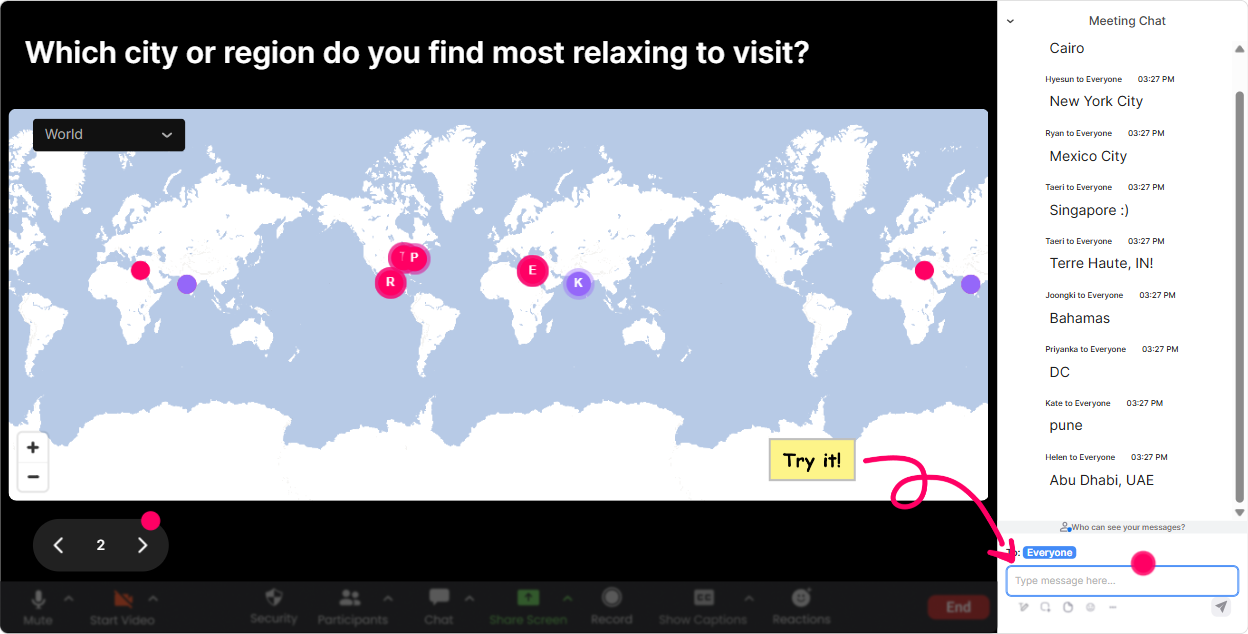
Magic Maps: make it human from minute one
Mental health sessions land better when the room feels like a community, not a crowd. Magic Maps is a super simple icebreaker that instantly makes everyone feel seen without forcing anyone to share anything too personal. How to use it in your Mental Health & Wellbeing Focus training: - Kick off with: Where are you joining from today? and let StreamAlive plot everyone live on the map. Its an easy win for connection. - Try a wellbeing-themed spin: If you could take a 3-day reset anywhere on earth, where would you go? (Great way to start talking about recovery and rest without getting heavy.) - Or keep it workplace-relevant: Which city do you work in most often? (Helpful if youre training multi-site teams or agency partners.) Trainer tip: If your group is global, use the map to casually acknowledge time zones: Okay, weve got people joining super early and super late-lets keep breaks generous. It builds trust fast.
Rating Polls: quick pulse checks that guide how you teach
When youre training on wellbeing, you dont want to guess where people are at-you want to know. Rating Polls give you a clean, instant pulse check without putting anyone on the spot. Ways to use Rating Polls during the session: - Confidence check (start): On a scale of 110, how confident are you in having a supportive conversation with someone whos struggling? - Stress pulse (mid-session): Right now, how stressed do you feel today? 1 = calm, 10 = maxed out. (Then you can react in the moment-slow down, add a micro-break, or do a quick breathing reset.) - Practicality check (end): How usable were todays tools for your real training rooms and clients? 110. Trainer tip: Say what youll do with the data. Example: If confidence is under 6, Ill add a few more examples and a script you can steal. People participate more when it clearly benefits them.

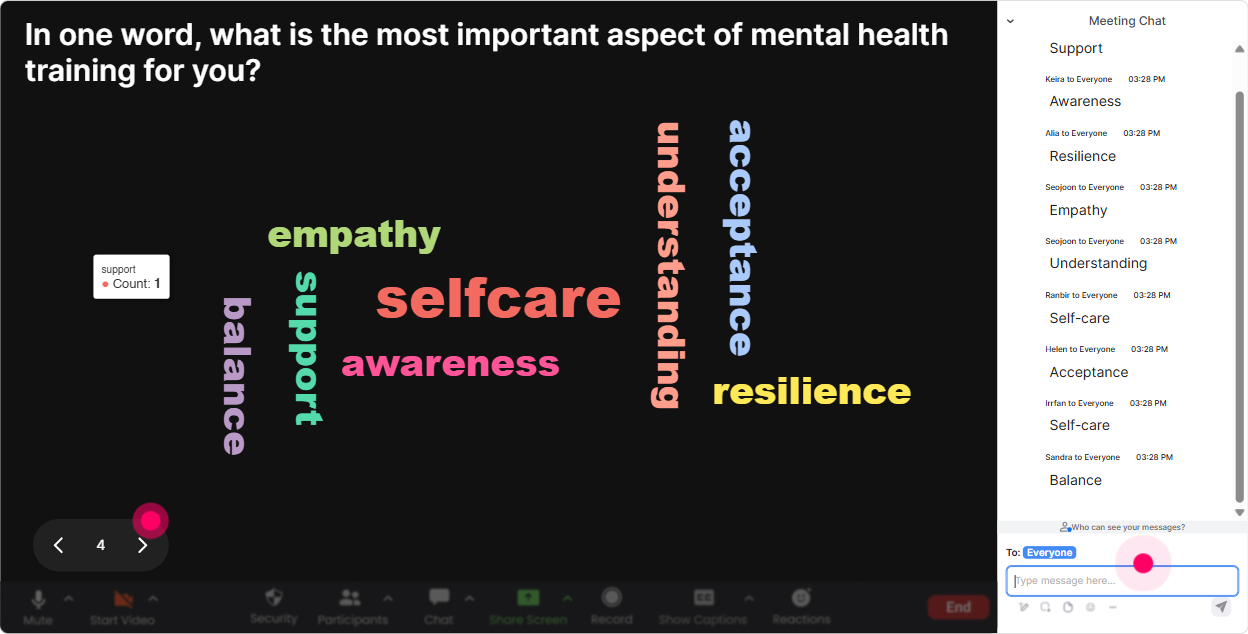
Wonder Words: capture the vibe in the room (fast)
You know that moment where you ask, Hows everyone feeling about this topic? and get silence? Wonder Words fixes that. It turns quick chat replies into a live word cloud-so you can literally see what the group is thinking. Great prompts for Mental Health & Wellbeing Focus training: - In 12 words: what comes to mind when you hear workplace wellbeing? - How are you arriving today? One word. (Perfect for setting a supportive tone.) - Whats the biggest barrier to prioritizing mental health at work? (Expect words like time, culture, workload, stigma-and now you know what to address.) Trainer tip: If you see a big word like stigma or burnout, pause and name it: Okay, thats loud and clear-lets talk about that one. The room feels heard immediately.
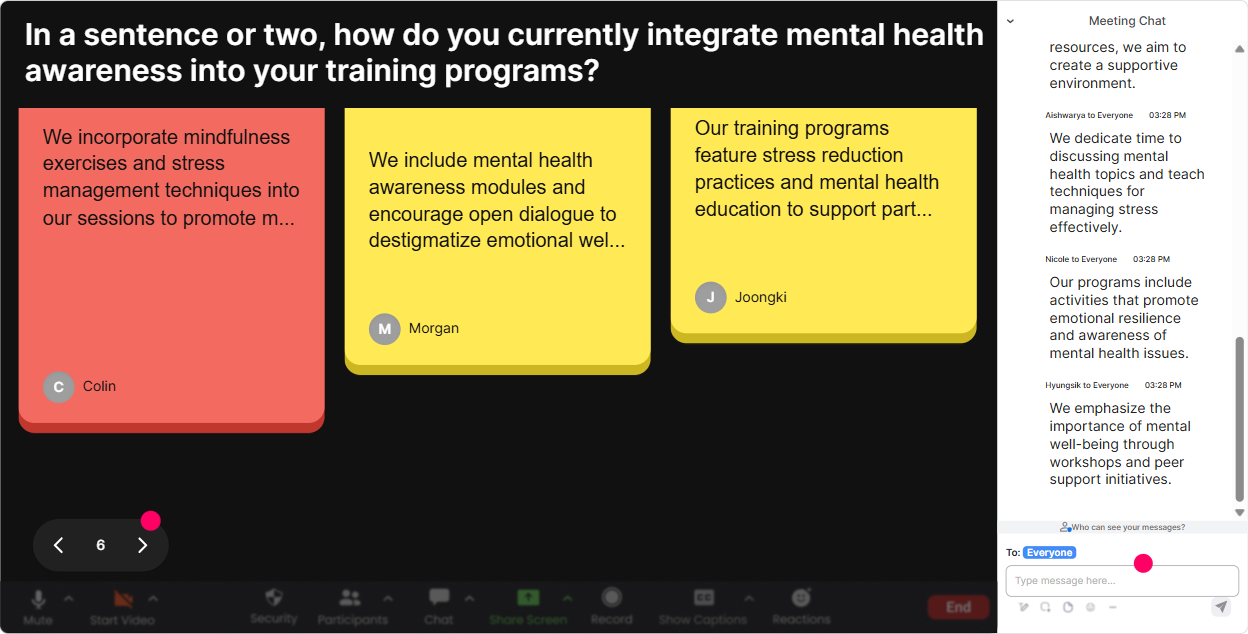
Talking Tiles: turn real experiences into teachable moments (without the awkwardness)
Talking Tiles is where you get richer, more real answers-without needing people to unmute and do a big speech. Their messages fall onto the screen like tiles, so the whole group gets a sense of shared experience. Use it for prompts that need more than a couple words: - Whats one early sign youve noticed (in yourself or a team) that stress is becoming a problem? - Whats one thing a manager/trainer could say that would make it easier to speak up? - Finish this sentence: A mentally healthy workplace looks like Trainer tip: In wellbeing sessions, add a gentle boundary: Share what youre comfortable with-no personal details needed. Youll still get great insights, and people feel safe.
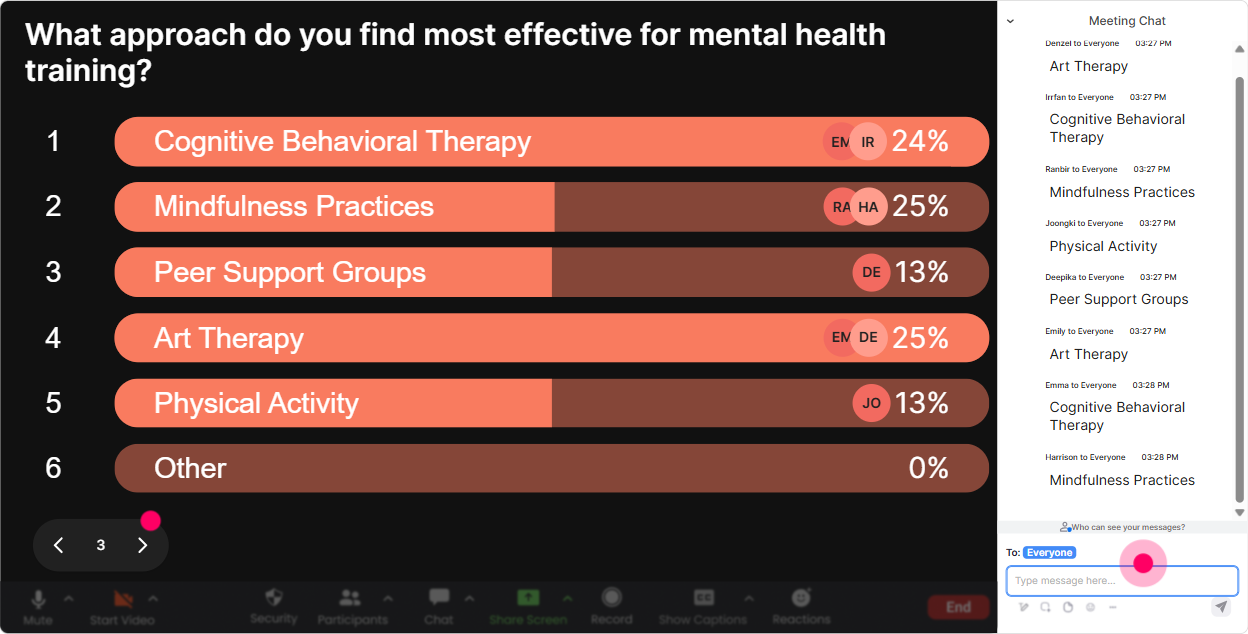
Power Polls: let the group decide what you focus on
Power Polls are perfect when youve got a lot to cover (and not enough time). Instead of guessing what matters most to this agency/client group, let them vote-and then teach to the room. Poll ideas that fit Mental Health & Wellbeing Focus training: - What do you want most from today? 1) Practical conversation scripts 2) Spotting early warning signs 3) Preventing burnout in teams 4) Building a wellbeing culture - Which situation feels hardest? 1) An employee whos disengaged 2) Someone whos tearful/emotional 3) A high performer burning out 4) A team under constant deadlines - Whats your biggest constraint right now? 1) Time 2) Leadership buy-in 3) Confidence/skills 4) Company culture Trainer tip: Show results live and narrate your pivot: Looks like burnout prevention is winning-cool, Ill spend extra time there and keep the other pieces tight. People love when you adapt in real time.
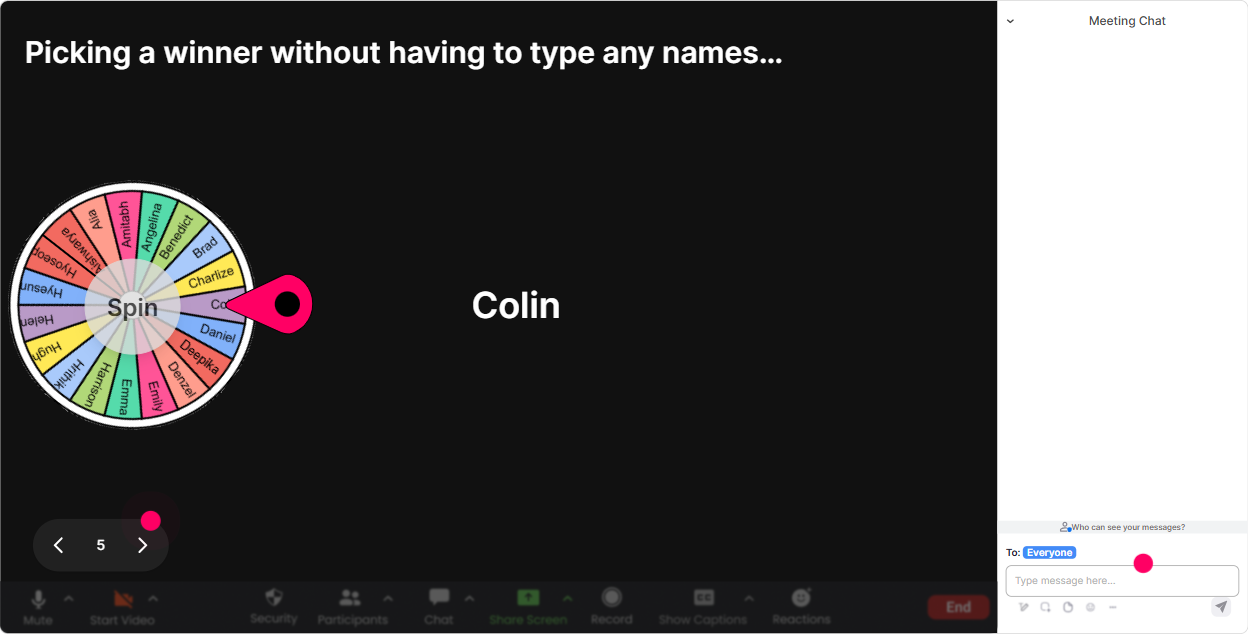
Winner Wheel: get voices in the room (without the pressure)
Getting people to speak up in a mental health session can be tricky-some folks are nervous, some dont want attention, and some are just multitasking. Winner Wheel is a fun, low-friction way to invite participation. How trainers use it without making it stressful: - Tell people: If you comment once in chat, youre in the draw-no pressure to overshare. - Use it for low-stakes prompts: - Share one small wellbeing habit that actually works for you. - Drop a quick yes/no-should we role-play a manager check-in? - Spin the wheel to pick someone to answer a simple, practical question: - Whats a phrase you might use to start a supportive conversation? Trainer tip: Always give an opt-out line: If youd rather not unmute, just say pass and Ill spin again. That one sentence protects psychological safety.
Quiz: quick myth-busting and knowledge checks people actually enjoy
A Quiz interaction is your best friend for mental health training because it helps you correct misconceptions without calling anyone out. People answer in chat, you show results live, and then you reveal the correct answer. Quiz questions you can run (simple and useful): - Which is the best first step when someone shares theyre struggling? A) Give advice immediately B) Listen, thank them, and ask what support looks like for them (Correct) C) Tell them to take a few days off D) Escalate to HR right away - True or False: Burnout is only caused by working long hours. (Correct: False) - Which phrase is most supportive? A) Youll be fine. B) Others have it worse. C) That sounds tough-do you want to talk about whats been hardest lately? (Correct) D) Try not to think about it. Trainer tip: Use the quiz results to steer discussion: Interesting-lots of us chose A. Lets unpack why advice-first can backfire.

Rating Polls: quick pulse checks that guide how you teach
When youre training on wellbeing, you dont want to guess where people are at-you want to know. Rating Polls give you a clean, instant pulse check without putting anyone on the spot. Ways to use Rating Polls during the session: - Confidence check (start): On a scale of 110, how confident are you in having a supportive conversation with someone whos struggling? - Stress pulse (mid-session): Right now, how stressed do you feel today? 1 = calm, 10 = maxed out. (Then you can react in the moment-slow down, add a micro-break, or do a quick breathing reset.) - Practicality check (end): How usable were todays tools for your real training rooms and clients? 110. Trainer tip: Say what youll do with the data. Example: If confidence is under 6, Ill add a few more examples and a script you can steal. People participate more when it clearly benefits them.
Q&A: capture every question without losing the chat
In wellbeing training, questions often show up quietly in the chat-especially if people dont want to say it out loud. StreamAlive Q&A automatically detects questions and organizes them for you, so you dont miss the important stuff. How it helps in your Mental Health & Wellbeing Focus session: - Invite questions anytime: Drop questions in chat as they come up-StreamAlive will catch them. - Use it for sensitive topics where people may be hesitant: - What can I say if someone discloses anxiety? - Whats my role vs HRs role? - How do we support someone without becoming their therapist? - Do a structured Q&A block: Lets do 10 minutes-top questions on the board, well go one by one. Trainer tip: If a question is heavy, normalize it: Youre not the only one wondering this. That keeps the room open and reduces shame.

Analytics: figure out what truly engaged them (so your next session is even better)
After a mental health session, youll want more than That was great! StreamAlive Analytics shows you what actually happened-minute by minute-so you can improve the session with real evidence. What to look for after your training: - Minute-by-minute engagement: Spot where attention dipped (maybe your lecture section ran long) and where it spiked (often during polls, quizzes, or stories). - Chat replay + analysis: See which topics triggered the most conversation-burnout, workload, boundaries, manager scripts, etc. - Fantastic Fans / top participants: Identify your most engaged attendees (great for follow-up, champions, or pilot groups for future programs). - Interaction reports: Review which questions/polls landed best so you can reuse the strongest ones. - Email reports: Share outcomes with your team or the client: Heres what the room cared about most, and where confidence shifted. Trainer tip: Use analytics to evolve the course: if the data shows people light up during scripts and scenarios, build more role-play moments next time. Thats how you turn one good session into a repeatable, high-engagement program.

Use StreamAlive in all your training sessions
StreamAlive isn’t just for
Mental Health & Wellbeing Focus
training,
it can also be used for any instructor-led training session directly inside your PowerPoint presentation.
Explore similar traingin ideas: unlocking the potential of StreamAlive
See how StreamAlive transforms live training with engaging events and interactive sessions across industries, directly inside your PowerPoint presentation.

Interactions in action
(it's free)

.svg.png)


