Install StreamAlive for your PowerPoint slides
Learn more

AI Anxiety Training for L&D Leaders
StreamAlive helps 9x the audience engagement in your Virtual Instructor-led Trainings (VILT) directly inside your powerpoint presentation.
Make your instructor-led AI Anxiety training more fun with polls, word clouds, spinner wheels and more
Works inside your existing PowerPoint presentation
Install the StreamAlive app for PowerPoint and see your slides come to life as people participate in your interactions
AI generates audience interactions for you
Let our AI scan your presentation and automatically come up with relevant questions based on the content. Or spend two hours coming up with your own questions, your choice!
Built to work with MS Teams and Zoom
Native apps for Teams and Zoom so you never have to leave your existing workflows
No QR Codes
Chat-powered interactions means your audience doesn’t need to scan QR codes or look at another screen to participate. They just type in the chat!

Quickly approved by your IT team
StreamAlive’s apps for Teams and Zoom means that they have been through rigorous quality assurance and client safety reviews. You’ll find everything an IT team needs to approve the app within the organization within your StreamAlive account.

Youve been asked to run an AI Anxiety instructor-led training for L&D Leaders-and you want it to feel human, not heavy. The fastest win? Get people talking early and often, so the fear doesnt sit silently in the room. Here are simple, trainer-friendly ways to do it with StreamAlive (and keep engagement up to 9x higher).
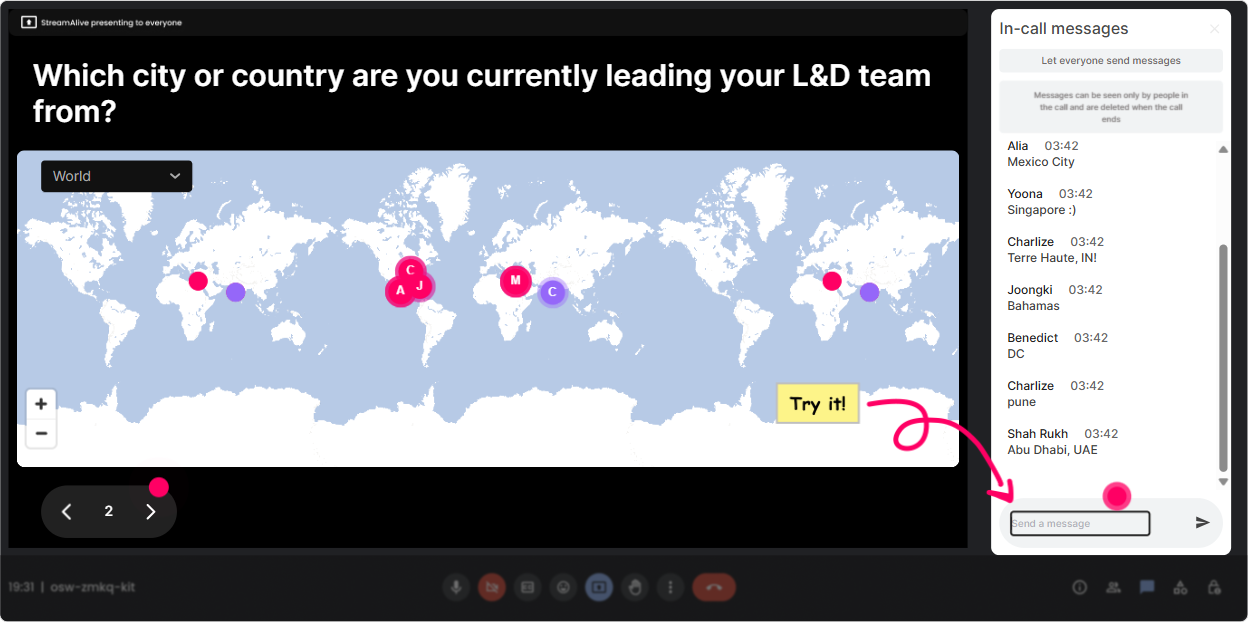
1) Magic Maps: Start with Were in this together energy
AI anxiety is personal, and people feel it differently depending on role, industry, even region. Magic Maps is an easy icebreaker that instantly turns a quiet room into a shared experience room. How to use it in your AI Anxiety training for L&D Leaders: - Kickoff question: Where are you joining from today? (classic, always works) - Make it topic-relevant: If AI could instantly solve ONE L&D challenge for you, where would you be doing that work from-HQ, remote, plant, field, client site? (ask them to answer with a city/location) - Add a fun twist: If you could teleport anywhere to learn AI skills for a week, where are you going? Trainer tip: When the map clusters pop up (hello, London / Toronto / Mumbai), use it as a segue: Cool-different regions, different pressures. Lets unpack whats driving AI anxiety for you.
2) Rating Polls: Take the temperature in 10 seconds
Before you teach anything, find out where people are at. Rating Polls give you an instant read-without putting anyone on the spot. How to use it: - Opener: On a scale of 110, how anxious is your org about AI right now? - Confidence check: Rate your confidence in explaining AI to business leaders (1 = not confident, 10 = I can lead the conversation). - Mid-session pulse: Right now, how clear is the difference between AI adoption and AI governance? - Wrap-up: After today, how ready do you feel to run an AI conversation with your stakeholders? Trainer tip: Read the average out loud and react like a real person would: Okay, were sitting around a 4/10 on confidence-perfect. That means were in the right room.

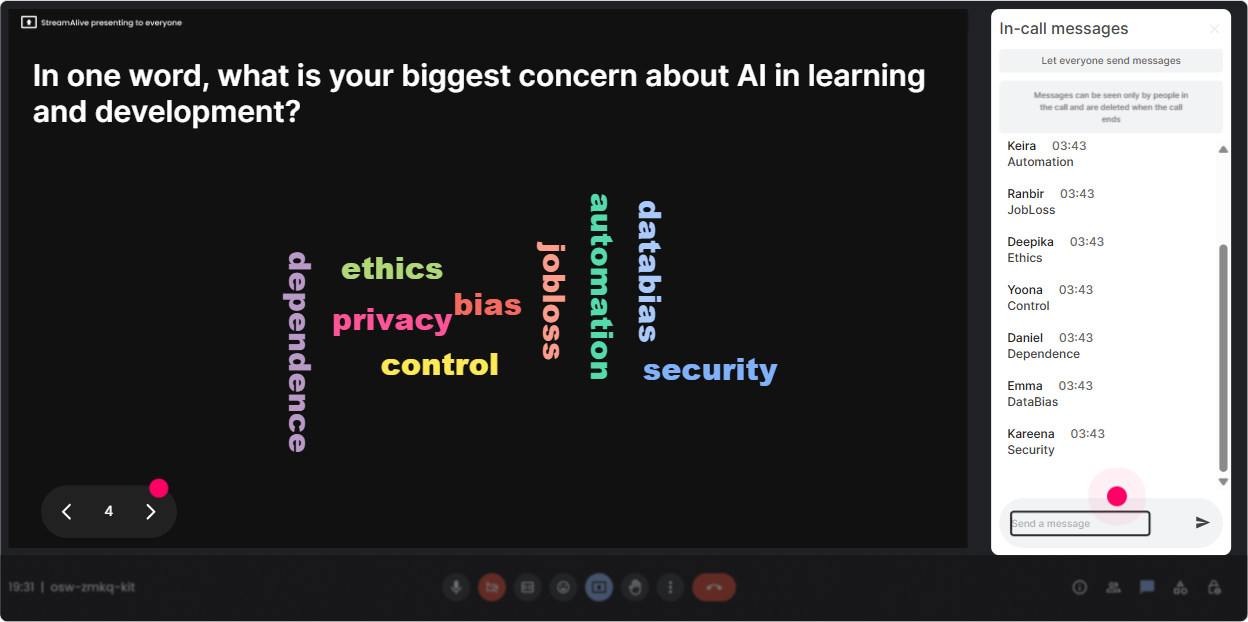
3) Wonder Words (Word Cloud): Let people admit the real feelings-fast
AI anxiety comes with emotion-fear, excitement, pressure, skepticism. A word cloud is the easiest way to surface what people wont say in a full sentence. Prompts that work great (keep it 12 words): - When you hear AI at work, whats your first reaction? - What word describes your leadership teams attitude toward AI? - Whats the biggest risk you worry AI brings to L&D? - One word: what do employees in your org assume AI will do? Trainer tip: When a word gets huge (like job loss or overwhelm), pause and name it: Alright, overwhelm is the big one. Lets normalize that-and then give you a way through it.
4) Talking Tiles: Turn nervous energy into real stories
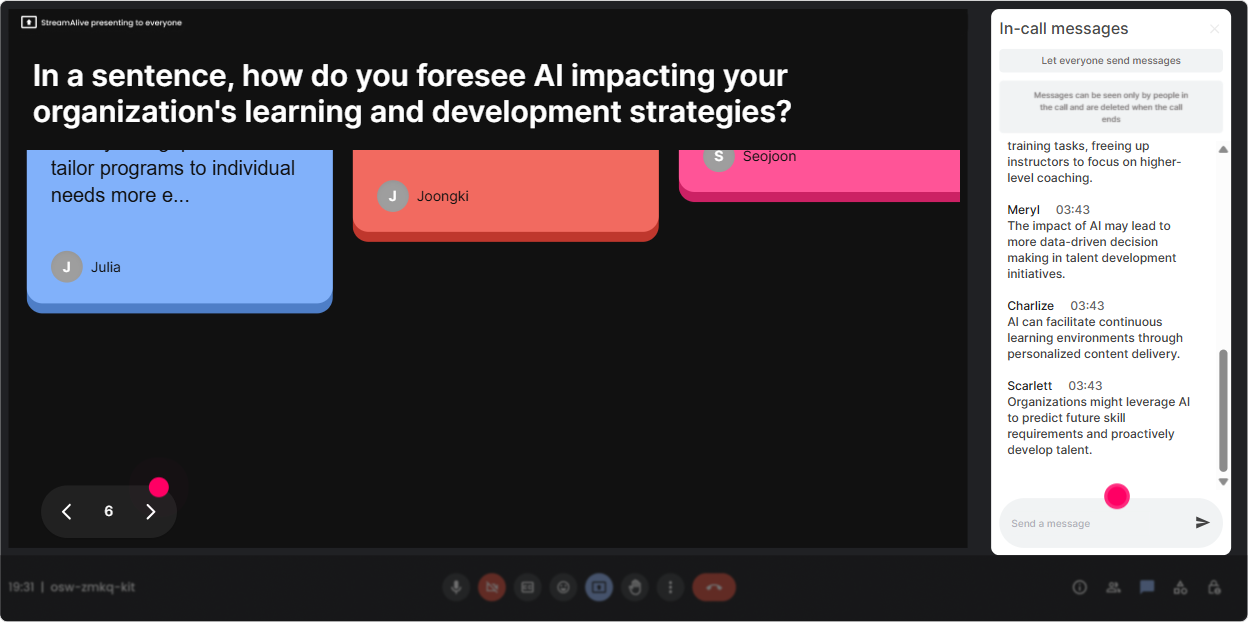
Once the feelings are on the table, you want context. Talking Tiles is perfect because it invites longer, real responses-and makes it fun to watch as they land on screen. Use it for prompts like: - Where is AI anxiety showing up in your organization-what are you hearing from employees or leaders? - Whats one AI-related question you keep getting asked (and youre tired of answering)? - Describe the most AI-panicky moment youve seen at work in the last 6 months. - Whats the one part of your role that feels most at risk-or most about to change? Trainer tip: After a few tiles fall, pick 23 and say, Lets group these-this sounds like fear of replacement, this sounds like legal/compliance worry, and this sounds like skills confusion. Boom: instant structure for your session.
5) Power Polls: Let the audience choose the direction (so they stay with you)
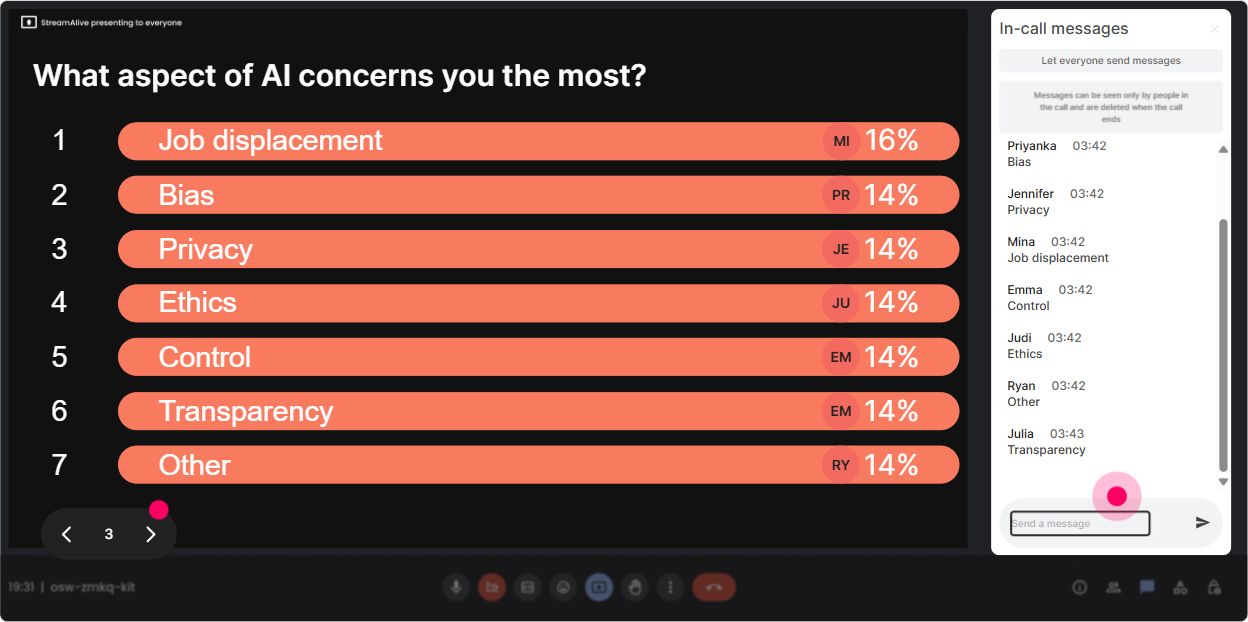
If you want engagement, give people control. Use Power Polls to decide what to cover deeper-then teach to what they voted for. Poll ideas for AI Anxiety training: - Whats the biggest driver of AI anxiety in your organization? 1) Job security/fear of replacement 2) Lack of skills 3) Legal/privacy concerns 4) Leadership pressure to use AI now 5) Misinformation/hype - What do you need most from L&D to reduce AI anxiety? 1) Clear communication plan 2) AI literacy training 3) Role-based upskilling paths 4) Governance/ethical guidelines 5) Manager enablement - Which group is most anxious in your org? 1) Managers 2) Individual contributors 3) Senior leaders 4) HR/L&D 5) Everyone equally Trainer tip: Show results live and narrate it like youre coaching: Looks like skills + job security are the top two. Great-then well focus on language you can use and a training path you can launch.
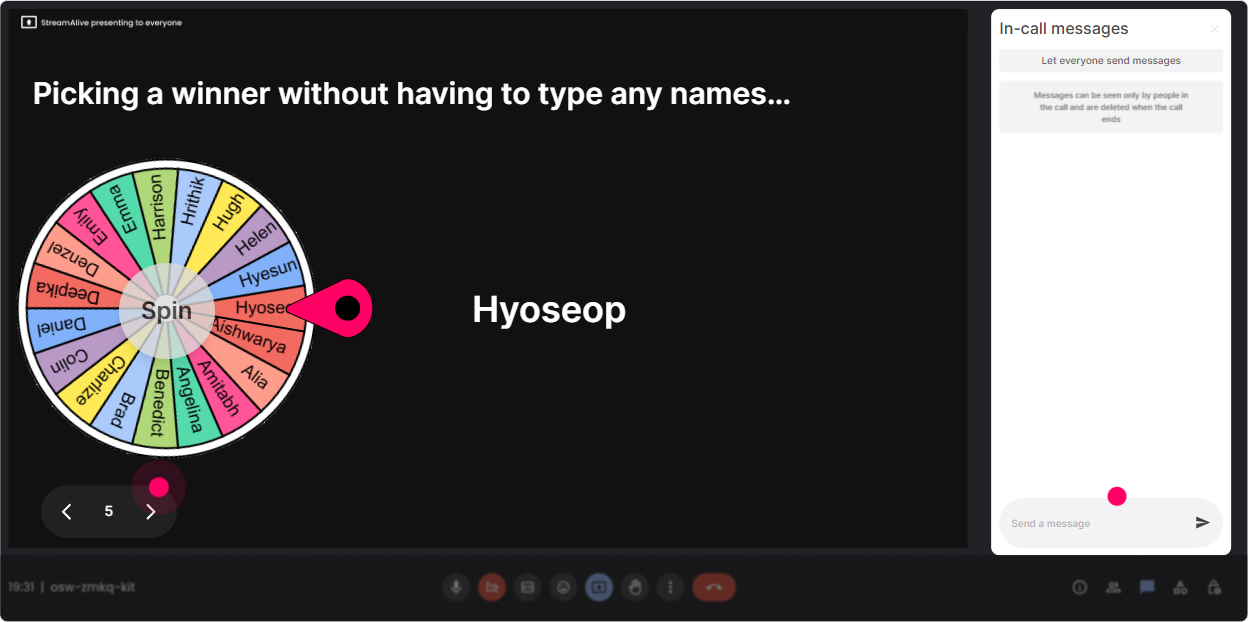
6) Winner Wheel: Get volunteers without the awkward silence
You know that moment: you ask a question and everybody suddenly becomes a statue. Winner Wheel fixes that by making participation feel playful and fair. Ways to use it in this topic: - Lets hear a real example. Im going to spin the wheel from everyone who shared in chat-winner un-mutes and gives us the 30-second version. - Who wants a quick coaching moment? Type COACH in chat. Ill spin and well workshop your AI anxiety situation live. - Were doing a mini role-play: leader asks Will AI replace us? Ill spin for who plays the leader. Trainer tip: Make it low-pressure: You can pass if you want-no problem. This is just to keep it lively. People participate more when they know theyre not trapped.
7) Quiz: Bust myths and build confidence (without a lecture)
AI anxiety is fueled by myths. A quick Quiz gives you that ohhh, I didnt know that learning moment-without you sounding preachy. Quiz questions you can run (multiple choice, one correct): - Which is the BEST first step for reducing AI anxiety in a workforce? A) Roll out an AI tool immediately B) Ban AI until policies are perfect C) Start with AI literacy + clear use guidelines (Correct) D) Let each team figure it out solo - Which is a stronger message for leaders to use? A) AI will replace roles. B) AI will change tasks; well support people with training. (Correct) C) Ignore AI-its hype. D) Only high performers will survive. - Whats most likely to increase anxiety? A) Transparent communication B) Role-based learning paths C) Vague leadership announcements with no plan (Correct) D) Manager toolkits Trainer tip: After revealing the correct answer, ask: If your leaders said the wrong option out loud, what would happen in your org? Thats where the real discussion starts.

2) Rating Polls: Take the temperature in 10 seconds
Before you teach anything, find out where people are at. Rating Polls give you an instant read-without putting anyone on the spot. How to use it: - Opener: On a scale of 110, how anxious is your org about AI right now? - Confidence check: Rate your confidence in explaining AI to business leaders (1 = not confident, 10 = I can lead the conversation). - Mid-session pulse: Right now, how clear is the difference between AI adoption and AI governance? - Wrap-up: After today, how ready do you feel to run an AI conversation with your stakeholders? Trainer tip: Read the average out loud and react like a real person would: Okay, were sitting around a 4/10 on confidence-perfect. That means were in the right room.
8) Q&A: Capture the tough questions without losing your flow
In AI Anxiety sessions, people have questions theyre nervous to ask-especially in front of peers. StreamAlives Q&A collects questions straight from chat so youre not scrolling like a maniac. How to use it smoothly: - Say at the start: Drop your questions anytime in chat-StreamAlive will catch them and Ill pull them into our Q&A moments. - Do two Q&A sprints: one at midpoint (Whats still fuzzy?) and one at the end (What do you need for next steps?) - Use it for anonymous-ish courage: people will type what they wont say out loud. Trainer tip: When you see repeated themes, name it: Im seeing three questions about policy and risk-lets handle that bucket together.

9) Analytics: Prove engagement, improve the next session, and show L&D impact
If youre training L&D Leaders, you already know the question that comes next: Did it work? StreamAlive Analytics helps you answer that with real engagement proof. What to look at after your AI Anxiety session: - Minute-by-minute engagement: Find the exact moments where attention spiked (maybe the myth-busting quiz) or dipped (maybe the long explanation). Then adjust your run-of-show. - Interaction reports: See which prompts got the best responses (so you can reuse the winners). - Chat replay: Pull real participant language-those phrases become gold for your follow-up comms (This is what leaders are worried about). - Top engaged participants: Identify your internal champions-people who can help drive adoption and calm nerves across the org. Trainer tip: Send the report to yourself or your team and use it as a mini debrief: What did they lean into? What did they avoid? Whats our next enablement move? Thats how you turn one training into an ongoing program.

Use StreamAlive in all your training sessions
StreamAlive isn’t just for
AI Anxiety
training,
it can also be used for any instructor-led training session directly inside your PowerPoint presentation.
Explore similar traingin ideas: unlocking the potential of StreamAlive
See how StreamAlive transforms live training with engaging events and interactive sessions across industries, directly inside your PowerPoint presentation.

Interactions in action
(it's free)

.svg.png)


