Install StreamAlive for your PowerPoint slides
Learn more

Behavioral Science Practices Training for L&D Leaders
StreamAlive helps 9x the audience engagement in your Virtual Instructor-led Trainings (VILT) directly inside your powerpoint presentation.
Make your instructor-led Behavioral Science Practices training more fun with polls, word clouds, spinner wheels and more
Works inside your existing PowerPoint presentation
Install the StreamAlive app for PowerPoint and see your slides come to life as people participate in your interactions
AI generates audience interactions for you
Let our AI scan your presentation and automatically come up with relevant questions based on the content. Or spend two hours coming up with your own questions, your choice!
Built to work with MS Teams and Zoom
Native apps for Teams and Zoom so you never have to leave your existing workflows
No QR Codes
Chat-powered interactions means your audience doesn’t need to scan QR codes or look at another screen to participate. They just type in the chat!

Quickly approved by your IT team
StreamAlive’s apps for Teams and Zoom means that they have been through rigorous quality assurance and client safety reviews. You’ll find everything an IT team needs to approve the app within the organization within your StreamAlive account.

Youve been asked to run an instructor-led training on Behavioral Science Practices for L&D Leaders-and you want it to feel alive, not like another slide parade. The good news: you can turn the session into a highly interactive experience without adding extra prep. Here are simple ways to teach the content while StreamAlive keeps people participating (not just listening).
1) Magic Maps: Put your L&D Leaders on the map (and instantly wake up the room)
This is the easiest everyone participates moment youll get all session. Launch Magic Maps at the start and ask a location-based question-people answer in chat, and StreamAlive plots them live on a world map. Its a small thing, but it creates instant connection and gets chat moving early (which makes everything else easier). Try it with Behavioral Science Practices-friendly prompts like: - Where are you joining from-and whats one behavior youre trying to change at work right now? (They type the city; you follow up verbally.) - If you could teleport your orgs culture to any city known for innovation, where would it be? - Which city has taught you the most about people and behavior-your hometown or somewhere you worked? Trainer move: When you see clusters (say, lots of folks from London or Singapore), call it out: Looks like weve got a strong Singapore group-drop in chat, whats one learning behavior you wish leaders modeled more? Youll get momentum before you even hit your first framework.
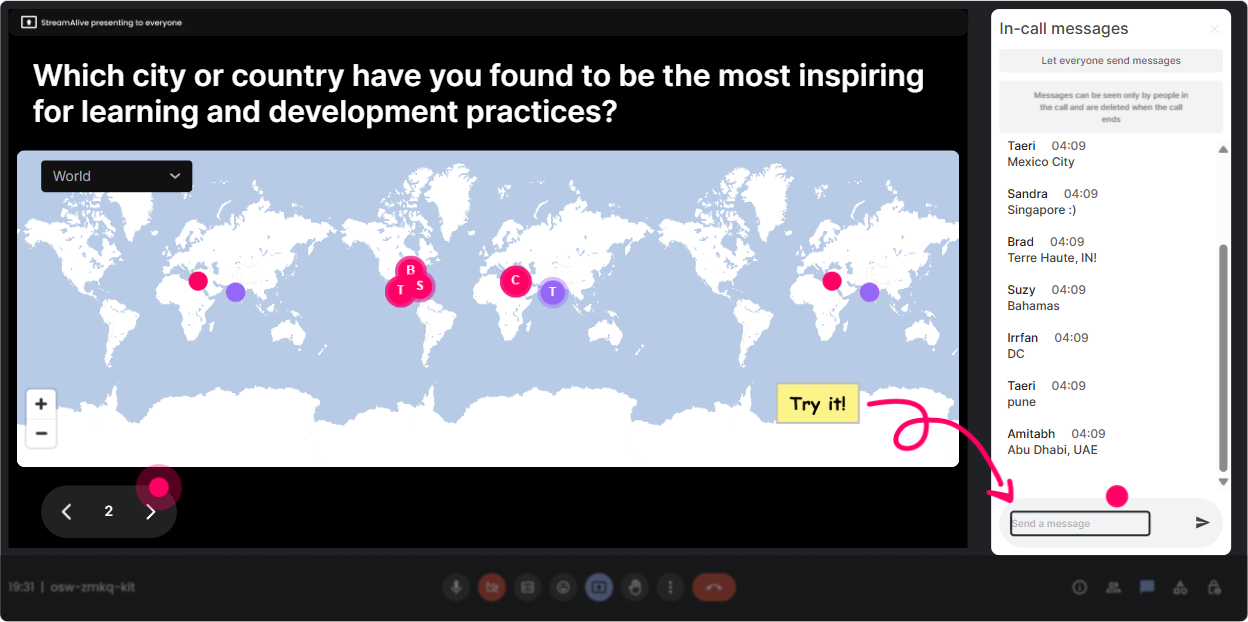
2) Rating Polls: Do a quick confidence check (so you teach to the room you actually have)
Before you go deep into nudges, habit loops, or choice architecture, run a Rating Poll to find out where people are at. Its fast, its visual, and it saves you from over-explaining to experts or losing beginners. Use Rating Polls like: - On a scale of 110, how confident are you applying behavioral science to L&D programs today? - Rate this statement (110): Our leaders consistently reinforce behavior change after training. - Mid-session pulse check: 110: How clear is the difference between motivation problems vs. environment/design problems? Trainer move: If the average is low, youve got permission to slow down and simplify. If its high, say: Cool, were going to skip the basics and move straight into practical design patterns. People feel seen either way.

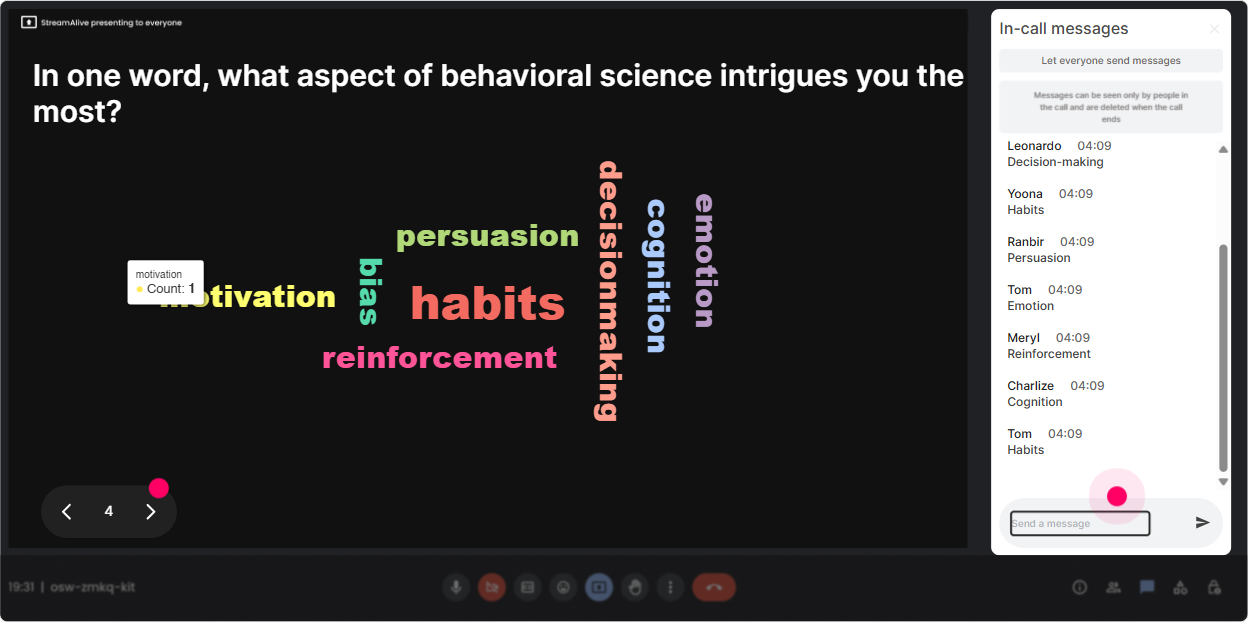
3) Wonder Words (Word Cloud): Get real feelings on the table-without forcing anyone to speak
Behavioral science is about real human behavior and your participants are humans walking in with opinions. Wonder Words is perfect for surfacing the rooms vibe in 30 seconds. Ask a 12 word question, and StreamAlive builds a live word cloud where popular responses grow bigger. Great prompts for this topic: - When you hear behavioral science in L&D, what word comes to mind? - Whats the biggest barrier to behavior change in your org? (12 words) - Describe your learners after training ends. One word. Trainer move: Use the biggest words as your agenda. If time, manager, or culture shows up huge, you can say: Awesome-lets design for that reality. Behavioral science is exactly for these constraints. Now the session feels tailored, not generic.
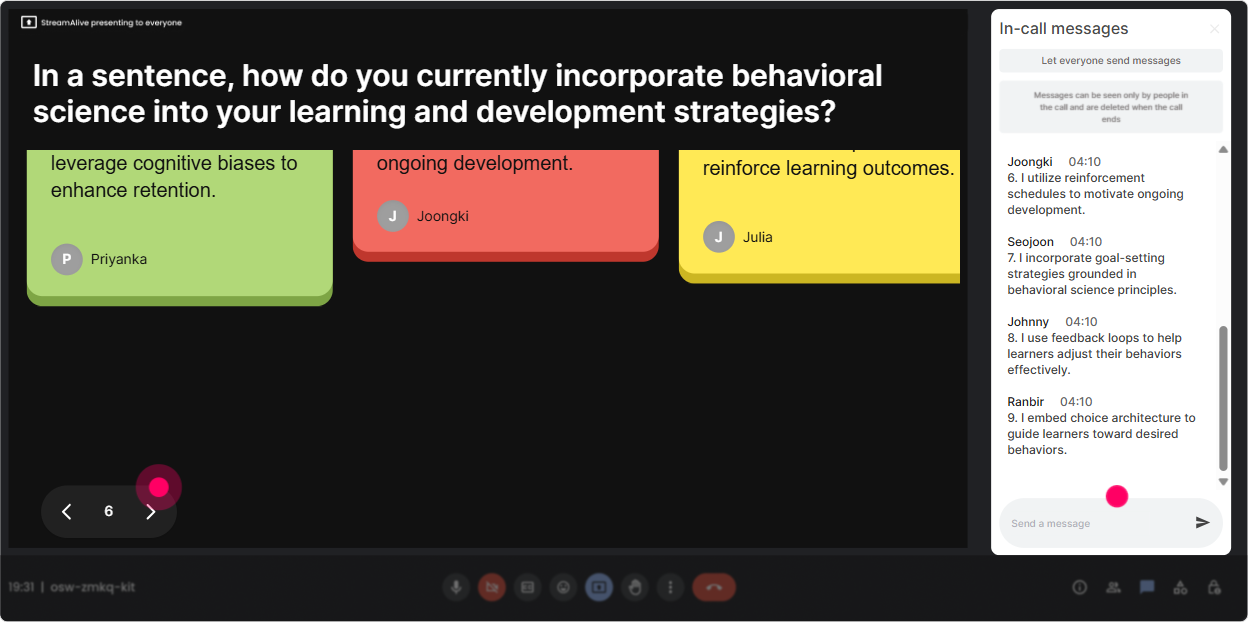
4) Talking Tiles: Turn stories into a shared learning moment (without awkward breakout rooms)
Talking Tiles is your go-to when you want more than one-word answers-real examples, mini-stories, and specifics. Responses appear as falling tiles on screen, so the chat becomes a visual brainstorming wall. Use it for prompts like: - Where do you see the biggest intention vs. action gap in your org? - Describe a training that people loved but behavior didnt change after. What happened? - Whats one behavior you want leaders to model after this quarters programs? Trainer move: Grab 23 tiles and coach live: Lets diagnose this using behavioral lenses: is it a cue problem, a friction problem, or a reinforcement problem? Youre not just collecting comments-youre teaching people how to think.
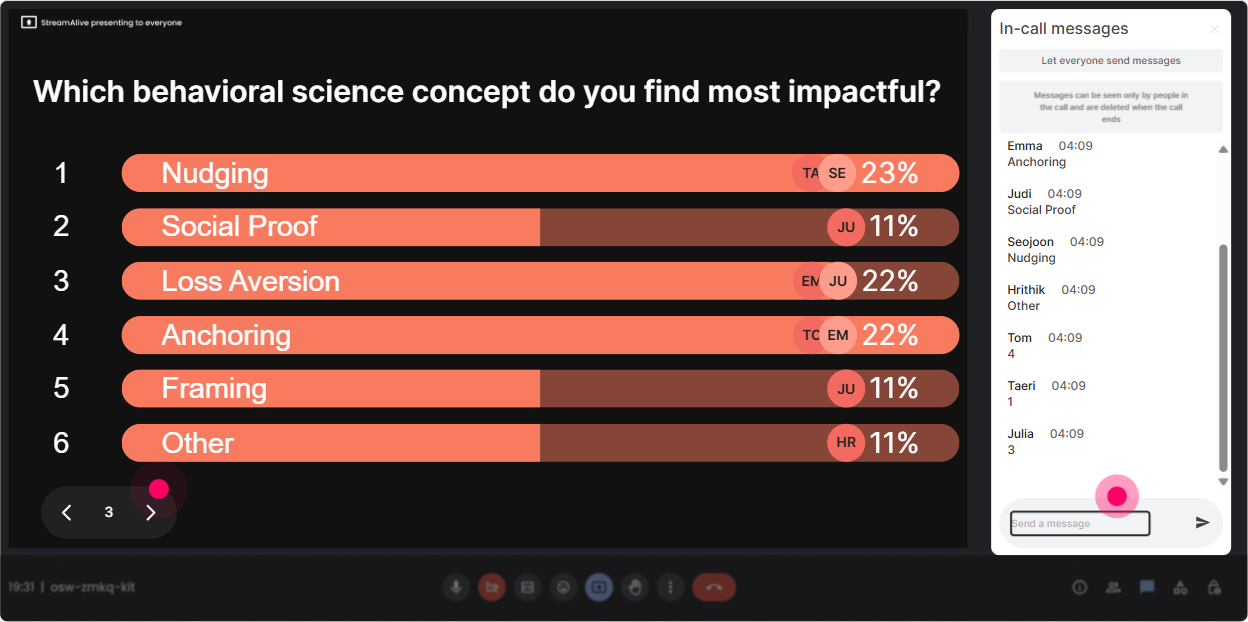
5) Power Polls: Let the group choose what you focus on (and youll get buy-in instantly)
With Power Polls, you can give options and have people vote by typing a number in chat. The results show live, so the group sees the direction instantly. This is perfect for L&D Leaders because they want relevance and priority. Poll ideas for Behavioral Science Practices training: - What do you want to spend the most time on today? 1) Habit formation in learning 2) Nudges & prompts 3) Choice architecture in programs 4) Reinforcement & manager follow-through 5) Measurement & behavior metrics - Where does behavior change usually break in your org? 1) After training (no follow-through) 2) Too much friction to apply 3) No clear cues/reminders 4) Misaligned incentives 5) Managers not reinforcing Trainer move: Teach the top two results first. Then circle back: Well cover the rest in a toolkit at the end. People feel like they didnt just attend a session-they influenced it.
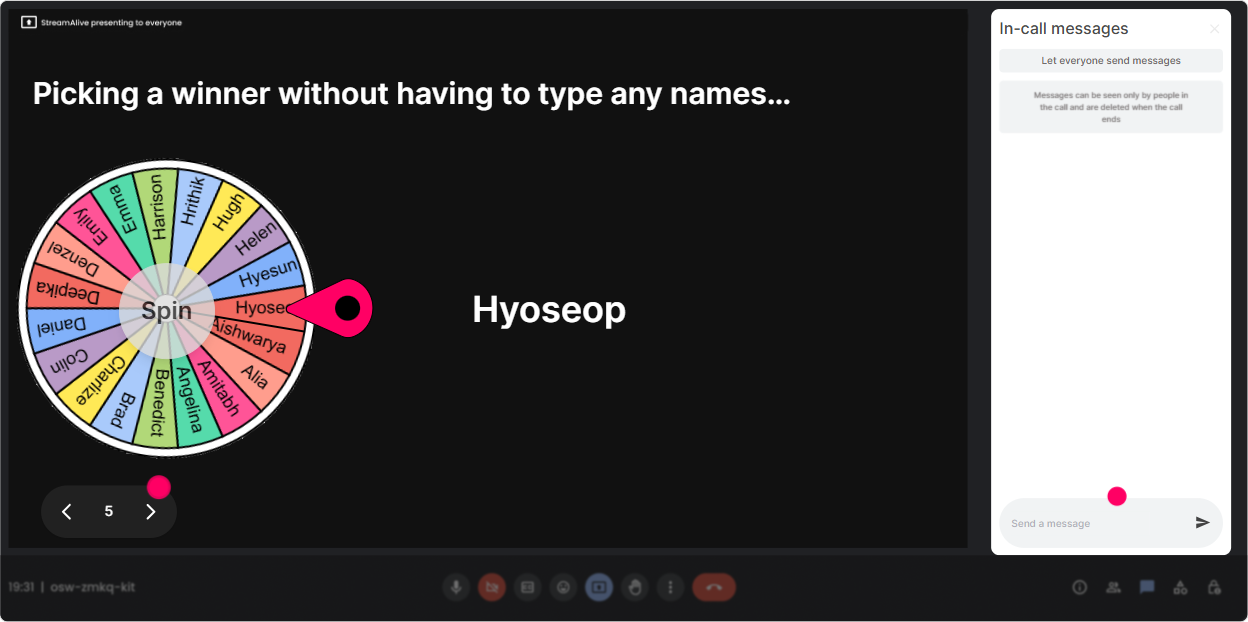
6) Winner Wheel (Spinner Wheel): Get volunteers without the cringe (and make participation fun)
You know that moment when you ask, Who wants to share? and the room goes silent? Winner Wheel fixes that. You can spin a wheel to randomly select someone from the folks who participated (commented) during an interaction. How to use it in this training: - After a word cloud: Im going to spin the wheel-winner, unmute and tell us why you chose that word. - After a scenario poll: Wheel pick! Youll be our behavior detective-tell us what youd change in the environment to make the right behavior easier. - For incentives: Anyone who answers the next question goes on the wheel for a coffee card / ebook / shout-out. Trainer move: Frame it playfully and safely: You can always pass, but if youre up for it, wed love a 20-second share. Participation stays high without putting people on the spot harshly.
7) Quiz: Do quick knowledge checks that dont feel like school (but lock in learning)
Behavioral science has a few concepts people *think* they understand-until you test it with a real example. Use StreamAlive Quiz to run a multiple-choice question, then reveal the correct answer and explain why. Quiz questions that work well: - Which is the best example of reducing friction? 1) Telling managers to support learning 2) Adding a one-click calendar link for practice sessions 3) Sharing a motivational quote 4) Posting a long policy reminder (Correct: 2) - Whats a nudge primarily about? 1) Forcing compliance 2) Changing personality 3) Shaping the environment to make the desired behavior easier 4) Increasing training hours (Correct: 3) Trainer move: After revealing the answer, ask: Where could you apply this in your next program-on day 1, day 7, or day 30? Now the quiz becomes application, not trivia.

2) Rating Polls: Do a quick confidence check (so you teach to the room you actually have)
Before you go deep into nudges, habit loops, or choice architecture, run a Rating Poll to find out where people are at. Its fast, its visual, and it saves you from over-explaining to experts or losing beginners. Use Rating Polls like: - On a scale of 110, how confident are you applying behavioral science to L&D programs today? - Rate this statement (110): Our leaders consistently reinforce behavior change after training. - Mid-session pulse check: 110: How clear is the difference between motivation problems vs. environment/design problems? Trainer move: If the average is low, youve got permission to slow down and simplify. If its high, say: Cool, were going to skip the basics and move straight into practical design patterns. People feel seen either way.
8) Q&A (Quick Questions): Catch every question without juggling chat chaos
In a live session, great questions get buried fast. StreamAlives Q&A feature pulls questions from chat and organizes them so you can actually manage them (instead of scrolling like a maniac). Use it intentionally during Behavioral Science Practices training: - Park questions during teaching: Drop questions anytime-StreamAlive will capture them. Well do a Q&A sprint every 15 minutes. - Invite practical questions: Ask me anything about getting managers to reinforce behaviors-real situations welcome. - End with a lightning round: Well go through the top 10 questions and Ill give short, usable answers. Trainer move: When you answer, tie it back to a principle: This is a classic misaligned incentives issue-lets redesign the reward loop. People walk away with patterns, not just answers.

9) Analytics: Figure out what actually worked (so your next session gets even better)
After the training, StreamAlive Analytics shows you what parts of your session pulled people in-and where attention dipped. This is gold for L&D Leaders because you can improve your facilitation like a pro, using data instead of gut feel. Ways to use analytics for this topic: - Identify your high-engagement moments: People lit up during the habit loop example-next time Ill bring that earlier. - See which interaction types performed best (polls vs. word clouds vs. tiles) and adjust your run-of-show. - Find your most engaged participants (Fantastic Fans) and invite them to be champions in future cohorts or pilot groups. - Share interaction results with stakeholders: export/email the report to show what leaders prioritized (e.g., biggest barrier = manager follow-through). Trainer move: Build a feedback loop: Next session, Im keeping the parts where engagement spiked, and Im tightening the sections where chat dropped. Thats how you steadily push engagement up-session after session.

Use StreamAlive in all your training sessions
StreamAlive isn’t just for
Behavioral Science Practices
training,
it can also be used for any instructor-led training session directly inside your PowerPoint presentation.
Explore similar traingin ideas: unlocking the potential of StreamAlive
See how StreamAlive transforms live training with engaging events and interactive sessions across industries, directly inside your PowerPoint presentation.

Interactions in action
(it's free)

.svg.png)


