Install StreamAlive for your PowerPoint slides
Learn more

Blue-Collar Renaissance Training for Corporate Trainers
StreamAlive helps 9x the audience engagement in your Virtual Instructor-led Trainings (VILT) directly inside your powerpoint presentation.
Make your instructor-led Blue-Collar Renaissance training more fun with polls, word clouds, spinner wheels and more
Works inside your existing PowerPoint presentation
Install the StreamAlive app for PowerPoint and see your slides come to life as people participate in your interactions
AI generates audience interactions for you
Let our AI scan your presentation and automatically come up with relevant questions based on the content. Or spend two hours coming up with your own questions, your choice!
Built to work with MS Teams and Zoom
Native apps for Teams and Zoom so you never have to leave your existing workflows
No QR Codes
Chat-powered interactions means your audience doesn’t need to scan QR codes or look at another screen to participate. They just type in the chat!

Quickly approved by your IT team
StreamAlive’s apps for Teams and Zoom means that they have been through rigorous quality assurance and client safety reviews. You’ll find everything an IT team needs to approve the app within the organization within your StreamAlive account.

Youve been asked to run a Blue-Collar Renaissance instructor-led training for other corporate trainers-and you want it to feel lively, practical, and not like a lecture. The easiest win? Get people talking early, then keep pulling them back in every 57 minutes. Here are simple, trainer-friendly ways to do that using StreamAlive (and yes, it can seriously multiply participation).
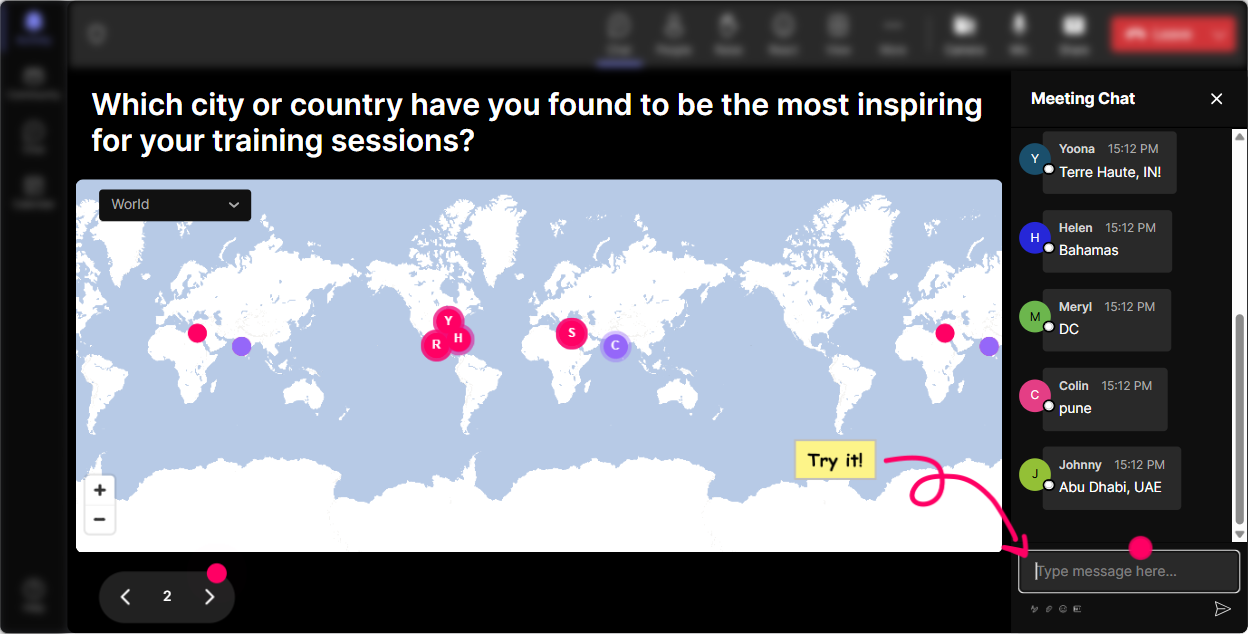
1) Magic Maps: Put Your Trainers on the Map (and instantly build community)
In a Blue-Collar Renaissance session, your group usually spans different sites, regions, even different types of workforces. Magic Maps lets you turn the classic Where are you joining from? into a real moment. How to use it in your session: - Kickoff icebreaker: What city are you training blue-collar teams in most often? - Context builder: Where are your frontline folks located-plants, warehouses, field, retail? - Empathy moment: If you could visit one jobsite to understand your learners better, where would it be? Why it works: when people literally see themselves appear on the map, the session stops feeling like a generic webinar. It feels like a room. Trainer tip: If you want clean data, set it to one location per person. Then call out clusters: Wow-big group from Texas. Whats the biggest training challenge there right now?
2) Rating Polls: Quick Confidence Checks (without the awkwardness)
Blue-Collar Renaissance training can mean a lot of things-skills-based learning, modern tech, pride in trades, learning that fits real shifts, real work. Before you teach anything, get a pulse check. How to use Rating Polls: - Opening baseline: On a scale of 110, how confident are you in designing training for frontline teams? - Mid-session temperature check: Rate this approach: Less theory, more job simulations. 110. - Readiness check before an activity: How ready are you to pilot one change in your next session? 110. Why it works: its fast, its visual, and it gives you permission to adjust in real time. If the average is a 4, you slow down. If its an 8, you go deeper. Trainer tip: Dont just show the result-react to it. Okay, Im seeing a lot of 56s. Lets make the next part super practical.

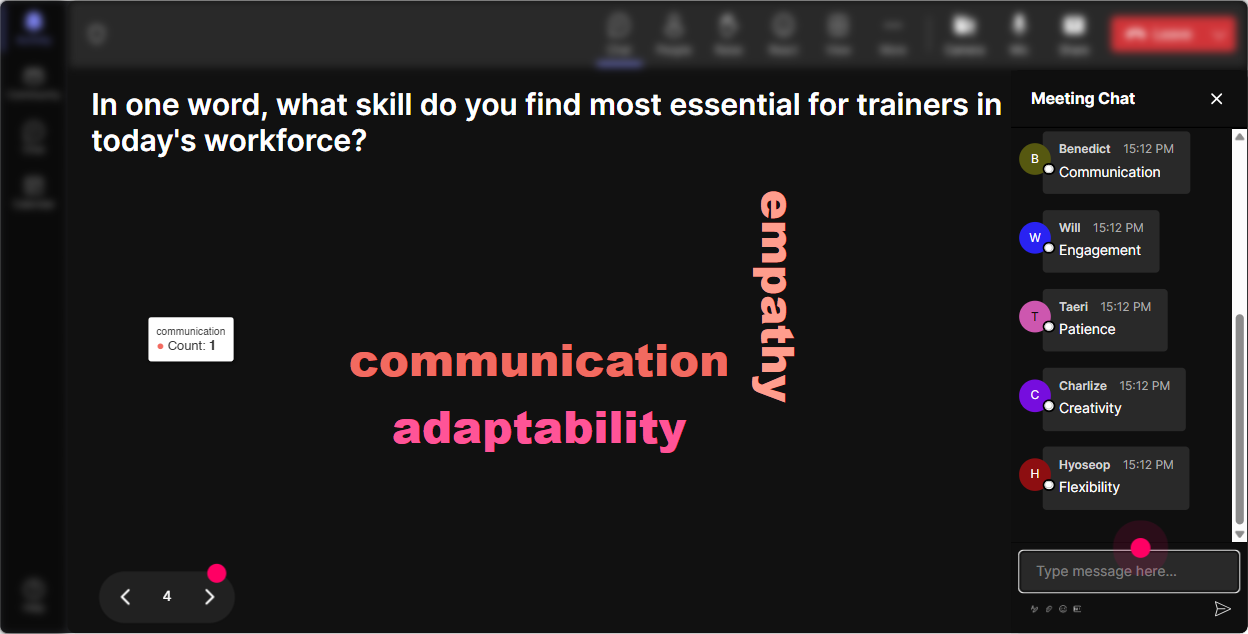
3) Wonder Words (Word Cloud): Capture the Rooms Mood in One Question
When you say Blue-Collar Renaissance, people come in with opinions-some are pumped, some are skeptical, some are burned out. A word cloud lets you surface that instantly without putting anyone on the spot. Great prompts for this topic: - When you hear Blue-Collar Renaissance, whats the first word that comes to mind? - One word: what do frontline learners want MORE of in training? - Whats the biggest barrier to engagement with your audience? (12 words) Why it works: its a low-effort chat response, and the visuals make it feel like everyone contributed-even quieter folks. Trainer tip: Use Combine Similar Answers so time, lack of time, and no time dont split into tiny bubbles. Then narrate it like a host: Time is HUGE here. Cool-lets solve for that today.
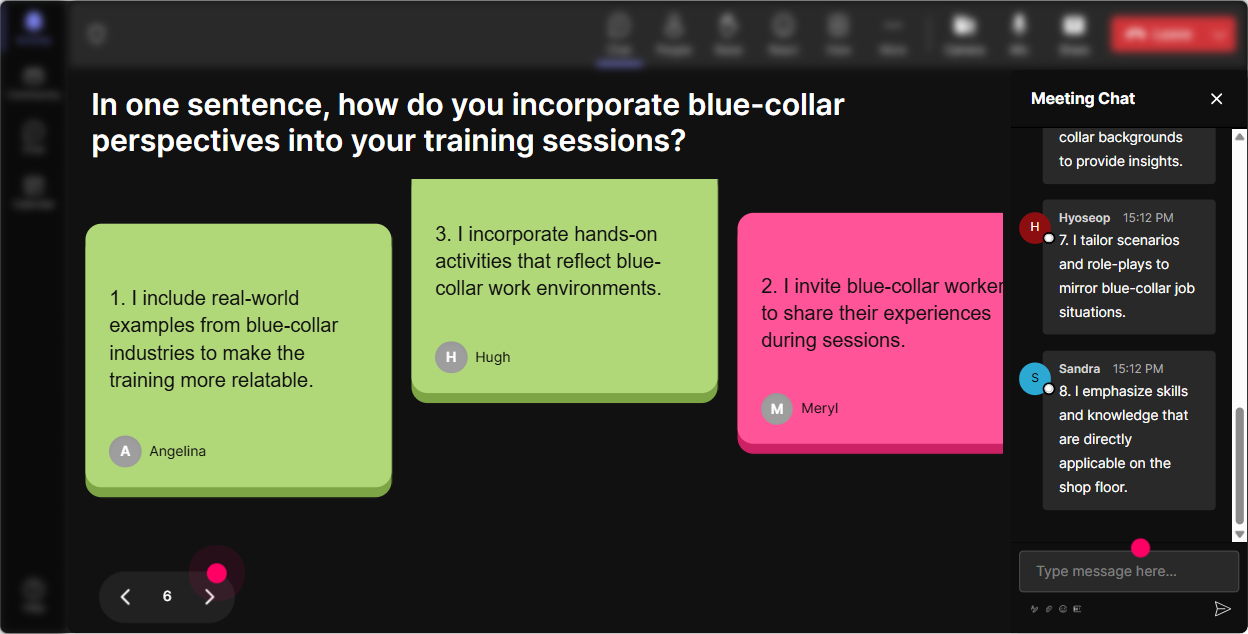
4) Talking Tiles: Turn Their Real-World Stories into the Content
This topic is strongest when trainers share what theyre actually seeing on the floor-late starts, shift handovers, language barriers, safety pressure, Im too busy energy. Talking Tiles is perfect because it rewards longer, more real responses. Use it for prompts like: - Whats one moment where you lost the room during frontline training-what happened? - Whats one thing that DOES work with your blue-collar audience? - If you could fix one training issue at your organization, what would it be? Why it works: the tiles make responses feel alive (and honestly, fun). And it gives you tons of examples to coach from. Trainer tip: After 812 tiles, pause and group patterns out loud: Im seeing time, distractions, phones, and language. Lets tackle these one by one.
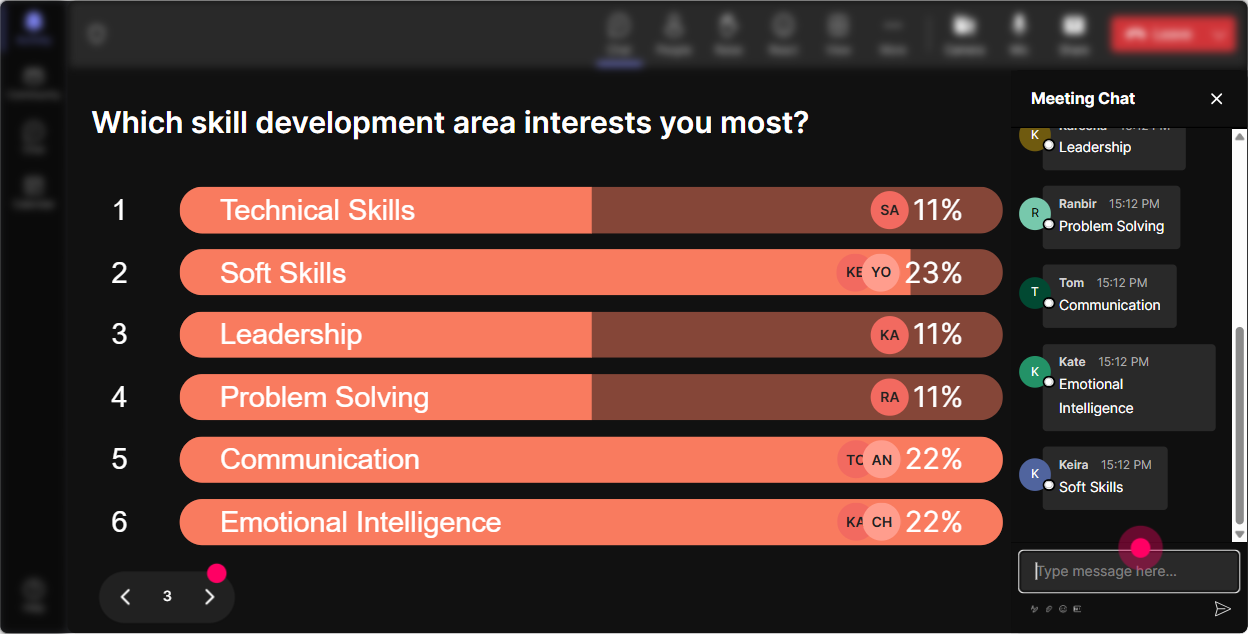
5) Power Polls: Let Them Choose the Direction (so it doesnt feel like your agenda)
Trainers love autonomy. If you tell them exactly what youre covering for 60 minutes, they may complybut they wont lean in. A Power Poll makes them co-own the session. Use Power Polls like this: - What do you want most from today? 1) More engagement tactics 2) Better job-relevant activities 3) Handling resistant learners 4) Measuring training impact - Which frontline setting are you training most? 1) Manufacturing 2) Warehouse/logistics 3) Field service 4) Retail 5) Construction Why it works: its instant clarity for you, and instant relevance for them. Trainer tip: If youre tight on time, promise to cover the top 2 live and put the rest into a follow-up resource. People appreciate that you didnt ignore their vote.
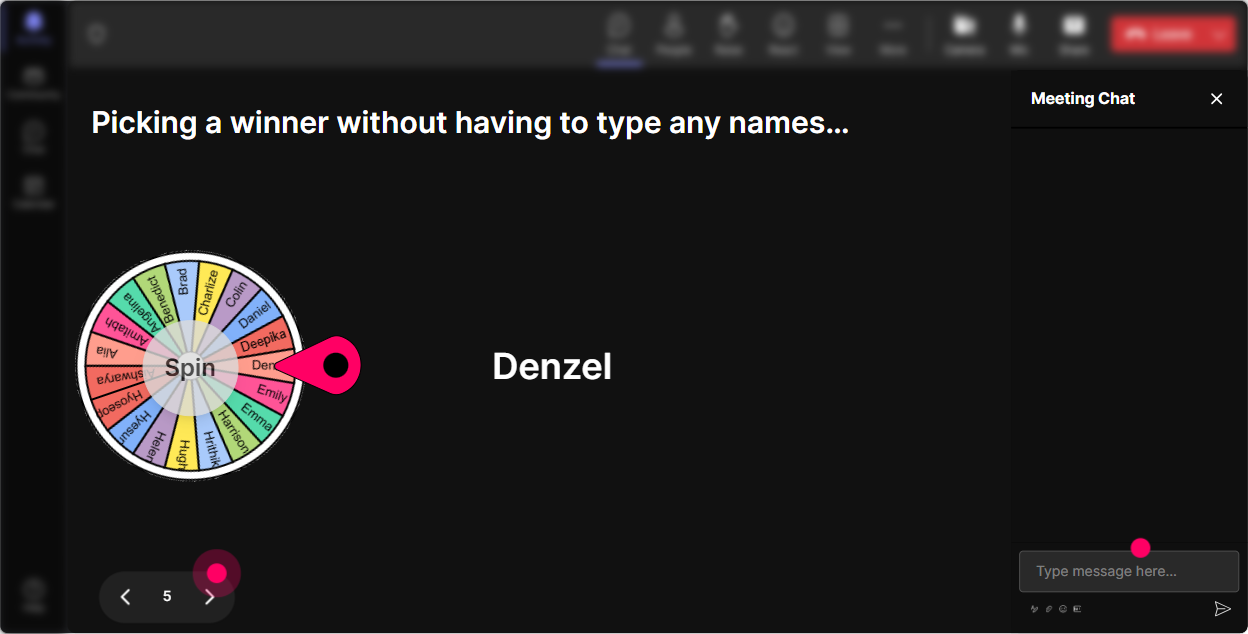
6) Winner Wheel (Spinner Wheel): Get Volunteers Without Begging for Volunteers
You know that moment: you ask, Anyone want to share? and the silence hits. Winner Wheel fixes that-playfully. It turns participation into a game, not pressure. Ways to use it in a Blue-Collar Renaissance ILT: - Drop one engagement tactic youve used. Im spinning the wheel to pick someone to explain it in 20 seconds. - Type READY if youre open to role-playing a tough learner scenario-lets let fate choose. - Everyone who answered the last poll is eligible-spinning for a quick share. Why it works: people comment more because they know engagement gets noticed (and selected). Trainer tip: Keep it safe. If someone gets picked, give them an easy prompt: Whats your role + one sentence on why you chose that option.
7) Quiz: Make Knowledge Checks Feel Like a Game, Not a Test
Blue-Collar Renaissance training often includes shifting from information dump to performance-based learning. A quick quiz helps you reinforce key concepts and keep attention high. Example quiz questions you can run: - Which approach best fits frontline learning? 1) 60-min slide deck 2) 10-min micro-lesson + job practice 3) Long reading assignment 4) Optional video library only (Correct: 2) - Whats the best first step when redesigning training for shift workers? 1) Add more content 2) Reduce seat time and increase practice 3) Make it more theoretical 4) Move everything to email (Correct: 2) - Which metric is closest to real training impact? 1) Attendance 2) Smiley sheets only 3) On-the-job behavior change 4) Slide completion (Correct: 3) Why it works: it wakes the room up and gives you a natural moment to explain why that answer matters. Trainer tip: After you reveal the correct answer, ask one follow-up in chat: Where would you apply this next week? Thats where behavior change starts.

2) Rating Polls: Quick Confidence Checks (without the awkwardness)
Blue-Collar Renaissance training can mean a lot of things-skills-based learning, modern tech, pride in trades, learning that fits real shifts, real work. Before you teach anything, get a pulse check. How to use Rating Polls: - Opening baseline: On a scale of 110, how confident are you in designing training for frontline teams? - Mid-session temperature check: Rate this approach: Less theory, more job simulations. 110. - Readiness check before an activity: How ready are you to pilot one change in your next session? 110. Why it works: its fast, its visual, and it gives you permission to adjust in real time. If the average is a 4, you slow down. If its an 8, you go deeper. Trainer tip: Dont just show the result-react to it. Okay, Im seeing a lot of 56s. Lets make the next part super practical.
8) Q&A: Capture Questions Without Losing the Thread
In trainer-to-trainer sessions, questions come fast-and theyre usually good ones. StreamAlive Q&A pulls questions straight from the chat and keeps them organized, so youre not scrolling and missing stuff. How to use it for this topic: - Tell them: Drop questions anytime in chat-Ill grab them in the Q&A stack. - Park-and-answer style: Im going to teach this chunk, then well hit the top 3 questions. - End with: Whats one obstacle you expect when you try this with a blue-collar audience? Why it works: it keeps your flow tight while still making people feel heard. Trainer tip: If you see repeat themes (like time or manager support), call it out: Im seeing the same question in different ways-lets tackle it properly.

9) Analytics: Prove What Worked (and Improve the Next Run)
If youre training corporate trainers, youre basically training people who will judge the craft. Analytics lets you see what actually landed-minute by minute-and what made people go quiet. How to use StreamAlive Analytics after your Blue-Collar Renaissance session: - Spot your peak engagement moments: Was it the quiz? The story prompt? The poll? Do more of that next time. - Review chat replay: Capture real quotes you can reuse as examples in future sessions. - Identify your most engaged participants (Fantastic Fans): These are your champions-follow up with them for pilots, testimonials, or peer-led demos. - Share interaction results with your team via email reports: Great for proving that your session wasnt just delivered, it was participated in. Why it works: you stop guessing. You get a clear picture of what increased engagement-and you can intentionally design for it next session.

Use StreamAlive in all your training sessions
StreamAlive isn’t just for
Blue-Collar Renaissance
training,
it can also be used for any instructor-led training session directly inside your PowerPoint presentation.
Explore similar traingin ideas: unlocking the potential of StreamAlive
See how StreamAlive transforms live training with engaging events and interactive sessions across industries, directly inside your PowerPoint presentation.

Interactions in action
(it's free)

.svg.png)


