Install StreamAlive for your PowerPoint slides
Learn more

Blue-Collar Renaissance Training for L&D Leaders
StreamAlive helps 9x the audience engagement in your Virtual Instructor-led Trainings (VILT) directly inside your powerpoint presentation.
Make your instructor-led Blue-Collar Renaissance training more fun with polls, word clouds, spinner wheels and more
Works inside your existing PowerPoint presentation
Install the StreamAlive app for PowerPoint and see your slides come to life as people participate in your interactions
AI generates audience interactions for you
Let our AI scan your presentation and automatically come up with relevant questions based on the content. Or spend two hours coming up with your own questions, your choice!
Built to work with MS Teams and Zoom
Native apps for Teams and Zoom so you never have to leave your existing workflows
No QR Codes
Chat-powered interactions means your audience doesn’t need to scan QR codes or look at another screen to participate. They just type in the chat!

Quickly approved by your IT team
StreamAlive’s apps for Teams and Zoom means that they have been through rigorous quality assurance and client safety reviews. You’ll find everything an IT team needs to approve the app within the organization within your StreamAlive account.

Youve been asked to run an instructor-led session on the Blue-Collar Renaissance for L&D Leaders-and you want it to feel alive, not like another slide parade. The easiest win? Make people participate every few minutes. Here are practical ways to do that using StreamAlive, without turning your session into a game show.
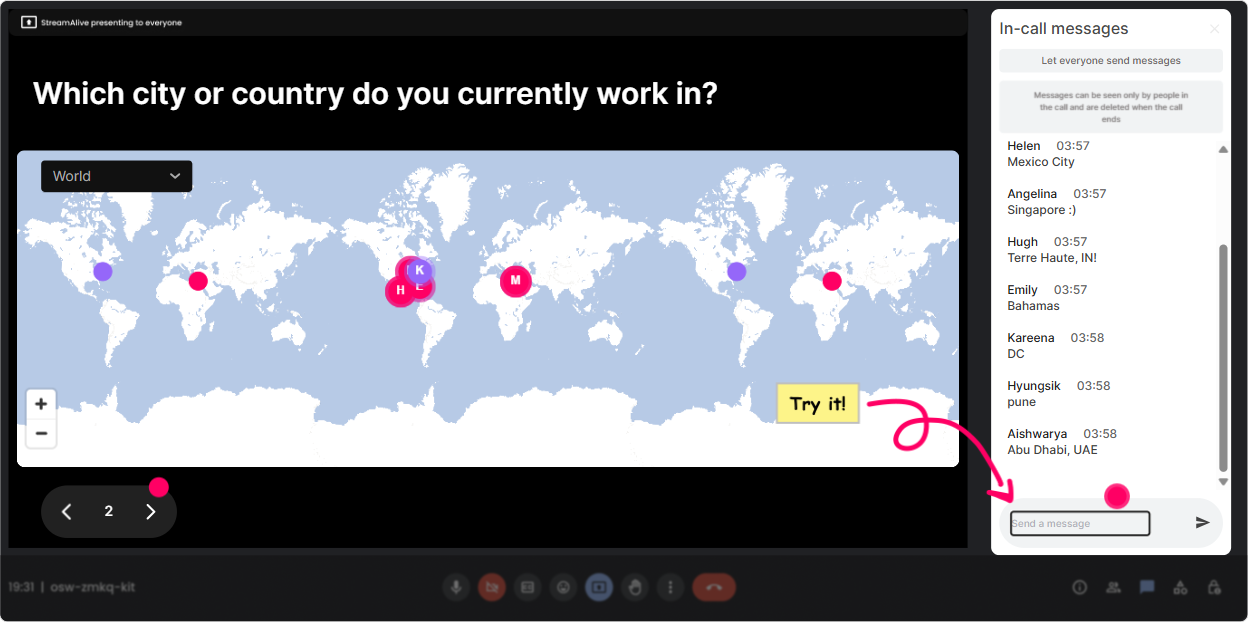
1) Magic Maps: Put your blue-collar audience reality on the map (literally)
The Blue-Collar Renaissance looks different depending on where people are-manufacturing hubs, ports, warehouses, rural service areas, major metros so start there. Magic Maps is the cleanest icebreaker because it takes the classic Where are you joining from? question and makes it visual in real time. How to use it in your session: - Kickoff question: Where are you joining from today (city + country)? Youll instantly see your footprint and you can call out clusters like, Okay, Im seeing a lot of folks from the Midwest-makes sense for skilled trades. - Make it topic-relevant: Drop a city where youve seen hiring get harder for technicians/operators in the last 12 months. - Future-focused: If you could visit one site doing blue-collar upskilling really well (anywhere on earth), where would you go? Trainer move: When the map fills up, pause for 20 seconds and narrate what youre seeing. That quick were all in this together moment boosts attention fast-and sets the tone that chat participation matters.
2) Rating Polls: Get a quick pulse check before you teach anything
With L&D Leaders, youll usually have a mixed room: some are deep in frontline training, others are just starting to care about it because of labor shortages. Rating Polls let you find the baseline in seconds-and it saves you from pitching too high (or too basic). How to use it in your session: - Knowledge check at the start: On a scale of 110, how familiar are you with the term Blue-Collar Renaissance? - Confidence check: Rate your confidence (110): We can build a strong frontline learning culture with our current tools. - Reality check mid-session: How urgent is frontline upskilling in your org right now? (1 = not urgent, 10 = on fire)" Trainer move: React to the average out loud. Example: Were at a 4.6-perfect. That means well move fast, but well build the foundation together. People feel seen, and they stay with you.

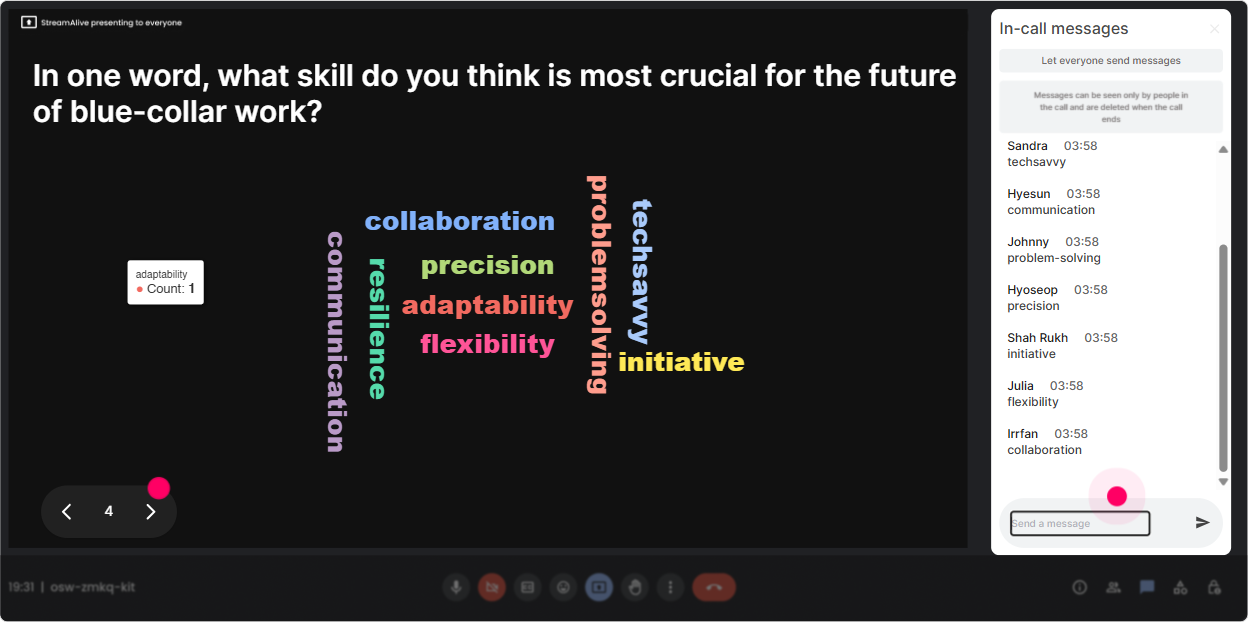
3) Wonder Words (Word Cloud): Surface beliefs and emotions around frontline learning
The Blue-Collar Renaissance isnt just about skills-its about pride, identity, tech anxiety, retention pressure, and leadership mindset. A word cloud helps you pull that stuff into the open without forcing anyone to give a speech. How to use it in your session (keep answers 12 words): - When you hear Blue-Collar Renaissance, whats the first word that comes to mind? - Whats the biggest barrier to frontline training in your world? (Answers like time, buy-in, shift work, turnover will pop.) - One word to describe your current frontline training experience. Trainer move: When you see big words like time or buy-in, dont rush past it. Say: Cool-those two are going to be our villains today. Lets beat them with a better design. Now your content has a storyline.
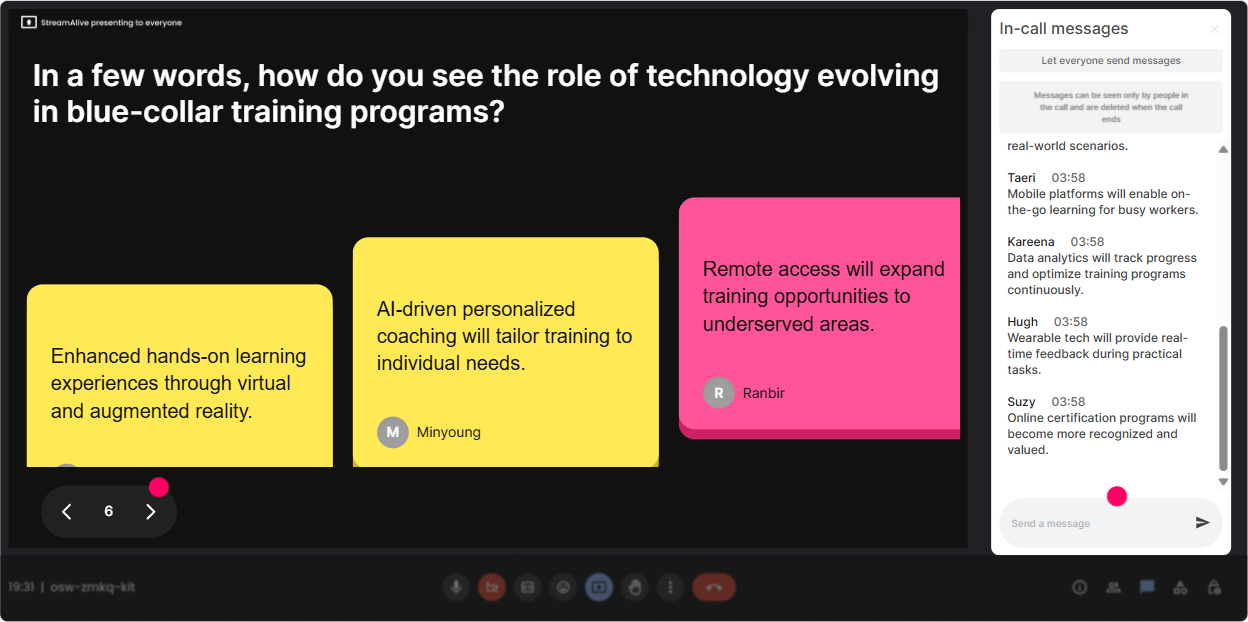
4) Talking Tiles: Collect real frontline stories (and make them visible)
If you want L&D Leaders to truly engage, get them talking about real moments: safety incidents, quality misses, onboarding chaos, supervisor gaps, the struggle to train across shifts. Talking Tiles is perfect because people can type a full thought, and it shows up in a fun, visual way-without you having to read a messy chat stream. How to use it in your session: - Whats one frontline role in your org thats hardest to hire or train right now-and why? - Finish this sentence: If we improved frontline training, the biggest business impact would be ___. - Whats one thing supervisors do that accidentally kills learning on the floor? Trainer move: After 1015 responses, pick 23 tiles and connect them to your next slide. It feels like youre teaching *with* them, not *at* them.
5) Power Polls: Let the group steer the agenda (and stay bought in)
In a Blue-Collar Renaissance session, there are a few directions you can go-skills taxonomy, career pathways, training delivery for shift workers, microlearning, coaching, assessments, incentives, union considerations, technology A Power Poll helps you quickly prioritize what they actually care about. How to use it in your session: - What do you want most from today? 1) Building frontline career pathways 2) Designing training for shift work 3) Supervisor coaching systems 4) Proving ROI for frontline L&D - Where are you stuck right now? 1) Participation 2) Time on shift 3) Manager buy-in 4) Measuring skills - Decision poll: If you could fix ONE training moment this quarter, what would it be? 1) Onboarding 2) Cross-training 3) Safety refreshers 4) Quality training Trainer move: Teach the winning option first. People instantly feel like, Okay, this is for me. Thats how you keep engagement high without begging for it.

6) Winner Wheel: Get volunteers without the awkward silence
You know that moment when you ask, Anyone want to share? and suddenly everyone becomes very interested in their mute button? Winner Wheel fixes that by making participation feel fair and fun. How to use it in your session: - Tell them: Drop a quick answer in chat and Ill spin the wheel to choose someone to expand on it. - Prompt ideas: - Share one frontline metric you care about most (safety, quality, scrap, throughput, retention). - Type YES if youre open to sharing a quick example from your organization. - Then spin: pick a winner from people who commented during that interaction. Trainer move: Keep it low-pressure. Say: You can pass if you want, no big deal-but most people dont pass because the vibe is lighter. Great way to get actual voices into the room.

7) Quiz: Do fast knowledge checks that dont feel like school
A Quiz interaction is perfect for myth-busting and quick checks-especially with L&D Leaders who may have assumptions like frontline wont engage or training doesnt stick. You can run a multiple-choice question, reveal the correct answer, and use it as a launch point for a discussion. Quiz ideas for a Blue-Collar Renaissance ILT: - Which approach usually improves frontline learning transfer the most? A) Longer courses B) One-time certification only C) Practice + coaching on the job D) More PDFs (Correct: C) - Whats the biggest reason frontline training fails most often? A) People dont care B) No time/space to practice on shift C) Too many incentives D) Training is too expensive (Often: B) - Which is the strongest signal your org is in a Blue-Collar Renaissance phase? A) Higher recruiting spend B) Clear skills pathways + internal mobility C) More town halls D) New LMS only (Correct: B) Trainer move: Dont just reveal the correct answer-ask: If you picked something else, what made you pick it? Thats where the real learning happens.

2) Rating Polls: Get a quick pulse check before you teach anything
With L&D Leaders, youll usually have a mixed room: some are deep in frontline training, others are just starting to care about it because of labor shortages. Rating Polls let you find the baseline in seconds-and it saves you from pitching too high (or too basic). How to use it in your session: - Knowledge check at the start: On a scale of 110, how familiar are you with the term Blue-Collar Renaissance? - Confidence check: Rate your confidence (110): We can build a strong frontline learning culture with our current tools. - Reality check mid-session: How urgent is frontline upskilling in your org right now? (1 = not urgent, 10 = on fire)" Trainer move: React to the average out loud. Example: Were at a 4.6-perfect. That means well move fast, but well build the foundation together. People feel seen, and they stay with you.
8) Q&A (Quick Questions): Catch every question without losing your flow
In live sessions, questions get buried fast-especially when chat is active. StreamAlives Q&A pulls audience questions out of the chat and organizes them so you can actually handle them without stopping your delivery every 30 seconds. How to use it in your session: - Set expectations early: Drop questions anytime-StreamAlive will capture them and Ill hit them at the end of each section. - Great prompts during a Blue-Collar Renaissance session: - Whats the hardest part of training across shifts in your environment? - What metrics do you need to prove ROI for frontline L&D? - How are you handling supervisor involvement (or lack of it)? Trainer move: Do Q&A pit stops. Example: after each major topic, answer 2 questions on screen. People trust the process and keep engaging because they know theyll be heard.

9) Analytics: Prove engagement and improve the next run (without guessing)
If youre serious about leveling up instructor-led training, you need more than vibes-you need visibility. StreamAlive Analytics shows you minute-by-minute engagement, what interactions landed, and who your most engaged participants were. How to use it after a Blue-Collar Renaissance session: - Spot the moments where chat spiked: Was it the career pathway discussion? The supervisor coaching part? Now you know what to expand next time. - Identify your Fantastic Fans (most engaged people): These are often your champions-great follow-up candidates for pilots, focus groups, or internal advocacy. - Share interaction results with stakeholders: Send the email report to your team or drop insights into Teams-like, Top barrier: time on shift, or Most requested topic: supervisor coaching. Trainer move: Use analytics to tighten your run-of-show. If engagement dips after 35 minutes every time, thats your cue to add a poll, a story prompt, or a quick wheel moment right there. Thats how you climb toward that up to 9x engagement effect-by designing for participation on purpose.

Use StreamAlive in all your training sessions
StreamAlive isn’t just for
Blue-Collar Renaissance
training,
it can also be used for any instructor-led training session directly inside your PowerPoint presentation.
Explore similar traingin ideas: unlocking the potential of StreamAlive
See how StreamAlive transforms live training with engaging events and interactive sessions across industries, directly inside your PowerPoint presentation.

Interactions in action
(it's free)

.svg.png)


