Install StreamAlive for your PowerPoint slides
Learn more

Micro-Credentials Training for Training Agencies
StreamAlive helps 9x the audience engagement in your Virtual Instructor-led Trainings (VILT) directly inside your powerpoint presentation.
Make your instructor-led Micro-Credentials training more fun with polls, word clouds, spinner wheels and more
Works inside your existing PowerPoint presentation
Install the StreamAlive app for PowerPoint and see your slides come to life as people participate in your interactions
AI generates audience interactions for you
Let our AI scan your presentation and automatically come up with relevant questions based on the content. Or spend two hours coming up with your own questions, your choice!
Built to work with MS Teams and Zoom
Native apps for Teams and Zoom so you never have to leave your existing workflows
No QR Codes
Chat-powered interactions means your audience doesn’t need to scan QR codes or look at another screen to participate. They just type in the chat!

Quickly approved by your IT team
StreamAlive’s apps for Teams and Zoom means that they have been through rigorous quality assurance and client safety reviews. You’ll find everything an IT team needs to approve the app within the organization within your StreamAlive account.

Youve been asked to run a Micro-Credentials instructor-led session for a training agency-and you already know the real challenge: keeping people active, not passive. The good news? With a few smart interactions, you can make it feel less like a lecture and more like a live, energetic workshop.
1) Magic Maps: Kick off your Micro-Credentials training by putting everyone on the map
The first 2 minutes of any live session decide the vibe. Magic Maps is an easy win because it gets everyone typing right away-and it instantly makes the group feel together, even if theyre spread across regions. How to use it in a Micro-Credentials ILT for training agencies: - Where are you joining from today? (classic, fast, everyone can answer) - Which city are most of your learners based in? (useful for context: corporate hubs vs. smaller regions) - If you could bring Micro-Credentials to ONE region first, where would you pilot it? (gets you strategic insight) - Drop a city where youve seen the biggest skills gap in your client base. Trainer tip: If youre doing a multi-cohort program, reset the map for each cohort so each group gets their own moment. Also, call out clusters (Wow, big group from Toronto-what are you all training on right now?). That tiny moment boosts participation fast.
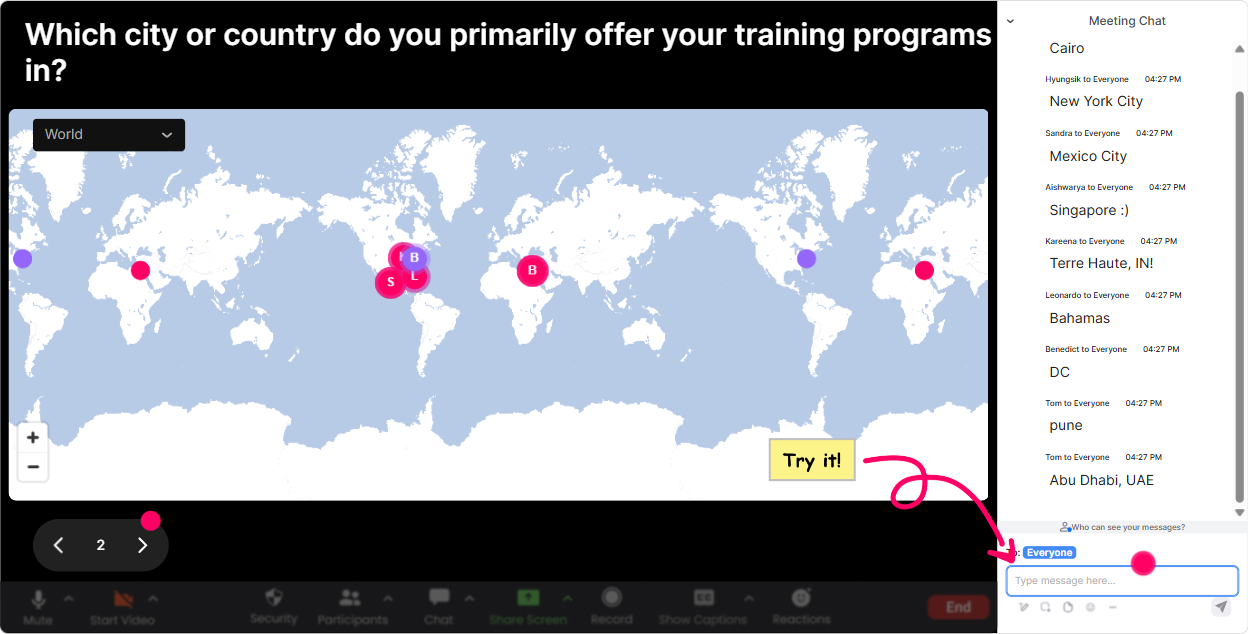
2) Rating Polls: Get a quick pulse on Micro-Credentials confidence (and adjust live)
Rating Polls are perfect when you want a real-time temperature check without putting people on the spot. And in Micro-Credentials training, people often *think* they understand it until you get into assessment design, evidence, and issuance. Use Rating Polls at key moments like: kickoff, after definitions, after compliance/quality, and before you move into implementation. Easy questions you can run: - On a scale of 110, how confident are you explaining Micro-Credentials to a client? - Rate your current readiness to launch a Micro-Credentials pilot in your agency (110). - How clear is the difference between a certificate program vs. a Micro-Credential? (110) - How confident are you about assessment and evidence requirements? (110) Trainer tip: If the average is low, say it out loud-Perfect, that means were in the right room. It builds trust and keeps people engaged because they feel seen.

3) Wonder Words (Word Cloud): Surface how people *really* feel about Micro-Credentials
Micro-Credentials can trigger mixed reactions-excitement, skepticism, confusion, pressure from clients, all of it. A Word Cloud lets you bring those feelings to the surface in a way thats quick and non-awkward. Great prompts for this session: - In ONE word, what comes to mind when you hear Micro-Credentials? - One word: whats your biggest challenge with launching Micro-Credentials? - Whats the biggest benefit you want clients to associate with Micro-Credentials? (ex: credibility, speed, employability) - One word: how do your corporate clients react when you mention Micro-Credentials? Trainer tip: Use this as your bridge into content. Example: if the cloud shows confusing and admin, you can say, Cool-lets simplify the framework first, then well talk workflow and tools. Now your agenda feels personalized, not generic.
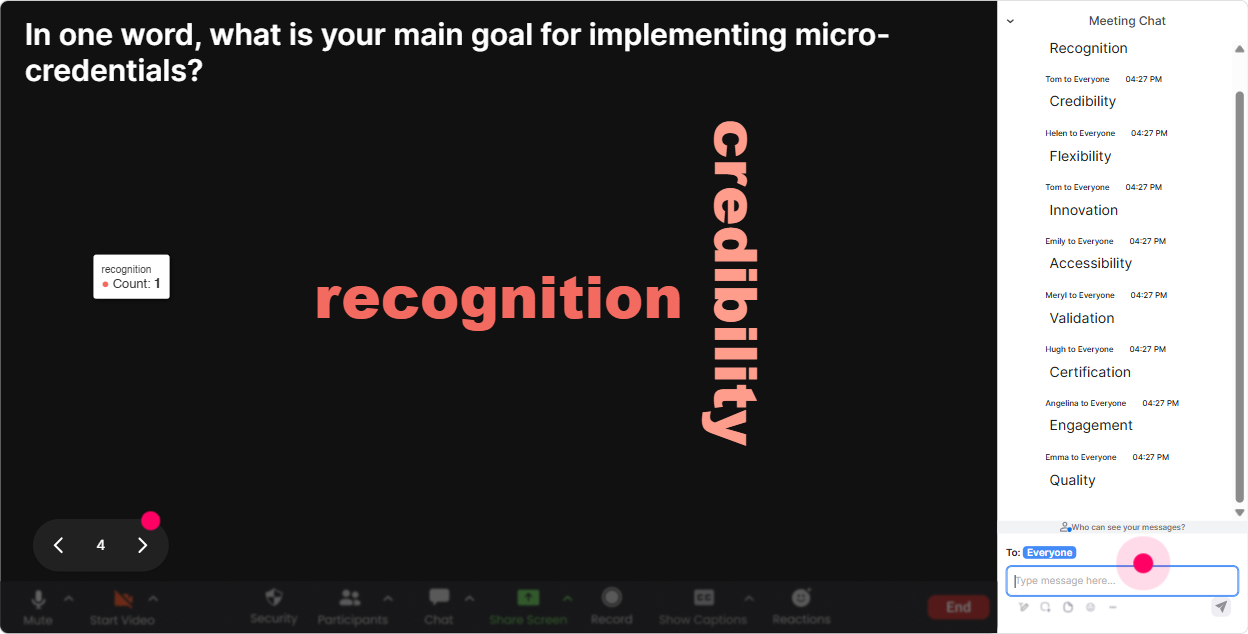
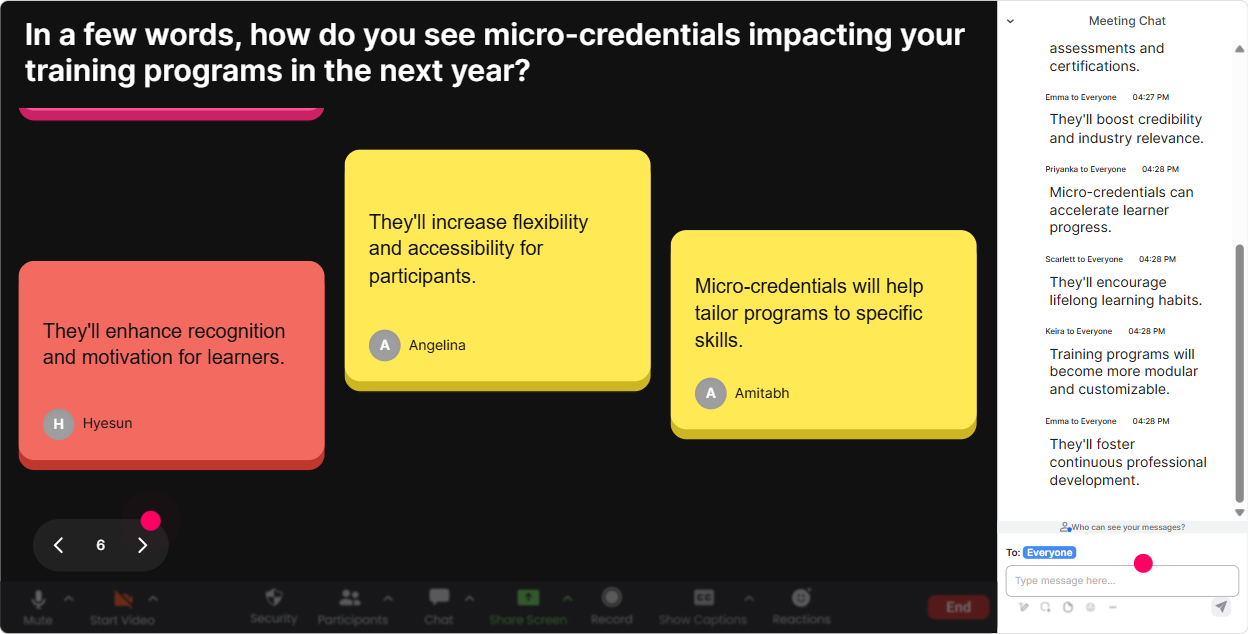
4) Talking Tiles: Turn audience input into a live brainstorm (without breakout room chaos)
Talking Tiles are gold when you want longer responses-real examples, opinions, mini-stories. It feels like the room is talking instead of silently listening. Use it in your Micro-Credentials ILT like this: - What role do Micro-Credentials play in your agency-sales tool, learning solution, compliance, or something else? - Describe a client request youve received that could be solved with a Micro-Credential. - Whats one thing that could slow down implementation in your organization? - If we launched a pilot next month, what would be your FIRST step? Trainer tip: Pick 23 tiles to read out and react to. When you respond to someones exact words on screen, the whole group starts typing more because they realize youre actually paying attention.
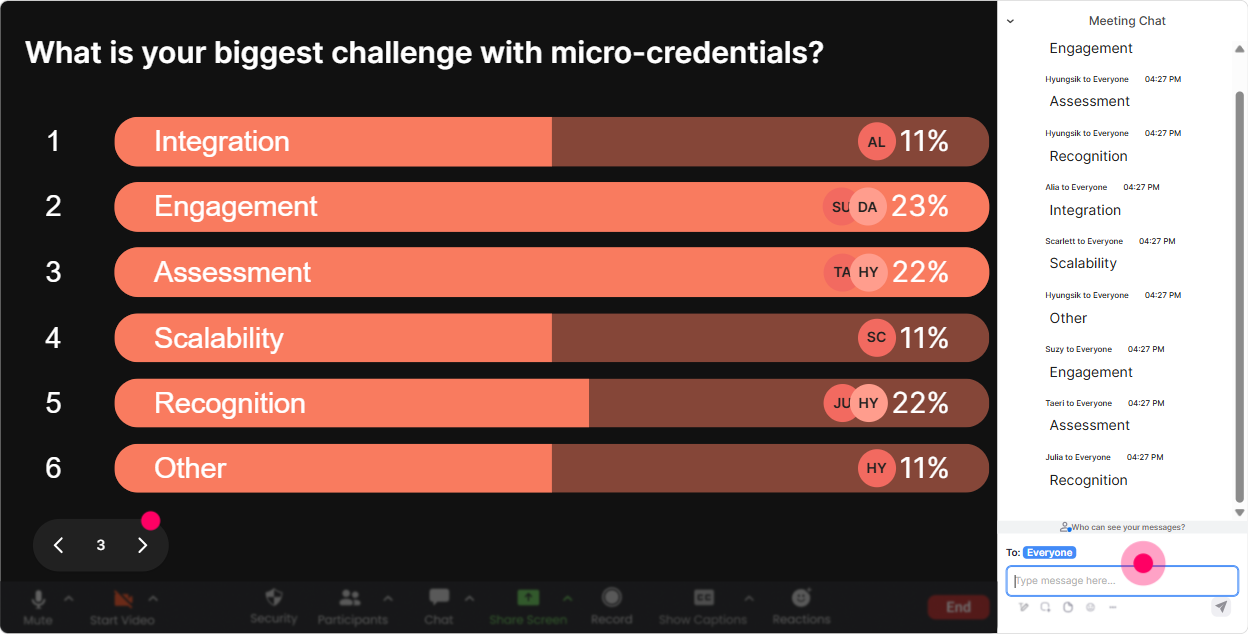
5) Power Polls: Let the group choose what to focus on (so they stay bought in)
In Micro-Credentials training, different people care about different things-some want standards and frameworks, some want sales positioning, some want assessment and QA. Power Polls help you stop guessing. Run a poll early with options like: Question: What do you most want to get out of todays Micro-Credentials session? Options: 1) Designing a Micro-Credential (structure + outcomes) 2) Assessment and evidence (what counts) 3) Platform + issuance (badges, verification, portability) 4) Selling Micro-Credentials to corporate clients 5) Quality assurance + governance You can also use a poll mid-session: - Which pilot model should we explore first? (single skill / role-based pathway / compliance / leadership) Trainer tip: After the poll, say: Alright, the room has spoken-well spend extra time on option #2. People engage more when they feel they influenced the agenda.
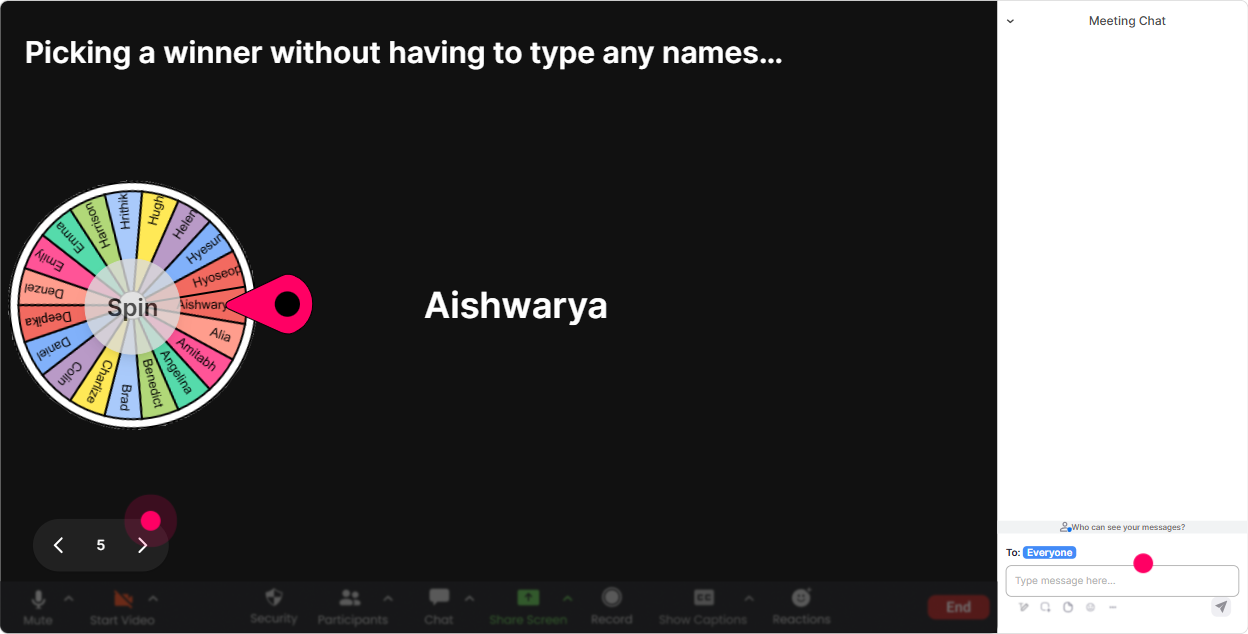
6) Winner Wheel (Spinner Wheel): Get participation without the awkward any volunteers? silence
You know that moment: you ask a question, everyone goes quiet, and you end up answering your own question. The Winner Wheel fixes that dynamic in a fun, low-pressure way. Simple ways to use it in a Micro-Credentials ILT: - Im going to spin the wheel and whoever it lands on shares: whats ONE client you think would be a great pilot for Micro-Credentials? - Wheel time: share one assessment method you currently use (quiz, observation, project, manager sign-off, etc.). - Lets pick someone to summarize: whats the difference between a Micro-Credential and a short course? Trainer tip: Set the rule that the wheel only pulls from people who commented during the last interaction. That way, quiet attendees have a reason to type-engagement goes up naturally.
7) Quiz: Do quick knowledge checks that feel like a game (not an exam)
Micro-Credentials have lots of sounds right statements floating around. A Quiz interaction is perfect for clearing up misconceptions fast-and it keeps people alert because they want to see the correct answer. Example quiz questions (multiple choice, one correct): - Which is MOST essential for a Micro-Credential? A) A long seat-time requirement B) A clear assessment tied to learning outcomes C) A final attendance certificate D) A trainer bio page (Correct: B) - What makes a Micro-Credential more credible to employers? A) A fancy title B) Verified evidence + transparent criteria C) More slides in the course D) A longer webinar (Correct: B) - Which is the best description of stackability? A) Learners can combine Micro-Credentials toward a larger pathway B) Learners can download the badge image C) Trainers can reuse the same deck D) Courses can be delivered faster (Correct: A) Trainer tip: After you reveal the correct answer, ask one follow-up in chat: What made you pick your option? Thats where the real learning (and engagement) happens.

2) Rating Polls: Get a quick pulse on Micro-Credentials confidence (and adjust live)
Rating Polls are perfect when you want a real-time temperature check without putting people on the spot. And in Micro-Credentials training, people often *think* they understand it until you get into assessment design, evidence, and issuance. Use Rating Polls at key moments like: kickoff, after definitions, after compliance/quality, and before you move into implementation. Easy questions you can run: - On a scale of 110, how confident are you explaining Micro-Credentials to a client? - Rate your current readiness to launch a Micro-Credentials pilot in your agency (110). - How clear is the difference between a certificate program vs. a Micro-Credential? (110) - How confident are you about assessment and evidence requirements? (110) Trainer tip: If the average is low, say it out loud-Perfect, that means were in the right room. It builds trust and keeps people engaged because they feel seen.
8) Q&A: Capture questions from chat automatically-so you dont miss the good ones
In Micro-Credentials sessions, questions come in waves-usually when you hit assessment, credential proof, or how do we sell this? StreamAlive Q&A pulls questions from chat and organizes them so youre not hunting through a scrolling mess. Ways to use it smoothly: - Tell the group: Drop your questions anytime-I'll pause every 15 minutes and clear the Q&A list. - During a framework section: Any questions on standards, credit equivalency, or governance? Toss them in chat. - During implementation talk: Ask me anything about rollout: tools, staffing, budget, client comms. Trainer tip: When someone asks something youll cover later, say: Great question-Im parking it and well come back right after the next activity. Then actually come back to it. That follow-through builds massive trust.

9) Analytics: Improve every Micro-Credentials cohort by seeing what actually engaged people
After you run a Micro-Credentials ILT once, analytics help you stop relying on gut feel. Youll see what segments got people chatting, where attention dipped, and which interactions sparked the most participation. What to look for as a trainer working with training agencies: - Minute-by-minute engagement: Find the exact point where energy dropped (often its when you go too long without an interaction). - Interaction reports: See which poll/quiz got the strongest response-then reuse that pattern in future cohorts. - Top engaged attendees (Fantastic Fans): These are your future champions-invite them to be pilot leads, peer mentors, or case study contributors. - Chat replay: Great for pulling real audience language (their exact words) to improve your slides and sales messaging. Trainer tip: Use analytics as your continuous improvement loop: run session review peaks/drops adjust run-of-show engagement climbs cohort after cohort. Thats how you get the up to 9x engagement effect-more moments where learners are doing, responding, choosing, and reacting instead of just watching.

Use StreamAlive in all your training sessions
StreamAlive isn’t just for
Micro-Credentials
training,
it can also be used for any instructor-led training session directly inside your PowerPoint presentation.
Explore similar traingin ideas: unlocking the potential of StreamAlive
See how StreamAlive transforms live training with engaging events and interactive sessions across industries, directly inside your PowerPoint presentation.

Interactions in action
(it's free)

.svg.png)


