Install StreamAlive for your PowerPoint slides
Learn more

Transparency Training for L&D Leaders
StreamAlive helps 9x the audience engagement in your Virtual Instructor-led Trainings (VILT) directly inside your powerpoint presentation.
Make your instructor-led Transparency training more fun with polls, word clouds, spinner wheels and more
Works inside your existing PowerPoint presentation
Install the StreamAlive app for PowerPoint and see your slides come to life as people participate in your interactions
AI generates audience interactions for you
Let our AI scan your presentation and automatically come up with relevant questions based on the content. Or spend two hours coming up with your own questions, your choice!
Built to work with MS Teams and Zoom
Native apps for Teams and Zoom so you never have to leave your existing workflows
No QR Codes
Chat-powered interactions means your audience doesn’t need to scan QR codes or look at another screen to participate. They just type in the chat!

Quickly approved by your IT team
StreamAlive’s apps for Teams and Zoom means that they have been through rigorous quality assurance and client safety reviews. You’ll find everything an IT team needs to approve the app within the organization within your StreamAlive account.

Youve been asked to run a Transparency instructor-led training for L&D Leaders-and you want it to feel real, not like another slide marathon. The easiest win? Get people talking early, then keep them interacting every few minutes. Here are practical ways to do that using StreamAlive so your session stays lively from minute one.
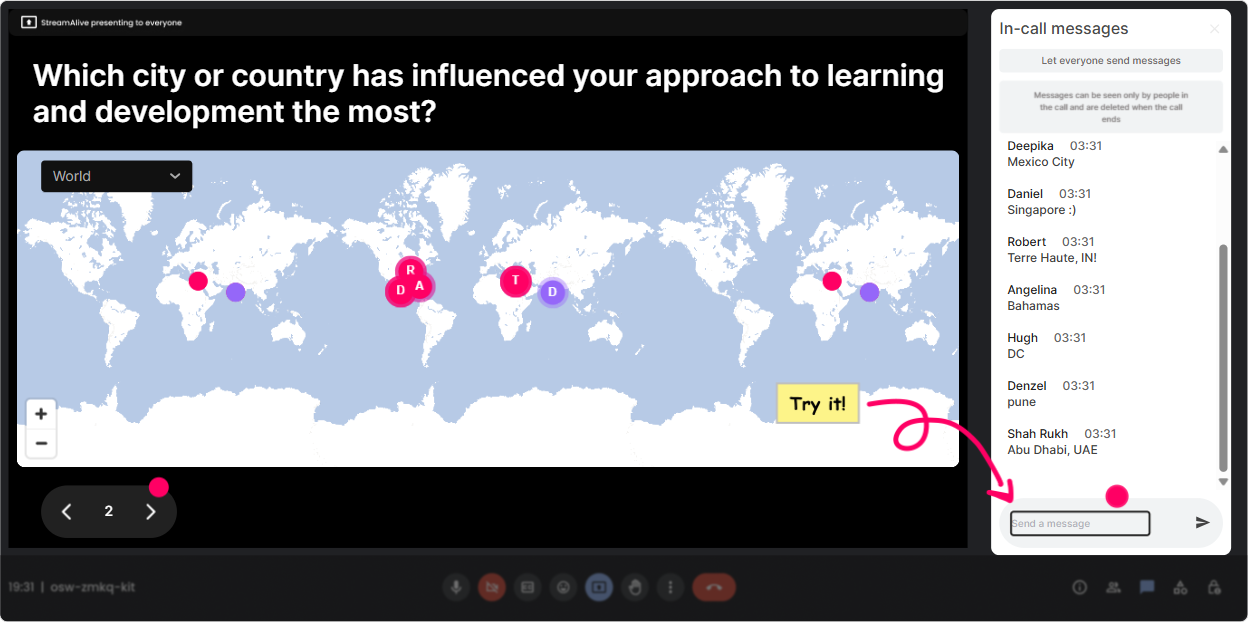
1) Magic Maps: put your L&D Leaders on the map (literally)
This is your go-to opener when you want instant energy without forcing awkward intros. Ask one location-based question, let everyone reply in chat, and StreamAlive drops pins on a live map in real time-so the group *sees* the room come alive. How to use it for Transparency training: - **Kick-off icebreaker:** Where are you joining from today? (Fast, familiar, and it gets everyone to type at least once.) - **Tie it to the topic:** Where in the world have you seen the *best* workplace transparency? - **Culture + context check:** Which city shaped your leadership style the most? - **Light but relevant:** If your org was a place on earth, what city would it be today? (Then segue into how transparent cultures *feel* different.) Trainer tip: If you want cleaner data, set it to **one location per attendee**. And if youve got clusters (lots of people from one place), call it out-those mini moments create connection fast.
2) Rating Polls: a quick pulse check on transparency (without the awkward silence)
Transparency is one of those topics where people *think* theyre aligned-until you see the spread. Rating Polls let you ask a 110 question and immediately show the distribution live. Its a simple way to surface reality and start a meaningful discussion. Strong Rating Poll prompts for this session: - **Confidence check:** On a scale of 110, how confident are you that your leaders model transparency consistently? - **Safety check:** How safe does it feel for employees to speak up in your org right now? (110) - **Clarity check:** How clear are decisions and decision-making criteria in your org? (110) - **Readiness check:** How ready is your L&D function to teach transparency as a capability? (110) Trainer tip: After you show results, dont rush. Ask: What made you pick your number? That one question turns a poll into a conversation.

3) Wonder Words (Word Cloud): make feelings visible in 10 seconds
Transparency isnt just a process thing-its emotional. Word Clouds are perfect when you want quick, honest gut reactions without putting anyone on the spot. People drop 12 words, and StreamAlive builds the live cloud where popular themes grow bigger. Great Word Cloud questions for Transparency ILT: - **Emotions at the start:** When you hear organizational transparency, whats the first word that comes to mind? - **What it takes:** One word that must exist for transparency to work? (Youll get: trust, clarity, safety, courage.) - **What blocks it:** One word that kills transparency in organizations? (Politics, fear, ego-great discussion starters.) - **Personal reality:** One word to describe how transparent communication feels in your org today. Trainer tip: Use **Combine Similar Answers** so trust/Trust/trusting dont split into separate tiny entries.
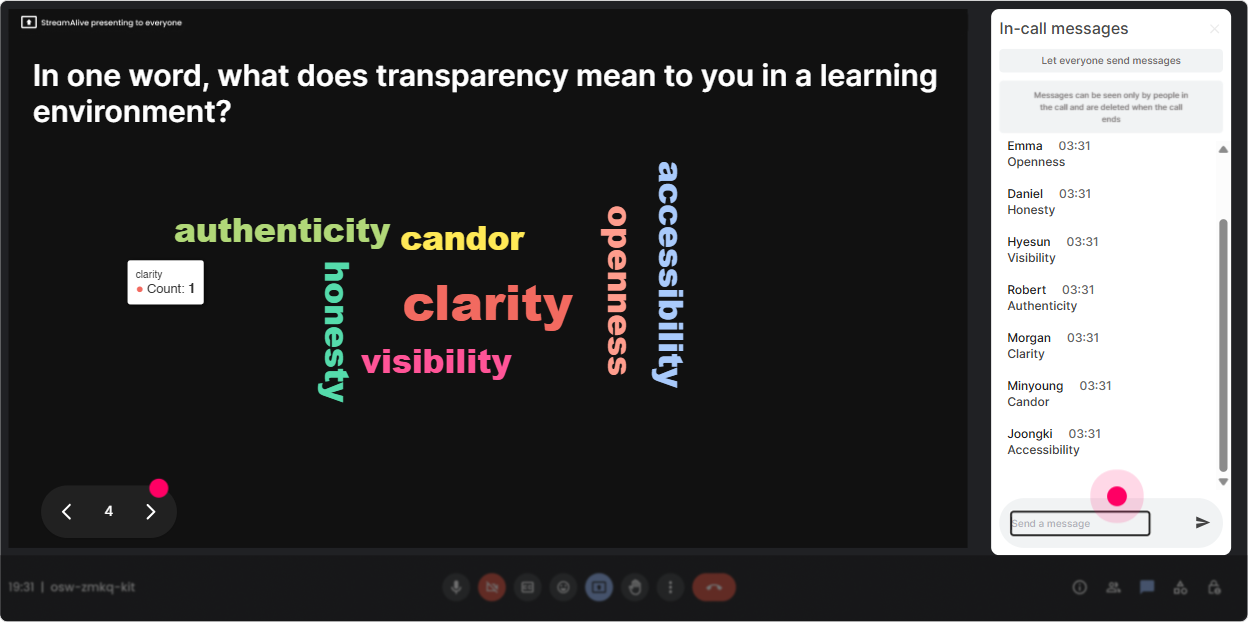
4) Talking Tiles: collect real stories (and make them fun to watch)
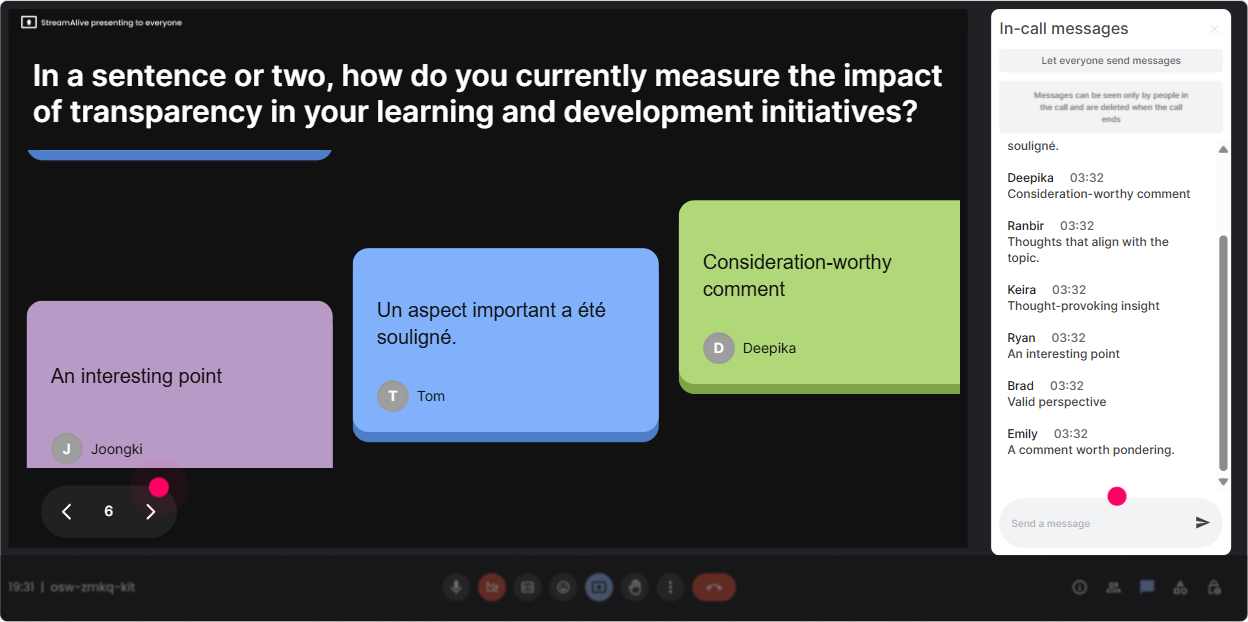
When you want more than one-word answers-like examples, scenarios, or quick reflections-Talking Tiles is money. People type into chat, and their messages drop onto the screen like tiles. It feels energetic, and it keeps everyone reading each others ideas. Use Talking Tiles for Transparency scenarios like: - **Role impact:** In your L&D leader role, where does lack of transparency slow you down the most? - **Define it through behavior:** What does transparent leadership look like in a meeting-give one example. - **Training design:** Whats one transparency moment you wish leaders handled better (reorgs, promotions, performance, etc.)? - **Modeling practice:** Finish this sentence: Id trust leadership more if they ____. Trainer tip: Read a few tiles out loud and group them: Im seeing a theme around decision clarity Thats how you turn chat into facilitated learning.
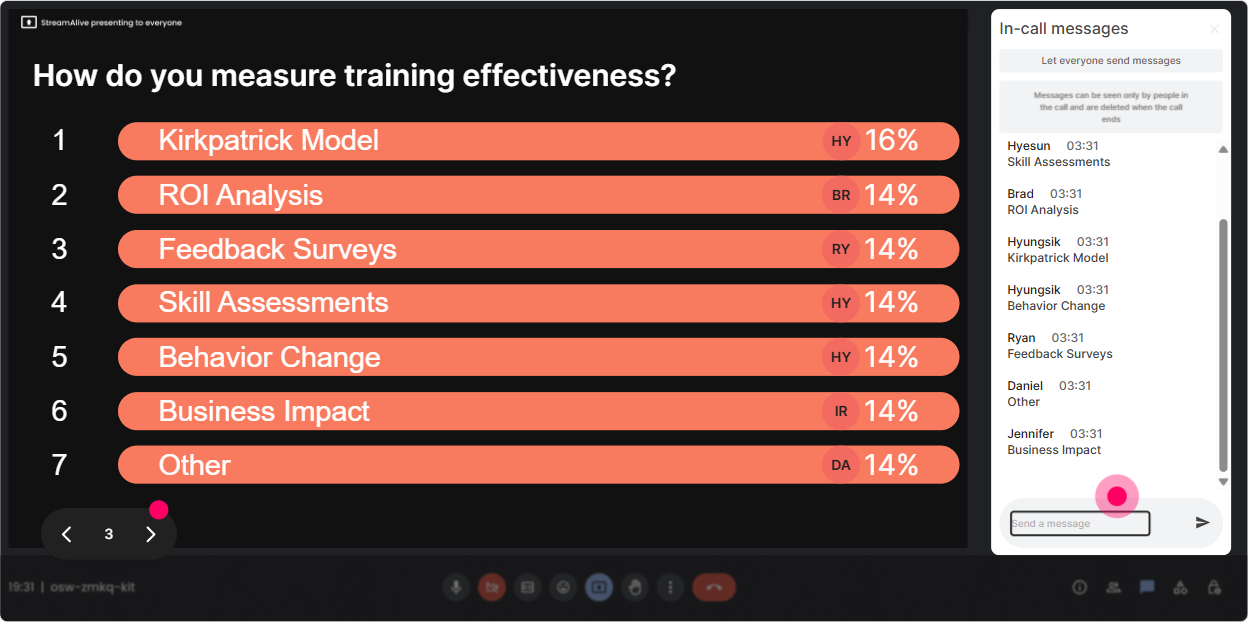
5) Power Polls: let the group choose the agenda (and theyll lean in)
If you want L&D Leaders to stay engaged, give them a little control. Power Polls help you quickly prioritize what they care about most-then you can tailor your examples and time accordingly. Power Poll ideas for Transparency ILT: - **What to focus on today:** 1) Decision-making transparency 2) Pay and promotion transparency 3) Change and reorg communication 4) Performance and feedback transparency - **Biggest barrier in your org:** 1) Fear of backlash 2) Leaders dont have the full info 3) Need-to-know culture 4) Poor communication habits - **Where transparency matters most right now:** 1) Hybrid work expectations 2) Career pathways 3) Business strategy shifts 4) Team goals and priorities Trainer tip: Run this poll early, then later say: Remember you voted for change communication-lets go deeper there. People love seeing you actually respond to them.
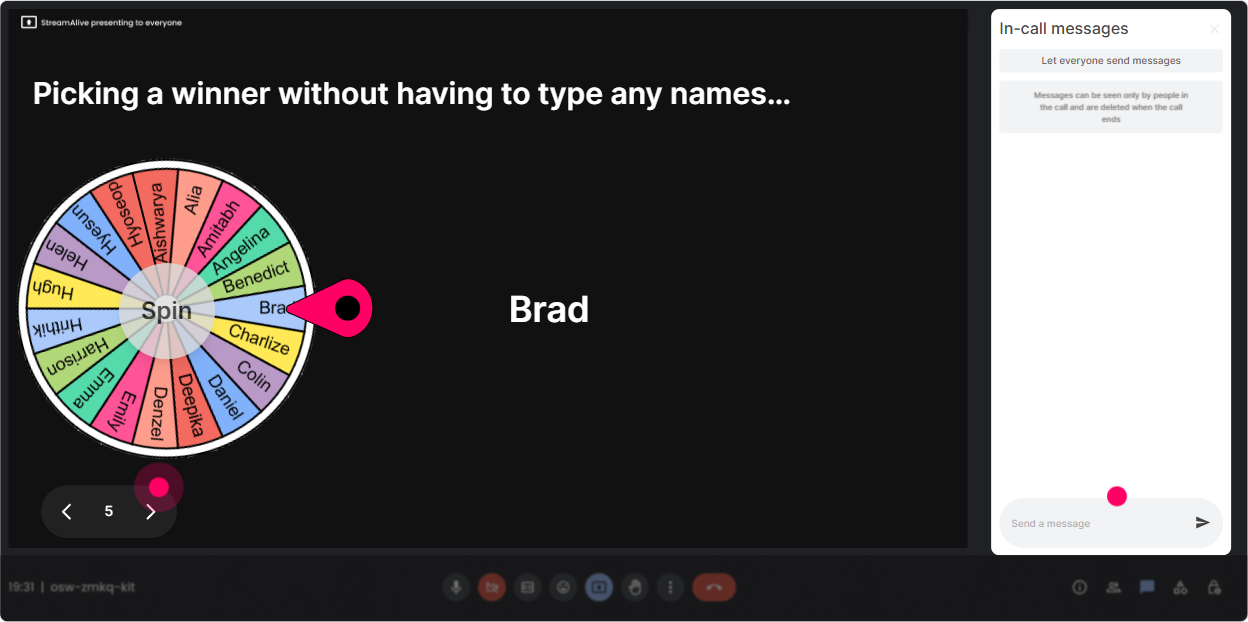
6) Winner Wheel: call on people without the cringe
Weve all done the Any volunteers? thingand got nothing. Winner Wheel fixes that in a playful way. You set the criteria (like people who commented), spin, and let fate pick who answers. Fun, trainer-friendly ways to use it in Transparency training: - **Story time:** Whos willing to share a quick example of transparency done well? Im spinning the wheel from everyone who posted a tile. - **Micro-coaching:** Ill share a scenario-wheel pick, you tell me how youd communicate it transparently. - **Accountability moment:** Who wants to summarize the top 3 takeaways from this section? Wheel decides. Trainer tip: Make it opt-in by saying: Type IN if youre open to being spun. Then only include those names. Keeps it safe and still fun.
7) Quiz: quick knowledge checks that dont feel like school
Transparency has myths. A Quiz is perfect for busting them with a fast multiple-choice question, then revealing the correct answer and discussing why. Quiz questions you can use: - **Myth-buster:** Transparency means sharing *everything* with everyone. A) True B) False *(Correct: B - transparency is about clarity and context, not oversharing.)* - **Practical behavior:** Which is the most transparent leadership behavior? A) Sharing decisions with no rationale B) Explaining decision criteria and trade-offs *(Correct)* C) Waiting until everything is finalized D) Avoiding tough questions - **Trust angle:** Transparency builds trust most when leaders A) Only share good news B) Share early, clearly, and consistently-even when its messy *(Correct)* C) Delegate communication to HR D) Use broad, vague statements Trainer tip: After Show Correct Answer, ask one follow-up in chat: What makes this hard in real life? Thats where the learning sticks.

2) Rating Polls: a quick pulse check on transparency (without the awkward silence)
Transparency is one of those topics where people *think* theyre aligned-until you see the spread. Rating Polls let you ask a 110 question and immediately show the distribution live. Its a simple way to surface reality and start a meaningful discussion. Strong Rating Poll prompts for this session: - **Confidence check:** On a scale of 110, how confident are you that your leaders model transparency consistently? - **Safety check:** How safe does it feel for employees to speak up in your org right now? (110) - **Clarity check:** How clear are decisions and decision-making criteria in your org? (110) - **Readiness check:** How ready is your L&D function to teach transparency as a capability? (110) Trainer tip: After you show results, dont rush. Ask: What made you pick your number? That one question turns a poll into a conversation.
8) Q&A (Quick Questions): stop losing great questions in the chat
In Transparency sessions, people have real questions-but chat moves fast and stuff gets missed. StreamAlives Q&A pulls questions from chat and displays them neatly so you can actually manage them without scanning nonstop. How to use it smoothly: - **Set expectations:** Drop your questions anytime-StreamAlive will capture them. - **Midpoint Q&A break:** Lets pause for 3 minutes and tackle the top questions coming in. - **Sensitive topic handling:** If your question is about a tricky situation (reorgs, pay, performance), ask it-chances are others are thinking it too. Trainer tip: If a question is spicy or complex, say: Im capturing this-if we cant do it justice now, Ill address it at the end. People feel heard either way.

9) Analytics: prove engagement (and improve the next session)
After the session, Analytics is where you get the so what data-what people reacted to, when chat spiked, and which interactions actually landed. This is especially useful for L&D Leaders because you can show impact, not just attendance. How L&D Leaders and trainers can use it: - **Minute-by-minute engagement:** Spot where energy dipped (maybe a long slide section) and where it spiked (like the Word Cloud on trust). Then redesign accordingly. - **Interaction replay:** Revisit poll results and tiles to pull real quotes/themes for follow-up resources. - **Identify top contributors:** Find your most engaged participants (potential champions for future programs). - **Share outcomes:** Email reports to stakeholders or drop insights into Teams: Top barrier to transparency was fear of backlash (43%). Trainer tip: Use the data to justify your facilitation choices: We kept interaction every 57 minutes, and engagement stayed steady. Thats how you build credibility fast.

Use StreamAlive in all your training sessions
StreamAlive isn’t just for
Transparency
training,
it can also be used for any instructor-led training session directly inside your PowerPoint presentation.
Explore similar traingin ideas: unlocking the potential of StreamAlive
See how StreamAlive transforms live training with engaging events and interactive sessions across industries, directly inside your PowerPoint presentation.

Interactions in action
(it's free)

.svg.png)


