Install StreamAlive for your PowerPoint slides
Learn more

Digital Twins Training for Corporate Trainers
StreamAlive helps 9x the audience engagement in your Virtual Instructor-led Trainings (VILT) directly inside your powerpoint presentation.
Make your instructor-led Digital Twins training more fun with polls, word clouds, spinner wheels and more
Works inside your existing PowerPoint presentation
Install the StreamAlive app for PowerPoint and see your slides come to life as people participate in your interactions
AI generates audience interactions for you
Let our AI scan your presentation and automatically come up with relevant questions based on the content. Or spend two hours coming up with your own questions, your choice!
Built to work with MS Teams and Zoom
Native apps for Teams and Zoom so you never have to leave your existing workflows
No QR Codes
Chat-powered interactions means your audience doesn’t need to scan QR codes or look at another screen to participate. They just type in the chat!

Quickly approved by your IT team
StreamAlive’s apps for Teams and Zoom means that they have been through rigorous quality assurance and client safety reviews. You’ll find everything an IT team needs to approve the app within the organization within your StreamAlive account.

Youve been asked to run a Digital Twins instructor-led training for corporate trainers-and you want it to feel alive, not like a slideshow with polite silence. The good news: this topic is perfect for interactive moments. Here are practical ways to use StreamAlive to keep people involved from minute one to the last question.
1) Magic Maps: Put your Digital Twins audience on the map (literally)
Digital Twins can feel high tech and abstract-so start with something human: where people are coming from and what world they work in. Magic Maps lets everyone type a location in chat, and StreamAlive plots it instantly on a live world map. How to use it in your Digital Twins ILT: - Warm-up opener: Where in the world are you joining from today? (simple, familiar, gets everyone typing fast) - Make it relevant to the topic: Drop the city where your companys operations are most complex (manufacturing site, plant, hospital, airport, etc.). - Digital Twin dream scenario icebreaker: If you could build a Digital Twin of ANY facility on earth, where would it be? Trainer tip: If youve got a global cohort, call out clusters (e.g., Wow, lots of folks from Singapore-bet youre seeing smart infrastructure firsthand). It creates instant community, and people feel seen early.

2) Rating Polls: Quick confidence check before you go deep
Before you teach anything, get a quick read on the room. Rating Polls are perfect because theyre fast: everyone just drops a number in chat, and you get a live visual of where the group stands. Ways to use it in Digital Twins training: - Baseline knowledge: On a scale of 110, how familiar are you with Digital Twins? - Comfort level as trainers: How confident do you feel explaining Digital Twins to a non-technical audience? (110) - Mid-session pulse check: Rate this so far: Are we moving too fast (1) or too slow (10)? Trainer tip: Use the result to narrate your plan: Looks like were mostly at 35. Great-lets keep it practical and use examples, not jargon. That tiny moment builds trust.

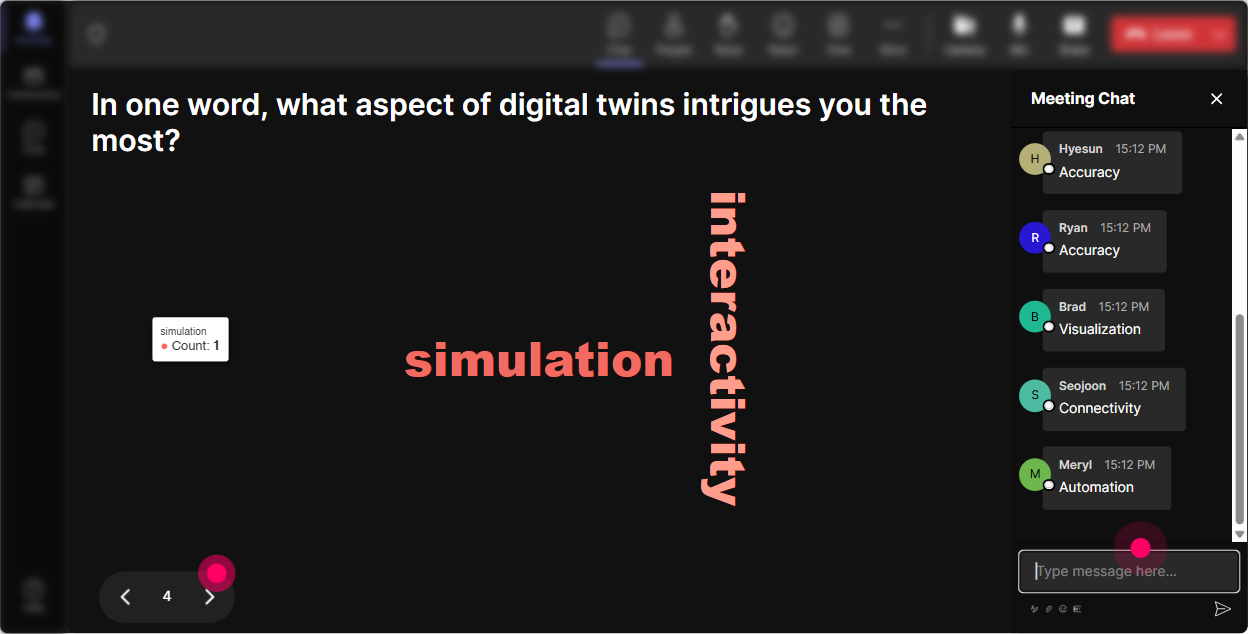
3) Wonder Words (Word Cloud): Capture the vibe around Digital Twins in real time
Digital Twins triggers big feelings-excitement, skepticism, confusion, curiosity. Wonder Words lets you ask for 12 word answers, and StreamAlive turns it into a live word cloud where the most common responses grow larger. Great prompts for your session: - Emotion check: Digital Twins in ONE word-how do you feel about it? (excited, overwhelmed, curious, etc.) - Use-case thinking: Name one thing in your organization that should have a Digital Twin. - Outcomes focus: Whats the #1 business benefit youd want from a Digital Twin? (predictive maintenance, safety, cost, speed, quality) Trainer tip: This is a super clean way to transition into your agenda: Okay, Im seeing predictive and maintenance popping up-lets use that as our running example.
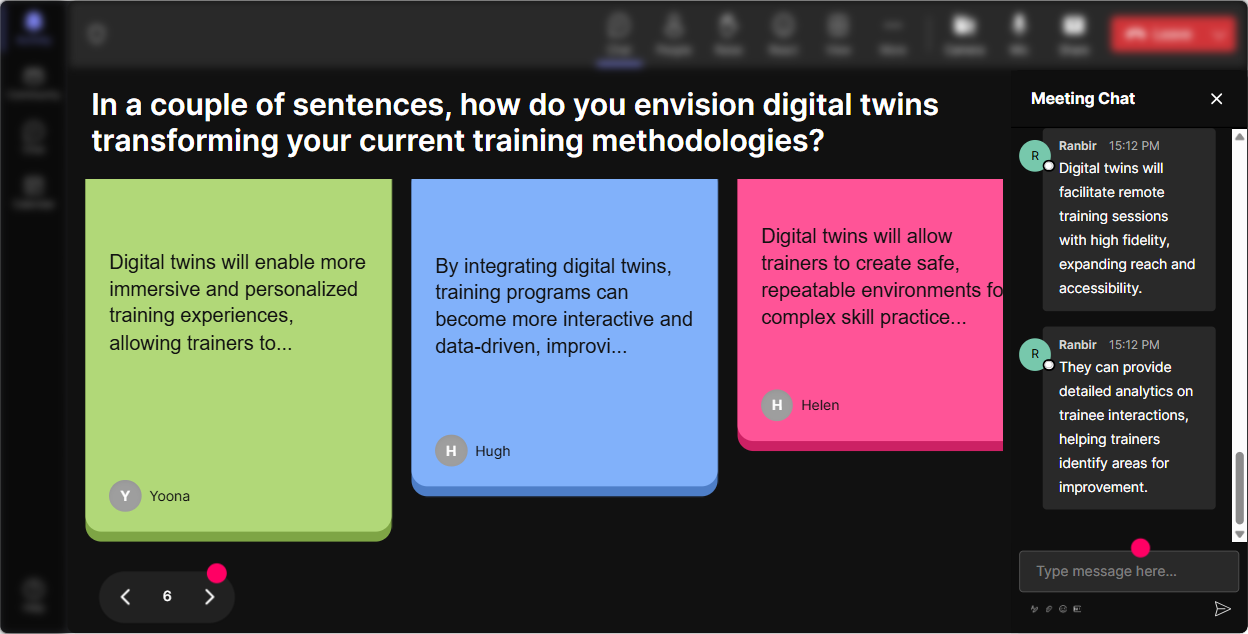
4) Talking Tiles: Turn audience ideas into a live Digital Twin brainstorm wall
When you want longer answers (more than one or two words), Talking Tiles is gold. People type in chat and their responses drop onto the screen like tiles-so it feels like a live brainstorm, not a lecture. Ideas you can run during Digital Twins ILT: - Role impact question: In one sentence: how could Digital Twins change YOUR job or the job of the people you train? - Real-world obstacles: Whats one thing that could block Digital Twins adoption in your org? (data quality, budget, change resistance, skills gap) - Trainer focus: Whats the hardest part of teaching Digital Twins to your internal audience? Trainer tip: Pick 34 tiles live and react to them. When people see you using their words, chat activity usually spikes the rest of the session.
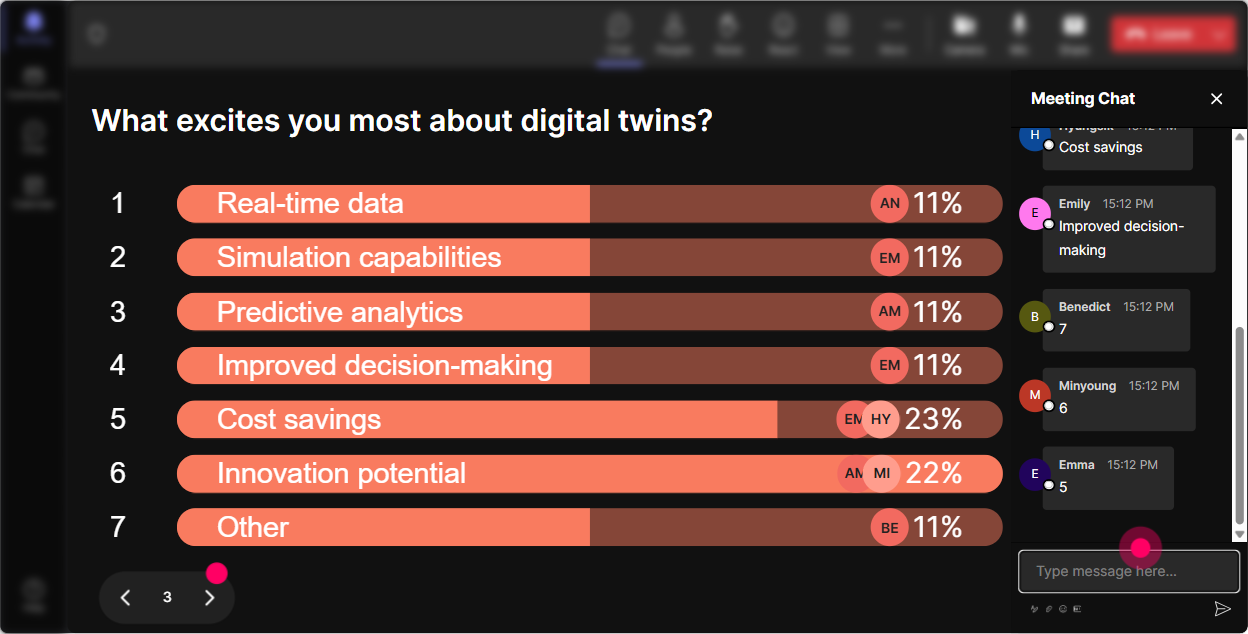
5) Power Polls: Let the audience choose what to zoom in on
Digital Twins is a big umbrella-IoT, simulation, analytics, lifecycle management, governance, and more. Instead of guessing what your group wants, run a Power Poll and let them decide. Poll ideas (choose options or let chat drive them): - What do you want most from today? 1) Digital Twins basics (no fluff) 2) Real business use cases 3) How to pitch it internally 4) How to teach it to non-technical teams - Which Digital Twin use case is most relevant to your org? 1) Predictive maintenance 2) Process optimization 3) Safety & risk 4) Customer experience Trainer tip: Run the poll early, then again near the end: What do you want a follow-up session on? That gives you content direction AND makes your learners feel like co-creators.
6) Winner Wheel (Spinner Wheel): Get participation without awkward volunteering
You know the moment: you ask a question, and everyone goes quiet. The Spinner Wheel solves that without putting anyone on the spot in a weird way-it turns it into a game. How to use it in Digital Twins training: - Type ONE industry where Digital Twins is already making an impact (auto, energy, healthcare, logistics). Im going to spin and ask one person to share why they picked it. - Drop a quick example of something you could twin (machine, building, supply chain, customer journey). Spin wheel decides who explains theirs. - Who wants a mini-coach moment? Type ME and Ill spin to pick someone and help them rephrase a Digital Twin explanation for executives. Trainer tip: Make the win friendly: shoutout, small prize, or just bragging rights. Even just saying Winner gets the title: Digital Twin Translator-in-Chief gets laughs and messages.

7) Quiz: Quick knowledge checks that dont feel like an exam
Digital Twins has lots of almost correct misunderstandings (especially the difference between a dashboard, a simulation, and a true twin). StreamAlive Quiz lets you run multiple choice questions in chat, then reveal the correct answer. Quiz questions you can use: - Which best describes a Digital Twin? A) A 3D model B) A real-time, data-connected representation used to simulate and optimize (Correct) C) A reporting dashboard D) A CAD drawing - Whats usually required for a working Digital Twin? A) Live data streams B) A model of the asset/process C) Feedback loop for decisions D) All of the above (Correct) - Digital Shadow vs Digital Twin-whats the key difference? (Great discussion starter) Trainer tip: After revealing the answer, ask: If you picked B, what word in the question influenced you? That one follow-up gets real learning conversations going.

2) Rating Polls: Quick confidence check before you go deep
Before you teach anything, get a quick read on the room. Rating Polls are perfect because theyre fast: everyone just drops a number in chat, and you get a live visual of where the group stands. Ways to use it in Digital Twins training: - Baseline knowledge: On a scale of 110, how familiar are you with Digital Twins? - Comfort level as trainers: How confident do you feel explaining Digital Twins to a non-technical audience? (110) - Mid-session pulse check: Rate this so far: Are we moving too fast (1) or too slow (10)? Trainer tip: Use the result to narrate your plan: Looks like were mostly at 35. Great-lets keep it practical and use examples, not jargon. That tiny moment builds trust.
8) Q&A: Catch every question without losing your place
Digital Twins sessions trigger lots of questions-usually scattered through chat while youre teaching. StreamAlive Q&A (Quick Questions) pulls questions out of chat and organizes them, so youre not scrolling and missing stuff. How it helps in this topic: - Capture technical + business questions cleanly: Do we need IoT for a Digital Twin? How do we justify ROI? Where do we start? - Do structured Q&A breaks: Im going to teach for 10 minutes, then well knock out the top 5 questions StreamAlive collected. - Keep flow during demos: you can stay focused while questions stack neatly for later. Trainer tip: Tell them exactly how to ask: Start your message with Q: so I can spot it easily. (Even though StreamAlive helps, this makes it extra clean.)

9) Analytics: Prove what engaged your learners (and improve every run)
After your Digital Twins training, youll want to know what actually worked-where attention spiked, where it dipped, and which activities got people talking. StreamAlive Analytics gives you that visibility. What you can do with it as a corporate trainer: - See minute-by-minute engagement: spot the exact moment chat lit up (maybe your use-case story) and the moment it went quiet (maybe too much theory). - Identify your most engaged participants (Fantastic Fans): great for follow-up, champions, or even future co-facilitators. - Review interaction performance: which poll got the best response, which question fell flat, what to tweak next time. - Share results easily: email reports to yourself or your team, or use insights to improve the next cohort. Trainer tip: Treat analytics like your trainer digital twin-its feedback data that helps you simulate improvements before the next session runs.

Use StreamAlive in all your training sessions
StreamAlive isn’t just for
Digital Twins
training,
it can also be used for any instructor-led training session directly inside your PowerPoint presentation.
Explore similar traingin ideas: unlocking the potential of StreamAlive
See how StreamAlive transforms live training with engaging events and interactive sessions across industries, directly inside your PowerPoint presentation.

Interactions in action
(it's free)

.svg.png)


