Install StreamAlive for your PowerPoint slides
Learn more

Talent Marketplaces Training for Training Agencies
StreamAlive helps 9x the audience engagement in your Virtual Instructor-led Trainings (VILT) directly inside your powerpoint presentation.
Make your instructor-led Talent Marketplaces training more fun with polls, word clouds, spinner wheels and more
Works inside your existing PowerPoint presentation
Install the StreamAlive app for PowerPoint and see your slides come to life as people participate in your interactions
AI generates audience interactions for you
Let our AI scan your presentation and automatically come up with relevant questions based on the content. Or spend two hours coming up with your own questions, your choice!
Built to work with MS Teams and Zoom
Native apps for Teams and Zoom so you never have to leave your existing workflows
No QR Codes
Chat-powered interactions means your audience doesn’t need to scan QR codes or look at another screen to participate. They just type in the chat!

Quickly approved by your IT team
StreamAlive’s apps for Teams and Zoom means that they have been through rigorous quality assurance and client safety reviews. You’ll find everything an IT team needs to approve the app within the organization within your StreamAlive account.

Youve been asked to run a Talent Marketplaces instructor-led training for a Training Agency-and you want people to actually stay with you (not multitask in silence). The easiest way? Build the session around quick, chat-powered moments that pull everyone in. Here are practical ideas using StreamAlive to keep energy high and engagement up to 9x.
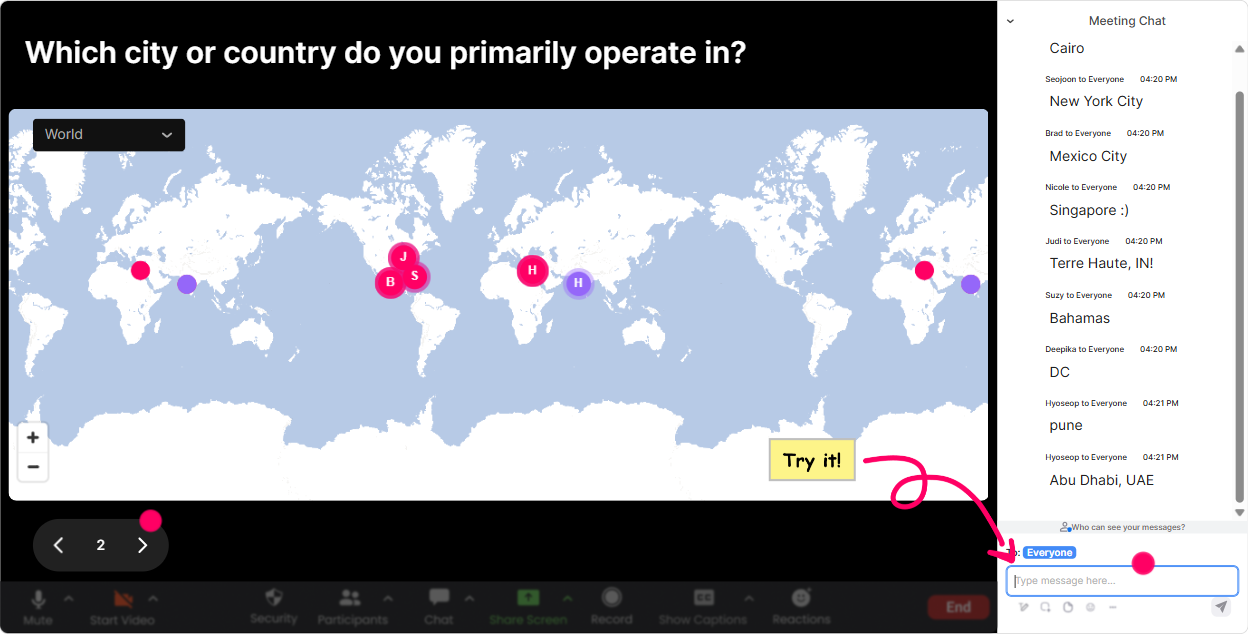
1) Magic Maps: Put your Talent Marketplace audience on the map (literally)
This is your easiest everyone participates in the first 60 seconds win. Kick off with a location-based question, and StreamAlive plots answers live on a world map-so your room instantly feels real and social. How to use it in Talent Marketplaces training: - Icebreaker (classic, works every time): Where are you joining from today? - Make it topic-relevant: Where is your Talent Marketplace currently live (or planned)-which city/country? - Experience-based variation: Wheres your biggest internal talent pool located? - Future-focused: If you could hire or redeploy talent from anywhere on earth, where would you pick? Trainer tip: If youre running this for multiple cohorts, reset the map each session so every group gets their own were all here together moment.
2) Rating Polls: Get a fast read on confidence and maturity (without awkward silence)
Rating Polls are perfect when you want a quick pulse check without a long discussion. People just drop a number in chat, and you instantly see the distribution and average. Use it at the start to shape how you teach: - Rate your current Talent Marketplace knowledge from 1 (brand new) to 10 (I could teach it). - How mature is your internal mobility process today? 1 = chaotic, 10 = well-oiled machine. - How confident are you that managers will support internal moves? 110. Use it mid-session to keep attention: - After explaining matching/AI recommendations: How clear was that? 110. Use it at the end for instant feedback: - How confident are you to explain Talent Marketplace value to a stakeholder now? 110. Trainer tip: When you see a split (some 2s and some 9s), say it out loud. That contrast creates instant relevance: Cool-this means well keep it practical and not assume everyones already bought in.

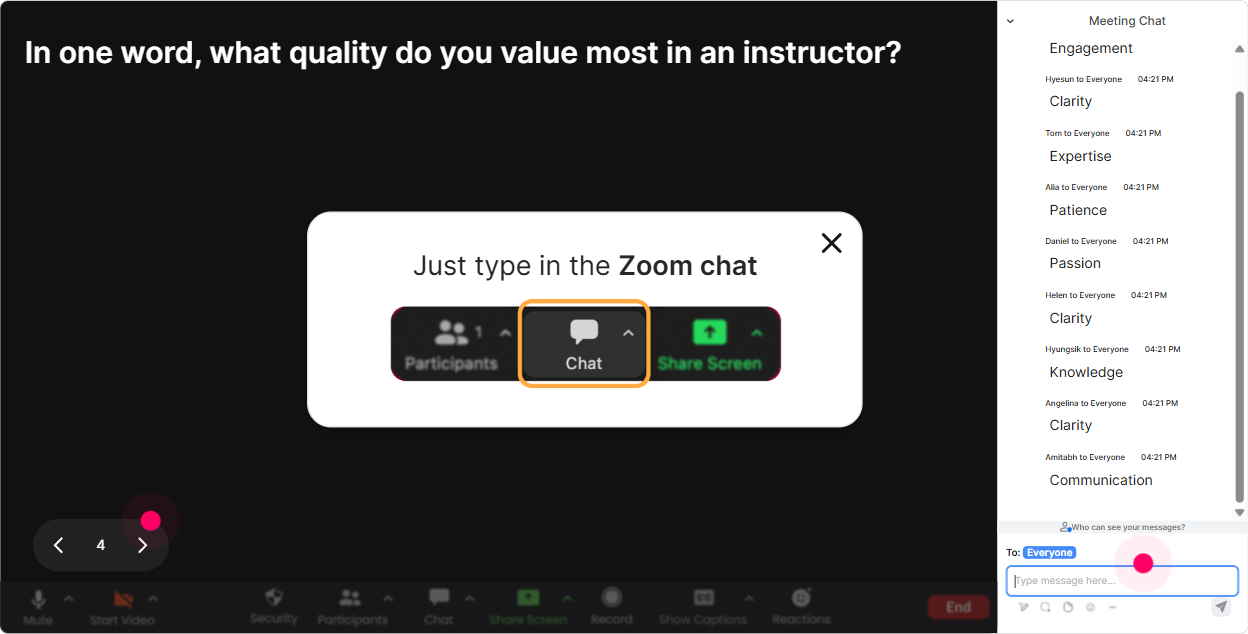
3) Wonder Words (Word Cloud): Capture the rooms feelings in one screen
Talent Marketplaces can trigger very different reactions-HR might be excited, managers might be nervous, employees might be skeptical. A word cloud lets you surface that honestly and quickly, using 12 word answers. Great prompts to use: - When you hear Talent Marketplace, whats the first word that pops into your mind? - Whats the biggest blocker in your org? One or two words. (Examples youll see: Managers, Time, Politics, Data, Trust) - What do employees want most from internal mobility? (Examples: Growth, Visibility, Fairness, Opportunity) - What does good matching mean to you? (Examples: Skills, Interests, Potential) Trainer tip: Use Combine Similar Answers so manager and managers dont split the vote. Then react to the biggest word: Okay, managers is huge-lets tackle that head-on with a rollout plan you can actually use.
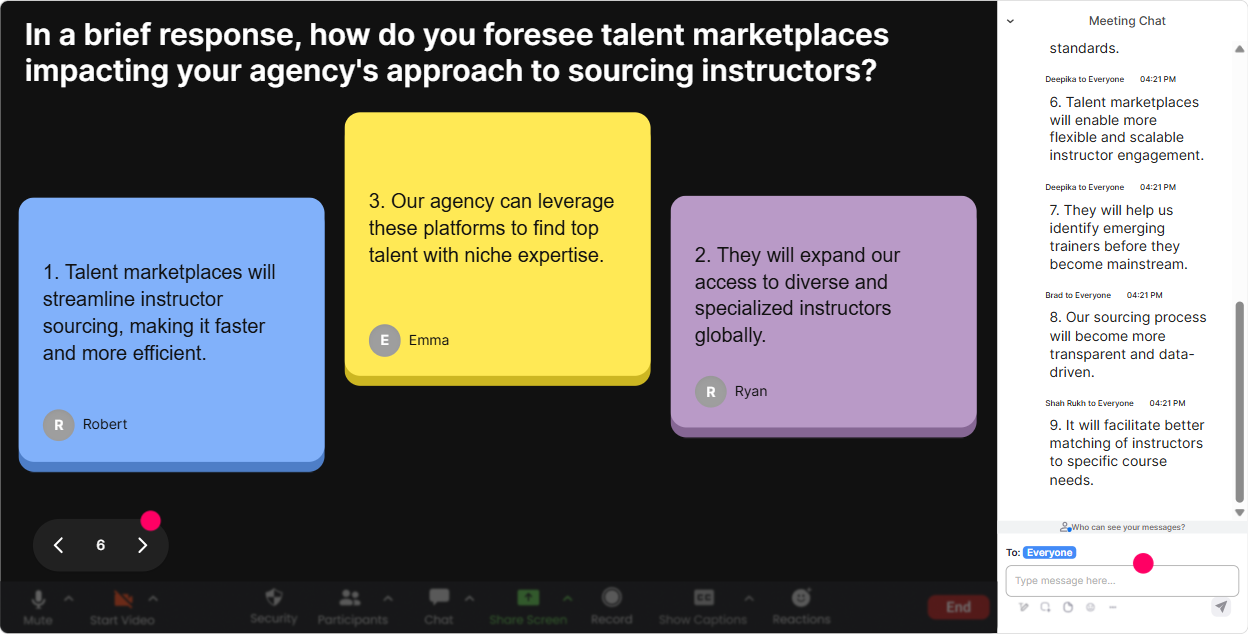
4) Talking Tiles: Turn real challenges into a live case study wall
Talking Tiles is where you go beyond one-word engagement. People type real thoughts in chat, and their responses drop onto the screen as tiles-super visual, super lively, and it feels like everyones contributing at once. Use it for real-world Talent Marketplace moments: - In one sentence: what impact could a Talent Marketplace have on your role or your clients programs? - Whats the biggest risk youre worried about if internal mobility increases? - Describe a time internal movement went wrong (or right). What happened? - If you had to sell this to managers in ONE line, what would you say? Trainer tip: After tiles come in, group them live: Im seeing themes: manager resistance, skills visibility, and fairness. Lets tackle each with a simple playbook. That I see you feeling keeps chat flowing.
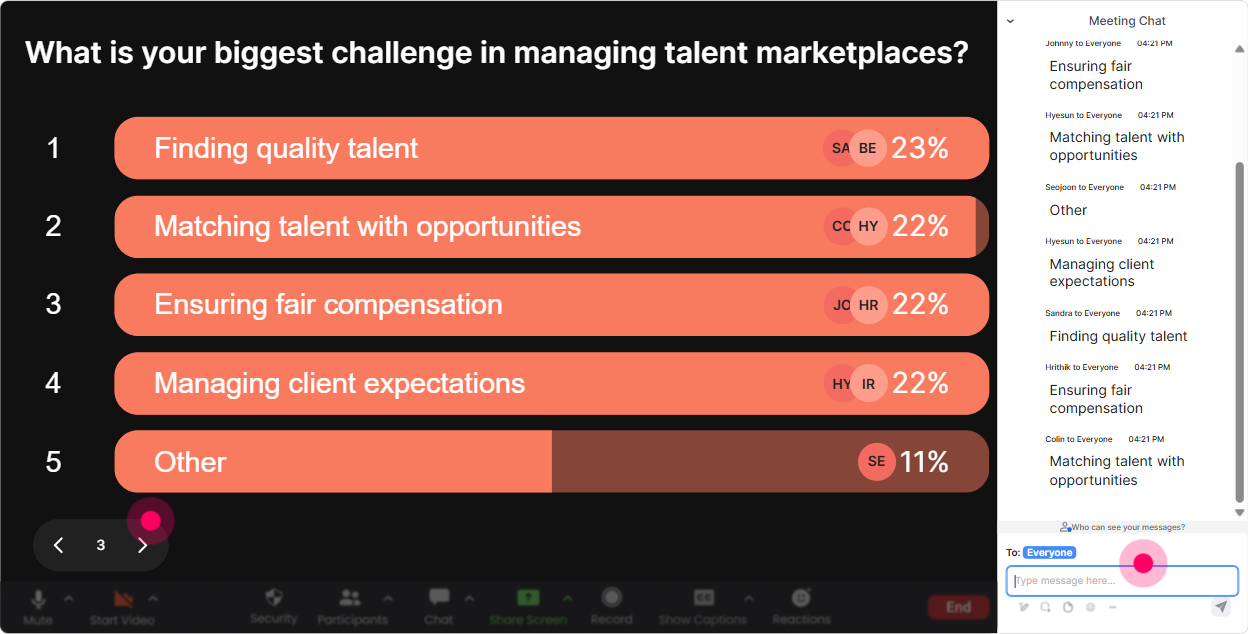
5) Power Polls: Let the audience choose what you teach next
Power Polls are your secret weapon for making ILT feel customized-even if youre teaching the same deck for the 10th time. Ask a multiple-choice question, show results live, and then teach to what the room actually cares about. Poll ideas for Talent Marketplaces training: - What do you want to focus on most today? 1) Business value + ROI 2) Skills framework + data 3) Adoption (employees + managers) 4) Governance + guardrails 5) Implementation roadmap - Whats your biggest adoption barrier right now? 1) Managers hoarding talent 2) Low employee trust 3) Weak skills data 4) No time/process 5) Unclear ownership - Which use case are you building first? 1) Internal gigs/projects 2) Mentorship 3) Internal roles 4) Learning-to-opportunity matching Trainer tip: Once the winning option shows up, say: Alright, you picked it-so were going to spend real time on this, not just a quick slide. People pay attention because they helped steer.
6) Winner Wheel: Get volunteers without the awkward anyone want to share? pause
You know that moment when you ask for a volunteer and nothing. Winner Wheel fixes that by randomly selecting someone from people who participated (commented) during an interaction. How to use it in this training (and keep it friendly): - Drop ONE challenge youve seen with internal mobility in chat. Im going to spin the wheel and have someone expand for 20 seconds. - Type value if you want to share your pitch to leadership. Ill spin for a volunteer. - Share your rollout audience: HR, Managers, or Employees. Wheel decides who gives a quick example. Trainer tip: Make it low-pressure: If you get picked and youd rather pass, just say pass-no big deal. People are way more willing when they feel safe.

7) Quiz: Quick knowledge checks that dont feel like school
Quizzes are perfect for Talent Marketplace concepts because there are a few common myths youll want to correct. Set up multiple choice options, let people vote in chat, then reveal the correct answer. Quiz questions you can steal: - Whats the primary goal of a Talent Marketplace? A) Fill jobs faster B) Increase internal mobility and opportunity visibility C) Replace the LMS D) Track performance reviews - Which data is most critical for matching? A) Job titles only B) Skills (plus interests and aspirations) C) Office location D) Years at company - Whats the biggest reason Talent Marketplaces fail? A) Too many opportunities B) Lack of manager buy-in and adoption C) Too much learning content D) Employees are not interested Trainer tip: Use the wrong answers as teaching moments: If you chose A, youre not alone-many leaders start there. Lets talk about why opportunity visibility is the actual engine.

2) Rating Polls: Get a fast read on confidence and maturity (without awkward silence)
Rating Polls are perfect when you want a quick pulse check without a long discussion. People just drop a number in chat, and you instantly see the distribution and average. Use it at the start to shape how you teach: - Rate your current Talent Marketplace knowledge from 1 (brand new) to 10 (I could teach it). - How mature is your internal mobility process today? 1 = chaotic, 10 = well-oiled machine. - How confident are you that managers will support internal moves? 110. Use it mid-session to keep attention: - After explaining matching/AI recommendations: How clear was that? 110. Use it at the end for instant feedback: - How confident are you to explain Talent Marketplace value to a stakeholder now? 110. Trainer tip: When you see a split (some 2s and some 9s), say it out loud. That contrast creates instant relevance: Cool-this means well keep it practical and not assume everyones already bought in.
8) Q&A: Catch every question without losing the chat
In Talent Marketplace sessions, questions come fast-and theyre usually important (policy, fairness, governance, change management). StreamAlives Q&A automatically detects questions from chat and organizes them so youre not scrolling and missing things. Ways to run it smoothly: - Park-and-answer: Drop questions anytime. Ill pause every 10 minutes and clear the list. - Theme-based: Ask your questions now-then Ill answer top ones under Adoption, Data, and Governance. - Objection handling round: What would a skeptical manager say? Put it in chat as a question. Trainer tip: When you answer, say the persons name and read the question out loud. People feel seen, and others are more likely to ask theirs too.

9) Analytics: Improve every cohort by knowing what actually worked
If youre a training agency, youre probably running this session more than once-so analytics is where you level up fast. StreamAlive shows you minute-by-minute engagement, interaction performance, chat replay, and who your most engaged participants were. How to use analytics after a Talent Marketplace ILT: - Find the drop-off minute: If engagement dips during governance slides, youll know to break it up next time with a poll or tiles. - Prove value to clients: Share interaction results (like top barriers, readiness ratings, chosen priorities) as a quick insights recap. - Identify champions: Your Fantastic Fans are often the people who could become internal advocates-flag them for follow-up. - Improve your Run of Show: Compare cohorts-did Quiz moments spike engagement more than lecture segments? Now youve got data, not guesses. Trainer tip: Send the report to your email and reuse it as a client-facing voice of the room summary. It makes your training feel measurable, not just delivered.

Use StreamAlive in all your training sessions
StreamAlive isn’t just for
Talent Marketplaces
training,
it can also be used for any instructor-led training session directly inside your PowerPoint presentation.
Explore similar traingin ideas: unlocking the potential of StreamAlive
See how StreamAlive transforms live training with engaging events and interactive sessions across industries, directly inside your PowerPoint presentation.

Interactions in action
(it's free)

.svg.png)


