Install StreamAlive for your PowerPoint slides
Learn more

Work-Life Balance Training for L&D Leaders
StreamAlive helps 9x the audience engagement in your Virtual Instructor-led Trainings (VILT) directly inside your powerpoint presentation.
Make your instructor-led Work-Life Balance training more fun with polls, word clouds, spinner wheels and more
Works inside your existing PowerPoint presentation
Install the StreamAlive app for PowerPoint and see your slides come to life as people participate in your interactions
AI generates audience interactions for you
Let our AI scan your presentation and automatically come up with relevant questions based on the content. Or spend two hours coming up with your own questions, your choice!
Built to work with MS Teams and Zoom
Native apps for Teams and Zoom so you never have to leave your existing workflows
No QR Codes
Chat-powered interactions means your audience doesn’t need to scan QR codes or look at another screen to participate. They just type in the chat!

Quickly approved by your IT team
StreamAlive’s apps for Teams and Zoom means that they have been through rigorous quality assurance and client safety reviews. You’ll find everything an IT team needs to approve the app within the organization within your StreamAlive account.

Youve been asked to run a Work-Life Balance instructor-led training for L&D Leaders-and you want it to feel real, useful, and actually fun (not another self-care lecture). Lets turn your session into something people participate in, not just sit through. Here are engagement-friendly ideas using StreamAlive to keep energy high and participation flowing.
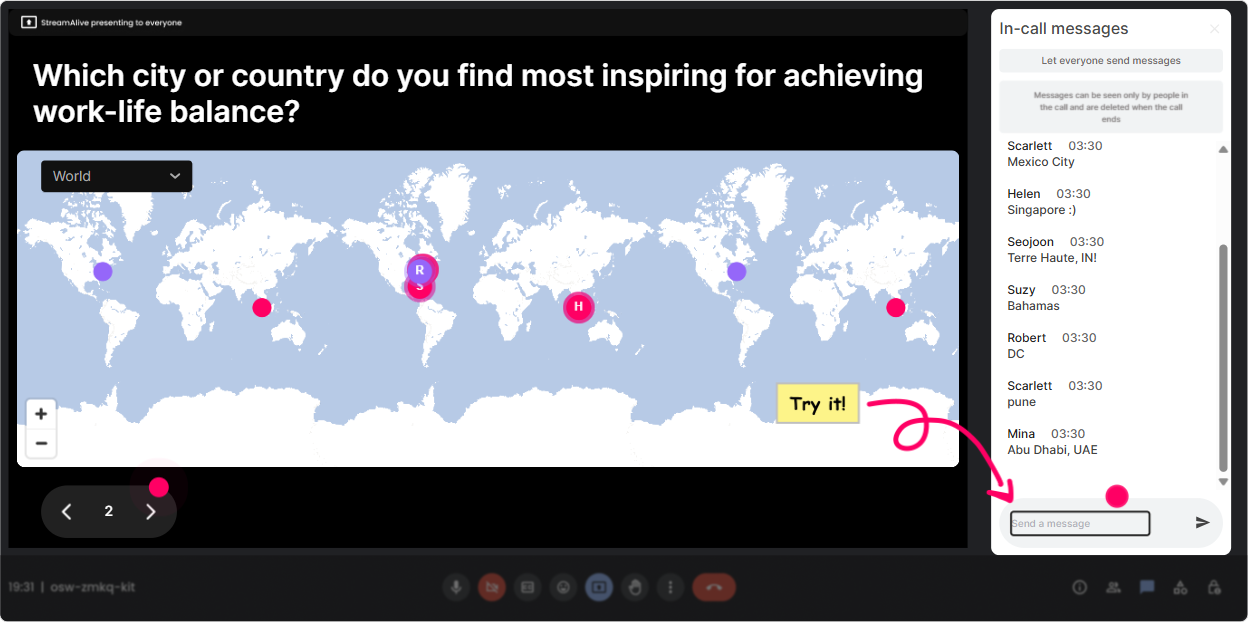
1) Magic Maps: Start with a human check-in (not a boring roll call)
The fastest way to warm up a room is to get everyone to type *something* early. Magic Maps does that instantly-and gives you a visual you can refer back to all session. **How to use it in Work-Life Balance ILT (for L&D Leaders):** - **Kickoff question:** Where are you joining from today? (classic, always works) - **Make it topic-relevant:** If you could take a 3-day recharge break anywhere on earth, where would you go? - **Culture + boundaries angle:** Which city taught you the most about work-life boundaries (good or bad)? **Trainer move:** When clusters pop up, call them out. Looks like weve got a big Toronto cluster-okay Toronto, whats the after-hours culture like? It feels personal immediately, and youve barely started.
2) Rating Polls: Get a quick pulse check before you teach anything
Before you drop frameworks and models, find out where people actually stand. Rating Polls let you do that in seconds, and the visual results make it easy to respond in the moment. **Work-Life Balance rating questions that work really well:** - On a scale of 110, how balanced does your work-life feel *this month*? - Rate your ability to switch off after work: 1 = cant, 10 = pro-level. - How confident are you in coaching managers on work-life balance? 110. **Trainer move:** Dont just show the average-react to it. If you see a spread, say: Interesting-lots of 3s and 8s. That tells me weve got different realities in the room. Lets unpack whats driving that. Now youve created permission for honest conversation.

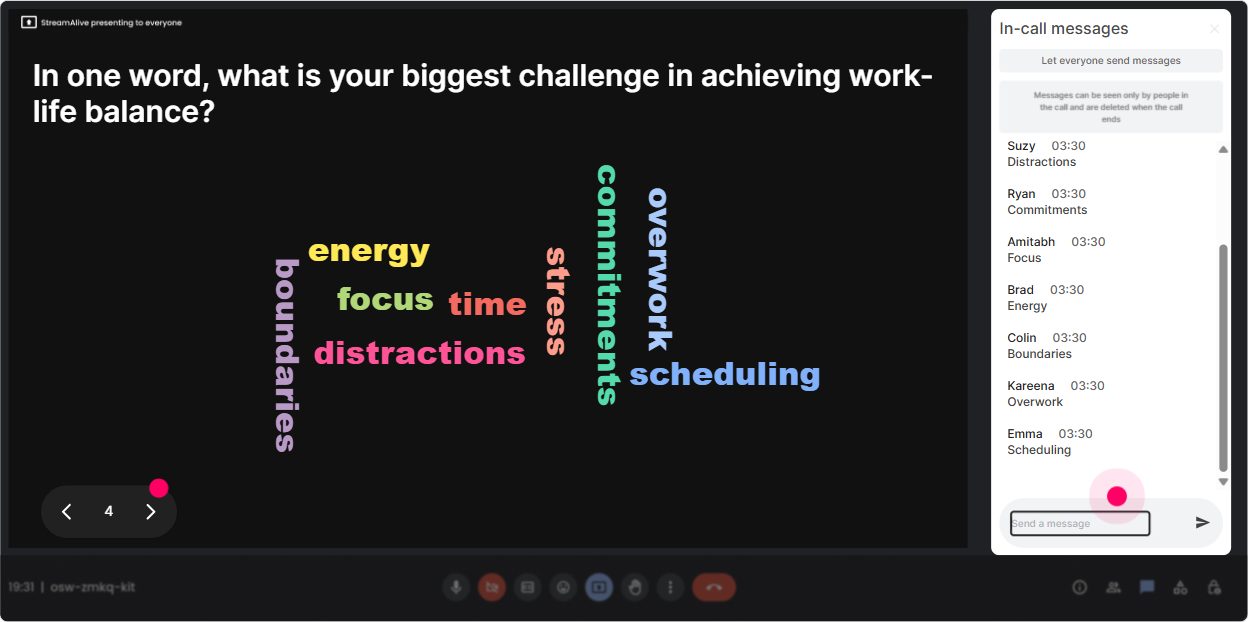
3) Wonder Words (Word Cloud): Turn feelings into something everyone can see
Work-life balance can get loaded. People may not want to speak up, but theyll type a word. Wonder Words makes that emotional temperature visible, fast. **Great word cloud prompts for this topic:** - When you hear work-life balance, whats the first word that comes to mind? - Whats the biggest thing stealing your personal time right now? (12 words) - One word for how your calendar usually feels. **Trainer move:** Use the biggest words as your agenda. If you see meetings, burnout, Slack, guilt, you can literally say: Cool, the group has spoken. Lets tackle the top two first. Thats how your session instantly feels customized.
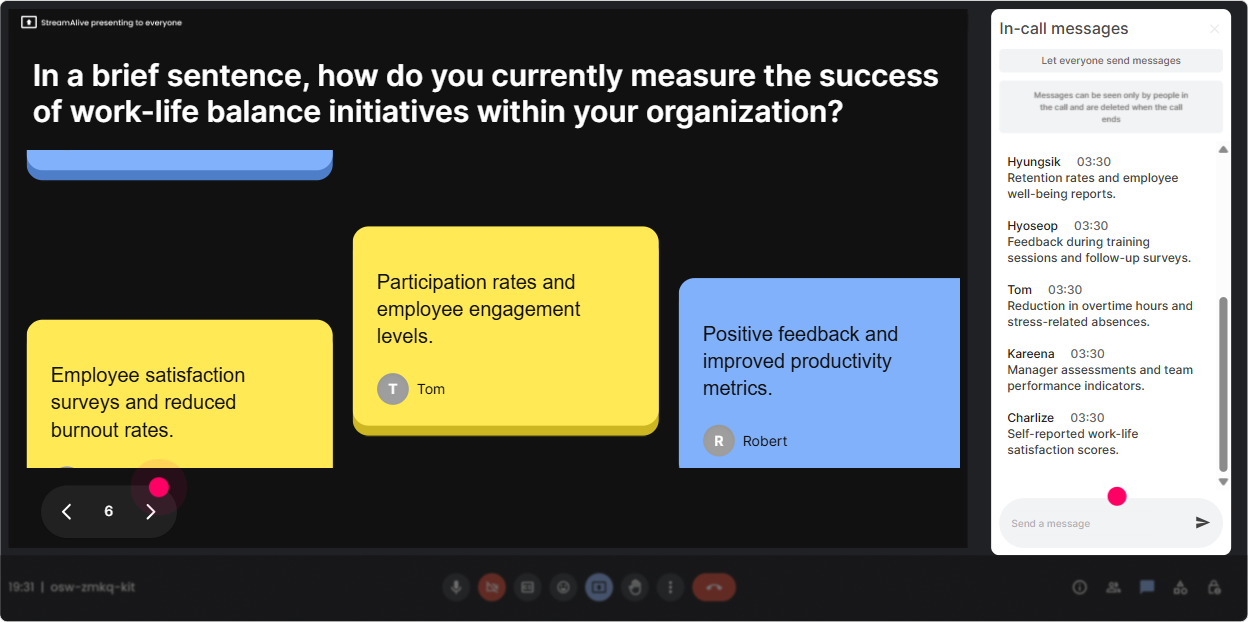
4) Talking Tiles: Let people share real situations (without the awkward silence)
When you want longer answers-stories, examples, scenarios-Talking Tiles is gold. People type, and their responses appear live as dynamic tiles. It feels active, like the room is talking together. **Prompts that spark meaningful responses from L&D Leaders:** - Whats one work-life boundary you *wish* leaders modeled better in your org? - Share a moment when work-life imbalance showed up in learning delivery (launches, programs, travel, facilitation days). - Whats one thing that drains you the most as an L&D leader/trainer? **Trainer move:** Pick 23 tiles and read them out loud (with permission). Then ask: Who else relates to this one? Youll get nods, chat replies, and suddenly youve got a real conversation-not theory.
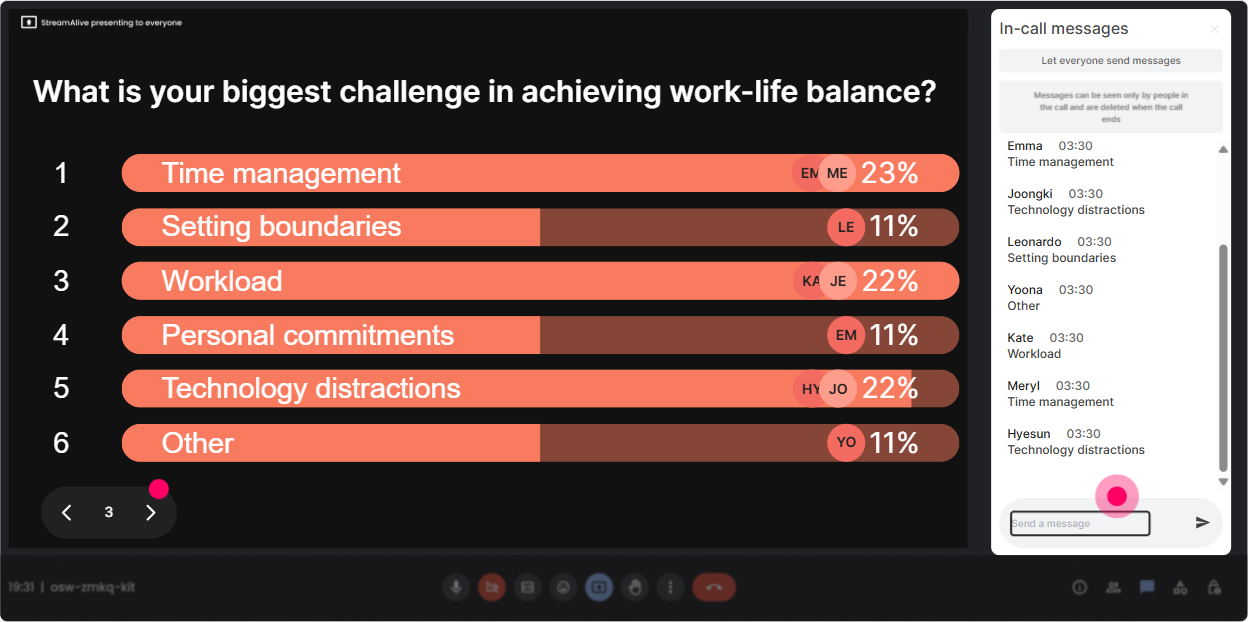
5) Power Polls: Let the group choose what to focus on (and boost buy-in)
L&D Leaders hate generic training. Power Polls helps you hand them some control: Tell me what you want, and Ill adapt. That alone raises engagement. **Poll ideas (choose options or let chat answers populate):** - What do you want most from today? 1) Personal boundary strategies 2) Coaching managers to protect team capacity 3) Preventing burnout during peak delivery periods 4) Managing workload + stakeholder expectations - Whats your biggest blocker to work-life balance right now? 1) Too many meetings 2) Always-on chat culture 3) Understaffed team 4) Poor prioritization / shifting priorities **Trainer move:** Commit out loud. Looks like too many meetings is winning. Ill add a 10-minute segment on meeting boundaries and scripts. Thats how you earn trust quickly.
6) Winner/Spinner Wheel: Make volunteering fun (and get voices into the room)
You know the moment: you ask a question, and crickets. The Spinner Wheel makes participation playful and fair-no one feels singled out by you. **How to use it in a Work-Life Balance session:** - Ask a question in chat first: Whats one boundary youre trying to build? - Then spin the wheel: Alright, Im going to spin and invite one person to share for 30 seconds-super casual. **Questions worth spinning for:** - Whats one boundary youve tried that actually worked? - Whats the hardest boundary to maintain in L&D? - If you could change one norm in your org that would improve balance, what would it be? **Trainer move:** Keep it light and give an out. You can pass if you want-no pressure. Ironically, when people feel safe, they talk more.

7) Quiz: Do quick myth-busting and knowledge checks (without sounding like school)
Work-life balance is full of myths (Just manage your time better!). A short quiz makes the learning stick-and wakes everyone up mid-session. **Quiz question ideas (1 correct answer):** - Which is the *best* example of a sustainable boundary? A) Working late all week, then taking Friday off B) Turning off notifications but checking email hourly C) Blocking focus time and communicating it proactively D) Saying yes to urgent work to be seen as helpful - Whats the most common early sign of burnout? A) Increased cynicism/irritability B) Wanting to take a vacation C) Being busy D) Needing coffee **Trainer move:** After revealing the correct answer, ask: What made that tricky? Thats where the real learning happens.

2) Rating Polls: Get a quick pulse check before you teach anything
Before you drop frameworks and models, find out where people actually stand. Rating Polls let you do that in seconds, and the visual results make it easy to respond in the moment. **Work-Life Balance rating questions that work really well:** - On a scale of 110, how balanced does your work-life feel *this month*? - Rate your ability to switch off after work: 1 = cant, 10 = pro-level. - How confident are you in coaching managers on work-life balance? 110. **Trainer move:** Dont just show the average-react to it. If you see a spread, say: Interesting-lots of 3s and 8s. That tells me weve got different realities in the room. Lets unpack whats driving that. Now youve created permission for honest conversation.
8) Q&A: Capture questions without losing the thread of your session
In work-life balance sessions, people often have personal, specific questions-but chat can get messy fast. StreamAlive Q&A pulls questions from chat and organizes them so you dont miss the important ones. **How to frame it for L&D Leaders:** - Drop your questions anytime-StreamAlive will collect them and Ill do a Q&A break every 15 minutes. - End-of-module prompt: Whats one situation youre dealing with right now where boundaries are tough? **Trainer move:** Tag-team the flow: teach collect questions answer the top 3 move on. People feel heard, and you stay in control of time.

9) Analytics: Prove engagement, learn what landed, and improve the next run
After the session, you want more than great training! in the feedback form. Analytics shows you what people actually did-where chat spiked, which interactions got the most responses, and who your most engaged participants were. **How L&D Leaders and trainers can use this right away:** - **Find your best moments:** See which topic caused the biggest engagement jump (maybe it was meeting boundaries not time management). - **Identify your champions:** Spot highly engaged participants-these are your future pilot-group members, internal advocates, or peer facilitators. - **Share outcomes internally:** Export or email interaction results to show stakeholders: Heres what leaders said their top barrier is (super useful for culture change conversations). **Trainer move:** Use the data to tweak your run-of-show. If engagement dipped during a lecture-heavy section, you know exactly where to add a poll, a word cloud, or a quick story prompt next time.

Use StreamAlive in all your training sessions
StreamAlive isn’t just for
Work-Life Balance
training,
it can also be used for any instructor-led training session directly inside your PowerPoint presentation.
Explore similar traingin ideas: unlocking the potential of StreamAlive
See how StreamAlive transforms live training with engaging events and interactive sessions across industries, directly inside your PowerPoint presentation.

Interactions in action
(it's free)

.svg.png)


