Install StreamAlive for your PowerPoint slides
Learn more

Facilitation Training for Training Agencies
StreamAlive helps 9x the audience engagement in your Virtual Instructor-led Trainings (VILT) directly inside your powerpoint presentation.
Make your instructor-led Facilitation training more fun with polls, word clouds, spinner wheels and more
Works inside your existing PowerPoint presentation
Install the StreamAlive app for PowerPoint and see your slides come to life as people participate in your interactions
AI generates audience interactions for you
Let our AI scan your presentation and automatically come up with relevant questions based on the content. Or spend two hours coming up with your own questions, your choice!
Built to work with MS Teams and Zoom
Native apps for Teams and Zoom so you never have to leave your existing workflows
No QR Codes
Chat-powered interactions means your audience doesn’t need to scan QR codes or look at another screen to participate. They just type in the chat!

Quickly approved by your IT team
StreamAlive’s apps for Teams and Zoom means that they have been through rigorous quality assurance and client safety reviews. You’ll find everything an IT team needs to approve the app within the organization within your StreamAlive account.

Youve been asked to run a Facilitation instructor-led training for a training agency-and you want it to feel lively, not like another slide marathon. The fastest way? Get people talking early and often. Here are simple, trainer-friendly ways to do that using StreamAlive interactions (and keep engagement humming the whole session).
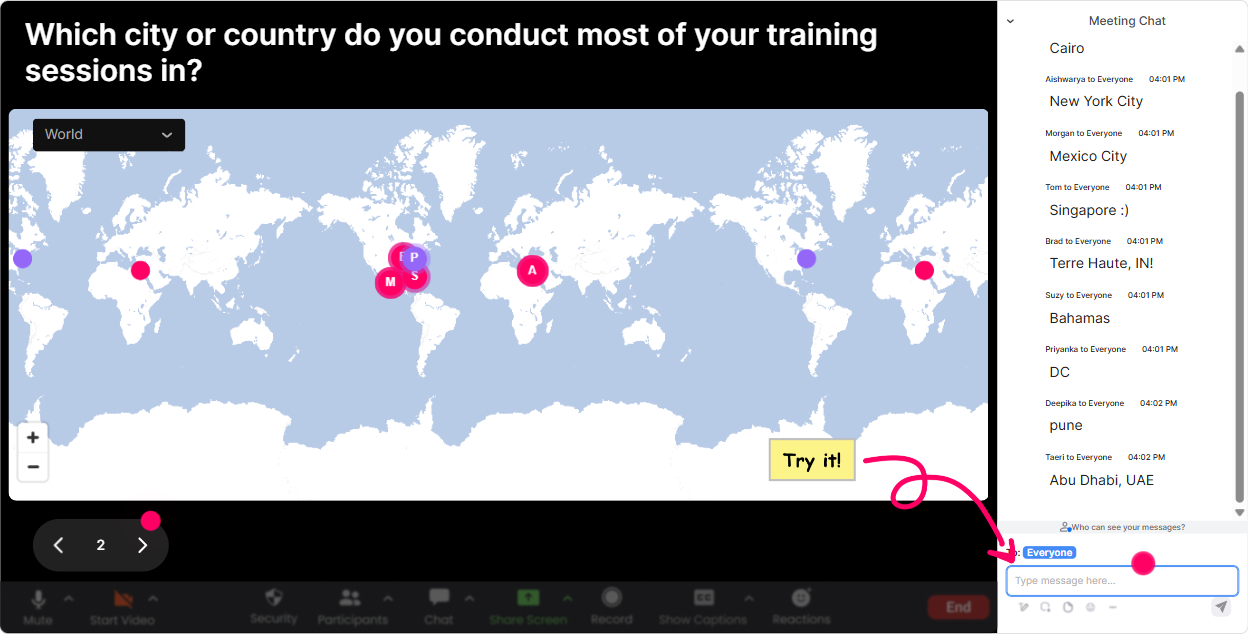
1) Magic Maps: Kick off with a were in this together moment
You know that classic opener: Where are you joining from? Magic Maps makes it instantly visual and genuinely fun-people love seeing themselves on the map. How to use it in Facilitation training: - Warm welcome + instant connection: Where are you facilitating from today? (city/country) - Make it relevant to their work: Name a location where youve facilitated a tough session before. - Future-focused icebreaker: If you could facilitate a dream workshop anywhere on earth, where would it be? Trainer tip: If youre doing a cohort vibe, allow one location per person so the map stays clean. If you notice a city cluster, call it out-Okay, I see a whole facilitation squad in Singapore! That tiny moment builds community fast.
2) Rating Polls: Quick pulse-checks that actually guide your delivery
Rating Polls are your best friend when you want a fast read of the room without awkward silence. People just drop a number in chat, and you instantly see where everyones at. Ways to use it during Facilitation ILT: - Baseline confidence check: On a scale of 110, how confident are you in facilitating a group discussion? - Difficulty thermometer: After a model (like ORID or GROW): Rate how easy this would be to use next week (110). - Energy check mid-session: Hows your energy right now? 1 = fading, 10 = fully on. Trainer tip: If the average is low, say it out loud and adjust: Cool-looks like were at a 5-ish. Lets do a quick example together before we move on. Thats what makes you look responsive and human.

3) Wonder Words (Word Cloud): Turn feelings and opinions into a visual moment
Facilitation is one of those topics where people have strong feelings-excitement, nerves, past trauma from messy meetings Wonder Words lets them say it in 12 words and creates a live word cloud. Great prompts for this training: - Emotion check: Facilitation, in one word: how does it make you feel? - Belief uncovering: Whats the #1 thing that makes groups hard to manage? - Outcomes focus: What do you want more of in your sessions? (clarity, participation, alignment, trust, etc.) Trainer tip: Use the big words as your agenda. If conflict shows up huge, you can literally say: Alright, conflict is the star of the show today-lets make sure we tackle it properly.

4) Talking Tiles: Let people share real stories without taking over the mic
Sometimes you want more than a one-word answer, but you dont want to open the unmute floodgates. Talking Tiles is perfect for that middle ground-participants type a short response, and it becomes a dynamic visual you can react to. Use it like this in Facilitation training: - Role impact: In 12 sentences: how does facilitation affect your job day-to-day? - Real-world challenges: Whats one situation that consistently derails your sessions? - Reflection after an activity: Whats one thing youll try in your next workshop? Trainer tip: Pick 23 tiles to read out and respond to. People feel seen, and you still keep time under control.

5) Power Polls: Decide the direction of the session with your audience
Power Polls are how you stop guessing what people want and let the group choose. Its also a slick way to increase buy-in: when they vote for the topic, theyre more likely to engage. Poll ideas for Facilitation ILT: - What do you want to get better at today? 1) Handling difficult participants 2) Asking better questions 3) Designing activities 4) Managing time + energy - Whats your biggest facilitation fear? 1) Silence 2) Conflict 3) One person dominates 4) Going off-track Trainer tip: Use the winning option as your next segment. Even if you still cover everything, start with the crowds #1 vote and youll feel engagement jump immediately.

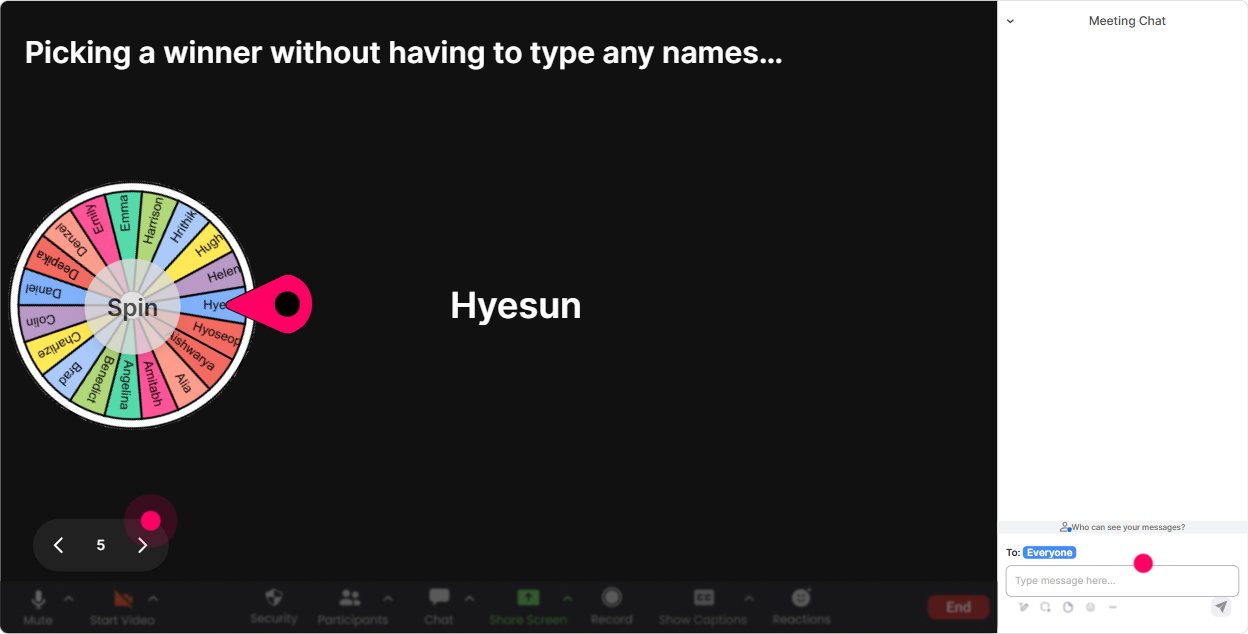
6) Winner Wheel (Spinner): Get volunteers without the awkwardness
Getting people to speak is important in facilitation training but asking Any volunteers? can be painfully quiet. The Winner Wheel fixes that by making participation feel playful and fair. How to use it: - Hot seat practice: Type ME if youre open to role-play a difficult participant. Ill spin the wheel. - Debrief prompts: Everyone type one takeaway. Ill spin to pick 2 people to expand on theirs. - Micro-coaching: Who wants quick feedback on a facilitation challenge? Drop coach in chat. Trainer tip: Keep it safe. Always say: If you get picked and prefer to pass, totally fine-just type PASS. Psychological safety = more participation over time.
7) Quiz: Turn knowledge checks into mini-games (and keep people awake)
A Quiz interaction is perfect for quick checks where theres one correct answer-and it feels more like a game than a test. Facilitation quiz questions you can run: - Which is the BEST first move when one person dominates? 1) Call them out directly 2) Thank them + redirect to others (Correct) 3) Ignore it 4) End early - Whats the purpose of setting ground rules? 1) Control the group 2) Build shared expectations (Correct) 3) Save slides 4) Impress leadership Trainer tip: After revealing the correct answer, ask: If you picked something else, what were you thinking? Thats where the real learning happens-and StreamAlive makes it easy to see where the group leaned.

2) Rating Polls: Quick pulse-checks that actually guide your delivery
Rating Polls are your best friend when you want a fast read of the room without awkward silence. People just drop a number in chat, and you instantly see where everyones at. Ways to use it during Facilitation ILT: - Baseline confidence check: On a scale of 110, how confident are you in facilitating a group discussion? - Difficulty thermometer: After a model (like ORID or GROW): Rate how easy this would be to use next week (110). - Energy check mid-session: Hows your energy right now? 1 = fading, 10 = fully on. Trainer tip: If the average is low, say it out loud and adjust: Cool-looks like were at a 5-ish. Lets do a quick example together before we move on. Thats what makes you look responsive and human.
8) Q&A (Quick Questions): Stop losing great questions in a chaotic chat
In live Facilitation training, questions pop up constantly-and they get buried fast. Quick Questions automatically detects and collects questions from the chat, so youre not scrolling like a maniac. How it helps in your session: - Park-and-return: Drop questions anytime-Ill do a Q&A pit stop every 20 minutes. - Cleaner discussions: When someone asks, What if the group goes silent? you can pull it up on screen and answer it properly. - Panel-style facilitation: If youre co-training, you can divide questions and keep the flow smooth. Trainer tip: Tell people what counts as a question (example: Start with Q:). It trains the group to use chat in a structured way-very facilitation-aligned.

9) Analytics: Prove engagement (and improve your next delivery)
If you train for a training agency, you already know the pressure: youre not just delivering-youre expected to show outcomes. StreamAlive Analytics helps you see what actually worked. What you can do with it: - Spot your strongest moments: See the minute-by-minute engagement peaks (often its polls, quizzes, and story moments). - Replay and refine: Review chat + interaction results to find where people got confused or super interested. - Identify your facilitation champions: Find your Fantastic Fans-the most engaged participants-great people to invite into future cohorts or advanced programs. - Share results easily: Send interaction reports to email or share insights with your team on Teams. Trainer tip: After the session, look at which interaction got the most responses. Then redesign your next ILT to include more moments like that. Thats how engagement compounds-session after session.

Use StreamAlive in all your training sessions
StreamAlive isn’t just for
Facilitation
training,
it can also be used for any instructor-led training session directly inside your PowerPoint presentation.
Explore similar traingin ideas: unlocking the potential of StreamAlive
See how StreamAlive transforms live training with engaging events and interactive sessions across industries, directly inside your PowerPoint presentation.

Interactions in action
(it's free)

.svg.png)


