Install StreamAlive for your PowerPoint slides
Learn more

Human-AI Synergy Training for L&D Leaders
StreamAlive helps 9x the audience engagement in your Virtual Instructor-led Trainings (VILT) directly inside your powerpoint presentation.
Make your instructor-led Human-AI Synergy training more fun with polls, word clouds, spinner wheels and more
Works inside your existing PowerPoint presentation
Install the StreamAlive app for PowerPoint and see your slides come to life as people participate in your interactions
AI generates audience interactions for you
Let our AI scan your presentation and automatically come up with relevant questions based on the content. Or spend two hours coming up with your own questions, your choice!
Built to work with MS Teams and Zoom
Native apps for Teams and Zoom so you never have to leave your existing workflows
No QR Codes
Chat-powered interactions means your audience doesn’t need to scan QR codes or look at another screen to participate. They just type in the chat!

Quickly approved by your IT team
StreamAlive’s apps for Teams and Zoom means that they have been through rigorous quality assurance and client safety reviews. You’ll find everything an IT team needs to approve the app within the organization within your StreamAlive account.

Youve been asked to run an instructor-led session on HumanAI Synergy for L&D Leaders-and you want it to feel alive, not like another slide parade. The easiest way? Get people talking early, keep them participating often, and make their input visible. Here are practical ways to do that using StreamAlive interactions (the kind that can seriously lift engagement-think up to 9x when its used throughout the session).
1) Magic Maps: Put your L&D leaders on the map (literally)
This is your easiest win in the first 3 minutes. Instead of the usual where are you joining from? that gets lost in chat, Magic Maps plots everyones location on a live world map-instant energy boost. How to use it in a HumanAI Synergy session: - Kickoff icebreaker: Where are you joining from today? - Make it topic-relevant: Which city is your organizations innovation hub? - Tie it to AI adoption: Where do you think AI will change work fastest-your city or somewhere else? Drop that location. - Dream scenario prompt: If you could teleport your L&D team anywhere to learn best-in-class AI, where would you go? Trainer tip: If your group is global, call out clusters (Looks like weve got a big Toronto pocket!). That tiny moment of recognition gets quiet folks to stay present.

2) Rating Polls: Get an instant pulse on AI readiness (no awkward silence)
Rating Polls are perfect for those Okay wheres everyone at? moments. People just drop a number in chat and you instantly see the groups confidence level on screen. How to use it during HumanAI Synergy ILT: - Opening baseline: On a scale of 110, how confident are you in explaining HumanAI Synergy to your stakeholders? - Reality check: Rate your orgs current AI learning maturity (1 = were guessing / 10 = weve got a system). - After a framework: How useful was that model for your role-1 to 10? - Risk comfort: How comfortable are you letting AI co-create learning content (110)? Trainer tip: Use it as a transition tool. If the average is low, you know to slow down and give examples. If its high, you can move faster and go deeper.

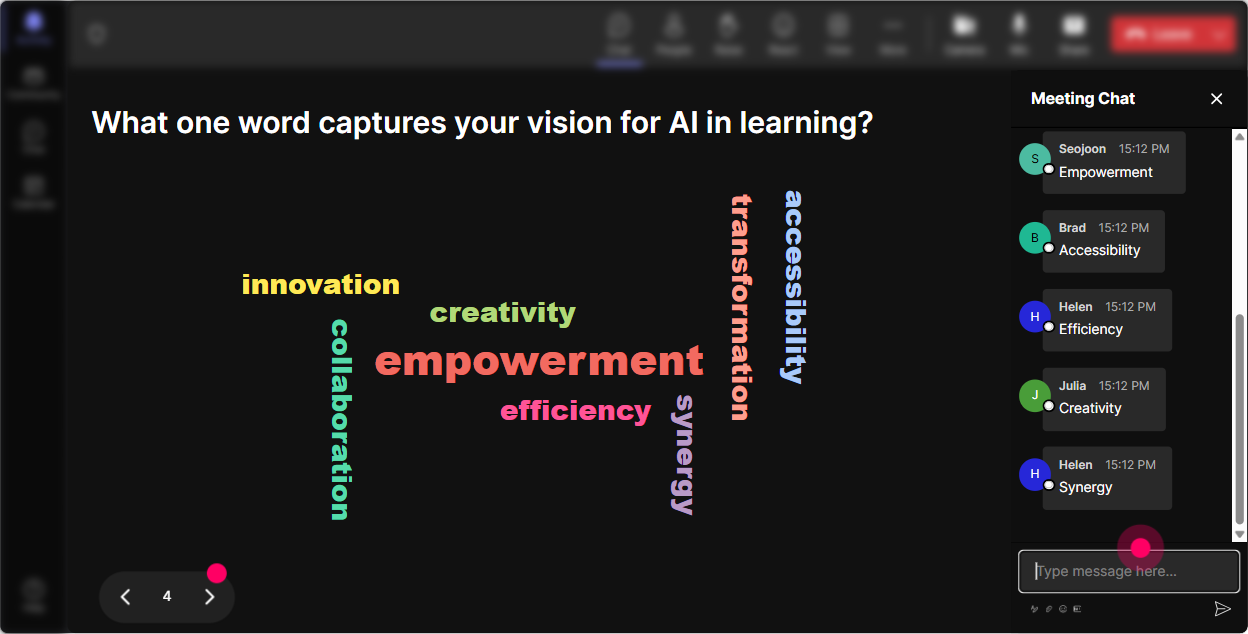
3) Wonder Words (Word Cloud): Make feelings and assumptions visible-fast
HumanAI Synergy can bring up big emotions: excitement, fear, skepticism, curiosity. Wonder Words lets you turn those vibes into a live word cloud so everyone can see, Oh, Im not the only one thinking that. Great prompts for L&D leaders: - In 12 words: How do you feel about AI in L&D right now? - Whats the biggest barrier to HumanAI Synergy at your workplace? (12 words) - What skill do L&D teams need most to work well with AI? (12 words) - Finish this: AI in training will mostly ______. (one word) Trainer tip: When one word grows huge (like time or trust), pause and ask: Who can share whats behind that word? Youve just created discussion fuel without forcing it.
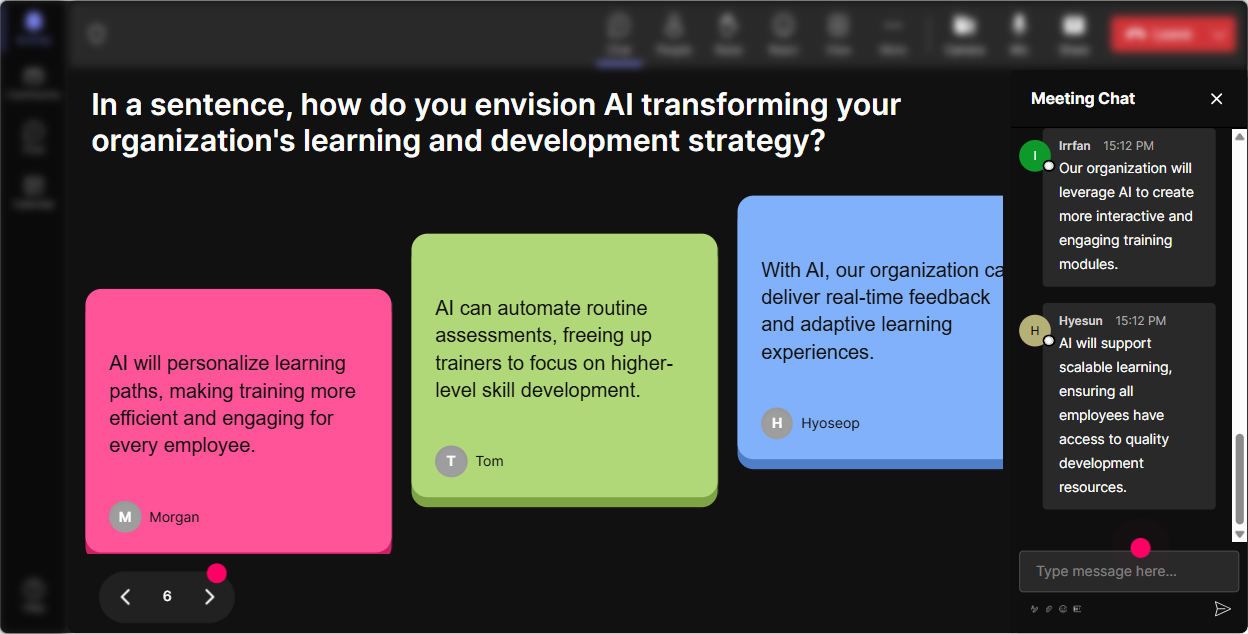
4) Talking Tiles: Turn the chat into a visual brainstorm (and keep it moving)
When you want more than a one-word answer-use Talking Tiles. Responses drop onto the screen like tiles, so participants feel like their ideas are part of the session (not just text floating by). Best uses for HumanAI Synergy training: - Role impact: Whats one part of your L&D role youd love AI to support-so you can focus on higher-value work? - Practical application: Describe one learning workflow where a human + AI partnership would improve quality. - Guardrails: Whats one non-negotiable youd want in your AI guidelines? - Change management: What resistance do you expect from stakeholders when you introduce AI-enabled learning? Trainer tip: After 812 tiles, stop and cluster them verbally: Im seeing themes: content creation, analytics, coaching, and policy. Thats HumanAI Synergy in action-pattern-finding as a group.
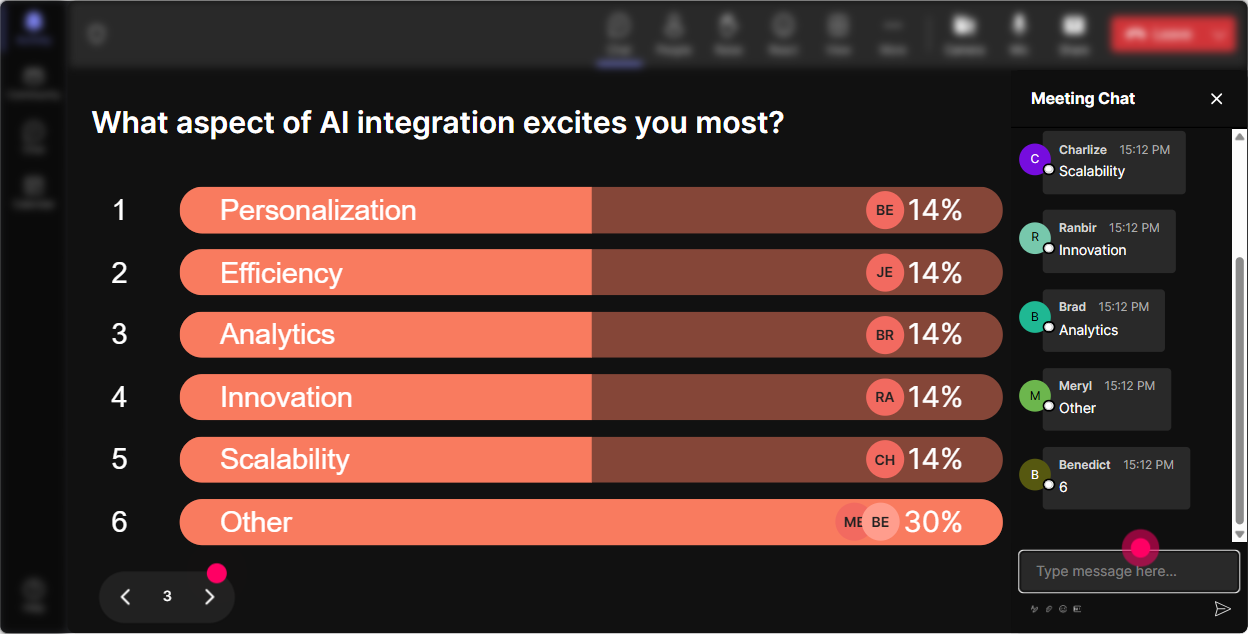
5) Power Polls: Let the audience choose the direction (and feel ownership)
Power Polls are your best friend when you want to avoid guessing what people care about. Put options up, let them vote in chat, and then teach to what wins. Poll ideas for L&D Leader sessions: - What do you want most from HumanAI Synergy? 1) Faster content creation 2) Better personalization 3) Stronger measurement 4) More coaching time for managers - Where should L&D start with AI? 1) Internal enablement 2) Pilot use-cases 3) Governance & policy 4) Vendor selection - Biggest risk we need to manage first? 1) Data privacy 2) Bias 3) Hallucinations/accuracy 4) Over-reliance on AI Trainer tip: Use the winning option as your next segment title. People pay more attention when they feel like they picked the agenda.
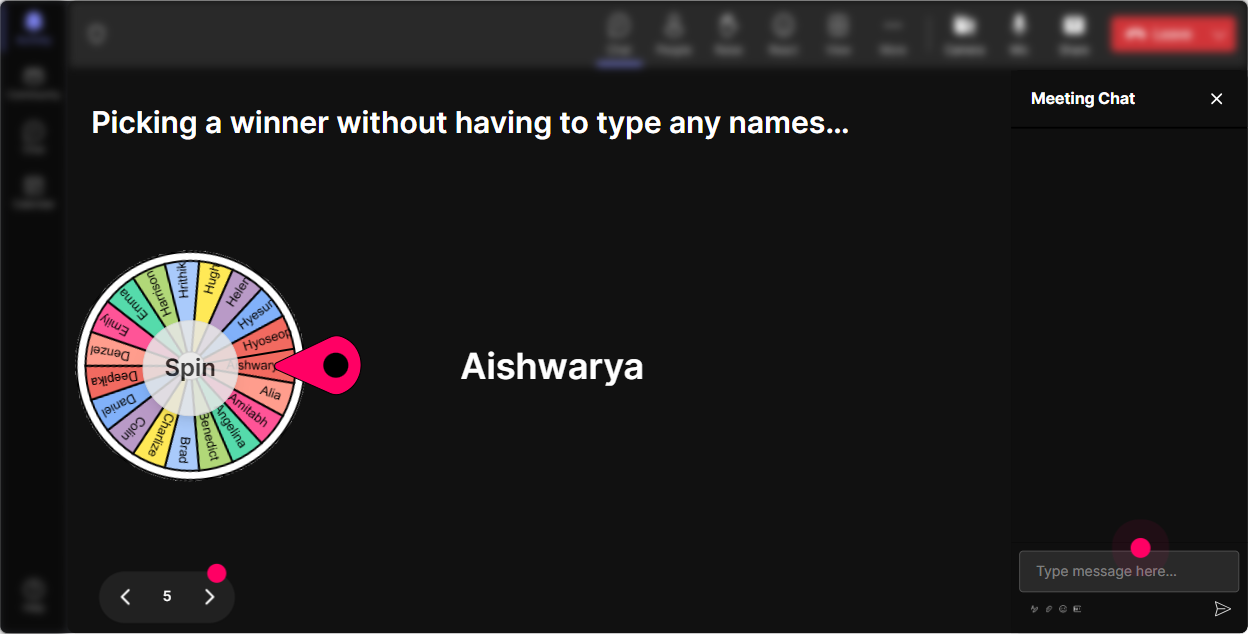
6) Winner Wheel: Get volunteers without the awkward anyone want to share?
You know that moment: you ask a question, and everyone suddenly becomes invisible. Winner Wheel fixes that by letting fate choose-only from people who participated. Fun (and useful) ways to use it: - Drop one HumanAI Synergy use-case youre considering. Ill spin the wheel and have one person share details. - Type READY if youre open to being called on for a quick scenario. Lets spin it. - Post your biggest AI training challenge. Wheel decides who we workshop live. Trainer tip: Keep it friendly: You can pass if you want! Ironically, that permission makes more people willing to speak.
7) Quiz: Do quick knowledge checks that dont feel like school
Quizzes are great for teaching HumanAI Synergy basics-especially when you want to bust myths without sounding preachy. You ask a multiple-choice question, participants answer in chat, and you reveal the correct option. Quiz questions you can steal: - Which is the best example of HumanAI Synergy in L&D? 1) AI replaces SMEs entirely 2) AI drafts content + SME reviews + facilitator improves flow 3) AI publishes courses without human review 4) Humans avoid AI to reduce risk (Correct: 2) - Whats the safest first step when using AI for learning content? 1) Upload confidential data 2) Start with a low-risk pilot + review outputs 3) Automate everything at once 4) Skip governance (Correct: 2) - What should humans always own in AI-assisted training? 1) Ethical judgment and context 2) Nothing 3) Only formatting 4) Only prompt writing (Correct: 1) Trainer tip: Use quizzes to create micro-momentum every 1015 minutes. Its like a mental stretch break-people snap back to attention.

2) Rating Polls: Get an instant pulse on AI readiness (no awkward silence)
Rating Polls are perfect for those Okay wheres everyone at? moments. People just drop a number in chat and you instantly see the groups confidence level on screen. How to use it during HumanAI Synergy ILT: - Opening baseline: On a scale of 110, how confident are you in explaining HumanAI Synergy to your stakeholders? - Reality check: Rate your orgs current AI learning maturity (1 = were guessing / 10 = weve got a system). - After a framework: How useful was that model for your role-1 to 10? - Risk comfort: How comfortable are you letting AI co-create learning content (110)? Trainer tip: Use it as a transition tool. If the average is low, you know to slow down and give examples. If its high, you can move faster and go deeper.
8) Q&A: Capture every question from chat (without losing your place)
In AI sessions, questions come fast-and theyre often messy (Wait, what about data? Can we do this in Teams? Is this allowed?). StreamAlive Q&A auto-detects and organizes questions from chat so youre not scrolling and missing the good stuff. How to run it smoothly: - Tell them upfront: Drop questions anytime-StreamAlive will catch them. - Do a structured pause: Im going to answer the top 3 questions weve collected so far. - Use it for stakeholder concerns: Any objections youre expecting from Legal/IT? Put it as a question. Trainer tip: This makes you look calm and in control-even when the chat is flying.

9) Analytics: Prove engagement and improve your next session
If youre training L&D Leaders, someone will eventually ask: Did this land? Analytics helps you answer that with real data-minute-by-minute engagement, chat intensity, and interaction performance. How L&D teams can use StreamAlive analytics after HumanAI Synergy training: - Spot your high engagement moments: Which topic or activity got people talking? - Improve your run-of-show: If engagement dips during a section, tighten it or add an interaction. - Identify champions: See your most engaged participants (your early adopters) and follow up with them for pilots. - Share outcomes internally: Email reports to stakeholders or recap what the group voted for and discussed. Trainer tip: Pair analytics with a simple story: Heres what the room cared about most, heres where confidence increased, and heres what well do next. Thats how you turn a live session into momentum.

Use StreamAlive in all your training sessions
StreamAlive isn’t just for
Human-AI Synergy
training,
it can also be used for any instructor-led training session directly inside your PowerPoint presentation.
Explore similar traingin ideas: unlocking the potential of StreamAlive
See how StreamAlive transforms live training with engaging events and interactive sessions across industries, directly inside your PowerPoint presentation.

Interactions in action
(it's free)

.svg.png)


