Install StreamAlive for your PowerPoint slides
Learn more

Agile Restrospective Training for Agile Team Leader
StreamAlive helps 9x the audience engagement in your Virtual Instructor-led Trainings (VILT) directly inside your powerpoint presentation.
Make your instructor-led Agile Restrospective training more fun with polls, word clouds, spinner wheels and more
Works inside your existing PowerPoint presentation
Install the StreamAlive app for PowerPoint and see your slides come to life as people participate in your interactions
AI generates audience interactions for you
Let our AI scan your presentation and automatically come up with relevant questions based on the content. Or spend two hours coming up with your own questions, your choice!
Built to work with MS Teams and Zoom
Native apps for Teams and Zoom so you never have to leave your existing workflows
No QR Codes
Chat-powered interactions means your audience doesn’t need to scan QR codes or look at another screen to participate. They just type in the chat!

Quickly approved by your IT team
StreamAlive’s apps for Teams and Zoom means that they have been through rigorous quality assurance and client safety reviews. You’ll find everything an IT team needs to approve the app within the organization within your StreamAlive account.

Youve been asked to run an Agile Retrospective instructor-led training for Agile Team Leaders-and you dont want it to feel like yet another slides + silence session. The good news: a retro is already built for participation. Now you just need simple, live interactions to pull every voice into the room.
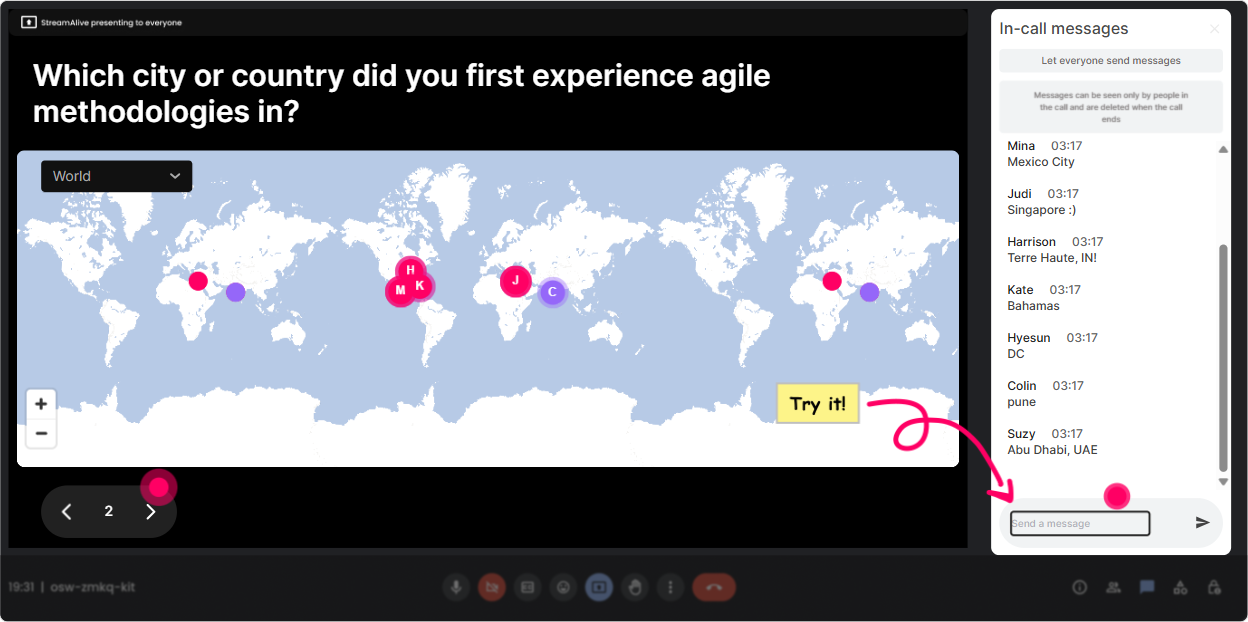
Magic Maps: Kick off the retro vibe by putting your Agile Team Leaders on the map
Start with something light that gets everyone typing within the first 60 seconds (this is where engagement momentum is made). With StreamAlives **Magic Maps**, you ask one location-based question and it instantly plots everyones answers on a live world map. **How to use it in Agile Retro training:** - **Warm-up opener:** Where are you joining from today? (classic, fast, always works) - **Make it retro-themed:** If your last sprint was a place on earth, what city would it be? (fun + surprisingly insightful) - **Team leadership angle:** Wheres the most challenging team youve ever led located (city/country)? **Trainer tip:** If youve got a global group, call out clusters (Looks like weve got a Toronto takeover today). It creates instant were in this together energy before you even teach the first concept.
Rating Polls: Get a real-time confidence check before you teach anything
Agile Team Leaders often *think* they know retros-until you get into facilitation pitfalls, psychological safety, and turning insights into action. A **Rating Poll** gives you a quick, visual pulse check without anyone overexplaining. **Use it at key moments:** - **Baseline confidence:** On a scale of 110, how confident are you facilitating a retro that leads to real change? - **After teaching formats:** Rate how practical this retro format feels for your team (110). - **After a case study:** How likely is your team to actually follow through on retro actions? (110) **Trainer tip:** When the average is low, youve got permission to slow down and coach. When its high, you can challenge them with advanced scenarios (quiet teams, dominant voices, blame culture, etc.).

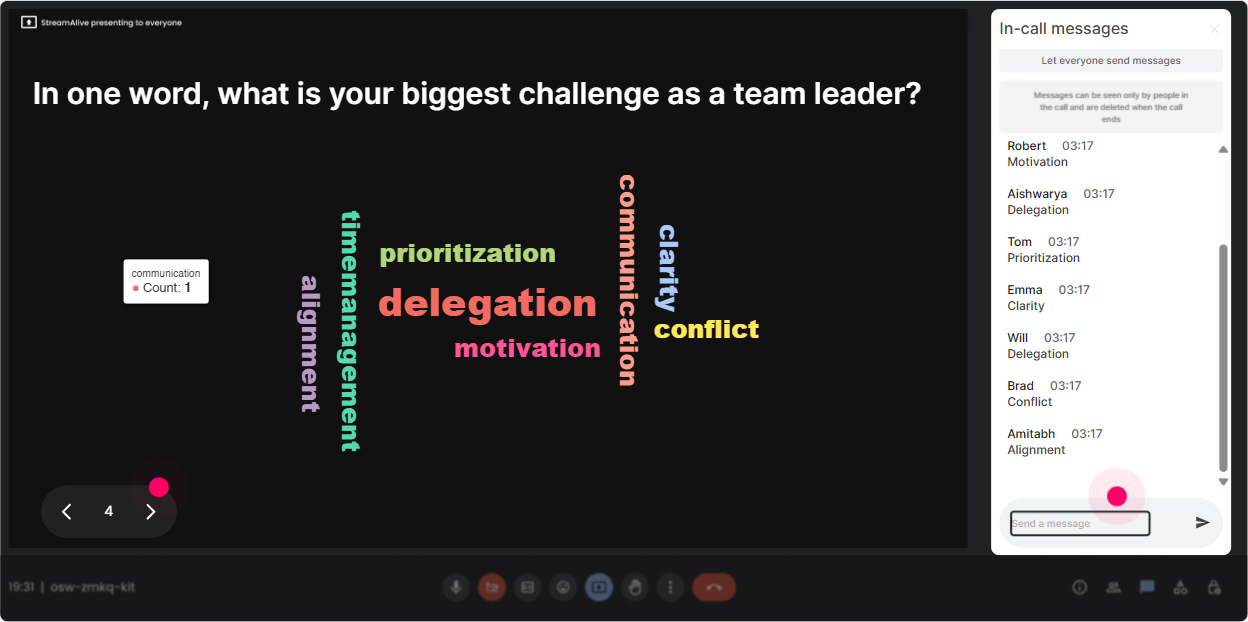
Wonder Words (Word Cloud): Make emotions and blockers visible in seconds
Retrospectives are emotional-people come in with baggage from failed action items, awkward conversations, or retro theater where nothing changes. **Wonder Words** helps you surface what people *really* feel, fast, and in a way that feels safe. **Great word cloud prompts for this training:** - One word: how do retros feel on your team right now? (youll see stuff like meh, rushed, useful, awkward) - Whats the biggest retro killer? (12 words) (common hits: blame, time, silence, no action) - One word you want your team to feel after a great retro: (youll get heard, clear, motivated) **Trainer tip:** Use the biggest word in the cloud as your next teaching pivot. If blame is huge, boom-youre now teaching psychological safety and neutral facilitation language, not just retro formats.
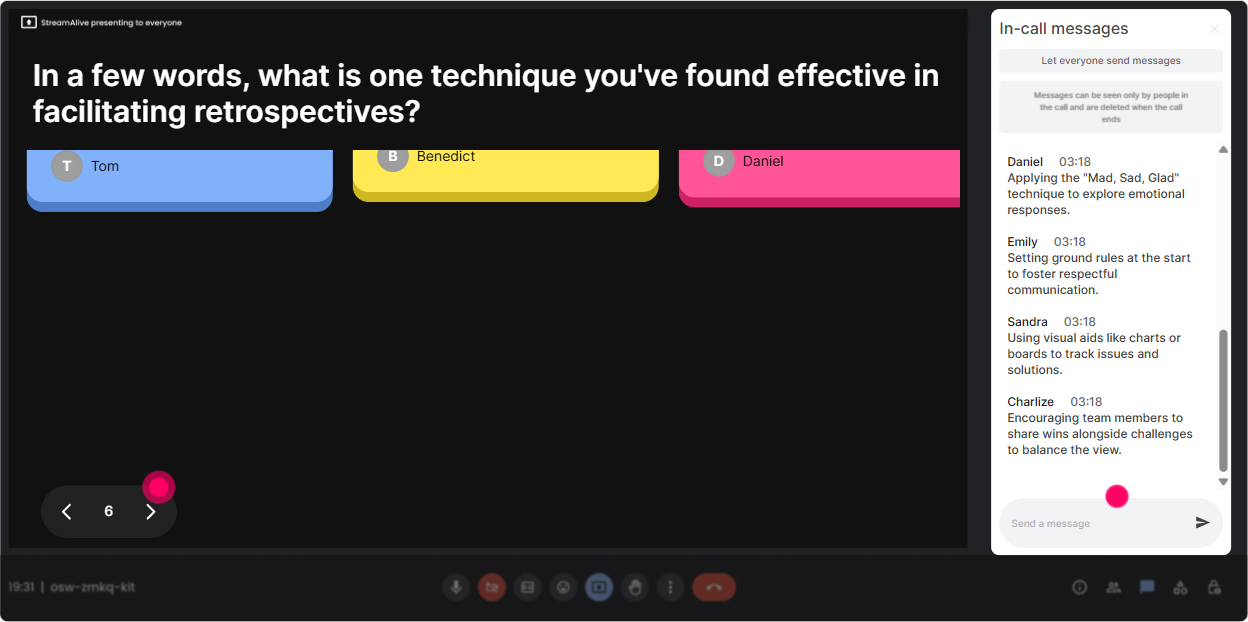
Talking Tiles: Turn real retro stories into a live learning wall
Sometimes you need more than 12 words-you need examples. **Talking Tiles** lets people type real experiences in chat, and their responses show up like a dynamic message wall (way more engaging than reading lines of chat). **Prompts that work really well for Agile Team Leaders:** - Describe a retro that went off the rails-what happened? - Whats one thing youve tried to improve retro action follow-through? - Whats the hardest personality type you manage in retros, and why? **Trainer tip:** After the tiles appear, pick 23 themes youre seeing (like dominant talkers, no time, actions ignored). Then teach directly to *their* reality. This is how you stop the session from feeling generic.
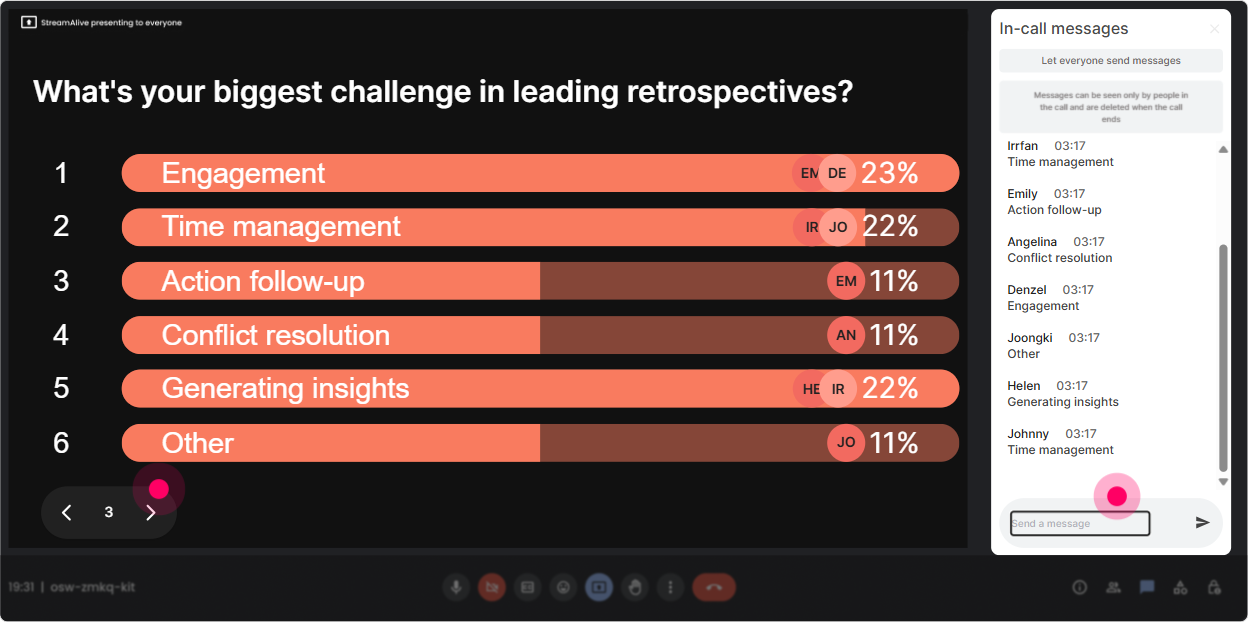
Power Polls: Let the group choose the direction (and feel ownership)
Agile Retro training can go a bunch of directions-formats, facilitation skills, metrics, action items, conflict, safety. With **Power Polls**, you let the audience vote on what to go deeper on, and theyll instantly feel like the session is tailored. **Poll ideas you can run mid-session:** - Whats your #1 retro challenge right now? 1) Too quiet 2) Too much complaining 3) No follow-through 4) Blame/defensiveness 5) Always the same topics - Which retro format do you want to practice today? 1) Start/Stop/Continue 2) 4Ls 3) Sailboat 4) Mad/Sad/Glad 5) Timeline retro - What should an Agile Team Leader focus on most in a retro? 1) Participation 2) Safety 3) Outcomes/actions 4) Data/metrics 5) Coaching ownership **Trainer tip:** Run the poll, then say: Cool-looks like follow-through wins. Lets fix that problem for real. That line alone boosts attention because now its *their* agenda.
Winner Wheel (Spinner Wheel): Call on people without making it awkward
Getting volunteers is tough-usually the same confident people jump in. The **Winner Wheel** solves that in a fun, fair way. You can pick someone randomly from people who participated (so engagement gets rewarded naturally). **Ways to use it in this training:** - Alright, Im going to spin the wheel-whoever it lands on shares one retro win from the last month. - Wheel pick: tell us which retro format you used most recently and how it went. - Wheel pick: read this retro scenario and tell me what youd do first as the facilitator. **Trainer tip:** Frame it playfully and give people an opt-out line: If youre not in a spot to speak, just type pass-no stress. People feel safe, and they still stay engaged because the wheel might land on them.

Quiz: Do quick knowledge checks that dont feel like school
Agile Team Leaders like practical learning-but quick quizzes wake up the room and spot misunderstandings instantly. With **Quiz**, you ask a multiple-choice question, everyone votes in chat, and you reveal the correct answer when youre ready. **Quiz questions that fit Agile Retrospective training:** - Which is the BEST primary goal of a sprint retrospective? 1) Assign accountability for issues 2) Improve the process and teamwork for next sprint 3) Review the product backlog 4) Estimate the next sprint (Correct: 2) - If the retro turns into a blaming session, whats the facilitators best next move? 1) Let it play out 2) Shut down the conversation 3) Reframe to facts + impact + improvements 4) Skip action items (Correct: 3) - How many improvement actions should a team typically commit to per retro to keep follow-through high? 1) 12 2) 57 3) 10+ 4) As many as possible (Correct: 12 range) **Trainer tip:** After you reveal the answer, ask: If you picked a different option, what made that feel right? Thats where the real learning happens.

Rating Polls: Get a real-time confidence check before you teach anything
Agile Team Leaders often *think* they know retros-until you get into facilitation pitfalls, psychological safety, and turning insights into action. A **Rating Poll** gives you a quick, visual pulse check without anyone overexplaining. **Use it at key moments:** - **Baseline confidence:** On a scale of 110, how confident are you facilitating a retro that leads to real change? - **After teaching formats:** Rate how practical this retro format feels for your team (110). - **After a case study:** How likely is your team to actually follow through on retro actions? (110) **Trainer tip:** When the average is low, youve got permission to slow down and coach. When its high, you can challenge them with advanced scenarios (quiet teams, dominant voices, blame culture, etc.).
Q&A: Capture every question without losing the chat (or your sanity)
In retro training, questions pop up constantly-especially when leaders are thinking about their real teams. StreamAlives **Q&A** auto-detects questions from the chat and collects them cleanly, so youre not scrolling around and missing the good stuff. **How to use it smoothly:** - Tell them early: Drop questions anytime-StreamAlive will grab them for me. - Do mini Q&A breaks: after each module (formats, safety, action follow-through) - Use it for scenario coaching: Ask your toughest retro situation as a question. Ill answer a few live. **Trainer tip:** If youre short on time, pick the top 3 themes youre seeing and promise to answer the rest in a follow-up email. People still feel heard because their questions were captured.

Analytics: After the session, see what actually engaged people (so you can make the next one even better)
If youre running ILT regularly, you dont want to guess what worked-you want receipts. StreamAlive **Analytics** shows you engagement minute-by-minute, what interactions landed best, and who your most engaged participants were. **How trainers use this for Agile Retro ILT:** - **Find your engagement spikes:** Maybe your Sailboat activity got 3x the chat of everything else-now you know what to expand next time. - **Prove outcomes to stakeholders:** Export/share interaction results (polls, word clouds) as evidence the session was genuinely interactive. - **Spot your champions:** Identify the most engaged Team Leaders (your Fantastic Fans). These are great people to invite into future cohort discussions, peer panels, or pilot sessions. **Trainer tip:** Use the interaction replay to improve your pacing. If engagement dipped right after a 12-slide explanation, thats your sign to replace part of it with an activity next run.

Use StreamAlive in all your training sessions
StreamAlive isn’t just for
Agile Restrospective
training,
it can also be used for any instructor-led training session directly inside your PowerPoint presentation.
Explore similar traingin ideas: unlocking the potential of StreamAlive
See how StreamAlive transforms live training with engaging events and interactive sessions across industries, directly inside your PowerPoint presentation.

Interactions in action
(it's free)

.svg.png)


